Two of the six security headers every scanner grades are the cheapest to add and the hardest to get wrong: X-Content-Type-Options: nosniff, which has one value and no downside, and framing protection, which is either X-Frame-Options or the frame-ancestors directive of a Content-Security-Policy. This guide explains what each one prevents with a concrete attack, when your own site needs to be framed (page builders, previews, embeds) and how to allow that without opening the door, and gives the config for every common server and platform. Twenty minutes, one reload, two findings gone.
Quick answer
X-Content-Type-Options: nosniff
X-Frame-Options: SAMEORIGIN
Content-Security-Policy: frame-ancestors 'self'nosniffon every response, always. There is no site that should not send it.X-Frame-Options: DENYif nothing ever frames your pages,SAMEORIGINif your own site does (WordPress's Customizer and most page builders do).ALLOW-FROMis dead; browsers ignore it.frame-ancestorsin CSP is the modern version: it takes a list of origins and overridesX-Frame-Optionswhere both are present. Send both for older browsers.- Set them at the web server or CDN, once. Not in
<meta>tags: neither header works there. - Run the security headers checker before and after.
Why these two headers matter
nosniff: stop the browser guessing
Browsers were built to be forgiving. A server that says a file is text/plain might be wrong, so the browser looks at the bytes and, if they look like JavaScript, may run them as JavaScript. That forgiveness is the attack. A comment form that accepts file uploads stores avatar.txt; the file contains a script; an attacker links to it in a <script src> on their page or gets a victim to open it directly; the browser sniffs, decides it is script or HTML, and runs it on your origin, with your visitors' cookies. The same trick turns an "image" upload into a page that renders as HTML.
X-Content-Type-Options: nosniff tells the browser to believe the Content-Type header. A <script> whose response is not a JavaScript MIME type is not executed; a <link rel="stylesheet"> whose response is not text/css is not applied; a text/plain file is shown as text. The header also lets the browser apply Cross-Origin Read Blocking more aggressively, so another origin cannot pull your HTML or JSON into its page through a resource tag. It has been supported in every major browser for years, and nothing legitimate breaks, provided your server sends correct MIME types, which it should anyway.
Framing: stop clickjacking
Clickjacking loads your page inside an invisible <iframe> on the attacker's page, positions your "Confirm order", "Delete account" or "Follow" button under a fake button the visitor wants to press, and lets the visitor's own click, with their own logged-in session, do the damage. No credentials are stolen; the visitor did it themselves.
The defence is to tell browsers who may frame the page. X-Frame-Options, the older header, has two working values: DENY (nobody) and SAMEORIGIN (only pages from the same scheme, host and port). CSP's frame-ancestors directive, added in CSP Level 2, does the same with a list: 'none', 'self', or specific origins such as https://partner.example. When a response carries both, browsers that understand frame-ancestors use it and ignore X-Frame-Options, so the two can be sent together without conflict.
How getReport checks it
The checker fetches the page like a browser, following redirects, and grades the final response's headers. For nosniff the test is exact: the header must be present and its value must be nosniff (any case); anything else, including a typo, is a finding. For framing, the check passes if X-Frame-Options is DENY or SAMEORIGIN, or if an enforcing Content-Security-Policy has a frame-ancestors directive whose source list is not *. A frame-ancestors in a report-only policy does not count, because report-only policies do not block anything.
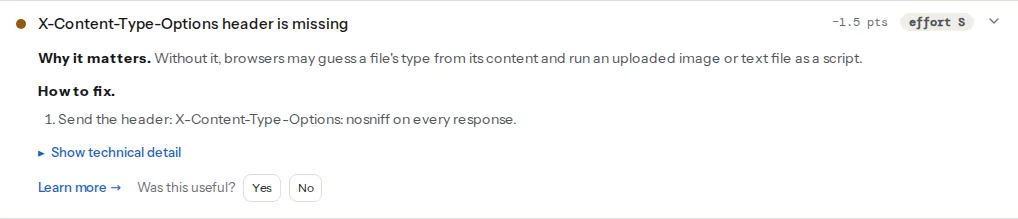
The evidence line under each finding shows what was received: x-content-type-options: (absent), or x-frame-options: (absent); frame-ancestors: (absent). If it shows a value you did not set (Cloudflare, a host or a plugin added it), that is your clue that two places are setting headers.
frame-ancestors lives inside the CSP, so a site that has no CSP at all also gets the separate CSP finding. You can fix framing with X-Frame-Options alone today and grow the CSP later:
Step by step
1. Decide DENY or SAMEORIGIN
Ask whether any page of your own site loads another page of your site in an iframe:
| Situation | Value |
|---|---|
| Plain site, no builder, no previews | DENY / frame-ancestors 'none' |
| WordPress (Customizer preview, block editor previews, Elementor and most builders) | SAMEORIGIN / frame-ancestors 'self' |
| Your page is embedded on a partner site as a widget | frame-ancestors 'self' https://partner.example and no X-Frame-Options for that path |
| A public embed anyone may frame (a map, a badge) | No framing header on that path only, or frame-ancestors * on it, and keep the rest of the site protected |
SAMEORIGIN is the right default for anything with an admin that previews pages. DENY on a WordPress site breaks the Customizer and page-builder previews, which show a blank frame and a console error. WordPress itself sends X-Frame-Options: SAMEORIGIN on wp-admin and the login page; the front end is what you are adding.
2. Add both headers at the server
nginx, in the server block; always so error pages carry them too:
add_header X-Content-Type-Options "nosniff" always;
add_header X-Frame-Options "SAMEORIGIN" always;
add_header Content-Security-Policy "frame-ancestors 'self'" always;
If a location block has its own add_header, it replaces the server-level ones for that location; repeat them there.
Apache, in .htaccess at the site root or the virtual host, with mod_headers enabled:
Header always set X-Content-Type-Options "nosniff"
Header always set X-Frame-Options "SAMEORIGIN"
Header always set Content-Security-Policy "frame-ancestors 'self'"Caddy:
example.com {
    header {
        X-Content-Type-Options "nosniff"
        X-Frame-Options "SAMEORIGIN"
        Content-Security-Policy "frame-ancestors 'self'"
    }
    reverse_proxy app:3000
}Cloudflare: Rules → Transform Rules → Modify Response Header → Set static header, one rule per header, "All incoming requests". Cloudflare's Managed Transforms also has an "Add security headers" switch that adds a fixed set including nosniff; use the explicit rule when you need SAMEORIGIN rather than the managed value. If the origin already sends the same header, remove it from one side so browsers see one value.
Next.js, in next.config.js:
// next.config.js — applied to every route, including static files
module.exports = {
  async headers() {
    return [
      {
        source: '/(.*)',
        headers: [
          { key: 'X-Content-Type-Options', value: 'nosniff' },
          { key: 'X-Frame-Options', value: 'SAMEORIGIN' },
          { key: 'Content-Security-Policy', value: "frame-ancestors 'self'" },
        ],
      },
    ];
  },
};
3. WordPress without server access
A small plugin or the child theme's functions.php:
<?php
// Sends the two framing headers and nosniff on every front-end response PHP serves.
add_action('send_headers', function () {
    header('X-Content-Type-Options: nosniff');
    header('X-Frame-Options: SAMEORIGIN');
    header("Content-Security-Policy: frame-ancestors 'self'");
});
Headers set in PHP only reach responses PHP produces. Static files and pages served from a full-page cache (a caching plugin, the host's cache, Cloudflare) may not carry them, so the server or CDN configuration is better whenever you can get at it. Several security plugins expose the same three headers as switches; use one source, not two.
4. Add the CSP directive without a full CSP
frame-ancestors 'self' is a complete, valid Content-Security-Policy on its own. It does nothing about scripts or styles, so it cannot break anything, and it satisfies the framing check. When you later roll out a full policy, keep the directive in it; the full procedure is in Content-Security-Policy from report-only to enforced. Note that frame-ancestors is one of the directives that cannot be set through a <meta http-equiv> tag; it must be a header.
5. Allow a partner to frame one path
A widget at /embed/ that partners include on their sites needs a looser rule on that path only:
location /embed/ {
    add_header X-Content-Type-Options "nosniff" always;
    # No X-Frame-Options here: it cannot express "these two origins"
    add_header Content-Security-Policy "frame-ancestors 'self' https://partner.example https://other-partner.example" always;
}
Because frame-ancestors overrides X-Frame-Options in every current browser, sending X-Frame-Options: SAMEORIGIN alongside it would only affect browsers too old to know CSP 2, which are rare enough to ignore for a widget. ALLOW-FROM was the old way to name one origin; Firefox dropped it and Chrome never supported it, so it is now equivalent to sending nothing.
6. Reload and re-run
Both headers apply on the next response; there is no cache to wait for unless a CDN caches full pages, in which case purge it. Re-run the checker: both findings should pass and the evidence line should show the values you set. The remaining four headers in the same panel are covered in Security headers from zero to A.
Platform notes
Shopify, Wix, Squarespace: the platform sets framing protection and nosniff for you and does not let you change them; the checker shows them as passing. Netlify: a _headers file in the publish directory with the same three lines under /*. Vercel: headers in vercel.json, or the Next.js config above. Cloudflare Pages: _headers as on Netlify.
Verify
- The security headers checker shows "X-Content-Type-Options: nosniff is set" and "Other sites cannot embed this page in a frame".
curl -sI https://example.com/ | grep -i -E "x-content-type|x-frame|content-security"prints exactly one line per header, with the values you chose.- In the browser, DevTools → Network → the document request → Headers lists them under Response Headers. To test framing, open a page on another origin that iframes yours; the console shows "Refused to display … in a frame" and the frame stays blank.
- Nothing you rely on broke: the WordPress Customizer preview loads, the page-builder editor works, partner embeds still render on the partner's site.
Common mistakes
DENYon a site whose admin previews pages. Symptom: a blank Customizer or builder preview and a "Refused to display" console error. Fix:SAMEORIGIN/'self'.ALLOW-FROMfor a partner. Ignored by every current browser, so the page is unprotected. Useframe-ancestorswith the origin list.frame-ancestorsonly in a report-only policy. It reports and blocks nothing; the checker does not count it. Put it in the enforcing header.- Headers in
<meta http-equiv>.X-Content-Type-OptionsandX-Frame-Optionsdo not work as meta tags, andframe-ancestorsis explicitly excluded from meta CSP. Send real headers. - Two sources with different values. A plugin sends
SAMEORIGIN, Cloudflare sendsDENY. Browsers see both headers; Chrome treats a conflicting pair asDENY, which breaks the admin preview, and other browsers differ. Keep one source. nosniffon the HTML page but wrong MIME types on assets. Once sniffing is off, a stylesheet served astext/plainis dropped. Fix the server's MIME map (.css→text/css,.js→text/javascript,.woff2→font/woff2) rather than removing the header.