A page has two addresses that are supposed to be the same: the canonical URL in <link rel="canonical">, which tells search engines which version to index, and og:url, which tells Facebook, LinkedIn, WhatsApp and the rest which version a share belongs to. When they agree, every share of the page, from any variant of the URL, lands on one card with one count. When they differ, the share splits between two addresses, the preview may link to a version you did not intend, and a tracking parameter or a staging domain can quietly become the page's public identity. This guide explains what og:url does, what the report compares, where the mismatches come from, and how to make the two come from one place.
Quick answer
- Set
og:urlto exactly the canonical URL: same host, same path, no tracking parameters. - Generate both from the same source. SEO plugins do; a theme with a hard-coded
og:urldoes not. - The link preview checker compares the two, ignoring the scheme and the trailing slash, and warns on any other difference (www, path, query string, another domain).
- Never point
og:urlat a variant of the same page (AMP, mobile, a parameter URL). It should be the canonical page, always. - After fixing, re-scrape in Facebook's Sharing Debugger and LinkedIn's Post Inspector, or the cached card stays wrong.
Why og:url matters
Facebook's documentation defines og:url as the canonical URL of the object: the undecorated address, without session variables, user-identifying parameters or counters, and it says likes and shares for the page aggregate at that URL. The crawler treats it as the identity of the thing being shared. When someone posts https://www.example-shop.hr/shoes/red-runner/?utm_source=newsletter, the crawler reads the page, finds og:url, and files the share under that clean address; the card links there, the count is added there, and the cached preview is keyed there.
Three things go wrong when og:url and the canonical disagree.
Shares split. The page is shared from the newsletter link, from the www address, from the bare domain. If og:url is not the same clean address each time, each variant becomes its own object with its own count and its own cached card. A page with 300 shares shows as three pages with 100.
The card links to the wrong version. og:url pointing at http:// while the site is https://, or at the staging domain, means the card people tap goes through a redirect or to the wrong site entirely.
A bad URL becomes permanent. Once the crawler has filed the object under ?utm_source=newsletter or staging.example-shop.hr, that is the address it keeps. Fixing the tag later helps new shares; the old object is still there.
Search engines do not use og:url for indexing, so the canonical tag is not affected by a wrong og:url. The damage is on the social side, which is where most links to a small site are shared.
How getReport checks it
The social module reads the first og:url on the page (by property or name; the first occurrence wins, as it does for Facebook's crawler) and resolves it against the page's final URL, so a relative value is made absolute. It then takes the first <link rel="canonical"> as the reference; if the page has no canonical, it uses the final URL after redirects instead, and the technical detail says which one it compared against. The comparison ignores the scheme (http vs https), the trailing slash, the fragment and the case of the host name, because every sharer normalises those; it keeps the host, the port, the path and the query string. So www.example-shop.hr/shoes/ and example-shop.hr/shoes/ warn, and ?utm_source=x warns, but https://…/shoes/ and http://…/shoes pass against each other. The finding only appears when the page has an og:url; a page without one is judged by the canonical finding alone.
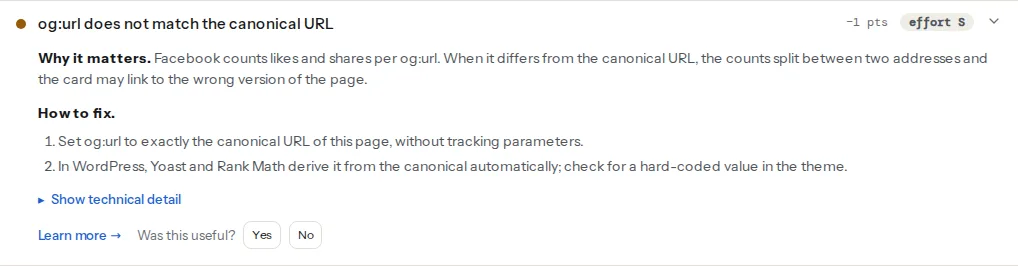
The same comparison appears in the canonical checker, next to the redirect, www and trailing-slash findings, which is the better tool when the problem is that the canonical itself is wrong. And because a wrong og:url often comes with a wrong image URL from the same hard-coded template, the image reachability finding is worth reading in the same pass.
Step by step
1. Find where each tag comes from
View the page source and search for og:url and rel="canonical". Note how many of each there are and what prints them: an SEO plugin marks its block with a comment, a theme's tags sit in header.php or the layout, a social plugin (Jetpack, a share-buttons plugin) prints its own. Two og:url tags with different values is a mismatch waiting to happen, because the crawler and the report read the first and you edit the second.
2. Decide the canonical first
og:url follows the canonical, so fix the canonical before touching og:url. The canonical should be the clean, final, indexable address of the page: the chosen host (www or not), https, the chosen trailing-slash style, no parameters. Canonical tags explained covers that decision and its mistakes; trailing slashes, www and https covers the redirects that make the variants land there.
3. Generate both from one value
The fix is structural: one variable, printed twice. In a PHP theme without an SEO plugin:
<?php
// In header.php, inside <head>. One source for both tags.
$canonical = wp_get_canonical_url(); // WordPress computes the clean permalink; false on non-singular pages
if (!$canonical) {
    $canonical = home_url(add_query_arg([], $GLOBALS['wp']->request ?? ''));
    $canonical = trailingslashit(strtok($canonical, '?'));
}
?>
<link rel="canonical" href="<?php echo esc_url($canonical); ?>" />
<meta property="og:url" content="<?php echo esc_url($canonical); ?>" />
On a static site or a custom app, the same idea in the layout:
<!-- The layout receives one `canonical` value per page and prints it in both places -->
<link rel="canonical" href="{{ canonical }}" />
<meta property="og:url" content="{{ canonical }}" />
What matters is that nobody can edit one without the other. A hard-coded domain (https://staging.example-shop.hr typed into a template during development) is the version of this that survives a launch.
4. Remove the second generator
If an SEO plugin prints both tags, the theme must not. Look for og:url in the theme's header.php or in the theme options ("Open Graph", "Social meta"), and remove or disable it. Jetpack's Open Graph tags turn off automatically when Yoast or Rank Math is active; other social plugins have a switch. The goal is one og:url and one canonical in the source.
5. Re-scrape the cached cards
Sharers keep the card they built. In Facebook's Sharing Debugger, paste the page URL: the result shows the "Canonical URL" the crawler resolved, which should now be your canonical, then click "Scrape Again". WhatsApp and Instagram use the same infrastructure. In LinkedIn's Post Inspector, paste the URL and it re-fetches. Other platforms (X, Slack, iMessage) have no refresh tool and will pick up the change on the next new URL they see.
When og:url may differ
For the same page, never. The cases that look like exceptions are not:
- AMP or mobile variants. Google's AMP guidance and Facebook's both expect the variant to declare the canonical page's URL in
og:url, so shares of the AMP page count for the real page. - Syndicated copies. A page republished on another site with a cross-domain canonical should also set
og:urlto the original, if the original is where shares should count; otherwise the copy is its own object. Either is a choice; the two tags should still agree with each other. - Paginated pages. Page 2 of an archive has its own canonical (page 2) and its own
og:url(page 2). Pointing both at page 1 is a canonical mistake, not anog:urlone. - Language versions. Each language page is its own object with its own canonical and matching
og:url;hreflanglinks them for search,og:locale:alternatefor Facebook.
Platform notes
WordPress
Yoast SEO and Rank Math print og:url from the same canonical they compute, including when you override the canonical on a post (Yoast: the Advanced tab; Rank Math: the Advanced tab's Canonical URL field), so they stay in sync by construction. Mismatches on these sites come from a theme or a second plugin printing a second og:url, or from a hard-coded domain in the theme. Search the theme folder for og:url.
Migrations. After moving from staging.example-shop.hr or from http, run a search-and-replace over the database (Better Search Replace or wp search-replace) so options and serialised theme settings carry the new address; a theme option holding the old domain is the usual source of a staging og:url that survives launch. Then purge the page cache.
Page builders. Elementor, Divi and others have their own SEO or social meta fields in some templates; if a template kit came with an og:url typed into a "custom head" field, it is a literal string on every page. Remove it.
Shopify
Themes print og:url in snippets/social-meta-tags.liquid (or meta-tags.liquid) as {{ canonical_url }}, the same object the canonical link uses, so they agree unless the snippet was edited. A page.url or product.url there instead of canonical_url gives a relative or variant-specific address; change it back.
Static sites and custom builds
One canonical value per page, computed once from the site's base URL and the page path, printed in both tags. Set the base URL from an environment variable per environment so the staging build cannot leak its domain into production.
Verify
- The link preview checker reads "og:url matches the canonical URL" and the technical line shows both addresses identical (or differing only in scheme or trailing slash).
curl -s https://www.example-shop.hr/shoes/red-runner/ | grep -i -E 'og:url|rel="canonical"'prints exactly one of each, with the same address.- The Sharing Debugger shows the canonical URL you expect and no "URL redirects to" warning; Post Inspector shows the same URL as the post's link.
- The canonical checker shows the www and http variants redirecting to the canonical in one hop.
Common mistakes
og:urlfrom the permalink, canonical from the plugin. Symptom: on posts with an overridden canonical, or with pagination, the two differ. Let the plugin print both; remove the theme's tag.- A tracking parameter in
og:url. Symptom: the report shows the query string in the technical line; Facebook files shares under the campaign link.og:urlmust be undecorated. - The staging domain after launch. Symptom: cards link to
staging.ordev.. Search-replace the database and the theme, purge caches, re-scrape. - www in one, bare domain in the other. Symptom: the most common warning after a host change. Fix the canonical, then the
og:url, then add the redirect. - Two
og:urltags. Symptom: you change the value in the plugin and nothing changes, because the theme's tag comes first. Keep one. - Fixing the tags and not re-scraping. Symptom: the debugger still shows the old canonical. Scrape Again, then check the Post Inspector.