Most links are not clicked from a search result; they are pasted into a chat, a Slack channel or a LinkedIn post, and what people see there is a card: an image, a title, a line of description. The card is built from a handful of meta tags, and when they are missing the app picks whatever it finds first, which is usually the logo and the cookie notice. This guide sets the tags up so the preview is right on every platform, explains the one image size that works everywhere, and shows how to fix a preview that is cached wrong.
Quick answer
<meta property="og:title" content="Alpina Pro trekking shoe, waterproof">
<meta property="og:description" content="Vibram sole, sizes 36–47, free delivery over €60.">
<meta property="og:image" content="https://example.com/img/og/alpina-pro-1200x630.jpg">
<meta property="og:image:width" content="1200">
<meta property="og:image:height" content="630">
<meta property="og:url" content="https://example.com/shoes/alpina-pro/">
<meta property="og:type" content="product">
<meta property="og:site_name" content="Outdoor Shop">
<meta name="twitter:card" content="summary_large_image">- Image: 1200 × 630 px, under 1 MB, JPEG or PNG, absolute
https://URL, publicly reachable (not behind a login or a bot block). og:urlequals the canonical URL.- Run the link preview checker to see the card as each platform renders it.
Why link previews matter
A link with a clear image and title gets opened; a link that previews as "example.com" with a grey box does not. On LinkedIn and Facebook the card is the post for most viewers; in WhatsApp and iMessage it is what makes a link look trustworthy. It costs a few tags per template and pays every time someone shares a page.
The tags also feed places you do not think of as social: Slack and Teams unfurl links in every message, Google Discover uses the OG image, and search engines fall back to og:description when the meta description is missing.
How getReport checks it
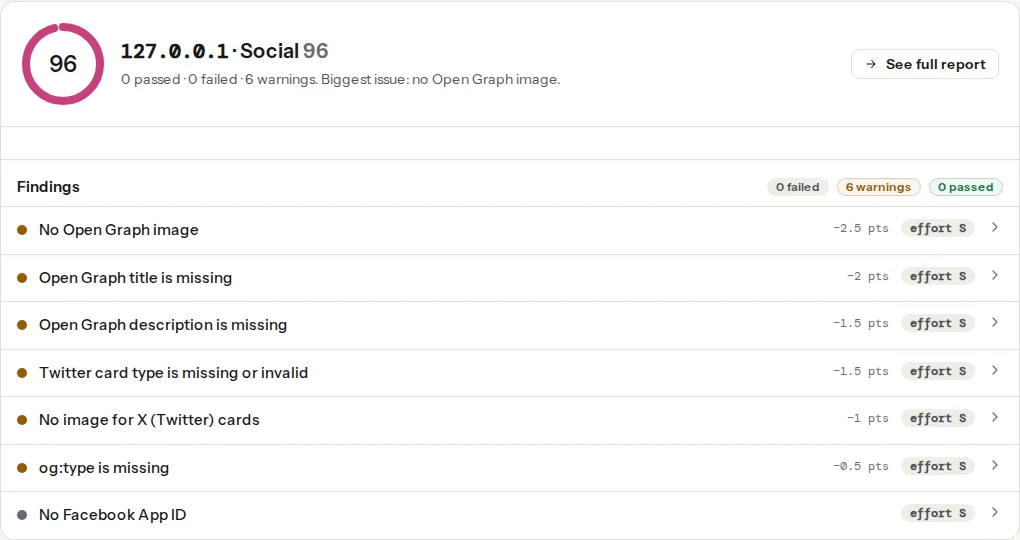
The social module reads the Open Graph and Twitter tags, fetches the image to measure it (the size finding needs the real pixels, not the declared ones), checks that og:url agrees with the canonical, and renders a preview card for the common platforms.
The tags, one by one
| Tag | What it does | Notes |
|---|---|---|
og:title | The card's headline | Shorter than the page title; the brand is in og:site_name |
og:description | One or two lines under it | 60–120 characters; most apps truncate at two lines |
og:image | The picture | 1200 × 630, absolute URL, https |
og:image:width/height | Lets the platform lay out the card before downloading the image | Prevents the first share showing no image |
og:url | The canonical URL of the page | Shares of ?utm variants collapse into one |
og:type | website, article, product, profile | article unlocks article:published_time and article:author |
og:site_name | The brand shown above the title | |
og:locale | hr_HR, en_GB | Optional |
twitter:card | summary_large_image for a big image, summary for a thumbnail | X falls back to OG for the rest |
twitter:image | Overrides og:image on X | Only if you want a different image there |
The image
One size works everywhere: 1200 × 630 pixels (1.91:1). Facebook, LinkedIn, X's large card, Slack, WhatsApp and iMessage all render it without cropping the important part; WhatsApp and some apps show a square crop of the centre, so keep the subject and any text in the middle 630 × 630. Under 1 MB (WhatsApp skips images over about 300 KB in some versions; aim for 100–200 KB as a JPEG at quality 80). Text on the image should be large (60 px+) because the card is shown at a third of the size.
The image must be fetchable by a bot that does not run JavaScript, does not send cookies, and comes from an unfamiliar IP. A CDN rule that blocks unknown user agents, a hotlink protection rule, or an image served only after login all produce a blank card. The reachability finding fetches it the same way.
Generating one image per page (title on a branded background) is worth automating; see Generating OG images automatically.
Step by step
1. Check one page per template
Home, product, article. The preview panel shows what each platform would render; the findings list what is missing or wrong.
2. Fix the image first
Missing, too small (under 600 × 315 renders as a tiny thumbnail), or not reachable. Upload a 1200 × 630 version and reference it with an absolute https URL.
3. Align og:url with the canonical
The share counters and the cache on each platform are keyed by og:url. If it differs from the canonical (http vs https, www, a parameter), shares of the same page split into several cards and the cache is harder to purge.
4. Add the Twitter card tag
Without twitter:card, X shows a small thumbnail card even when the OG image is large. summary_large_image is the right default; X reads og:title, og:description and og:image for the rest.
5. Purge the caches
Every platform caches the first preview it built, for hours to weeks. After changing the tags:
- Facebook/Instagram/WhatsApp: Sharing Debugger → Scrape Again (WhatsApp uses Facebook's cache).
- LinkedIn: Post Inspector.
- X: no debugger anymore; append a query parameter (
?v=2) to the shared URL to force a new fetch. - Slack, Discord, iMessage: cache per workspace/device; a query parameter works too.
Platform notes
WordPress: Yoast and Rank Math print the full set from the post's featured image and title; a "Social" tab per post overrides them. Set the default share image in the plugin's settings so pages without a featured image still get a card. Shopify: Online Store → Preferences → Social sharing image for the store-wide default; product pages use the featured image; the theme prints the tags. Static sites: a layout partial with the front matter; generate the image at build.
Verify
- The checker shows all findings passed and the preview cards render with the intended image.
- Paste the link into a private WhatsApp chat and into a Slack DM to yourself: image, title, description.
- After a change, run the Facebook and LinkedIn debuggers so their caches update.
Common mistakes
- A relative image URL (
/img/og.jpg). Bots resolve it inconsistently; use the absolute https URL. - The logo as the OG image. A 400 × 400 logo on every page makes every share look the same and renders as a thumbnail.
- Text in the corners of the image. Cropped on square previews.
- Blocking bots with a WAF rule that also blocks
facebookexternalhit,Twitterbot,LinkedInBot,WhatsAppandSlackbot. Allow them. - Changing the image but not purging. Platforms keep the old card for days.
og:typeset toarticleon every page including products and the home page.