Most links to a small site are not clicked from a search result. They are pasted into a WhatsApp group, a Slack channel, a LinkedIn post or an iMessage thread, and what the recipient sees is a card the app built by fetching the page. Every app reads the same handful of Open Graph tags, then applies its own image rules, its own bot, its own cache and its own quirks. This guide is the per-platform table: what each one reads, where it differs, which bots to let through, and how to test a preview before you send it.
Quick answer
- Four tags cover every platform:
og:title,og:description,og:imageandog:url. Addtwitter:cardfor X and Discord. - One image: 1200 × 630 px, JPG or PNG, under 1 MB, absolute https URL, publicly fetchable. Under about 300 KB it also qualifies for WhatsApp's larger preview.
- The tags must be in the HTML the server sends. No preview bot runs JavaScript.
- Allow the bots (
facebookexternalhit,WhatsApp,Slackbot-LinkExpanding,LinkedInBot,Twitterbot,Discordbot,TelegramBot) through your firewall and rate limits. - Test with the link preview checker, then refresh the caches: Facebook's Sharing Debugger, LinkedIn's Post Inspector, a new URL for everything else.
Why previews matter
The preview is the whole pitch. In a chat, the card is the only thing between "here is a link" and "nobody tapped it": a link with a picture and a headline gets read, a bare URL gets ignored, and a card showing the cookie banner or a broken image looks like a broken site. On LinkedIn the card is most of the post. On Slack it decides whether a colleague opens the page or scrolls on.
Previews fail quietly. The page works, the tags may even exist, but the image is 400 px wide, or it is behind a redirect, or the firewall blocked the bot, or the app cached the version from before the fix. Nobody reports "your WhatsApp preview is wrong"; they just do not tap.
How getReport checks it
The social module reads the Open Graph and Twitter tags from the HTML as fetched, taking the first occurrence of each tag, which is what the bots do. It then fetches og:image itself, through the same guard every outbound request goes through, and measures the real pixels and bytes rather than trusting the tag. The findings are one per missing tag, plus the image size (warns below 1200 × 630 px), image reachability (absolute https URL, answers 200, is an image), og:url against the canonical, og:type, and the X card tags.
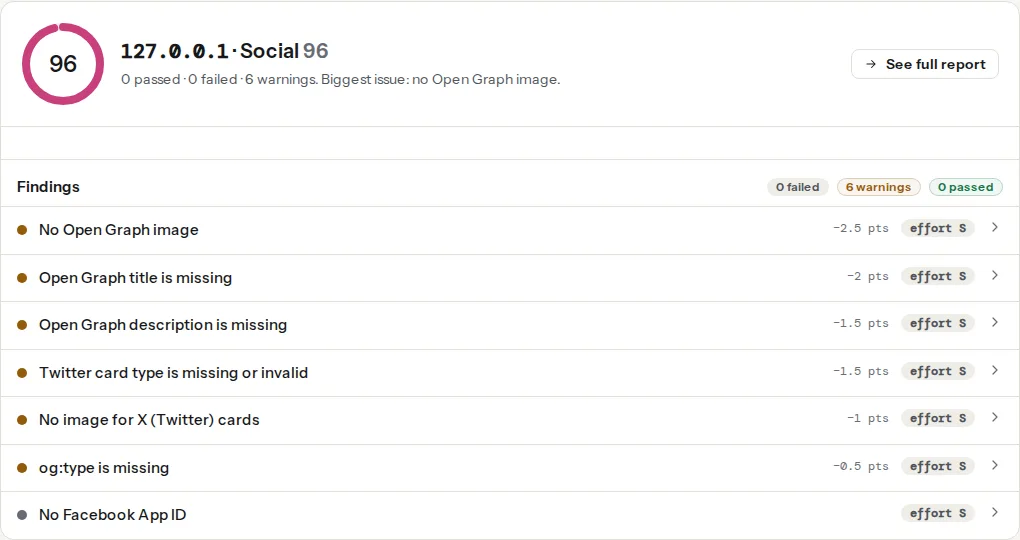
The card rendered in the panel is a generic one. It shows what the tags say, not a pixel-exact WhatsApp or Slack rendering, because each app crops and caches differently; the table below is for that.
What each platform reads
| Platform | Reads | Image rules | Cache and refresh | Bot user agent |
|---|---|---|---|---|
og:title, og:description, og:image | Small square thumbnail by default; a large preview only for images at least 300 × 200 px and small in file size (commonly reported as under 300 KB). Undocumented; treat as a rule of thumb. | Cached on the sender's device and server-side; re-scrape via Facebook's Sharing Debugger helps sometimes, a new URL always | WhatsApp/2.x | |
| Facebook, Messenger, Instagram | og:title, og:description, og:image, og:url, og:type | 1200 × 630 px full width; smaller than about 600 × 315 shows as a thumbnail | Sharing Debugger → Scrape Again | facebookexternalhit/1.1 |
og:title, og:description, og:image, og:url | Recommends 1200 × 627 px (1.91:1) | Post Inspector re-fetches | LinkedInBot/1.0 | |
| Slack | oEmbed if the site offers it, then Twitter card tags, then Open Graph | Image scaled to fit under the title; summary_large_image shows it wide | Unfurls once; a link recently shared in the same channel is not unfurled again. Users can remove a preview and turn them off per site | Slackbot-LinkExpanding 1.0 |
| iMessage | og:title, og:image; falls back to <title> and the site icon | Wide card with rounded corners; no image gives an icon-only card | Built on the sender's phone and sent with the message; the recipient fetches nothing | facebookexternalhit/1.1 Facebot Twitterbot/1.0 |
| Discord | Open Graph plus twitter:card; theme-color sets the embed's edge colour | Thumbnail beside the text unless twitter:card is summary_large_image | Cached per URL; a new URL refreshes | Discordbot/2.0 |
| Telegram | Open Graph; Instant View is a separate opt-in | Image under the text; large when the image is wide | Send the URL to @WebpageBot to refresh | TelegramBot (like TwitterBot) |
| Microsoft Teams, Google Chat | og:title, og:description, og:image | Thumbnail beside the text | Cached; a new URL refreshes | Varies |
Three platform-specific points are worth more than the table.
WhatsApp fetches the preview from the sender's phone the moment the link is pasted, before the message is sent. A slow server (more than a few seconds) means no preview at all, and the sender sees nothing to tell them why. It is also the platform most sensitive to image weight: keep the share image under 300 KB and WhatsApp's large preview usually appears; a 1.5 MB PNG gets the small square, cropped from the centre.
Slack reads three sources in order of preference. If the site publishes oEmbed (WordPress does, for posts), Slack may use that instead of the tags, which is why a WordPress post sometimes unfurls with the author and a different excerpt. The Twitter card tags come next, so a twitter:card of summary_large_image makes Slack show the image wide. Slack also stops unfurling a link that was posted in the same channel a short time before, which confuses testing: post it in a DM to yourself instead.
iMessage is the odd one out because the recipient never fetches the page: the sender's iPhone builds the card and sends it inside the message. Its fetcher identifies itself with a user agent that names Facebook's and X's bots, so a firewall rule that blocks those blocks iMessage too. With no og:image it shows the site icon (the touch icon or favicon), which is why a good icon is part of the preview setup; see favicon and touch icons.
Step by step
1. Put the common denominator on every page
In <head>, server-rendered:
<meta property="og:title" content="Red Runner trail shoe" />
<meta property="og:description" content="Lightweight trail shoe with a 4 mm drop, in stock in sizes 36–47." />
<meta property="og:image" content="https://www.example-shop.hr/images/share/red-runner.jpg" />
<meta property="og:image:width" content="1200" />
<meta property="og:image:height" content="630" />
<meta property="og:url" content="https://www.example-shop.hr/shoes/red-runner/" />
<meta property="og:type" content="product" />
<meta name="twitter:card" content="summary_large_image" />
og:image:width and og:image:height are optional but let Facebook lay out the card on the first share, before it has fetched the image. og:type is website for the home page, article for posts, product for products. The link previews guide goes through each tag.
2. Make one image that survives every crop
1200 × 630 px, JPG for photographs and PNG for flat graphics, under 1 MB, and under 300 KB if WhatsApp matters to you (for most local businesses it matters most). Keep the headline and anything that must be recognisable inside the centre; WhatsApp's small preview and X's summary card cut a square from the middle, Slack scales the whole image down. The safe-area numbers are in Open Graph images: size, safe area and weight.
3. Serve the tags in HTML, quickly
No preview bot executes JavaScript. A single-page app that fills the tags on the client sends every bot the same empty template, so every share shows the same card. Render the tags on the server (Next.js, Nuxt, Astro and the CMSs all do) or pre-render the pages that get shared. Then check the response time: the bots give up after a few seconds, and a slow first byte is the usual reason a preview appears for some people and not others. A TTFB test on the shared page shows where you stand.
4. Let the bots in
Firewalls, rate limiters and "bad bot" lists block preview fetchers by accident: they arrive in bursts (every member of a group chat's server may fetch), they send no cookies and they do not run JavaScript, which is what a bot rule looks for. Allow the user agents in the table. On Cloudflare, the built-in Verified Bots category covers most of them; a custom WAF rule that challenges everything non-browser needs an exception. On nginx, if you rate-limit by user agent or block empty referrers, add the same exception. Do not Disallow the share image or the page in robots.txt; some fetchers honour it.
The report's image reachability finding fetches og:image from getReport's servers, so a hotlink rule or a geo-block that stops it usually stops the preview bots too.
5. Test, then refresh the caches
Run the link preview checker on one page per template. Then, in this order: paste the link into a WhatsApp chat with yourself and wait for the card; into a Slack DM to yourself; into the LinkedIn Post Inspector; into Facebook's Sharing Debugger. Each shows the card as that platform builds it. If a platform shows an old card, refresh it there (Scrape Again, Post Inspector, @WebpageBot), and for the ones without a tool, add a query parameter (?v=2) to get a fresh fetch. The clean og:url keeps the variants counting as one page.
Platform notes
WordPress
Yoast SEO and Rank Math print the full set from the featured image, the title and the excerpt, with a per-post Social tab to override them. Set a default share image in the plugin (Yoast: Settings → Site basics → Site image; Rank Math: Titles & Meta → Social Meta → Default OpenGraph Thumbnail) so pages without a featured image still get a card. WordPress's built-in oEmbed endpoint is what Slack may prefer over the tags; it is fine to leave on. A security plugin's firewall (Wordfence, Solid Security) can rate-limit the preview bots; add the user agents to its allowlist if previews are intermittent.
Shopify
The theme prints the tags from the product's featured image and the store's social sharing image (Online Store → Preferences). Shopify's CDN serves the images with the right headers and no bot blocking, so problems are almost always the image itself: a portrait product photo that crops badly, or a 3 MB PNG that WhatsApp downgrades.
Static sites and custom builds
A layout partial fed from front matter, with the image generated at build time from the title. Check that the hosting's bot protection (Vercel, Netlify and Cloudflare Pages all have some) allows the fetchers, and that the HTML response for a shared page is not gated behind a JavaScript challenge.
Verify
- The link preview checker reads "Open Graph title is present", "Open Graph description is present", "Open Graph image is present", "Open Graph image is 1200×630" (or larger) and "Open Graph image can be fetched".
curl -s -A "facebookexternalhit/1.1" https://www.example-shop.hr/shoes/red-runner/ | grep -i "og:"returns the tags, in under two seconds, with no challenge page.- A WhatsApp message to yourself shows the large preview; a Slack DM shows the image and title; the Post Inspector and Sharing Debugger show the same card with no warnings.
- The share image loads in a private window at the URL in the tag, over https, without a redirect.
Common mistakes
- Tags added by JavaScript. Symptom: the report and every bot see no tags; the browser's inspector shows them. Render them on the server.
- A 2 MB share image. Symptom: the large preview on Facebook and LinkedIn, a small square on WhatsApp. Export under 300 KB.
- The firewall blocks the bots. Symptom: previews work for some people and not others, or worked last month. Allow the user agents in the table, and check the WAF's event log for
facebookexternalhit. - A relative or http image URL. Symptom: the reachability finding warns; cards have no picture. Absolute https.
- Testing in the channel where the link was already posted. Symptom: Slack shows nothing; you conclude the tags are broken. Test in a DM, or use a new URL.
- Fixing the tags and not refreshing. Symptom: the old card for days. Scrape Again, Post Inspector,
@WebpageBot, or a query parameter.