A favicon is the smallest image on your site and the one people see most often: in the tab, in the bookmark bar, next to your listing in Google, on a phone's home screen. Most sites have one that works in one place and fails in the others, or one that was made in 2014 and shows a logo two rebrands ago. This guide gives the minimal set of files that covers every current browser and Google's requirements, the link tags that go with them, one script to generate all of them, and the way to check it in five minutes.
Quick answer
The whole set is four files and five lines in <head>:
<link rel="icon" href="/favicon.ico" sizes="48x48">
<link rel="icon" href="/icon.svg" type="image/svg+xml">
<link rel="apple-touch-icon" href="/apple-touch-icon.png">
<link rel="manifest" href="/site.webmanifest">
<meta name="theme-color" content="#0b57d0">favicon.icoat the site root, containing 16, 32 and 48 px versions, for legacy browsers and everything that requests/favicon.icowithout reading the HTML.icon.svg, a square SVG, for modern browsers and dark mode.apple-touch-icon.png, 180 × 180 px, opaque background, for iOS home screens and Messages previews.site.webmanifestlisting 192 × 192 and 512 × 512 PNGs, for Android and Chrome's install prompt.- Google wants a square icon whose size is a multiple of 48 px (or an SVG), at a stable URL that robots.txt does not block.
Why icons matter
The favicon in a browser tab is a convenience. The favicon in a Google result is a marketing asset: Google has shown favicons next to mobile results since 2019 and now shows them on desktop as well, so your listing either carries your mark or a grey globe placeholder. On a phone, where ten results scroll past in a second, the icon is what makes yours recognisable on the second visit.
The touch icon matters on iOS. When someone taps "Add to Home Screen" or when a link to your site appears in Messages, iOS looks for an apple-touch-icon. Without it, the home screen gets a tiny screenshot of the page, which looks broken next to real app icons. (The preview card itself comes from Open Graph tags, a separate job covered in Link previews: Open Graph and Twitter cards.) The manifest icons do the same job on Android: Chrome's "Install" prompt and the launcher icon come from the 192 and 512 px files, and without them Chrome does not offer to install at all.
The formats matter because each consumer reads a different one. Old browsers and many tools ask for /favicon.ico without looking at the HTML. Chrome, Firefox and Edge prefer an SVG when you declare one, which scales cleanly and can switch colours in dark mode. Safari ignores SVG favicons and takes the ICO or PNG. Google's crawler reads the <link rel="icon"> on your home page. One file cannot satisfy all four; four small files can.
How getReport checks it
The SEO audit reads the <head> of the page you give it and looks for two link tags. The favicon check accepts any <link> whose rel contains the token icon, so rel="icon" and the older rel="shortcut icon" both count, and lists the first three href values it finds. It does not request /favicon.ico itself: a site that relies on the file at the root without declaring it in the HTML gets the warning, which is deliberate, because that is also the only case Google documents as reliable. The touch icon check looks for rel="apple-touch-icon" or apple-touch-icon-precomposed.
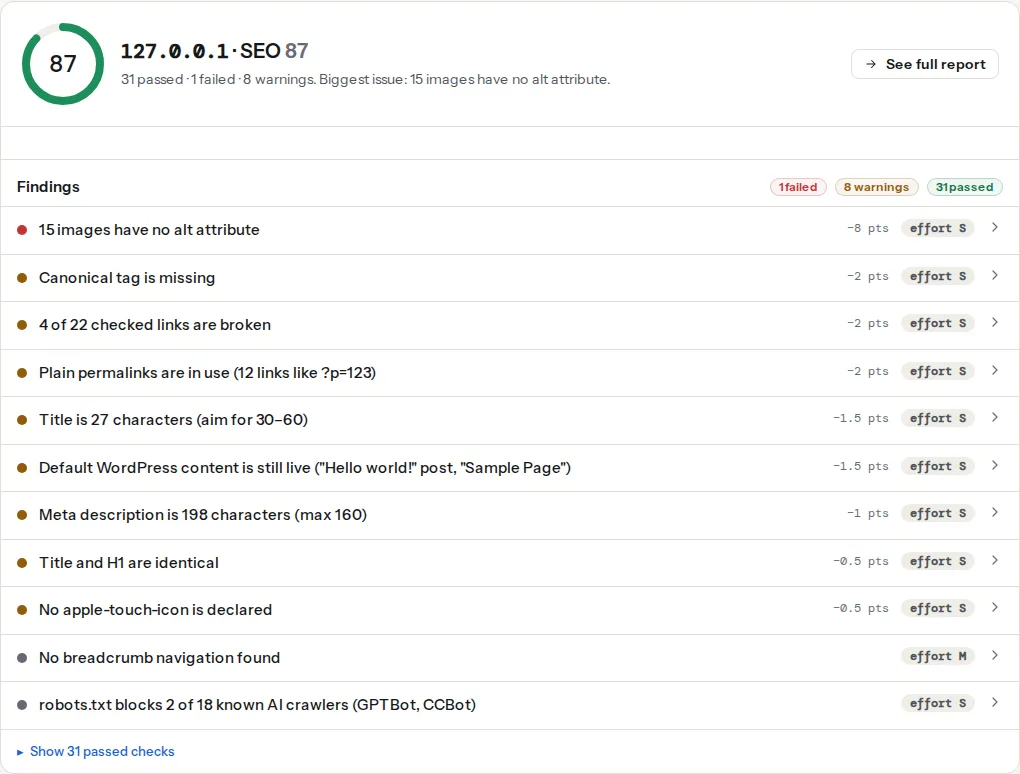
Both are low-weight warnings: they do not move the score much, but they are two of the cheapest fixes in the report, and two that the pre-launch website checklist puts in the last hour before go-live. The short version of both lives on the favicon learn page. The same two findings appear in the meta tags checker next to the title, description and Open Graph tags.
Step by step
1. Start from one square source image
Everything below is generated from a single square master: an SVG of the mark (not the full wordmark, which becomes unreadable at 16 px), or a PNG of at least 512 × 512 px. Test it at 16 px before going further: if the shape is not recognisable at that size, simplify it. Many brands use a one-letter or one-shape version of the logo for icons only.
2. Generate the files
With Node and the sharp package (npm install sharp), from a logo.svg master, save this as icons.mjs and run node icons.mjs:
import sharp from 'sharp';

const src = 'logo.svg';
const png = (size, file) =>
  sharp(src).resize(size, size).png().toFile(file);

await png(180, 'apple-touch-icon.png');
await png(192, 'icon-192.png');
await png(512, 'icon-512.png');
await png(48, 'favicon-48.png');
sharp does not write ICO. For the multi-size favicon.ico, ImageMagick 7 does it in one line:
magick logo.svg -background none -define icon:auto-resize=48,32,16 favicon.icoPut favicon.ico, apple-touch-icon.png, icon.svg (a copy of the master, cleaned of editor metadata), icon-192.png, icon-512.png and site.webmanifest in the web root, so they are served at /favicon.ico, /apple-touch-icon.png and so on. Root paths matter: iOS requests /apple-touch-icon.png from the root if the link tag is missing, and many tools request /favicon.ico the same way.
RealFaviconGenerator produces the same set from an upload if you prefer a form to a script.
3. Make the SVG follow dark mode
An SVG favicon can carry its own stylesheet. Chrome and Firefox apply prefers-color-scheme inside it, so a dark mark on light tabs becomes a light mark on dark tabs:
<svg xmlns="http://www.w3.org/2000/svg" viewBox="0 0 64 64">
  <style>
    path { fill: #111; }
    @media (prefers-color-scheme: dark) { path { fill: #eee; } }
  </style>
  <path d="M8 8h48v48H8z"/>
</svg>
Safari does not use SVG favicons, so keep the ICO and PNG regardless. Avoid transparency in the touch icon: iOS fills transparent areas with black.
4. Write the manifest
site.webmanifest at the root:
{
  "name": "Example Shop",
  "short_name": "Example",
  "icons": [
    { "src": "/icon-192.png", "sizes": "192x192", "type": "image/png" },
    { "src": "/icon-512.png", "sizes": "512x512", "type": "image/png", "purpose": "any maskable" }
  ],
  "theme_color": "#0b57d0",
  "background_color": "#ffffff",
  "display": "browser"
}
maskable tells Android it may crop the icon into a circle or squircle; leave a safe margin of about 10 % around the mark in the 512 px file so nothing important is cut off. display: browser keeps the site a normal website; change it only if you are building an installable app.
5. Add the link tags
The five lines from the quick answer go in <head> of every page, not only the home page. Order does not matter to browsers, but Google reads the home page, so make sure the home page has them even if the rest of the site is templated differently. The sizes="48x48" on the ICO link tells Google which size to expect; the SVG link needs the type attribute or some browsers will skip it.
6. Meet Google's rules
Google's favicon guidelines are short. The icon must be square, with a size that is a multiple of 48 px (48, 96, 144 …) or an SVG; it must be a representation of your brand, not a generic symbol; both the home page and the icon file must be crawlable, so no Disallow in robots.txt covering the file or its folder; and the URL should not change often, because Google refreshes favicons when it recrawls the home page, which can take days. If the favicon has changed and Google still shows the old one, request indexing of the home page in Search Console and wait.
The full list is in Google's documentation on defining a favicon to show in search results.
7. Deal with caching
Browsers cache favicons hard, sometimes for months, independently of the page. After a redesign, a visitor's tab may show the old icon for weeks. The reliable fix is a new file name (/icon-v2.svg) or a query string in the link tag (/favicon.ico?v=2), both of which are new URLs to the cache. Keep the old files in place for a while: bookmarks and Google may still ask for them.
Platform notes
WordPress
One upload does most of the work. Under Appearance → Customize → Site Identity → Site Icon, upload a square PNG of at least 512 × 512 px. WordPress then prints, on every page, a 32 px and a 192 px rel="icon", a 180 px apple-touch-icon and a 270 px Windows tile image, all generated from your upload. Both report findings pass with no further work.
In a block theme the Customizer is not in the menu, but it still exists at /wp-admin/customize.php; the Site Logo block in the Site Editor also has a "Use as site icon" toggle that sets the same option.
What WordPress does not do: it does not produce an SVG icon or a manifest. Add those two link tags in the theme's header.php, or through a small plugin, only if you want dark-mode icons or an installable site. And check the theme: some themes hard-code a <link rel="icon"> in their header, which then appears next to the Site Icon tags. Browsers cope, but keep one source; remove the theme's line or leave the Site Icon empty.
Shopify
Online Store → Themes → Customize → Theme settings → Favicon accepts one image (32 × 32 px is what most themes ask for; upload a larger square and the theme scales it). Whether the theme also prints an apple-touch-icon or a manifest depends on the theme; run the audit on the home page to see which tags it emits.
Static sites and custom code
Put the files in the public folder that maps to the root. Frameworks that move assets into hashed paths (/_next/static/…) break the "stable URL at the root" rule; keep icons out of the asset pipeline and reference them with absolute root paths.
Verify
- The SEO audit reads "A favicon is declared" and "An apple-touch-icon is declared", and the technical detail lists the files you expect.
- Open
https://example.com/favicon.ico,/apple-touch-icon.png,/icon.svgand/site.webmanifestin a browser: each answers 200 and shows the icon, not a login page or a 404 page with a 200 status. - Dark mode: switch the operating system to dark and reload the tab in Chrome or Firefox; the SVG icon should change.
- On an iPhone, Share → Add to Home Screen shows your icon, not a screenshot.
- In Google, search
site:example.comon a phone; the favicon appears next to results after Google has recrawled the home page.
Common mistakes
- Only a
favicon.icoin the root, no link tag. Browsers find it, the report and Google want it declared. Add the link. - A 16 × 16 icon. Google requires a multiple of 48 px and browsers upscale small icons into a blur. Generate from a large master.
- A transparent touch icon. iOS fills the transparency with black. Use an opaque background for
apple-touch-icon.png. - The icon folder blocked in robots.txt.
Disallow: /assets/covers/assets/favicon.pngtoo, and Google then shows the placeholder. Keep icons at the root or allow the path. - Two sources of truth in WordPress. The Site Icon and a theme's hard-coded icon produce two different
rel="icon"tags. Remove one. - Changing the icon and keeping the URL. Caches keep serving the old one for weeks. New file name or a version query string.