A link posted on X becomes a card: an image, and depending on the card type and the year, a title and a line of text. The card is built from a handful of twitter: meta tags, and where those are missing X reads the Open Graph tags most sites already have. One tag decides most of what you see, twitter:card, and it is the one most often missing, because X is the only platform that needs it. This guide explains the two card types that matter, exactly which tag falls back to which, what the image must be, what has changed on X since 2022, and how to check the result without a validator that no longer exists.
Quick answer
- Add
<meta name="twitter:card" content="summary_large_image">to pages with a wide share image (articles, products, landing pages). Usesummaryonly when the image is square (a logo, an avatar, a tool icon). twitter:title,twitter:descriptionandtwitter:imageare optional: X falls back toog:title,og:descriptionandog:image.twitter:cardandtwitter:sitehave no fallback.- The large image is 2:1, at least 300 × 157 px, under 5 MB, JPG, PNG, WEBP or GIF. The usual 1200 × 630 Open Graph image works; X trims about 15 px top and bottom.
- Since late 2023 X shows large-image cards as the image with the domain overlaid, so the image must carry the message.
- Check with the link preview checker; there is no X card validator any more. A cached card only refreshes for a new URL.
Why the card type matters
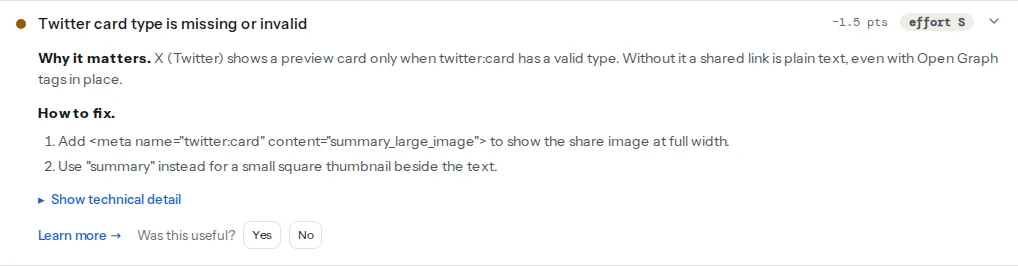
Without a valid twitter:card, X documents the link as plain text: the URL, and nothing else. In practice a page with only Open Graph tags sometimes gets a small summary card, but never the wide one, and you cannot rely on either. A post with a wide image takes about three times the vertical space of a text post in the timeline, and the image is what people stop for. For a product, a blog post or a campaign page, summary_large_image is the difference between a link that gets read and one that scrolls past.
The choice between the two types is about the image, not the page. summary puts a small square thumbnail beside the title and description; it suits a square logo or a portrait and it is the wrong choice for a photograph or a headline image, which gets cropped to a square from the centre. summary_large_image shows the image full width at 2:1 and is what almost every content page wants. The other two types, app and player, are for app store listings and embedded video and need extra tags and, for player, an approval from X.
How getReport checks it
The social module reads every twitter: and og: meta tag on the page (by name and by property, since both spellings are common) and, like X's own crawler, uses the first occurrence of each. The card finding checks that twitter:card is present and one of the four valid values (summary, summary_large_image, app, player); anything else, including a typo like summary-large-image, fails.
The image finding applies X's fallback rule: twitter:image (or the older twitter:image:src) passes, and if neither exists, an og:image passes too, with the technical detail saying so. Only a page with no image tag at all fails. The Open Graph image finding is the one to fix in that case, because it feeds every other network as well.
The image itself is fetched and measured for the Open Graph size finding, which warns below 1200 × 630 px. That threshold is Facebook's and LinkedIn's; X's minimum for the large card is lower, so an image that passes the size finding is fine for X too.
The tags and their fallbacks
X reads the twitter: tag first and, for some of them, the Open Graph tag when it is absent. From X's Cards markup reference:
| Tag | Falls back to | Notes |
|---|---|---|
twitter:card | nothing | Required. summary or summary_large_image for almost every page. |
twitter:site | nothing | The site's @handle. Optional, but attributes the card to the account. |
twitter:creator | nothing | The author's @handle on articles. Optional. |
twitter:title | og:title | Truncated to about 70 characters. |
twitter:description | og:description | Truncated to about 200 characters. |
twitter:image | og:image | Absolute https URL. |
twitter:image:alt | nothing | Up to 420 characters, read by screen readers. |
Two consequences. A site with correct Open Graph tags needs exactly one more line, the card type, plus twitter:site if it wants attribution. And a site that sets both twitter:title and og:title should set them to the same text unless it wants a different headline on X, because X will use the twitter: one and everyone else the og: one.
Step by step
1. Pick the type per template, not per page
Content pages (posts, products, landing pages, tools with a screenshot) get summary_large_image. Pages whose only image is square (an author page, a company profile, an app) get summary. Set it in the layout, so every page of a type gets the right one; a per-page override is rarely needed.
2. Add the tags
A complete set for an article, next to the Open Graph tags in <head>:
<meta property="og:title" content="Split opening hours in LocalBusiness schema" />
<meta property="og:description" content="Two OpeningHoursSpecification objects per day, and 00:00 to 00:00 for a closed day." />
<meta property="og:image" content="https://www.example-shop.hr/images/share/opening-hours.png" />
<meta property="og:url" content="https://www.example-shop.hr/blog/opening-hours-schema/" />

<meta name="twitter:card" content="summary_large_image" />
<meta name="twitter:site" content="@exampleshop" />
<meta name="twitter:creator" content="@anamaric" />
<meta name="twitter:image:alt" content="A weekly opening hours table with a lunch break on weekdays" />
No twitter:title, twitter:description or twitter:image: the Open Graph tags cover them. twitter: tags use name=, og: tags use property=; X reads both spellings, but the standard form is the one above.
3. Make the image carry the message
Since October 2023, X no longer prints the headline and description under a large-image card. The card is the image, with the domain (and, after a later change, a short title) overlaid in a corner. The title in the tag is still read for accessibility and for other clients, but on the timeline the image is the card. So the share image needs the headline in it, in type large enough to read at a phone width, inside the safe area described in Open Graph images: size, safe area and weight. A photo with no text is a card that says nothing.
The limits, from X's documentation: 2:1 aspect ratio, at least 300 × 157 px, at most 4096 × 4096 px, under 5 MB, JPG, PNG, WEBP or GIF (first frame only). SVG is not supported. The 1200 × 630 image made for Facebook and LinkedIn is 1.91:1; X crops it to 2:1 by trimming about 15 px from the top and bottom, which is why text should stay away from the edges.
4. Check it
The X Card Validator stopped rendering previews in August 2022 and was later removed; the only way to see a card on X is to post it. Before that, the link preview checker shows the tags X will read and whether the image is fetchable and how big it is. For a live look, post the link in a private conversation with yourself (a DM to your own account works) rather than to the timeline.
5. Refresh a cached card
X caches the card it built for a URL for days. Changing the tags does nothing for a link that has already been posted. There is no refresh tool; the reliable fix is a new URL, which for a page usually means a query parameter that the page ignores:
https://www.example-shop.hr/blog/opening-hours-schema/?v=2The canonical tag keeps that variant from becoming a duplicate for search engines, and the og:url should still point at the clean URL so shares aggregate there (see og:url and the canonical tag).
Platform notes
WordPress
Yoast SEO prints twitter:card as summary_large_image by default on every page, with the title, description and image falling through from the post's Open Graph settings. The per-post Social tab has an X section for a different title, description or image on X only. twitter:site comes from the X profile URL entered under Yoast SEO → Settings → Site representation → Other profiles.
Rank Math sets the type under Rank Math SEO → Titles & Meta → Social Meta → Twitter Card Type, with the profile handle next to it. Each post's Social tab has an X panel with a "Use data from Facebook tab" switch, on by default, which is the fallback behaviour done in the editor.
Themes occasionally print their own twitter:card too, giving two tags. The report reads the first; X reads the first. Turn off the theme's social tags when a plugin prints them.
Shopify
Most themes print twitter:card as summary_large_image in snippets/social-meta-tags.liquid (or meta-tags.liquid), with the image from the product's featured image or the store-wide social sharing image (Online Store → Preferences). twitter:site is usually taken from the theme's social settings. Check the snippet if the report shows a missing or invalid type.
Static sites and custom builds
Put the four Open Graph tags and the two X tags in the shared layout, driven by front matter. Generate the share image at build time with the title rendered into it; Astro, Next.js and Eleventy all have image-generation packages for exactly this.
Verify
- The link preview checker reads "Twitter card type is valid" and "X (Twitter) cards have an image" (the technical detail says whether it came from
twitter:imageor fell back toog:image). curl -s https://www.example-shop.hr/blog/opening-hours-schema/ | grep -i "twitter:"prints the card, site and alt tags once each.- The image URL loads in a private window over https, and the file is under 5 MB and at least 300 × 157 px.
- A post to a DM with yourself shows the wide image with the headline legible at phone width.
Common mistakes
- Open Graph only, no
twitter:card. Symptom: the link posts as plain text or a small square thumbnail. Add the one tag. summaryon pages with a wide image. Symptom: the headline image is cropped to a square from the centre. Switch the layout tosummary_large_image.- The logo as the image. Symptom: every post looks the same and the card says nothing. One image per page, with the headline in it.
- Text in the top or bottom 15 px of a 1200 × 630 image. Symptom: cut-off headlines on X only. Keep text inside the safe area.
- Fixing the tags and re-posting the same URL. Symptom: the old card. Use a new URL with a query parameter.
- A different headline in
twitter:titleandog:titleby accident, from two plugins or a theme. Keep one source and let the fallback do the rest.