A title tag is the one line Google reads first and shows biggest. When forty pages share it, Google has to guess which one to show and what to call it, and the guess is rarely the page you wanted. This guide shows where duplicate titles and descriptions come from, how to find all of them on a site of any size, and how to fix the template once so new pages get a title of their own.
Quick answer
- Duplicates come from templates, not from people: a site name alone, category pages without a page number, one product listed in three categories, WordPress date and tag archives.
- Google reacts by rewriting the title (it takes the H1, the anchor text of links to the page, or the site name) or by folding the pages together and showing one.
- Find them in Search Console (Pages report: "Duplicate, Google chose different canonical than user") and by pasting your sitemap URLs into the bulk URL checker, which returns the title of every page in a CSV you can sort.
- Fix the template:
%%title%% %%sep%% %%sitename%%for posts and pages,%%title%% %%page%% %%sep%% %%sitename%%for archives, product name plus one distinguishing attribute plus brand for products. - Write descriptions that answer the query for that page. If nothing specific can be said, leave the description out; Google's own sentence beats a duplicate.
- Check one page of each type with the meta tags checker: title 30–60 characters, description 70–160, title and H1 not identical.
Why duplicate titles matter
For a searcher, a title is the label on the door. Two doors with the same label are a coin toss, so Google avoids showing both: it picks one page, or it rewrites the label. Since 2021 Google builds the title link shown in results from several sources, and the <title> element is only the first candidate. When that element is boilerplate ("Home", the site name, the same sentence on every category), Google substitutes the H1, text from links pointing at the page, or the site name. You lose the wording you chose and, often, the keyword you were targeting.
The duplication itself is a signal. Ten pages titled "Products – Example Shop" tell Google there are ten pages about products, with nothing to tell them apart. In the Pages report this shows up as "Duplicate, Google chose different canonical than user": Google decided that two of your pages were the same thing and kept one. The page it kept is sometimes page 3 of a series, sometimes an old version with more links.
Descriptions matter less and duplicate more. Google rewrites descriptions freely, so a description that says the same thing on every page is simply ignored, and you lose the two lines under the result that could have said why this page and not the neighbour's. On a product listing, that is the difference between "Free delivery over €50, in stock, 2-year warranty" and a random sentence from the footer.
None of this is a penalty. It is a lost opportunity that scales with the number of pages, which is why shops and blogs with archives feel it most.
How getReport checks it
The checker reads one page at a time, exactly as Google fetches it. It takes the first <title> in the document (titles inside inline SVG icons are ignored, a common false alarm in other tools), counts its characters, and does the same for the first <meta name="description">. It also compares the title with the first <h1> after normalising whitespace and case. A page with no <title> fails the presence check and the length finding is not shown at all, because there is nothing to measure.
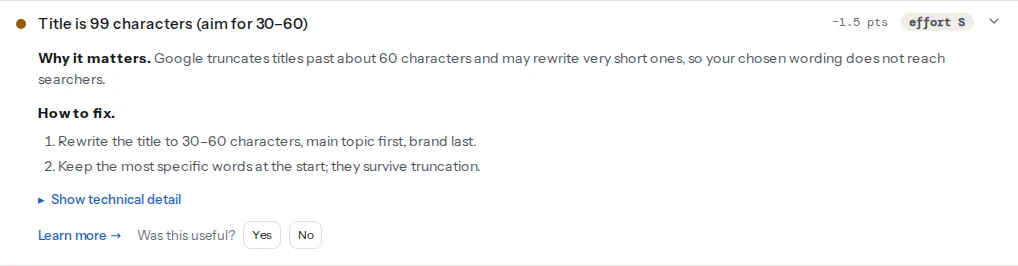
The count is in characters because that is what you can control in a template. Google truncates by pixel width (about 600 px on desktop, which is why wide letters and capitals run out sooner), so 60 characters is a safe approximation, not a rule Google enforces.
The report checks the page you give it. To find duplicates across a site, use the bulk URL checker: paste the URLs from your sitemap (up to 1,000), download the CSV, and sort by the title column. Every run of identical rows is a duplicate group, with the URLs next to it.
Step by step
1. Get the list of duplicates
Three sources, from cheapest to most complete:
- Search Console → Pages. Open "Duplicate, Google chose different canonical than user" and "Duplicate without user-selected canonical". These are pages Google already folded together. Then open the Performance report, filter by page, and sort by impressions: pages with many impressions and few clicks are often the ones whose titles Google rewrote.
- The bulk URL checker. Paste the URLs from the sitemap. The CSV has a title column and a canonical column. In a spreadsheet,
=COUNTIF(B:B, B2)next to each title gives the size of its duplicate group; filter for values above 1. - A crawl (Screaming Frog, Sitebulb, or the site crawl on the funding page when it unlocks) if the sitemap does not list every page.
2. Sort duplicates by cause
Nearly every group falls into one of these patterns:
| Pattern in the list | Cause |
|---|---|
| Every page: "Example Shop" | The theme prints the site name and nothing else |
/category/shoes/, /category/shoes/page/2/ … | Paginated archives share the category's title |
/shoes/red-runner/, /sale/red-runner/ | One product reachable under several categories |
?colour=red, ?sort=price | Faceted or sorted URLs of the same listing |
/2024/03/, /tag/news/, /author/admin/ | WordPress date, tag and author archives with generic titles |
/product/red-runner/ and /product/red-runner-2/ | Two real pages for the same product (an import ran twice) |
The first two are template fixes and cover most sites. The next two are canonical problems: see Canonical tags explained. The last one is content: merge the pages and redirect the loser.
3. Fix the template
In Yoast SEO: Yoast SEO → Settings → Content types → Posts (and Pages, Products), field "SEO title". Set it to:
%%title%% %%sep%% %%sitename%%For archives, under Categories & tags and the archive types:
%%term_title%% %%page%% %%sep%% %%sitename%%%%page%% prints "Page 2 of 7" only on paginated pages, so page 1 stays clean. %%sep%% is the separator you chose in Site basics.
In Rank Math: Rank Math SEO → Titles & Meta → Posts (and the other types). The variables are %title%, %sep%, %sitename%, %page% and %term%, with the same meaning.
On a custom WordPress theme without an SEO plugin, WordPress already builds the title from parts when the theme declares add_theme_support('title-tag'), and it appends "Page N" on paginated archives by itself. To adjust the parts, in the theme's functions.php:
add_filter('document_title_parts', function (array $parts): array {
    // Keys: title, page, tagline, site. Drop the tagline; keep site name last.
    unset($parts['tagline']);
    if (is_front_page()) {
        $parts['title'] = get_bloginfo('name') . ' – ' . get_bloginfo('description');
        unset($parts['site']);
    }
    return $parts;
});
On any other stack, the rule is the same: the title is built from the page's own name, then a series marker when the page is part of one, then the brand. Never the brand alone.
4. Paginated series: name the page number
Page 2 of a category is a different page from page 1 and deserves a different title. "Running shoes – Page 2 of 7 – Example Shop" is enough. Do not canonical page 2 to page 1 and do not add noindex to it by default; the full reasoning is in Pagination in 2026: rel=prev/next is gone, what now.
5. Products: name plus one attribute plus brand
"Red Runner – Example Shop" is fine until you sell the Red Runner in three widths. The pattern that stays unique as the catalogue grows is product name + the attribute a searcher would type + brand:
Red Runner trail shoe, wide fit – Example ShopIf the product lives under several categories, its title must come from the product, not from the category it was opened through, and the canonical must point at one URL. In WooCommerce the product has one permalink whatever category you browse, so this is only a problem when the theme builds titles from the current category.
6. Descriptions: answer the query, per page
A description template is acceptable for products, because product data is different on every page: name, price, availability, delivery. It is not acceptable for posts, because the only variable that changes is the title you already used. Rules that hold:
- Say what the visitor gets on this page, in one or two sentences, 70–160 characters.
- Include the phrase you expect people to search for, once, because Google bolds it.
- End with a reason to click: a number, a date, a price, "with examples".
- If the page is a listing with nothing specific to say, remove the description. Google will pick a sentence from the page, which is better than a sentence it has seen on 40 other pages.
In Yoast and Rank Math the field is on every post; the template for products can use %%excerpt%% / %excerpt% as a fallback.
7. Keep the H1 and the title related but not identical
The H1 is the headline visitors read once they are on the page; the title competes with nine other results. Using the same string for both wastes the second phrasing. A pattern that works: the H1 says the topic ("Running shoes"), the title adds the promise and the brand ("Running shoes for road and trail, tested – Example Shop"). Keep the first three or four words in common, so the searcher who clicks recognises the page they were promised. The report's duplicate-title-vs-h1 finding (explained on the page title learn page) is a warning with a small weight; it is a hint, not an error, and pages where the H1 and title are legitimately the same (a one-word brand page) can ignore it.
Platform notes
WordPress
Date, tag and author archives are where most surprise duplicates live. Either give them titles with %%page%% as above or set them to noindex in the SEO plugin's archive settings. If the site has one author, the author archive is a copy of the blog index: noindex it. Attachment pages are their own case; see Attachment pages: redirect them.
Shopify
The theme's layout/theme.liquid builds the title. Dawn's default already handles pagination and the shop name:
<title>
{{ page_title }}
{%- if current_tags %} – tagged "{{ current_tags | join: ', ' }}"{% endif -%}
{%- if current_page != 1 %} – Page {{ current_page }}{% endif -%}
{%- unless page_title contains shop.name %} – {{ shop.name }}{% endunless -%}
</title>Per-product titles and descriptions are under Products → the product → "Search engine listing" → Edit. Collections have the same field.
Static sites and custom code
Titles live in front matter or in the page component. A check that runs in CI catches duplicates before they ship. From the built site:
# Print every title that appears on more than one page, with its count.
grep -rho "<title>[^<]*</title>" dist/ | sort | uniq -c | sort -rn | awk '$1 > 1'
Verify
- The bulk URL checker CSV, sorted by title, has no group of identical titles except pages that are genuinely the same and canonical to one URL.
- The meta tags checker on one page of each type reads "Title is N characters — a good length", "Meta description is N characters — a good length" and "Title and H1 are different".
- In Search Console, "Duplicate, Google chose different canonical than user" shrinks over the following weeks, and the Performance report shows your wording in the title links instead of Google's rewrite. Check with a
site:example.comsearch for a few pages.
Common mistakes
- Putting the site name first. "Example Shop – Running shoes" truncates to the brand on every page. Topic first, brand last; the report's fix says the same.
- Fixing the pages instead of the template. Editing 200 titles by hand works until the next 200 pages. Change the template, then hand-edit only the pages that matter most.
- Adding
noindexto everything that duplicates. Paginated pages and category pages carry links to your products; noindexing them can cut those pages off from crawling. Unique titles and correct canonicals first; noindex only for archives nobody searches for. - Stuffing the title to make it unique. "Running shoes | Trail shoes | Road shoes | Cheap shoes" is unique and useless. One phrase, one page.
- A single site-wide description. Google ignores it, and the finding will look green on every page while every result shows Google's own sentence. Per page, or none.