Meta tags are short lines of HTML in a page's <head> that describe the page to search engines, browsers and social apps; visitors never see them on the page itself. For SEO, only a handful matter: the title, the meta description, the robots tag, the viewport and charset tags, plus the canonical link and the Open Graph tags that shape shared links. This guide is the map of all of them: what each one does, whether Google uses it, what a good one looks like, and where to set it in WordPress, Shopify or plain HTML. By the end you will know which tags to fix first and which to ignore.
Quick answer
- Every page needs its own
<title>of about 30–60 characters, topic first, brand last. It is the headline Google usually shows and a ranking signal. - Add a unique
<meta name="description">of about 70–160 characters that says what the page offers. It does not rank you, but it is often the text people read before they click. - Leave the robots meta tag out unless a page must stay out of search; a stray
noindexremoves the page from Google. - Keep the technical basics in every template:
<meta charset="utf-8">,<meta name="viewport" content="width=device-width, initial-scale=1">,<html lang="…">and one<link rel="canonical">. - Add Open Graph tags (
og:title,og:description,og:image) so links look right in WhatsApp, LinkedIn, Slack and Facebook. - Ignore
meta keywords. Google says it is not used and has no effect on indexing. - Check any page in one run with the free meta tags checker.
What are meta tags?
A meta tag is an HTML element that carries information about a page rather than content on it. Most are written as <meta name="…" content="…"> inside the <head>, and each has one job: set the character encoding, describe the page for search results, tell crawlers not to index it, or tell a phone how wide to draw it.
In everyday SEO language, "meta tags" also covers a few head elements that are not strictly <meta> tags: the <title> element, the canonical <link> and the lang attribute on <html>. They sit in the same place, are read by the same crawlers and go wrong in the same ways, so this guide treats them together.
Here is the head of a product page with every tag that matters and nothing else:
<!doctype html>
<html lang="en">
<head>
  <meta charset="utf-8">
  <meta name="viewport" content="width=device-width, initial-scale=1">
  <title>Alpina Pro trekking shoe, waterproof · Outdoor Shop</title>
  <meta name="description" content="Waterproof trekking shoe with a Vibram sole, sizes 36–47. Free delivery over €60 and 30-day returns.">
  <link rel="canonical" href="https://example.com/shoes/alpina-pro/">
  <meta property="og:title" content="Alpina Pro trekking shoe">
  <meta property="og:description" content="Waterproof, Vibram sole, sizes 36–47.">
  <meta property="og:image" content="https://example.com/img/alpina-pro-1200x630.jpg">
  <meta property="og:url" content="https://example.com/shoes/alpina-pro/">
  <meta name="twitter:card" content="summary_large_image">
</head>
Google's Search Central page "Meta tags and attributes that Google supports" is the primary source for what Google reads. Anything in an old template that is not on that list is either for another reader, such as social apps and browsers, or ignored.
Which meta tags matter for SEO?
| Tag | What it does | Does Google use it? | Priority |
|---|---|---|---|
<title> | Names the page; the usual headline in results and the browser tab text | Yes: the main source of the title link, and a ranking signal | Every page |
<meta name="description"> | Summarises the page | For the snippet, sometimes; not for ranking | Every important page |
<meta name="robots"> | Indexing and snippet rules: noindex, nofollow, max-snippet… | Yes | Only where needed |
<link rel="canonical"> | Names the preferred URL of duplicate content | Yes, as a strong hint | Every page |
<meta name="viewport"> | Tells phones to use the device width | Yes, for mobile rendering | Every template |
<meta charset> | Declares the text encoding | Yes | Every template |
<html lang> | Names the page language | Not for Google's language detection; yes for screen readers and browsers | Every template |
og:* and twitter:* | The title, text and image of shared links | Google may use og:title as one source for the title link | Every shareable page |
<meta name="keywords"> | A list of keywords | No, ignored | Skip it |
google-site-verification | Proves ownership in Search Console | Yes, for verification only | Once, on the home page |
The rest of this guide takes each row in turn, with a summary and a link to the in-depth guide where one exists.
The title tag: the one that ranks
The <title> element is the most important tag in the head. Google uses it as the main source for the clickable headline in search results (Google calls it the "title link"), browsers show it in the tab and in bookmarks, and social apps fall back to it when a page has no og:title. It is also a ranking signal, a modest one, which is why it belongs to the words people search.
A good title names one topic, puts the most specific words first and the brand last, and differs from every other title on the site: "Alpina Pro trekking shoe, waterproof · Outdoor Shop", not "Outdoor Shop | Products".
Google does not always use your title. Its Search Central page on title links lists the other sources it draws on: the main visible heading, other headings, og:title, prominent text, anchor text of links to the page and WebSite structured data. It rewrites titles that are missing, outdated, inaccurate, boilerplate or stuffed with keywords. In September 2021 Google said it uses the page's title element about 87% of the time; a title that describes the page better than anything else on it stays in that majority.
What a title tag is, how to write one per page type, brand placement, pagination and where each CMS stores it are in the title tag guide. The short fix-page version is how to write a good page title.
How long should a title be?
About 30–60 characters. Google has no character limit for the <title> element; it truncates the displayed title link "as needed, typically to fit the device width", in its own words. Pixel width, not character count, decides the cut, so titles in capitals or in languages with long words run out of room sooner. getReport flags titles under 30 characters (too vague, and more likely to be rewritten) and over 60 (likely to be cut).
SEO title length: how many characters fit before Google cuts it explains the pixel limit, desktop against mobile, what happens to titles that are too long or too short, and six ways to shorten a title, including the template overhead most sites forget.
The meta description: the one that gets the click
The meta description is a sentence or two in <meta name="description" content="…"> that summarises the page. Google often, not always, shows it as the grey text under your title in results, and many chat and social apps use it as the preview text when there is no og:description.
It is not a ranking factor: Google said in 2009 that it does not use the description in ranking, and its snippet documentation describes the tag only as a way to influence the snippet. What it affects is the click. Google builds the snippet from the page by default and uses your description when it describes the page better for that query, so a description matched to the page's main query is shown often and a generic one is replaced. The tag has no length limit, but the snippet is cut to fit the device, around 150–160 characters on desktop; getReport flags descriptions under 70 characters and over 160.
What to write: what the page offers, in the searcher's words, and one concrete reason to click, such as a price, a delivery time or a number. "Waterproof trekking shoe with a Vibram sole, sizes 36–47. Free delivery over €60 and 30-day returns." does all three.
The full guide covers length on phones and desktops, how often and why Google replaces descriptions, and how to set templates per page type: meta description: how long, what to write, and why Google rewrites it.
Meta description examples by page type
Most weak descriptions fail the same few ways: they talk about the company, make claims instead of giving facts, or announce the page ("in this article…") instead of answering the search. Meta description examples: 11 before-and-after rewrites shows a weak version and a rewrite for eleven page types, from home and category pages to recipes and events, each with its character count and why it works.
Title tags and meta descriptions: writing the pair
The result page is where a search becomes a visit, and the title and the description are the only parts of it you control. Searchers read them as one unit, so write them as one. The title makes the claim; the description backs it up with the detail that does not fit in 60 characters. Repeating the title in the description wastes the second line.
<title>Alpina Pro trekking shoe, waterproof · Outdoor Shop</title>
<meta name="description" content="Waterproof trekking shoe with a Vibram sole, sizes 36–47. Free delivery over €60 and 30-day returns.">
<meta property="og:title" content="Alpina Pro trekking shoe, waterproof">
<meta property="og:description" content="Waterproof, Vibram sole. Free delivery over €60.">
Three rules keep the pair working:
- Same topic, different words. Title "Trekking shoes for women", description "120 waterproof and lightweight models".
- Specifics, not adjectives. "120 models" and "24 h delivery" earn clicks; "best", "top" and "ultimate" do not.
- Match the page, not the wish. A promise the page does not keep earns a click and a quick return to the results.
On a real site the work is mostly templates. Run the meta tags checker on one page per template (home, a category, a product or article): the findings show missing, short and overlong tags, and the evidence line quotes each one so you can see where a result would cut it.
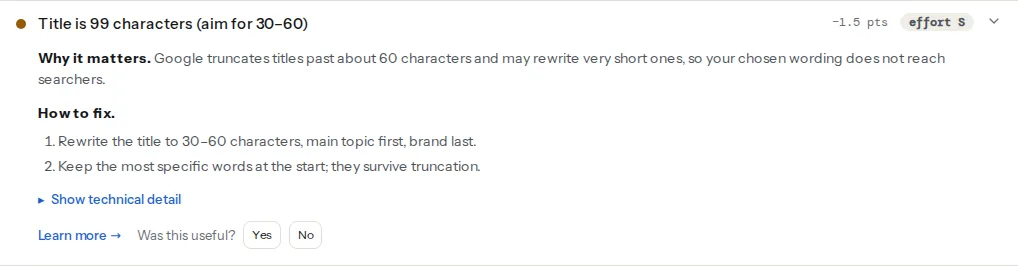
Then fix the pattern your CMS uses, such as %title% · %sitename%, once, and hand-write the pair for the 20 pages that bring the most search traffic. Keep the Open Graph versions in sync but shorter: a shared link has less room than a search result, and no brand suffix to carry. Four to six weeks later, compare each page's click-through rate at the same position in Search Console → Performance. If Google shows a rewritten title, compare it with the H1 and move your title towards it.
The robots meta tag: the one that can remove a page
The robots meta tag tells search engines what they may do with a page. With no tag, the default is all: index the page and follow its links. You only add the tag to change that.
<!-- Keep this page out of search results -->
<meta name="robots" content="noindex">

<!-- Keep it out and do not follow its links -->
<meta name="robots" content="noindex, nofollow">

<!-- Stay indexed, but limit the text snippet to 120 characters -->
<meta name="robots" content="max-snippet:120">
Google's robots meta documentation lists the directives it supports today: noindex, nofollow, none, nosnippet, indexifembedded, max-snippet, max-image-preview, max-video-preview, notranslate, noimageindex and unavailable_after. It lists noarchive, nocache and nositelinkssearchbox as no longer used. The same rules can be sent as an X-Robots-Tag HTTP header, which is the only way to noindex a PDF or an image.
A leftover noindex is the most expensive tag mistake: the page keeps working for visitors and only disappears from search. It usually comes from a staging site, an SEO plugin setting or the WordPress "Discourage search engines" box.
Two things the tag cannot do: it cannot work on a page that robots.txt blocks (Google never fetches the page, so never sees the tag), and nofollow on the page is not the same as rel="nofollow" on a single link. The full reference, with the right choice for staging, thank-you, search and filter pages, is noindex, nofollow and the other robots directives. For the WordPress checkbox specifically, see the "Discourage search engines" setting that hides your site.
Canonical, viewport, charset and language: the technical four
These four do not win clicks, but a template without them causes problems on every page at once. Set them once in the layout and check them after every theme change.
The canonical link
<link rel="canonical" href="…"> names the preferred address when the same content is reachable at several URLs: with and without a trailing slash, with tracking parameters, through filters or on http and https. Google treats it as a strong hint and combines the signals of the duplicates on the URL you name. Most pages should carry a canonical that points to their own clean URL. A canonical that points to another site, to the home page or to a URL that returns 404 asks Google to drop the page you want to rank. The how-to is in canonical tags explained.
The viewport tag
<meta name="viewport" content="width=device-width, initial-scale=1">Without it, phones draw the page at a desktop width of about 980 pixels and shrink it, so text is tiny and tap targets overlap. Google indexes the mobile version of pages, which makes this line a search issue as well as a usability one. Never add maximum-scale=1 or user-scalable=no: they stop people from zooming, which fails WCAG. See how to fix the mobile viewport and why you should never disable pinch zoom.
The charset tag
<meta charset="utf-8"> tells the browser how to turn bytes into characters. The HTML standard requires it within the first 1,024 bytes of the document, so put it first in the head. Without it, accented letters and symbols can turn into strings like "é". A Content-Type header with charset=utf-8 from the server does the same job. Details: the charset fix page.
The language attribute
<html lang="en"> is not a meta tag, and Google's documentation says it does not use it to detect the language; it reads the text. Screen readers do use it to pick the right pronunciation, and browsers use it for translation prompts and hyphenation, so it still belongs in every template. For pages in several languages, hreflang is what tells Google about the alternates. Testing with a screen reader shows what a wrong lang sounds like.
Open Graph and Twitter tags: the ones for shared links
When someone pastes your link into WhatsApp, LinkedIn, Slack, iMessage or Facebook, the app fetches the page and reads its Open Graph tags to build the preview card. Without them, the app guesses, often picking the logo, a cookie banner line or nothing at all.
The minimum set is four tags: og:title, og:description, og:image (an absolute URL to an image of 1200 × 630 pixels) and og:url, which should match the canonical. X reads twitter:card to choose between a small and a large image, and falls back to the Open Graph tags for the rest.
Open Graph tags are not a ranking factor, but Google lists og:title as one of the sources it may use for a title link, so keep it close to your title. For the full set, image sizes and how to clear a cached preview, read link previews: Open Graph and Twitter cards and Open Graph title, description and type.
Headings work with the tags, not instead of them
The H1 is not a meta tag, but it is part of the same story: Google may use it as the title link when your <title> is weak, and it is the first thing a visitor reads after the click. One H1 per page that names the topic, in slightly different words from the title, gives Google two consistent phrasings and gives you a second way to match a search.
getReport flags a title that repeats the H1 word for word, and pages with several H1s or none. The H1 tag guide covers the heading outline and the theme bugs that add extra H1s.
Meta keywords and other tags Google ignores
The <meta name="keywords"> tag was abused for keyword stuffing, and Google stopped using it long ago: its list of supported tags says the keywords tag is "not used by Google Search" and has no effect on indexing. It does not hurt, but it tells competitors which keywords you target.
Bing does not reward it either. Remove old ones at your next template change; it is tidy, not urgent. Meta keywords: what they are and why Google ignores them covers the history, Bing, and where plugins and themes print the tag.
Other head lines you can leave out or remove:
<meta name="revisit-after">,<meta name="distribution">,<meta name="rating" content="general">and similar lines from old templates. Google readsratingonly for adult content, as a SafeSearch label.<link rel="next">andrel="prev"for pagination. Google no longer uses them for indexing; see pagination after rel prev/next.noarchivein the robots tag. Google no longer shows cached pages, so it does nothing there.<meta http-equiv="refresh">as a redirect. Google follows it, but a server-side 301 is faster and clearer.
Duplicate titles and descriptions across a site
One page with a weak title is a small problem; a template that gives 400 product pages the same title is a large one. Duplicates make pages look interchangeable to Google and to searchers, and Google is more likely to rewrite titles it sees repeated as boilerplate.
The usual causes are a template that falls back to the site name, paginated archives without "Page 2" in the title, and variant or filter URLs that inherit the parent's tags. The fix is almost always in the template, not in 400 hand edits. The step-by-step guide is duplicate titles and descriptions across a site.
How to check your meta tags
The meta tags checker fetches the page and reads the title, meta description, canonical, robots, viewport, language and favicon tags, plus the Open Graph and Twitter basics. Each tag is checked for presence, length and consistency, such as a title that repeats the H1 or a description over 160 characters. It reads one page per run, so one page per template covers most of the site.
These are the findings it reports most often:
To check by hand, press Ctrl+U (Cmd+Option+U on a Mac) to view the source and search for <title, name="description", name="robots" and rel="canonical". Each should appear exactly once.
In Google Search Console, URL Inspection shows whether Google indexed the page and which canonical it chose; the Performance report, filtered by page, shows the click-through rate your title and description earn.
How to add or change meta tags
WordPress
WordPress prints a <title> itself (the page name and the site name) but has no meta description field. An SEO plugin such as Yoast SEO, Rank Math or All in One SEO adds per-page fields for the SEO title, the meta description, the canonical and the robots settings, with site-wide templates for everything you do not write by hand. Use one SEO plugin only: two plugins print two sets of tags. Viewport and charset come from the theme; check that yours prints both.
Shopify
Each product, collection, page and blog post has a "Search engine listing" section at the bottom of its editor for the page title, meta description and URL handle. The home page's title and description are under Online Store → Preferences. The theme's theme.liquid prints them in the head.
Static sites and frameworks
Set the title and description in front matter or page data, and let the layout print them. In Next.js, export a metadata object (or generateMetadata) from the page with title, description, alternates.canonical and openGraph. Whatever the framework, do not fall back to one site-wide description when a page has none; leave the tag out instead, or every page shares the same description.
Common mistakes
- A stray
noindexfrom staging, a plugin setting or a "hide this page" toggle. It removes the page from Google while the page keeps working. - The same title or description on every page because a template falls back to the site name.
- Brand first in the title. "Outdoor Shop – Trekking shoes for women" loses the topic when the title is cut.
- Two sets of tags from a theme and an SEO plugin, or from two SEO plugins. Google then sees two titles or two canonicals.
- Tags added by JavaScript only. Google renders pages, but social apps and many other crawlers read only the HTML the server sends.
Questions people ask
What is a meta tag in HTML?
A meta tag is an HTML element, usually written as <meta name="…" content="…">, that gives information about a page instead of showing content on it. It sits in the <head>, is invisible to visitors and is read by browsers, search engines and social apps. The viewport tag tells phones how to draw the page, the description tag summarises it, and the robots tag controls indexing.
How do meta tags help SEO?
A few of them help directly: the title tag is a ranking signal and the usual headline in results, and the robots tag decides whether a page can appear at all. The meta description helps only indirectly, by earning more clicks from the same position. The viewport and canonical tags prevent problems rather than add rankings. Most other meta tags do nothing for search.
Which meta tags does Google support?
Google's Search Central list includes the description, robots and googlebot tags, notranslate, nopagereadaloud, google-site-verification, charset and Content-Type, refresh, viewport and rating for adult content. Google also reads the <title> element and the canonical link. It says the keywords tag is not used, and that it does not use the lang attribute to detect a page's language.
What is the difference between a meta title and a title tag?
There is none: "meta title", "SEO title" and "title tag" all mean the <title> element in the page's head. SEO plugins call their field "SEO title" because it can differ from the page's visible headline, the H1. Whatever it is called, it is the text Google usually shows as the clickable headline in results and the browser shows in the tab.
Where do meta tags go in the HTML?
Meta tags go inside the <head> element, before the <body> starts. Put <meta charset="utf-8"> first, because the HTML standard requires it within the first 1,024 bytes, then the viewport, title, description, canonical and social tags. Meta tags placed in the body are invalid HTML, and Google's documentation says they belong in the head.
How many meta tags should a page have?
About ten is typical, and there is no minimum or maximum that affects ranking. A normal page has one charset, one viewport, one title, one description, one canonical and four or five Open Graph and Twitter tags, plus a robots tag only when needed. What matters is that each appears once: two titles, two descriptions or two canonicals make Google choose for you.
Can Google ignore my meta tags?
Yes, some of them. Google may replace your title and description in results when it finds text that describes the page better for a search, and it treats the canonical as a hint, not an order. It follows noindex reliably, but only if it can crawl the page. It ignores the keywords tag completely. Accurate, unique tags are the ones Google keeps.