The meta description is the two lines of grey text under your result. Google does not use it to rank the page, but a searcher uses it to choose between you and the result above you, which makes it the cheapest click-through-rate lever you have. This guide covers the length Google actually shows, what to put in the 160 characters, why Google replaces your text with a sentence of its own, and where to set descriptions for a whole site without writing them one by one.
Quick answer
- 70–160 characters, one or two sentences, in the page's own voice. Google cuts at a pixel width (roughly 920 px on desktop, less on a phone), which is about 155–160 characters.
- Contain the words the searcher used: Google bolds them in the snippet, and a description without them is the one Google replaces.
- Say what the visitor gets, with one specific: a number, a price, a date, a place.
- Unique per page. A site-wide fallback is ignored.
- Google replaces descriptions that do not fit the query. You cannot force yours; you can only make it the best match.
- Run the meta tags checker to see the description, its length and whether it is there at all.
Why the description matters
Google has said since 2009 that the description is not a ranking factor, and it still is not. What it changes is the click. Two results at position 3 with the same title get different traffic when one snippet says "Waterproof trekking shoe, sizes 36–47, free delivery over €60" and the other says "Home | Products | About us | Contact | Cookie settings", which is what Google shows when it has to pick a passage from a page with no description.
Google's documentation on snippets is explicit about the mechanism: the snippet is generated from the page content, and the meta description is used when it describes the page better than the passage Google would otherwise choose. Studies over the years have put the share of results where Google shows the site's own description anywhere between a third and two thirds, depending on the query mix; long-tail queries are rewritten most, because a description written for the page's main topic rarely contains the words of a six-word question. That is not a reason to skip the description. For your main queries, the ones you wrote the page for, a good description is shown most of the time.
The description is reused elsewhere too. Chat apps and social networks fall back to it when og:description is missing, and some read it even when the Open Graph tag is present.
How getReport checks it
The checker reads the first non-empty <meta name="description"> in the rendered HTML and counts its characters. It warns when the tag is missing and, separately, when the text is under 70 or over 160 characters. The evidence line quotes the description, so you can see what the page sends and where Google would cut it. The title has the same pair of checks, and because the two are written together they usually fail together:
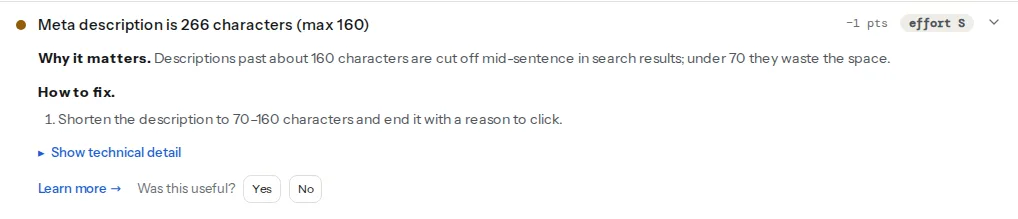
The checker cannot tell you whether Google will show your description for a given query; only a search can. What it can tell you is whether the page gives Google something usable: present, within the window, and different from the title. The meta description learn page has the short version.
Step by step
1. Find the pages that need a hand-written description
Every page that earns search traffic deserves its own. In practice that is the home page, every category or service page, every product that sells, and the twenty articles that bring most visits. Search Console → Performance → Pages, sorted by impressions, is the list. Everything else can run on a template (step 6).
2. Write it as the answer, not the introduction
A description is what the visitor gets, in one breath. It is not the first paragraph of the page and not a summary of the company.
| Page type | Pattern | Example |
|---|---|---|
| Product | What it is, key spec, the offer | Waterproof trekking shoe with Vibram sole, sizes 36–47. Free delivery over €60, 30-day returns. |
| Category | What is in it, how many, how to choose | 48 women's waterproof trekking shoes from 6 brands, filtered by weight and sole. Fit advice on every page. |
| Article | The takeaway | Leather boots leak at the seams, not the leather. The two products that fix it, the wax that ruins them, tested over two winters. |
| Local service | Service, place, the practical detail | Emergency dentist in Split, open Sundays 9–17. Same-day appointments, most insurers accepted, parking on site. |
| Home | What the site does, for whom, one proof | Hiking gear for the Dinaric Alps since 2009. 2,400 products in stock in Zagreb, delivered in 24 h. |
Each example has one specific number, contains the words the page's searcher would type, and ends on a reason to click. None repeats the title, because the title already sits above it.
3. Use the searcher's words
Google bolds query terms in the snippet, and it prefers passages that contain them. Write the description with the same phrase you chose for the title, in its natural form. "Trekking shoes for women" if that is the query, not "footwear for the female hiker". Do not repeat the phrase three times; once is bolded, three times is spam.
4. Keep it inside 160 characters, and above 70
Under 70 characters the snippet looks thin next to the competitors' two lines. Over 160 it is cut mid-sentence with an ellipsis, which is exactly where the call to action usually sits. Put the specific and the benefit in the first 120 characters so a phone shows them; on mobile Google shows fewer characters than on desktop, often around 120. Avoid quotation marks inside the text: the HTML attribute needs them escaped ("), and a stray one ends the description early. Pipes and bullet characters are safe but wasted space.
5. Product pages: price, availability, what is included
For products, the snippet competes with shopping results that already show price and stock. Put the price range or the shipping promise in the description ("from €129", "in stock, ships today"), and keep it true: a description with a price that has since changed is the kind Google marks inaccurate and replaces. Product structured data can add the price under the snippet on its own; the description is where you add the reason to buy from you.
6. Set a template for everything else
Most CMSs build a description from a pattern when the page has none. The right fallback is the page's own excerpt or first sentences, never the site tagline, which produces the same description on every page and gets ignored.
WordPress without an SEO plugin prints no description at all. This small plugin prints one from the post's excerpt (or its first 25 words) on single posts and pages, trimmed to 160 characters:
<?php
// wp-content/mu-plugins/meta-description.php
add_action('wp_head', function () {
    if (!is_singular()) {
        return;
    }
    $post = get_queried_object();
    $text = has_excerpt($post) ? $post->post_excerpt : wp_trim_words(wp_strip_all_tags($post->post_content), 25, '');
    $text = trim(preg_replace('/\s+/', ' ', $text));
    if ($text === '') {
        return;
    }
    if (mb_strlen($text) > 160) {
        $text = rtrim(mb_substr($text, 0, 157)) . '…';
    }
    printf('<meta name="description" content="%s">' . "\n", esc_attr($text));
}, 1);
Priority 1 keeps it near the top of <head>. Remove the file the day you install an SEO plugin, or the page has two descriptions.
Yoast SEO and Rank Math have templates per content type and a field per page; the "Platform notes" give the screens. Shopify has a per-page field and a home page field. Static sites render description: from front matter:
<meta name="description" content="{{ page.description | escape }}">Wrap it in a condition so an empty description: produces no tag rather than an empty one; Google treats an empty description as missing, and the checker does too.
7. When to leave it empty
Never on the pages from step 1. For tag archives, paginated pages and thin listings, a template that yields a sensible sentence is fine, and if the template yields nothing Google will pick a passage, which for a listing page is often adequate. A page so thin that no sentence describes it is a page to noindex rather than describe; thin content: when short pages are fine draws that line.
Platform notes
WordPress
Yoast SEO: per page, the "Meta description" field under Google preview in the Yoast box, with a bar that turns green between about 70 and 160 characters. The site-wide template is under Yoast SEO → Settings → Content types → Posts (and Pages), field "Meta description"; it is empty by default, so posts without a hand-written description get no tag. Insert the Excerpt variable there and Yoast uses the post's excerpt or first sentences. Categories have their own template under Settings → Categories & tags, and a home page that shows latest posts has a field under Content types → Homepage.
Rank Math: per page, click the Rank Math icon at the top right of the editor → Edit Snippet → Description, with a counter under the field. The template is under Rank Math SEO → Titles & Meta → Posts, field "Single Post Description", which contains %excerpt% by default. Pages built with a page builder often have no text Rank Math can turn into an excerpt, so the tag goes missing on exactly the landing pages that matter; write those by hand. The WordPress checker shows the plugin's own fix steps under the finding when it detects Yoast or Rank Math.
In both plugins, purge the page cache after editing; the report reads the cached HTML until you do.
Shopify
Products, collections, pages and blog posts have a "Search engine listing" section at the bottom of the editor with a "Description" field, limited to 320 characters; stop at 160. The home page description is under Online Store → Preferences → "Homepage meta description". The theme prints the field as page_description in theme.liquid; if your theme does not, add it inside <head>:
{%- if page_description -%}
  <meta name="description" content="{{ page_description | escape }}">
{%- endif -%}
When the Search engine listing field is empty, page_description falls back to the product's or collection's own description text, the one shown on the page. Its first sentence then doubles as the snippet, so write it with that in mind.
Static sites and custom code
Keep description in the page's front matter next to title, and have the build fail when a page in a list of key paths has none. That turns "we forgot the description" into a build error instead of a Search Console surprise a month later.
Verify
- Re-run the meta tags checker: "Meta description is present" and "Meta description is N characters — a good length" both pass, and the evidence line shows your text.
- Search Google for the page's main query and look at the snippet. If it shows your text, done. If it shows a passage from the page, your description does not contain the query's words; rewrite it with them.
- Search Console → Performance → Pages, compare click-through rate at the same position over four to six weeks. A description change that works shows up as more clicks per impression, not more impressions.
Common mistakes
- The title repeated as the description. The searcher reads the same words twice and learns nothing. Use the description for the specific and the offer.
- One description for the whole site, from a tagline fallback. Google ignores it and picks a passage on every page. Use the excerpt as the fallback and hand-write the key pages.
- Keyword lists. "Trekking shoes, hiking boots, outdoor footwear, mountain shoes" gets bolded once and trusted never. One sentence, one phrase.
- Promising what the page does not deliver. "Free delivery" in the snippet and €6.90 at checkout costs the sale and, over time, the snippet: Google replaces descriptions it finds inaccurate.
- Forgetting the cache. The description is fixed in the editor and the report still shows the old one an hour later. Purge the page cache and the CDN, then re-run.
- A quotation mark inside the text. Unescaped, it ends the attribute early and the description becomes three words. Use single quotes in the text or escape the double ones.