The <title> is the one line of your page that people read before they have seen the page. It is the blue headline in Google, the text in the browser tab, the name of the bookmark, and the words a chat app shows when a link has no Open Graph tags. This guide shows how to write titles that Google keeps instead of rewriting, that fit the result page on a phone, and that get clicked, then where to set them in each CMS. Plan ten minutes per template and a minute per hand-written page.
Quick answer
- 30–60 characters, the page's topic first, the brand last. Google cuts at a pixel width (roughly 580–600 px on desktop), which is about 55–60 characters in English.
- One idea per title, and the same idea as the H1, but not the same words.
- Unique across the site. Two pages with one title compete with each other.
- Google rewrites titles that are too long, boilerplate ("Home", "Products"), stuffed with keywords or out of step with the visible headline. The fix is a better title, not a trick.
- Run the meta tags checker to see the title, its length and whether it repeats the H1.
Why the title matters
Google's own documentation on title links describes them as a primary way people decide which result to click, and the <title> text is a ranking signal for the words in it. A page about waterproof trekking shoes with the title "Product 4412" can rank for "product 4412" and little else. The same page titled "Alpina Pro waterproof trekking shoe" has a chance for every phrase in that line.
The title is also reused in places you do not control. Browsers show it in the tab and in history, screen readers announce it when a page loads, and WhatsApp, Slack and iMessage fall back to it when og:title is missing. A title written for a search result works in all of them; a title written for the CMS ("Untitled – Draft 3") embarrasses you in all of them.
When Google rewrites it
Since August 2021 Google generates the title link from several sources, not only the <title>: the main visible headline, other prominent headings, the text of links pointing to the page and the site name from WebSite structured data. It leans on those instead of your title when yours has one of the problems it documents:
- Half-empty or boilerplate: "| Outdoor Shop", "Home", "Products" repeated on many pages.
- Too long: the title runs past the space, so Google picks a shorter headline from the page.
- Keyword stuffing: "Shoes, cheap shoes, buy shoes, running shoes online".
- Obsolete: "2023 catalogue" on a page updated this year.
- Inaccurate: the title promises something the page does not contain.
- Mismatch with the headline: the H1 says one thing, the title another; Google often prefers the H1.
The pattern behind the list is simple. A title that says what the page is about, in the words a searcher uses, close to what the visible headline says, is the title Google keeps.
How getReport checks it
The checker fetches the page, reads the first non-empty <title> in the rendered HTML and counts its characters. Three findings come out of it. The first fails when there is no title at all; the second warns when the count is under 30 or over 60; the third compares the title with the first H1 after ignoring case and extra spaces, and warns when they are identical. The evidence line of each finding quotes the title, so you see the exact text the page sends.
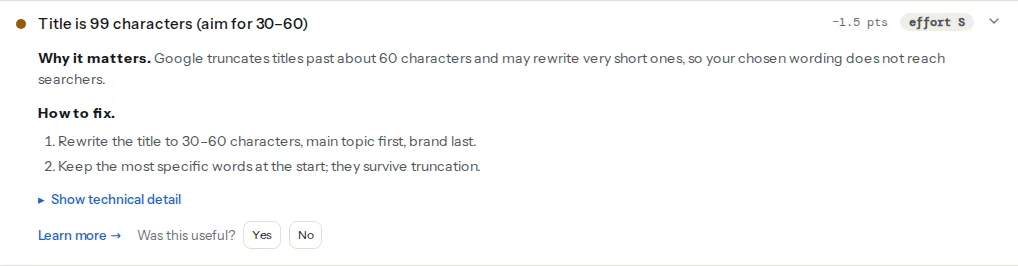
The length check counts characters, not pixels, because the page cannot know which font Google renders in; the page title learn page has the short version of the rules. Treat 60 as the working limit: a title of 60 narrow characters ("little", "still") fits, a title of 60 wide ones ("WOMEN'S MAXIMUM") does not. When the title is in the window and the finding still shows a rewrite in Google, the problem is wording, not length.
Step by step
1. Decide the one idea for the page
Write down the query the page should win, in the words a searcher types. "trekking shoes women waterproof", not "our premium footwear collection". If you cannot name one query, the page is either a home page (the brand is the query) or two pages that should be split.
2. Write it in the pattern for the page type
| Page type | Pattern | Before | After |
|---|---|---|---|
| Home | Brand: what it does, where | Home | Outdoor Shop: hiking gear in Zagreb, 24 h delivery |
| Category | What is in it, a specific · Brand | Products | Women's waterproof trekking shoes, 48 models · Outdoor Shop |
| Product | Product name, key attribute · Brand | Alpina Pro | Alpina Pro trekking shoe, waterproof, 36–47 · Outdoor Shop |
| Article | The question or the claim | Blog post #12 | How to waterproof leather boots (and what ruins them) |
| Local service | Service in place · Brand | Welcome | Emergency dentist in Split, open Sundays · Riverside Dental |
Three things make the "after" column work: the topic comes first, a specific ("48 models", "open Sundays") replaces an adjective ("best", "premium"), and there is exactly one topic.
3. Keep it inside the window
Google truncates from the end, so put the words that must survive at the start. Count characters as you write and stop at 60; on mobile a long title wraps to two lines and the second line is cut. If the brand pushes you over, drop the brand from that page: Google adds the site name next to the result on its own, from your WebSite structured data or the domain.
Characters are a proxy for pixels. A title full of "i", "l" and "t" fits 65 characters; one full of capitals and "w" and "m" fits 50. When in doubt, search for the page and look at the result on a phone.
4. Put the brand last, and pick one separator
"Trekking shoes · Outdoor Shop" survives truncation; "Outdoor Shop · Trekking shoes" becomes "Outdoor Shop · Trekk…". A separator costs three characters including the spaces; "–", "|" and "·" all work, and Google shows them as sent. Pick one for the whole site. Two separators in one title ("Shoes | Women – Outdoor Shop") read as a list, and Google trims lists.
5. Make the H1 agree without copying it
The H1 greets the visitor who is already on the page; the title competes for the click. They should describe the same thing in different words, so the page covers two phrasings:
<head>
  <title>Alpina Pro trekking shoe, waterproof, sizes 36–47 · Outdoor Shop</title>
</head>
<body>
  <h1>Alpina Pro waterproof trekking shoe</h1>
</body>
When the two are word-for-word identical the report warns, because you have spent the second phrasing on nothing. When they contradict each other ("Trekking shoes" vs "Summer sale"), Google tends to show the H1, which is a rewrite you caused. See one H1 and a sane heading order for the rest of the headline rules.
6. Handle pagination and filters
Page 2 of a category is a different page with the same title, which is the definition of a duplicate. Add the page number: "Women's trekking shoes, page 2 · Outdoor Shop". WordPress does this itself (wp_get_document_title() appends "Page 2"), Yoast and Rank Math have a page variable, and Shopify's Dawn theme appends "Page 2" in theme.liquid.
Filter pages (?colour=blue&size=42) either get their own title ("Blue trekking shoes in size 42") when you want them indexed, or a canonical pointing at the unfiltered category when you do not. A filtered page with the category's title and no canonical is the most common source of duplicate titles in a shop; duplicate titles and descriptions across a site covers finding them.
7. Set it where the CMS expects
WordPress without an SEO plugin prints "Page name – Site name" from wp_get_document_title(). The separator and the parts are filterable; this drops the site name on long titles and sets the separator to a middle dot. It goes in a small plugin file so it survives theme updates:
<?php
// wp-content/mu-plugins/document-title.php
add_filter('document_title_separator', function () {
    return '·';
});

add_filter('document_title_parts', function ($parts) {
    if (isset($parts['title'], $parts['site']) && mb_strlen($parts['title']) > 45) {
        unset($parts['site']);
    }
    return $parts;
});
Yoast SEO and Rank Math replace the core title with a template per content type plus a per-page field; the "Platform notes" below give the screens.
Static sites and custom code: the layout renders front matter into <title>. Keep the template short and let the page's own title: carry the topic:
<title>{{ page.title }} · {{ site.name }}</title>Do not fall back to the site name when page.title is empty; a build that produces "· Outdoor Shop" on ten pages is worse than a build error.
Platform notes
WordPress
Yoast SEO: the site-wide template is under Yoast SEO → Settings → Content types → Posts (and Pages), field "SEO title", built from the variables Title, Separator and Site title. The separator itself and the website name are under Settings → Site basics. Per page, the "SEO title" field sits in the Yoast box under the editor; whatever you type there overrides the template. Rank Math: the template is under Rank Math SEO → Titles & Meta → Posts, field "Single Post Title", default %title% %sep% %sitename%; the separator is under Titles & Meta → Global Meta; per page, click the Rank Math icon at the top right of the editor → Edit Snippet → Title. In both plugins, if most titles are too long, the site name is the usual reason: shorten it or drop %sitename% from the template. Our WordPress checker shows the Yoast or Rank Math fix steps under the finding when it detects the plugin.
Shopify
Each product, collection, page and blog post has a "Search engine listing" section at the bottom of its editor with a "Page title" field; the home page title is under Online Store → Preferences. The theme prints them in layout/theme.liquid. Dawn's pattern already handles pagination, tags and the shop name:
<title>
{{ page_title }}
{%- if current_tags %} – tagged "{{ current_tags | join: ', ' }}"{% endif -%}
{%- if current_page != 1 %} – Page {{ current_page }}{% endif -%}
{%- unless page_title contains shop.name %} – {{ shop.name }}{% endunless -%}
</title>If your shop name is long, change the last line to drop it, or shorten the name under Settings → Store details.
Static sites and custom code
One place should own the title: the layout. If a component, a router and the layout each set document.title, the crawler sees whichever ran last. For client-rendered apps, set the title in the server response, because the checker and Google read the rendered HTML but chat apps and older crawlers read only the source.
Verify
- Re-run the meta tags checker: "The page has a
<title>", "Title is N characters — a good length" and "Title and H1 are different" all pass, and the evidence line shows the text you wrote. - Search Google for the page's exact title in quotes. If the result shows different words, compare them with your H1 and move the title towards it.
- Search Console → Performance → Pages: click-through rate for the page rises at the same average position over four to six weeks. Titles need that long to be recrawled and measured.
Common mistakes
- Site name first. "Outdoor Shop – Women's trekking shoes" is cut to "Outdoor Shop – Women's tr…" on a phone. Topic first, brand last.
- The same title on every page from a theme that prints the site name alone. Check the template before you check the pages.
- Title identical to the H1. The page ranks for one phrasing instead of two, and the report warns. Reword one of them.
- Chasing the rewrite with tricks. Hiding the H1, stuffing the title with the query, or adding
og:titlevariants does not stop Google; a title that matches the headline does. - Changing titles every week. Each change resets the measurement. Change, wait six weeks, read Search Console, then change again if needed.
- Titles written for the CMS: "Home", "Untitled", "New page", the SKU. The report's length check catches the short ones; the rest you catch by reading the tab.