Hreflang errors mean Google cannot confirm or understand your set of language versions, so it ignores the broken pairs and picks a version itself, often the wrong country and the wrong currency. Almost every error an audit tool reports comes down to five causes: a missing return link, a missing self-reference, an invalid code, an alternate that does not answer 200 at its canonical URL, or two sources that contradict each other. Fix them in that order, then generate the tags from one source so they stop drifting. This guide sits under our international SEO guide; for the syntax itself, see hreflang tags explained.
Quick answer
| Error (wording varies by tool) | What it means | Fix |
|---|---|---|
| Missing return link, no return tags | Page A lists B, but B does not list A | Print the same full set on every version |
| No self-referencing hreflang | The page lists the others but not itself | Add a tag with its own code and canonical URL |
| Invalid language or region code | en_GB, english, en-UK | ISO 639-1 language, optional ISO 3166-1 region: en-GB |
| Alternate returns 4xx, 5xx or a redirect | The listed URL is not a live page | Point the tag at the final 200 URL |
| Alternate is not canonical, or noindex | The listed URL tells Google to index another URL | List only indexable, self-canonical URLs |
| Conflicting hreflang | One code for two URLs, HTML and sitemap disagree | One source, one URL per code |
Run the free hreflang checker on one page per template; its table shows each alternate's status and whether it links back.
Why hreflang errors matter
Google's rule is simple: if page A says B is its alternate and B does not say A is its alternate, the pair is ignored. The rule stops spam (anyone could otherwise declare your pages as their alternates) and resolves ambiguity (if B has its own set without A, which set is right?).
The practical effect is that a half-finished setup works about as well as none. A site with 40 language versions where the German team forgot the return links to French will see French searchers land on German pages, and Search Console no longer reports why: Google retired its International Targeting report in 2022.
Sets break silently because different people edit the versions. Marketing updates the English page, a local agency the German one, and each template prints the tags it knows about. Checking from outside, page by page, is the only way to see the whole matrix.
How getReport checks it
The checker fetches the page and reads every <link rel="alternate" hreflang> in its HTML, which gives the first finding: the codes, at most one x-default, no duplicates and a self-reference.
It then fetches up to 50 of the alternates and parses their hreflang tags, looking for a link back to the starting page or its canonical. Only an outside check can produce these two findings:
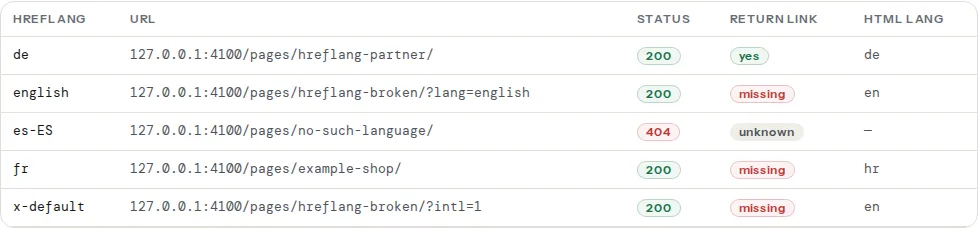
The table lists each alternate with its code, URL, HTTP status, whether the return link exists and the lang attribute of its <html> element, a quick way to spot a de alternate that actually serves English:
The checker reads hreflang in the HTML only; sets declared in a sitemap or HTTP header are not checked yet.
Fixing each error
Missing return links ("hreflang no return tags")
In the checker's Return link column, yes means the pair holds. Missing means the alternate answered 200 but its set does not include this page. Open the alternate's source and look for the tags: usually the whole set is missing there, or it lists a slightly different URL for this language (a trailing slash, www, http instead of https). The return link must name the target's canonical URL exactly. Unknown means the alternate did not answer 200 with HTML, so fix its status first.
No self-referencing hreflang
Every page lists itself. The German page carries <link rel="alternate" hreflang="de" href="https://example.com/de/"> pointing at its own URL. Templates that build the list "from the other languages" forget this, and the first finding then reports that no entry points to this page. Google's documentation asks each version to list itself and all the others; it is one line per page, and generating the set from one map (below) adds it automatically.
Invalid language and region codes
The first finding lists codes it cannot read. The usual ones:
| Written | Problem | Correct |
|---|---|---|
en_GB | underscore | en-GB |
en-UK | UK is not an ISO 3166-1 code | en-GB |
english | word instead of code | en |
uk meant as "United Kingdom" | uk is the language code for Ukrainian | en-GB |
GB alone | a region needs a language | en-GB |
es-419 | valid: Spanish for Latin America | keep |
Codes are case-insensitive, but lowercase language and uppercase region make diffs readable. The full list, with scripts such as zh-Hant, is in hreflang language and region codes.
Alternates that 404, redirect or are not canonical
An alternate that answers 404 was removed or never existed: delete the entry or point it at the live URL. An alternate that redirects is reachable, but Google wants the final URL in the tag; the redirect checker shows it. An alternate that is noindex, or whose canonical points somewhere else, asks Google to list a URL it has been told not to index, and the pair is dropped. Hreflang and canonical tags explains why every version needs a self-referencing canonical.
Hreflang conflicts
Conflicts are sets that give contradictory answers:
- The same code pointing at two URLs in one set, often
enfrom a template plusenhand-written for a campaign page. - One URL claimed for two codes where the pages are really different, such as
de-DEandde-ATboth listing the German page but the Austrian page listing only itself. - HTML and sitemap disagreeing, because a plugin prints tags while an export writes the sitemap from a different table.
- Two
x-defaultentries, or anx-defaultthat redirects visitors by IP. x-default explained covers what it should point at.
The fix is always the same: one method (HTML, sitemap or HTTP header), one URL per code, generated from one source.
Stop the errors coming back: generate the set
Hand-written tags drift within weeks. Generate them from the one place that knows the mapping between versions: the CMS's translation relation, a routing table, or a spreadsheet exported at build time. Every version prints the same set:
<link rel="alternate" hreflang="en" href="https://example.com/en/shoes/" />
<link rel="alternate" hreflang="de" href="https://example.com/de/schuhe/" />
<link rel="alternate" hreflang="hr" href="https://example.com/hr/cipele/" />
<link rel="alternate" hreflang="x-default" href="https://example.com/en/shoes/" />// build step: one map, every version prints the same set, self-reference included
const versions = { en: '/en/shoes/', de: '/de/schuhe/', hr: '/hr/cipele/' };
const base = 'https://example.com';
const tags = Object.entries(versions)
.map(([lang, path]) => `<link rel="alternate" hreflang="${lang}" href="${base}${path}" />`)
.concat(`<link rel="alternate" hreflang="x-default" href="${base}${versions.en}" />`)
.join('\n');The hreflang generator builds the same set from a list of URLs, as HTML tags or sitemap entries. For large sites the sitemap is often the cleaner place; hreflang in sitemaps vs in HTML compares the two.
Platform notes
WordPress. WPML, Polylang and TranslatePress print the set from their translation relation, self-reference included. Yoast SEO and Rank Math do not print hreflang themselves; duplicates come from a second translation plugin, a theme or hand-coded tags. If a page has no translation in a language, that language must not appear in its set; a fallback to the home page shows as a redirect or a missing return link. See multilingual WordPress with WPML and Polylang.
Shopify. Shopify prints hreflang for each published language and market automatically. Errors usually come from an app or theme adding a second set, or from a market domain that redirects.
Static sites and frameworks. Astro, Hugo and Next.js each have a documented way to emit alternates from their i18n routing. Generate every page's set from that one routing table.
Verify
- The Return link column reads "yes" for every alternate and "self" for the page itself.
- Every status is 200, with no redirects in the table.
- One page per template and per language passes: a failure in one language only means that language's template differs.
- Re-run after every deploy that touches templates or routing, since Search Console no longer reports hreflang errors.
Common mistakes
- Pointing alternates at the home page when a translation does not exist. Leave that language out of the page's set.
- Mixing
wwwand non-www, orhttpandhttps, between the tags and the canonical. - Canonicalising one language to another. A canonical from
/de/to/en/tells Google to drop the German page, and its hreflang goes with it. - Forgetting paginated and filtered URLs. Each is its own page and needs its own set, or none.
- Fixing one page by hand instead of the template, so the error returns on the next page published.
Questions people ask
What does "no self-referencing hreflang" mean?
It means the page's hreflang set lists the other language versions but not the page itself. Google's documentation says each version should list itself as well as all the others, and audit tools flag the omission. The fix is one line per page: a <link rel="alternate"> with the page's own language code and its own canonical URL. Generating the whole set from one source adds it automatically.
What does "hreflang no return tags" mean?
It means page A lists page B as an alternate, but page B does not list page A back. Google ignores annotations that are not confirmed from both sides, so the pair stops working. The usual causes are a translation template that prints a different set, a return link to a redirecting or non-canonical URL, or a page missing its tags entirely. The checker's Return link column shows which alternates fail.
What are hreflang conflicts?
Hreflang conflicts are sets that give Google contradictory answers: the same language code pointing at two URLs, one URL claimed for two codes, HTML tags that disagree with the sitemap, or alternates that are not the canonical URLs of their pages. Google may then ignore some or all of the set. Use one method, one URL per code and canonical URLs only.
How do I fix hreflang tags with errors?
Check one page per template and language, then fix in this order: alternates that answer 404 or redirect (point them at the final 200 URL), invalid codes (en-GB, not en_GB or en-UK), missing self-references, then missing return links. Finally, generate every page's set from one routing table or plugin so the versions cannot drift apart again.
Why does Search Console no longer show hreflang errors?
Because Google retired the International Targeting report, which listed hreflang errors, in 2022 and did not replace it. Google still reads and validates hreflang; it just no longer tells you when a pair fails. That makes an outside check the only way to see missing return links and invalid codes, so run one after every change to templates, routing or translation plugins.
Does Google use the html lang attribute for language targeting?
No. Google has said it ignores the lang attribute and works out a page's language from its visible text, then uses hreflang to choose which version to show. Set lang anyway: screen readers use it for pronunciation and browsers for translation offers. A lang value that disagrees with the page's own hreflang code is a useful sign that a template is wrong.
How long does Google take to pick up hreflang fixes?
Usually days to a few weeks, because Google has to recrawl every version in the set before it can confirm the return links. Popular pages are recrawled sooner than deep ones. Listing the versions in your XML sitemap with a fresh lastmod and requesting indexing for the main ones in Search Console speeds it up.