WPML and Polylang both print hreflang tags for you, and both produce broken sets when the site around them changes: a page translated into three of five languages, a language removed, a trailing slash added by a redirect plugin, a theme that hardcodes lang="en-US". Google ignores a broken pair silently and shows whichever version it prefers, which is how a German searcher lands on the Croatian shop. This guide covers the URL structures the plugins offer, what each emits, the failures the hreflang checker finds most often on WordPress, and a step-by-step that ends with three pages checked and a sitemap that agrees with them.
Quick answer
- URL structure: subdirectory (
/de/) for almost everyone; subdomain or separate domains only with a reason; never the?lang=parameter. - Set the default language once and let the plugin's
x-defaultpoint at it. Do not pointx-defaultat a language-switcher page. - Untranslated pages must not be listed as alternates. WPML: "Skip languages that have no translation". Polylang: an untranslated page has no alternates, by design.
- Codes: language, optionally a region, hyphen not underscore (
de,de-AT, notde_DE). Pick one convention across the site. - Check three pages (home, a post, a product): every alternate answers 200 directly and links back;
html langmatches the page. - One source of hreflang. If a second plugin or a theme snippet also prints tags, remove it.
Why hreflang breaks on WordPress specifically
Hreflang is a contract between pages: A says "B is my German version", and B must say "A is my English version", and each must list itself. On a hand-built site the set is written once. On WordPress it is generated per page from the translation relation in the plugin's database, at request time, from whatever state that relation is in. Every gap in the relation becomes a gap in the set: a post translated later than its page, a translation left in draft, a language added and never filled.
The second WordPress-specific failure is the URL. The plugin prints the alternate URLs it knows; a redirect plugin, a trailing-slash setting or a www change means the printed URL answers 301 instead of 200, and Google drops a redirected alternate from the set. The third is the theme: html lang is printed by the theme, and a theme that hardcodes it tells screen readers and Google that the Croatian page is English. The checker catches all three from the outside, the way Google does.
How getReport checks it
The checker reads every <link rel="alternate" hreflang> on the page and validates the set: plausible codes (a two- or three-letter language, optional subtags separated by hyphens; x-default allowed once), no duplicate codes, a self-reference (an entry pointing at this page's URL or its canonical). It then fetches up to 50 of the alternates, reads their own hreflang sets and checks that each one lists this page. The table shows each alternate with its HTTP status, whether the return link exists and the html lang of the alternate page.
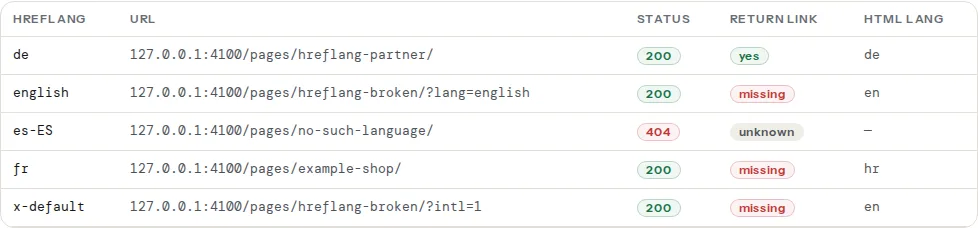
Return links are only judged for alternates that answered 200 with HTML; an alternate that failed to load shows "unknown" in the return-link column and is counted by the reachability finding instead. Codes are compared case-insensitively, so de-at and de-AT both pass; underscores (de_AT) fail.
Step by step
1. Choose the URL structure, once
| Structure | WPML | Polylang | hreflang and the report |
|---|---|---|---|
Subdirectory example.com/de/ | Languages → Language URL format → "Different languages in directories" | Languages → Settings → URL modifications → "The language is set from the directory name in pretty permalinks" | Simplest; one host, one certificate, one report per page |
Subdomain de.example.com | "A different domain per language" with subdomains | "The language is set from the subdomain name" | Each subdomain is its own origin for field data and needs its own TLS; alternates are cross-host, which the checker fetches fine |
Separate domains example.de | "A different domain per language" | "The language is set from different domains" | Only with a business reason per country; hreflang works across domains |
Parameter ?lang=de | "Language name added as a parameter" | Plain permalinks only | Avoid: caches, canonicals and analytics all treat it as the same page with a query string |
Subfolder vs subdomain vs ccTLD has the SEO argument; for WordPress the operational one is that a subdirectory needs nothing from DNS, the host or the certificate, and every cache plugin understands it.
2. Set the default language and x-default
WPML → Languages → Site Languages sets the default. WPML prints an x-default pointing at the default language's version of each page when the hreflang option is on (WPML → Languages → Hreflang links). Polylang does the same automatically for the default language (Languages → Settings → the default language is the one marked as such; the x-default needs no setting). Do not build a language-chooser page and point x-default at it: Google treats x-default as "the page to show when no language matches", and a page that only lists flags is a worse landing page than your default language. Details in x-default explained.
Both plugins offer a browser-language redirect. Leave it off: it redirects Googlebot too, and the checker then sees a 302 where it expects a page.
3. Translate or unpublish, never half-copy
The most common return-link failure is a page listed in five languages where two of the five are the original text with a language prefix, created by "duplicate" in WPML or by a machine-translation pass that was never reviewed. Those pages have their own hreflang sets, but they are duplicates of the original and get indexed as thin, wrong-language content. Either translate them or unpublish them. In WPML, "Skip languages that have no translation" under the hreflang options removes untranslated languages from the set; in Polylang, a page without a translation in a language simply has no entry for it. Machine-translated drafts that stay drafts are fine; they are not in the set.
Related: a translated page must never carry a canonical pointing at another language. The plugins get this right; a manual canonical in an SEO plugin's per-page box is how it goes wrong, and the canonical checker shows it.
4. Run the checker on three pages
The home page, one post and one product (or one service page). Read the table for each:
- Status other than 200: the alternate is gone or redirects. A
wwwor trailing-slash mismatch shows as a redirect chain; fix the redirect target to match what the plugin prints, or the plugin's URL setting to match the redirect. A 404 is a language version that was deleted without telling the plugin; remove the language from that page or restore the translation. - Return link "missing": the alternate exists but its own set does not include this page. Open the alternate in the editor; its translation relation is usually pointing at a different page (a duplicate created twice, or a page re-created after deletion). Re-link the translations in the plugin's translation box.
- html lang not matching the language in the row: step 6.
- Region codes:
de-DE,de-AT,de-CHwhen the content differs by country (prices, legal text), plaindewhen it does not. Mixingdeon one page andde-DEon its partner is a valid set with a mismatched convention; pick one and apply it in the plugin's language settings (WPML: Languages → Edit Languages → the "hreflang" column; Polylang derives it from each language's locale under Languages → edit the language).
5. Fix the sitemap
Yoast SEO and Rank Math generate the sitemap. With WPML or Polylang on subdirectories, the sitemap lists every language's URLs (separate domains get a sitemap each); neither SEO plugin adds xhtml:link alternates to it, so hreflang lives in the HTML only, which is fine. What must be true: every URL the sitemap lists is a real, indexable, translated page, and every URL the hreflang sets point at is in the sitemap. Run the sitemap validator on each language's sitemap index; a sitemap listing untranslated "duplicate" pages from step 3 is the usual finding. Hreflang in sitemaps vs in HTML covers when the sitemap method is worth it.
6. Make the language switcher real links and the lang attribute right
The switcher must be <a href="https://example.com/de/seite/">, not a JavaScript onclick or a form. Both plugins output real links; page builders' custom menus and header templates sometimes replace them with buttons that change a cookie. Check the page source of the switcher for href.
html lang comes from the theme's language_attributes() call, which WPML and Polylang filter per language. A theme that writes <html lang="en-US"> literally in header.php overrides them; search the theme for lang= and replace with the function:
<!-- header.php: let WordPress and the multilingual plugin set the language -->
<html <?php language_attributes(); ?>>
The report's lang-attr finding and the "html lang" column of the alternates table both show what the page actually says.
7. Only if no plugin prints hreflang: a minimal manual set
For a custom setup with a fixed map of translated pages (two languages, a dozen pages, no plugin), a mu-plugin can print the set. Every page must list every version including itself, and the URLs must be exactly the ones that answer 200:
<?php
/**
 * Plugin Name: Manual hreflang
 * Description: Prints hreflang for a fixed map of translated pages. Save as wp-content/mu-plugins/hreflang.php.
 */
add_action( 'wp_head', function () {
    // Each group lists the URL per language; 'x-default' points at the default language.
    $groups = [
        [ 'en' => 'https://example.com/', 'de' => 'https://example.com/de/', 'x-default' => 'https://example.com/' ],
        [ 'en' => 'https://example.com/pricing/', 'de' => 'https://example.com/de/preise/', 'x-default' => 'https://example.com/pricing/' ],
    ];
    $current = trailingslashit( home_url( $GLOBALS['wp']->request ) );
    foreach ( $groups as $group ) {
        if ( in_array( $current, $group, true ) ) {
            foreach ( $group as $lang => $url ) {
                printf( '<link rel="alternate" hreflang="%s" href="%s" />' . "\n", esc_attr( $lang ), esc_url( $url ) );
            }
            return;
        }
    }
}, 1 );
This covers what a plugin does for you badly: it does not follow renamed slugs, and every new page needs a line. Use it for a small fixed site, and switch to a plugin the day the site grows.
Platform notes
WPML and WooCommerce
WooCommerce Multilingual & Multicurrency (WCML) translates products, variations and the cart, checkout and account pages per language, and sets the currency per language if you want it. Product variations must be translated with the product or the translated product page shows the original attribute names, and the checker then shows a return link from a product page that is only half translated. The WooCommerce pages are registered per language, so caching exclusions must cover every translated /warenkorb/ and /kasse/ too.
Polylang and WooCommerce
Polylang's WooCommerce support is a paid add-on (Polylang for WooCommerce); without it products are not translatable and the shop is single-language. With it, the same per-language page registration applies.
TranslatePress and Weglot
TranslatePress translates the rendered page and serves each language under a subdirectory; it prints hreflang with a self-reference and sets html lang. Weglot translates through its proxy and serves subdomains (de.example.com) or, with the WordPress plugin, subdirectories, and prints hreflang for every language you enable; because every page exists in every language automatically, the "untranslated alternate" failure cannot happen, but every machine-translated page is indexable by default, which is step 3's problem in another form. Review or exclude what you do not want indexed.
Two sources of hreflang
Yoast SEO and Rank Math do not print hreflang themselves; they leave it to the multilingual plugin. Two sets appear when a second multilingual plugin was left active during a switch, a theme or a snippet prints its own, or a manual set like the one in step 7 survived a plugin install. The checker's valid-pairs finding reports the duplicate codes; view the page source, find both <link rel="alternate" hreflang blocks and remove the one that is not the plugin's.
Verify
- On all three test pages: every alternate shows status 200, return link "yes" (or "self"), and an
html langthat matches its row. - The valid-pairs finding passes: no invalid code, one
x-default, self-reference present. - The sitemap validator lists only translated, indexable pages, per language.
- The language switcher links are
<a href>to the URLs in the hreflang set, not to a redirect. - In Search Console, International Targeting (or the page-level hreflang errors in Pages) stops reporting "no return tags" over the following weeks.
Common mistakes
- Alternates pointing at the original for untranslated languages. Google sees five URLs, two of them duplicates. Skip untranslated languages or translate them.
x-defaulton a flag-picker page. Point it at the default language's version of each page.- Trailing-slash or
wwwredirect on the alternates. A redirected alternate is dropped. Make the plugin's URLs and the redirect rules agree. de_DEfrom the WordPress locale. WordPress locales use underscores; hreflang uses hyphens. Set the hreflang code per language in the plugin, not the locale.- A theme with a hardcoded
lang. Every language page says it is English. Uselanguage_attributes(). - Browser-language redirect switched on. Googlebot, the checker and every visitor with a mismatched browser get a 302 instead of the page they asked for. Off; a switcher is enough.