A visitor in Brazil searches for your product. Your hreflang set has English, German and Croatian; none of them is Portuguese. Which page does Google show? Without x-default, whichever it estimates is best, which is often the German page because it was crawled most recently. With x-default, the page you chose. This guide explains what x-default is, which page it should point at, how it fits into language-only and language-region sets, and the redirect mistake that makes the whole set useless. It takes about 20 minutes to add and one report to verify.
Quick answer
x-defaultis one morehreflangentry whose value is the literal stringx-default. It names the URL to show when no other entry matches the searcher's language and region.- Point it at the page that makes sense for a stranger: the global English page, or a language selector page that answers 200.
- It can be the same URL as an existing entry (
enandx-defaultboth pointing at/en/is normal). - One
x-defaultper set, on every version of the page, reciprocal like every other entry. - Do not redirect visitors by IP to a language version. Show a banner instead; the redirect breaks hreflang for Googlebot.
- Run the hreflang checker on one page per template; the first finding flags a missing or doubled
x-default.
Why x-default matters
hreflang is a lookup table: the searcher's language and country on one side, a URL on the other. Tables need a default row. When the searcher's settings match nothing (a Portuguese speaker on a site with three European languages, or a Swiss visitor on a site with de-DE and de-AT but no de-CH), Google falls back to its own guess. That guess is not random; it leans on which version it crawled first, which has more links and which language it detected from the content. It is still a guess, and the visible symptom is a wrong-language page ranking in a country you never targeted.
x-default replaces the guess. It is not required (hreflang basics), and a site with one language per country and no international traffic may never need it. It is cheap, and Google's own documentation recommends it, so most multilingual sites should have it.
There is a second use. Many sites have a page that exists only to route people: a country picker at /, or a language selector. That page is not any language, so no hreflang="en" or hreflang="de" fits it. x-default is exactly its role: "if you are not sure, send them here".
How getReport checks it
The checker reads every <link rel="alternate" hreflang> on the page, validates the set as written, then fetches up to 50 of the alternates and reads their tags to confirm each one links back. x-default is treated as an ordinary member: it must appear at most once, its URL is fetched, and its return link is checked like the others.
The <html lang> attribute is read for the page and for every alternate, and reported both in the table and as its own finding, because a language selector page that declares lang="en" while showing six languages, or an alternate whose lang contradicts its hreflang code, is a clue that the URLs are pointing at the wrong pages:
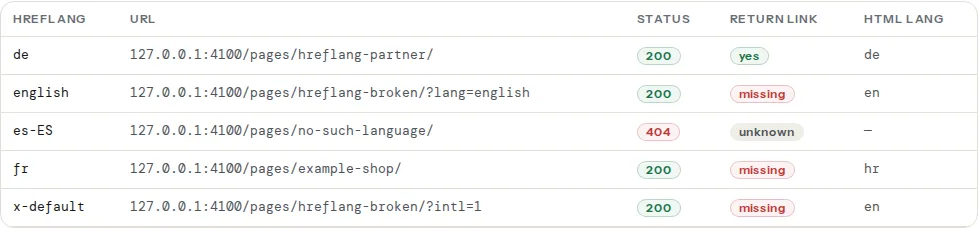
A row marked "missing" in the return-link column means that page answered 200 but its own set does not include the page you tested. A red status means the URL could not be read at all, so its return link is unknown until it is fixed. Reading and fixing each column is covered in Hreflang return links; the lang column follows the rules on the html lang page.
Step by step
1. Choose the x-default page
Pick by what your site has:
| Site | x-default |
|---|---|
| Global English site with local versions | The global English page (/en/ or /) |
| A country picker or language selector page | That page, provided it answers 200 and is not redirected |
| One language per country, no global version | The version for your largest market, or add a selector page |
Language-only set (en, de, fr) | The page in the language most visitors outside those markets can read, usually English |
The page must be a real page: HTTP 200, indexable, no noindex, no redirect. A selector page that is noindex cannot be shown in results, which defeats its purpose.
2. Add the entry to every version
The x-default line is part of the set, so it goes on every member, including the page it points at. Three language versions plus a global English page:
<!-- Identical block in <head> of /en/, /de/, /hr/ and / -->
<link rel="alternate" hreflang="en" href="https://example.com/en/" />
<link rel="alternate" hreflang="de" href="https://example.com/de/" />
<link rel="alternate" hreflang="hr" href="https://example.com/hr/" />
<link rel="alternate" hreflang="x-default" href="https://example.com/" />
Here / is a selector page. When the global English page doubles as the default, the last line points at /en/ and both en and x-default carry the same URL; that is allowed and common.
In a sitemap the entry is one more xhtml:link per <url>:
<url>
  <loc>https://example.com/de/</loc>
  <xhtml:link rel="alternate" hreflang="en" href="https://example.com/en/" />
  <xhtml:link rel="alternate" hreflang="de" href="https://example.com/de/" />
  <xhtml:link rel="alternate" hreflang="hr" href="https://example.com/hr/" />
  <xhtml:link rel="alternate" hreflang="x-default" href="https://example.com/" />
</url>
The urlset needs xmlns:xhtml="http://www.w3.org/1999/xhtml". Pick HTML or sitemap, not both: hreflang in sitemaps vs in HTML covers the choice.
3. Language-only or language-region
A set can mix both, and x-default is where the mixing gets resolved. Take a site with a global English page, a UK page with pounds and a US page with dollars:
<link rel="alternate" hreflang="en" href="https://example.com/en/" />
<link rel="alternate" hreflang="en-GB" href="https://example.com/uk/" />
<link rel="alternate" hreflang="en-US" href="https://example.com/us/" />
<link rel="alternate" hreflang="x-default" href="https://example.com/en/" />
Google matches the most specific entry first: a searcher in the UK gets /uk/, one in the US gets /us/, an English speaker in Australia gets en (/en/), and a Spanish speaker in Mexico gets x-default, which is also /en/. Without the plain en entry, the Australian visitor would fall to x-default too, which happens to be the same page here, but would not be if x-default were a selector.
Codes: language from ISO 639-1 (en, de, hr), region from ISO 3166-1 alpha-2 (GB, US, AT). en-UK is invalid because the United Kingdom's code is GB. A region without a language (hreflang="gb") is invalid too; x-default is the only value that is not a language code.
4. Remove the geo-redirect
This is the step that fixes more international sites than any tag. A site that reads the visitor's IP and redirects / to /de/ for German addresses is doing the routing itself, and it breaks hreflang in two ways. Googlebot crawls mostly from the United States, so it gets redirected to the US or English version every time and never sees the German page at its own URL. And the x-default page, being a redirect for almost everyone, does not answer 200 for anyone, so it is dropped from the set.
Google's guidance is to avoid automatic redirects based on the visitor's perceived language or location. Serve every URL to everyone, and show a banner:
<!-- Shown at the top of /en/ to visitors whose browser language is German -->
<div class="lang-hint" role="region" aria-label="Language suggestion">
  Diese Seite gibt es auch auf Deutsch.
  <a href="https://example.com/de/">Zur deutschen Version</a>
</div>// Decide in the browser, never on the server, and never redirect.
const wanted = navigator.language.slice(0, 2).toLowerCase();
const current = document.documentElement.lang.slice(0, 2).toLowerCase();
if (wanted !== current && ['en', 'de', 'hr'].includes(wanted)) {
document.querySelector('.lang-hint').hidden = false;
}The banner is a suggestion the visitor accepts; the redirect was a decision made for them and for Googlebot. If a redirect must stay for a legacy reason, exempt known crawlers and make sure every language URL is reachable directly without it.
5. Run the checker and read the x-default row
Test one page per template. In the table, the x-default row should show status 200 and "yes" for the return link, the same as every other row. The first finding lists "2 x-default entries (max 1)" when two plugins each add one, and "no entry points to this page" when the self-reference is missing.
Note
The tool reads HTML tags. If your set is in the sitemap, confirm the x-default entry there by searching the XML; the checker will report no hreflang on the page, which is correct for that method.
Platform notes
WordPress
WPML: WPML → Languages → "Hreflang links", and choose the default language under "Language URL format"; the x-default entry points at the default language's page. Polylang prints x-default for the default language automatically. Both put the tag on every translation; check that only one plugin prints hreflang if an SEO plugin also offers it. A "browser language redirect" option exists in both plugins; leave it off for the reason in step 4.
Shopify
Shopify Markets prints the set with x-default pointing at the primary market and does not offer a choice. If a third-party app redirects visitors by country, replace it with a recommendation banner; Shopify's own Geolocation app shows one instead of redirecting.
Static sites and custom
Next.js, Astro and Hugo each have an i18n config with a default locale; the sitemap or head plugin maps that default to x-default. If your default locale lives at / without a prefix, make sure / answers 200 with content and is not a redirect to /en/.
Verify
- The alternates table shows one
x-defaultrow, status 200, return link "yes", on every template you test. curl -sI https://example.com/(or your selector page) returnsHTTP/2 200, not a 301 or 302, when sent from a country you do not serve. A VPN or a colleague abroad is enough to test.- Search Console no longer has an International Targeting report; use URL inspection on the
x-defaultpage and on one alternate to confirm each is indexed under its own URL and that Google's chosen canonical is the URL itself, not another language. - Search a country you do not target (a
gl=parameter in a Google search URL, or a VPN) for your brand and confirm thex-defaultpage is the one that appears.
Common mistakes
- Two x-default entries. The multilingual plugin and the SEO plugin each add one, sometimes to different URLs. The finding says "2 x-default entries (max 1)"; turn one plugin's hreflang output off.
- x-default pointing at a redirect. A selector page that immediately forwards visitors by IP never answers 200 for Googlebot. Serve the page to everyone and use a banner.
- x-default on some versions and not others. Each member of the set carries the whole set. A version without the entry breaks the reciprocity for the default page.
- A selector page with noindex. A noindex page cannot appear in results, so
x-defaultpointing at it has nothing to show. Make it indexable or use the global English page instead. - Using x-default instead of a language entry. An English page tagged only
x-defaulthas noenentry, so English searchers in a region you serve may still get another version. Keep the language entries and addx-defaulton top. - Canonical from every version to the default. A
rel="canonical"from/de/to/en/tells Google the German page is a duplicate; hreflang cannot override that. Every version is its own canonical. See Canonical tags explained.