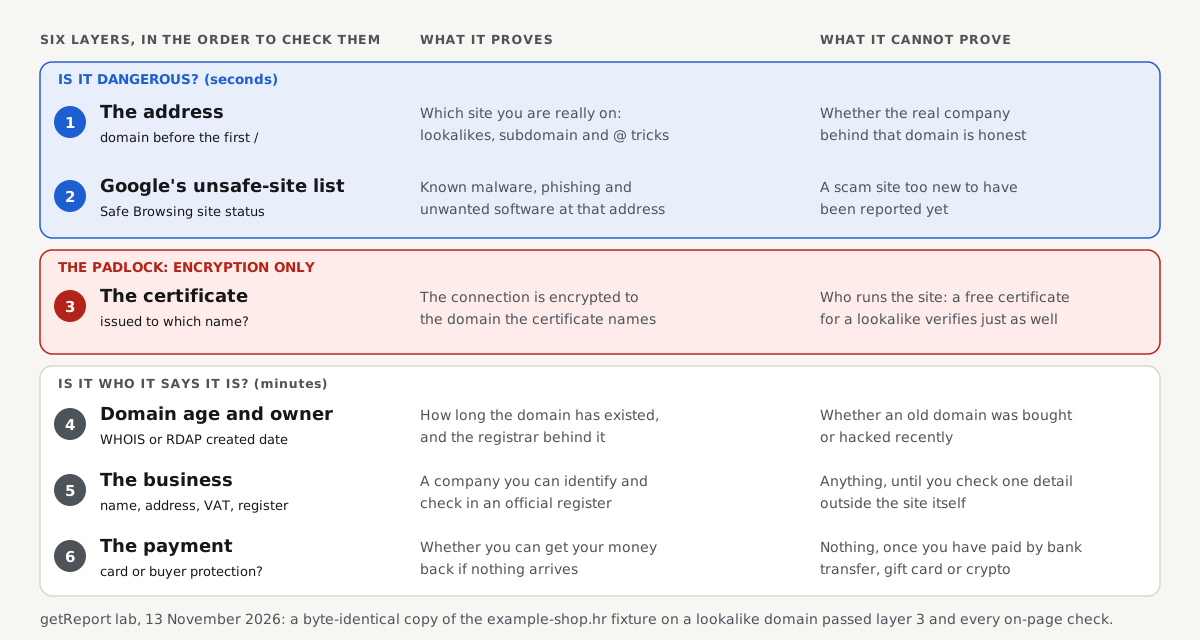
A website is safe to use when three things are true: it is the site it claims to be (the address is the real one), it is not on a malware or phishing blocklist, and a real, reachable business stands behind it. The padlock in the address bar proves none of the three on its own, because it only means the connection is encrypted to whatever domain you typed or clicked. You can check all three for any site in about two minutes with free tools, and this page shows you how, in the order that catches the most problems first.
Quick answer
- Read the domain first. The part right before the first single
/is the site you are on.example-shop.hr.secure-checkout.exampleis not example-shop.hr. Most fake sites fail here. - Look it up on Google's list. Paste the address into Google's Safe Browsing site status page. A "Dangerous" or "Some pages are unsafe" result means leave.
- Do not trust the padlock alone. Certificates are free and issued in minutes. In our test a byte-for-byte copy of a shop on a lookalike domain got a valid certificate and the same padlock as the original.
- Check the domain's age and the business. A shop registered a few weeks ago, with no company name, address or VAT number, and no reviews outside its own pages, is a classic scam.
- Pay only in ways you can reverse. Card or a payment service with buyer protection, never a bank transfer, gift card or crypto to a shop you do not know.
What does "safe" actually mean?
People who type "is this website safe" usually mean one of three different things, and each needs a different check.
- Will opening it harm my device or steal my login? That is malware and phishing. Google's Safe Browsing lists, which Chrome, Firefox and Safari all use, are built to answer it.
- Is it really the site it looks like? That is impersonation. A fake bank or shop page can be a perfect copy, so only the address and the certificate's name settle it.
- Will they deliver what I pay for and treat my data properly? That is a fraud and trust question. No blocklist answers it; the business details, the domain's history and outside reviews do.
| Question | What answers it | What it cannot tell you |
|---|---|---|
| Is this a known dangerous site? | Google Safe Browsing site status, your browser's red warning page | A brand-new scam site that nobody has reported yet |
| Is this the real domain? | The address bar, read right to left from the first / | Whether the real company is honest |
| Is the connection private? | The padlock and the certificate (issued to which name) | Who runs the site: most certificates name only the domain |
| How old is the site? | WHOIS or RDAP registration date | Whether an old domain was bought or hacked recently |
| Is there a real business? | Company name, address, VAT or registration number, phone, policies | Whether those details are true, until you cross-check them |
| Can I get my money back? | The payment method offered at checkout | Anything, once you have paid by bank transfer or crypto |
Keep the three questions apart. A site can be clean on every blocklist and still be a fake shop that never ships, and a real, well-known site can be hacked and serve malware for a day.
The two-minute check, step by step
Do these in order. Stop at the first clear red flag; you do not need the rest.
1. Read the address, not the page
Phishing and fake shops copy the look of a site perfectly, but they cannot use its domain. Find the domain by reading the address up to the first single slash after https://, and look at the last two parts before that slash (three for addresses like .co.uk or .com.hr). That is who you are talking to.
We parsed seven addresses with the same URL parser browsers use (Node.js 22's WHATWG URL) to show how far the visible text can be from the real host:
# Node.js 22: new URL(link).hostname for each link
https://example-shop.hr/kosarica                           -> host example-shop.hr
https://example-shop.hr.secure-checkout.example/kosarica   -> host example-shop.hr.secure-checkout.example
https://example-shop.hr@login-verify.example/kosarica      -> host login-verify.example  (user part "example-shop.hr" ignored)
https://login-verify.example/example-shop.hr/kosarica      -> host login-verify.example
https://exаmple-shop.hr/kosarica                           -> host xn--exmple-shop-zij.hr
https://examp1e-shop.hr/kosarica                           -> host examp1e-shop.hr
https://example-shop-hr.example/kosarica                   -> host example-shop-hr.example
Only the first line goes to example-shop.hr. The fifth looks identical on screen, but its "a" is the Cyrillic letter U+0430, and the browser really connects to xn--exmple-shop-zij.hr. Chrome shows such mixed-script names in that xn-- form in the address bar for exactly this reason.
2. Ask Google's unsafe-site list
Paste the address into the Google Safe Browsing site status page (link under Sources). It reports whether Google has seen malware, phishing or unwanted software there. Your browser checks the same lists in the background and shows a full red page ("Dangerous site", "Deceptive site ahead") when a URL is on them. Never click past that page.
A clean result is necessary but not enough. Lists catch sites after someone reports or detects them, and scam shops often live for only weeks, so a site registered yesterday is usually clean on every list.
3. Look at the certificate's name, not just the padlock
Click the icon to the left of the address and open the certificate details. Check that the name it was issued to matches the domain you meant to visit. Most certificates today are domain-validated: the authority only checked that the requester controls the domain, so the certificate names the domain and nothing else. Let's Encrypt, the largest issuer, issues only this type, free and within minutes.
That is why the padlock means "encrypted to this domain", not "trustworthy". Chrome replaced the padlock with a neutral settings icon in 2023 after Google's research found that only 11% of people understood what the padlock actually means.
4. Check how old the domain is
Look the domain up in a WHOIS or RDAP service, such as ICANN's lookup tool, and read the creation date. A WHOIS lookup explains every field. A shop that says "trusted since 2009" on a domain created last month is lying about one of the two. Age is not proof, because old domains get bought and hacked, but a very young domain selling big brands at half price is the most common pattern in fake shops.
5. Find the business behind it
A real business tells you who it is. Look for a company name, a postal address, a phone number, a VAT or company registration number, a privacy policy and a returns policy. In the EU, shops have to show most of this by law. Then check one detail outside the site: search the company number in the official business register, or the address on a map.
6. Read reviews somewhere else
Reviews on the site itself prove nothing; they are easy to write and to copy. Search for the domain together with "scam" or "reviews", and look at independent review platforms and forums. No mentions at all, for a shop with "thousands of happy customers", is a warning sign in itself.
7. Look at how you pay
Before typing card details, check the payment options. A legitimate shop takes cards or a known payment service. A shop that pushes you to a bank transfer, a gift card, a payment app to a private person or cryptocurrency at checkout is removing your only way to get money back.
We copied a shop to see what you can and cannot spot
The competing guides list warning signs. We wanted to know which signs a careful copy leaves behind, so we made one. On 13 November 2026 we served the homepage of the example-shop.hr fixture twice over HTTPS: once on its own name, and once on the Cyrillic lookalike xn--exmple-shop-zij.hr, each with a certificate for its own name from the same lab authority.
# Terminal: openssl s_server serves both copies; curl fetches each and trusts the lab CA
curl -sv --cacert ca.pem https://example-shop.hr:8711/index.html -o page-8711.html
*  subject: CN=example-shop.hr
*  SSL certificate verify ok.
curl -sv --cacert ca.pem https://xn--exmple-shop-zij.hr:8712/index.html -o page-8712.html
*  subject: CN=xn--exmple-shop-zij.hr
*  SSL certificate verify ok.

sha256sum page-8711.html page-8712.html
5ca96d1d7322ae14279525e3bf3a0998cff46454fadc23466bdf9ce3665bf16e  page-8711.html
5ca96d1d7322ae14279525e3bf3a0998cff46454fadc23466bdf9ce3665bf16e  page-8712.html
Both connections were encrypted with TLS 1.3, both certificates verified, and the two pages were byte-identical. Everything on the page, from the logo and prices to the contact link and the privacy policy, is the same in the copy. What differs is only what the copier cannot copy: the domain name, the date that domain was registered, the certificate's issue date and the business and payment details behind the checkout.
That is the order of this guide. Page content is the last thing to trust, because it is the first thing a scammer copies.
What a getReport report shows about any site
A getReport report reads a site from the outside, like a careful visitor, and several of its checks answer safety questions. This is the real output of our checks on the example-shop.hr fixture, from the snapshot our test suite runs on every change:
| Check | Result on example-shop.hr | What it tells a visitor |
|---|---|---|
https-enforced | fail | The fixture is served over plain HTTP locally, so the page loads without encryption. On a real shop, never type a password or card number there. |
hack-conditional-redirect, hack-cloaking, hack-spam-links, hack-hidden-links | pass | Visitors from Google, Googlebot and direct visitors all get the same page: no sign of a hack that redirects some visitors elsewhere. |
privacy-policy-link, contact-page-link | pass | The page links to a privacy policy and a contact page, as a real business should (a copy would pass too, see above). |
exposed-env-or-git | fail | A configuration file is publicly readable: a sign the owner's own security is weak, not that the site is a scam. |
tech-stack | info | The platform the page reveals: the fixture announces WordPress 7.1 and loads WooCommerce and Elementor styles, a common, legitimate shop setup. |
The free tools that run these checks:
The CMS detector shows what a site is built with and flags known vulnerable versions, which matters more to the owner than to a visitor.
Watch out
getReport does not yet ask Google's Safe Browsing lists about a site: the Web Risk lookup is in our check catalogue but not switched on, so a clean report is not a clean blocklist result. Use the Google Safe Browsing site status page for that step.
Is this website legit? The checks for online shops
Buying from a shop you have never heard of is where most people meet a scam site. The checks above still apply, and shops add a few of their own: a business you can identify in an official register, prices that are not wildly below every other seller, delivery and returns terms with real time limits, and a payment step on a known provider.
The strongest single signal is a mismatch between the shop's story and its domain: "family business since 1998" on a domain registered this year. The next is a checkout that only works with bank transfer or crypto. Our upcoming guide to checking whether a shop is legit goes through each check with the exact fields to look at, and what an organisation-validated certificate does and does not add.
Is this link safe? Checking before you click
A link in an email, a text message or a social post can lead somewhere other than its text says, and short links hide the destination entirely. You can find where a link really goes without opening it: hover or long-press to see the address, read the domain as in step 1, and expand short links with a redirect checker that shows every hop.
Then paste the final address into the Safe Browsing status page. A link to a login page that you did not ask for is suspicious however clean it looks; type the site's address yourself instead. A dedicated guide to checking links covers short links, QR codes and the redirect chain test we ran.
Scam websites: the common patterns
Scam websites fall into a handful of patterns that repeat across countries and seasons: fake shops with brand goods at 50 to 80 percent off, copies of banks, parcel services and tax offices that ask for a login or a small "customs fee", fake investment and crypto platforms, fake tech-support pages that ask you to call a number, and ticket or travel sites around big events. Each has a typical way in (an ad, a text message, a search result) and a typical way it takes your money.
Knowing the pattern helps more than any checklist: once you recognise "parcel held, pay 1.99 to release it", you do not need to inspect the certificate. The scam websites guide later this week lists each pattern with the giveaway and the check that exposes it.
Fake website: telling a copy from the original
A fake website is a copy of a real one on a different domain. As our test showed, the page itself can be identical, so you tell a fake from the original by its address and its history: the lookalike domain, a certificate issued days ago, a registration date that does not match the real company's age.
The safe habit is to reach important sites the same way every time, from a bookmark or by typing the address, and never from a link or an ad. Search ads in particular are bought for brand names by impostors, so the top result for your bank's name is not always your bank. The fake website guide shows which lookalike tricks a browser exposes and which it does not.
Phishing links and what happens if you click
A phishing link takes you to a page made to collect your login, card or personal details. Clicking alone is rarely the damage; typing something into the page is. If you clicked a link and closed the page without entering anything, the risk is low on an updated browser and device. If you entered a password, change it at once on the real site, and everywhere you reused it, and turn on two-factor sign-in.
The phishing link guide covers how phishing URLs are built, why a padlock appears on them, and the exact steps after a click, by what you typed.
Trust signals: making your own site look as safe as it is
If you run a site, every check above is also a check visitors run on you. The signals that hold up are the ones a scammer cannot copy cheaply: a domain with history, a company name and address that match the business register, working contact details, clear policies, HTTPS on every page, reviews on independent platforms and a checkout on a known payment provider. Privacy policy and contact links: the trust signals a report checks covers the two a getReport report tests.
Badges and seals are the weak end. Most are images that anyone can paste on any page. The trust signals guide at the end of this week separates the badges that can be verified from those that cannot.
If you already used a site you now doubt
Act in this order, fastest damage first:
- You paid by card: call your card issuer, report the payment as fraud and ask for a chargeback. Note the date, amount and shop name.
- You entered a password: change it on the real site and on every site where you used the same one. Turn on two-factor sign-in.
- You entered bank details or ID numbers: tell your bank, and follow your country's identity-theft steps (in the US, identitytheft.gov).
- You downloaded a file: do not open it; delete it and run a full scan with your device's security software.
- Report the site: to Google's phishing report form so browsers warn the next visitor, and to your national fraud reporting service (in the US, reportfraud.ftc.gov).
Do this even if the amount was small. Scam sites often test a card with a small charge first.
For site owners: when your own site is the one flagged
If visitors tell you your site shows a red warning page, or a security tool flags it, your site has most likely been hacked rather than mistaken for a scam. Google Safe Browsing: check your site and clear a flag covers the review request, and is my website hacked? the signs to look for and the clean-up. A certificate problem shows as a different warning, "Your connection is not private"; SSL errors, browser by browser maps each message to its cause.
How we tested
The getReport team ran the tests on this page on 13 November 2026 on Linux. The address table comes from Node.js 22.23's WHATWG URL parser (new URL() and url.domainToASCII), the same standard browsers implement. For the copy test, OpenSSL 3.0.13's s_server served the example-shop.hr fixture homepage on two local ports, each with a certificate for its own name signed by a lab certificate authority, and curl 8.5.0 fetched both with --cacert and --resolve; sha256sum compared the bodies. The report table is the current snapshot of getReport's security, SEO and practices checks on the fixture, from packages/checks (Chromium rendering for the practices checks).
Not tested: Google Safe Browsing itself (our sandbox cannot reach it, and getReport's Web Risk lookup is not live), real WHOIS or RDAP lookups, real certificate authorities, real browsers' address bar display (the xn-- display rule comes from Chromium's documentation), and any real scam site. We never name or test a real site as a scam.
Questions people ask
How do I check if a website is safe for free?
Use three free checks: paste the address into Google's Safe Browsing site status page, open the certificate details from the address bar to confirm the domain name, and look up the domain's creation date in ICANN's lookup tool. Together they cover known dangerous sites, impersonation and brand-new scam domains. Add a search for the domain with "scam" or "reviews" before you pay a shop you do not know.
Does the padlock mean a website is safe?
No. The padlock only means your connection to that domain is encrypted, so nobody on the network can read what you send. It says nothing about who runs the site or whether they are honest, because free certificates are issued automatically to anyone who controls a domain, scam domains included. Read the domain name next to the padlock; that is the part that tells you where you are.
Can a website be unsafe even if Google says it is clean?
Yes. Google's lists only contain sites that have been detected or reported, and new scam shops and phishing pages are often hours or days old. A clean result rules out known malware and phishing, not fraud. That is why the domain's age, the business details and the payment method still matter for any site you are about to pay or log in to.
What should I do if my browser says a site is dangerous?
Close the tab and do not click "details" or "visit this unsafe site". The red warning page means Google or your browser has evidence of malware, phishing or unwanted software at that address. If it is a site you trust, it has probably been hacked; reach the company another way and tell them. If you own the site, check Search Console's Security Issues report and clean it before requesting a review.
Is it safe to visit a website if I don't click anything?
Usually yes, on a browser and operating system with current updates. Most harm from bad sites comes from what you do there: typing a password or card number, downloading and opening a file, allowing notifications or calling a support number. Attacks that infect a device just by loading a page exist, but they rely on unpatched software, which is why updates matter more than any website check.
How can I tell how old a website is?
Look up the domain in a WHOIS or RDAP tool such as ICANN's lookup and read the creation or registration date. That is when the domain was first registered, which usually matches when the business went online. Compare it with what the site claims about itself. The Internet Archive's Wayback Machine also shows earlier versions of the site, which reveals a domain that sold something very different last year.
Sources
- Google Transparency Report: Safe Browsing site status (accessed November 2026)
- Chromium Blog: An update on the lock icon (May 2023)
- Let's Encrypt FAQ: what kinds of certificates it issues (accessed November 2026)
- Chromium: IDN in Google Chrome, when an address is shown as punycode (accessed November 2026)
- ICANN Registration Data Lookup Tool (RDAP) (accessed November 2026)
- US Federal Trade Commission: How to recognize and avoid phishing scams (accessed November 2026)
- WHATWG URL Standard: host parsing and the userinfo part (accessed November 2026)