A phishing link is a link, sent by email, text message, chat, social post or QR code, that leads to a fake page built to capture your login, card or personal details, usually on a domain made to look like a real one. Clicking it is rarely the harm by itself; typing into the page is, because the page sends everything you enter to the attacker and then usually forwards you to the real site so nothing seems wrong. This guide shows how phishing links and pages are built, what we saw when we submitted a form to one in our lab, and what to do after a click, step by step. It is part of is this website safe?.
Quick answer
- A phishing link points somewhere other than it claims: a lookalike domain, a subdomain trick, or a short link that hides the destination.
- The harm happens when you type. A phishing page stores whatever you submit, even a wrong password, and then forwards you to the real site.
- Clicked but typed nothing? On an updated device the risk is low. Close the page and delete the message.
- Typed a password? Change it on the real site now, and everywhere you reused it, then turn on two-factor sign-in or a passkey.
- Typed card or bank details? Call your bank or card issuer straight away and report the phishing link.
What is a phishing website?
A phishing website is the page at the end of a phishing link: an imitation of a login, payment or form page belonging to a bank, a delivery company, an email provider, a shop or a government service. It exists only to collect what you enter. Phishing pages are usually short-lived, hosted on cheap or hacked servers, and copied from kits that are sold or shared between criminals.
Phishing differs from a scam shop in what it wants. A scam shop wants a payment for goods. A phishing site wants credentials or card data it can use later, often at scale. Scam websites covers the other patterns.
How phishing links are built
A phishing link has two jobs: get past spam filters and get past your eyes. These are the common constructions:
| Construction | Example | Why it works |
|---|---|---|
| Lookalike domain | examp1e-shop.hr/prijava | Reads as the brand at a glance |
| Brand as a subdomain | example-shop.hr.account-check.example/prijava | The brand appears first; the real domain is at the end |
Brand before @ | example-shop.hr@login-verify.example/ | Everything before @ is ignored by the browser |
| Short link | short.example/x7Kq | Hides the destination entirely |
| Open redirect on a real site | real-site.example/out?url=... | Starts on a trusted domain, ends on the fake |
| Hosted on a trusted platform | A form or document on a well-known file-sharing or form service | The domain is real; the content is not the brand's |
| QR code | A sticker on a parking meter or a letter | You cannot read the address before scanning |
We parsed the first three with a browser-standard URL parser; each one connects to the domain at the end, not to the brand. Is this link safe? shows that test and how to expand short links and redirect chains without opening them, and fake website goes through the lookalike letters a browser exposes and those it does not.
The free redirect checker follows a link's hops from our servers, so you can see where it ends before you open it:
What a phishing page does with what you type
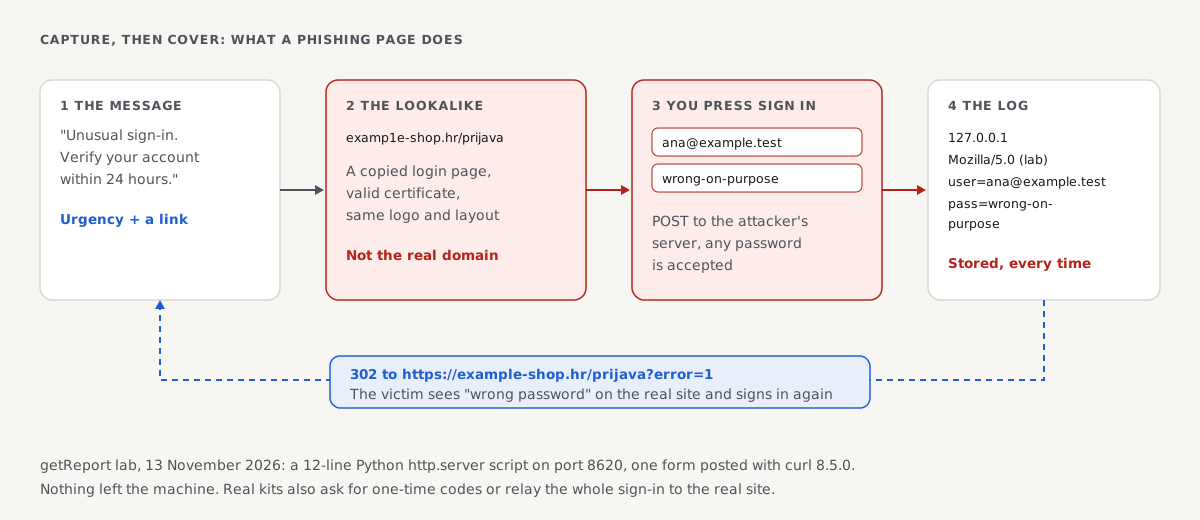
To show why typing, not clicking, is the risk, we built the back end of a phishing page in a lab on 13 November 2026: a small server that accepts a login form, logs it and redirects the visitor. Then we submitted a form to it, with a deliberately wrong password:
# Terminal: submit a login form to the lab phishing server, as a browser would on "Sign in"
curl -s -i -A 'Mozilla/5.0 (lab)' -d 'user=ana%40example.test&pass=wrong-on-purpose' http://127.0.0.1:8620/prijava
HTTP/1.0 302 Found
Location: https://example-shop.hr/prijava?error=1

# The server's log file after one submission
127.0.0.1 Mozilla/5.0 (lab) user=ana@example.test pass=wrong-on-purpose
A dozen lines of server code produced three things a victim never sees:
- Everything was stored, including the wrong password. A phishing page cannot check a password, so it accepts any input. Typing a fake password to "test" a page tells you nothing, and typing your real one after it is the mistake.
- The device was recorded: the IP address and browser. Kits use these to replay the login from a similar-looking device.
- The visitor was sent back to the real site's login, with an error flag. The victim sees "wrong password", signs in again on the real site, and moves on.
Real kits add more: they send the data to the attacker instantly through a chat bot, ask for the one-time code from your authenticator or text message on the next screen, or sit invisibly between you and the real site and pass everything through, including the session cookie. That last kind defeats one-time codes, which is why passkeys and security keys, which are bound to the real domain, are the strongest protection.
What happens if you click a phishing link?
What happens depends on what you did after the click, not on the click itself.
| What you did | Risk | What to do now |
|---|---|---|
| Opened the page, typed nothing, closed it | Low | Delete the message; install pending browser and system updates |
| Typed your email address only | Low to medium | Expect more targeted phishing; nothing to change |
| Typed a password | High | Change it on the real site now, and every site that shares it; turn on two-factor sign-in |
| Typed a one-time code or approved a sign-in prompt | High | Sign out all sessions in the account's security settings, then change the password |
| Typed card details | High | Call the card issuer to block the card; watch statements |
| Typed bank login or ID numbers | High | Call your bank; follow your country's identity-theft steps |
| Downloaded and opened a file | High | Disconnect from the network, run a full security scan, get help if it is a work device |
| Allowed browser notifications | Medium | Remove the site under your browser's notification settings |
Two things matter more than speed of panic: change passwords on the real site (typed by hand, not through the message), and if this is a work account, tell your IT or security team right away, because one stolen work login is how many company breaches start.
How to report a phishing link
- Forward a phishing email to your provider's report option ("Report phishing" in most mail apps) and to the impersonated organisation's phishing address.
- Forward a phishing text to your carrier's spam number (7726 in the US and UK).
- Report the page to Google's Safe Browsing phishing form, so browsers warn the next person once Google confirms it.
- Report losses to your national fraud service (in the US, reportfraud.ftc.gov).
For site owners: stop your domain from being used
Phishing that impersonates your organisation hurts your customers and your reputation. Three measures do the most:
- Email authentication. With SPF, DKIM and a DMARC policy of
p=reject, mail that pretends to come from your exact domain gets rejected by receiving servers. SPF, DKIM and DMARC explains the setup. - No open redirects. A page on your site that redirects to any address given in its URL lets phishers start their links on your trusted domain. Allow only your own destinations.
- HTTPS everywhere and a clear login domain. Use one domain for sign-in, publish it, and serve it over HTTPS with HSTS, so customers learn what your real address looks like.
How we tested
The getReport team ran the lab on 13 November 2026 on Linux: a 12-line Python 3.11 http.server script on local port 8620 that writes posted user and pass fields with the client address and user agent to a log file and answers with a 302 to the real fixture site's login. curl 8.5.0 posted the form as shown. The URL constructions were checked with Node.js 22.23's WHATWG URL parser. The lab never sent data anywhere outside the machine.
Not tested: real phishing kits, adversary-in-the-middle proxies, one-time-code relay, real email or SMS filtering, Google Safe Browsing and the reporting services, whose steps follow their published instructions.
Questions people ask
What happens if you click on a phishing link but don't enter anything?
Usually nothing, on a device with current updates. The page loads, but a phishing page needs you to type or download something to do harm. Close it, delete the message, and install any pending browser or system updates, because the rare attacks that work on a page load depend on unpatched software. If the page started a download, delete the file without opening it.
Can a phishing link steal your information on a phone?
Only what you give it, in nearly all cases. A phishing link on a phone works like one on a computer: it opens a fake page and collects what you type. Phones add one risk: the small screen hides most of the address, so long-press the link to read the domain first. Never install an app or a configuration profile from a link in a message.
How do I recognise a phishing website?
Look at the address first: a phishing website is on a domain that is not the organisation's own, even if it contains the brand's name. Then ask how you got there: phishing pages are reached through links in messages, ads and QR codes, not by typing. A page asking you to sign in, confirm payment details or pay a small fee right after such a link is the classic sign.
Does two-factor authentication stop phishing?
Partly. Two-factor sign-in stops an attacker who only has your password. But a phishing page can also ask for your one-time code and use it within seconds, and some kits relay the whole sign-in through to the real site. Passkeys and hardware security keys resist this, because they only work on the real domain. Use them where you can, and change your password after any phishing incident anyway.
Why do phishing websites have https?
Because certificates are free and automatic for any domain, including one registered for phishing. The certificate proves the connection is encrypted to that domain; it says nothing about who owns it. Most phishing pages today use https, so the padlock or settings icon in the address bar is not a sign of safety. Read the domain next to it instead.
Should I report a phishing link even if I didn't fall for it?
Yes. Reporting the email or text to your provider and the page to Google's phishing form takes a minute and helps filters and browsers block it for others, sometimes within hours. Many people who receive the same message will not notice what you noticed. If the message impersonates your bank or employer, forward it to their phishing reporting address too.
Sources
- US Federal Trade Commission: How to recognize and avoid phishing scams (accessed November 2026)
- CISA, NSA, FBI and MS-ISAC: Phishing guidance, stopping the attack cycle at phase one (October 2023)
- UK National Cyber Security Centre: Phishing, spot and report scam emails, texts, websites and calls (accessed November 2026)
- FIDO Alliance: Passkeys (accessed November 2026)
- MITRE ATT&CK: Phishing, spearphishing link (T1566.002) (accessed November 2026)
- Google Safe Browsing: Report phishing page (accessed November 2026)