Scam websites are sites built to take your money, your logins or your personal details under a false pretence, and nearly all of them follow one of eight patterns: fake shops, copies of real brands, "small fee" parcel and toll pages, fake investment platforms, tech-support pages, fake ticket and rental sites, unofficial government-service sites and job "task" platforms. Knowing the pattern is faster than any checklist, because each one has a giveaway you can check in a minute. This page lists all eight, then shows what an automated website check can and cannot see. It belongs to the is this website safe? series.
Quick answer
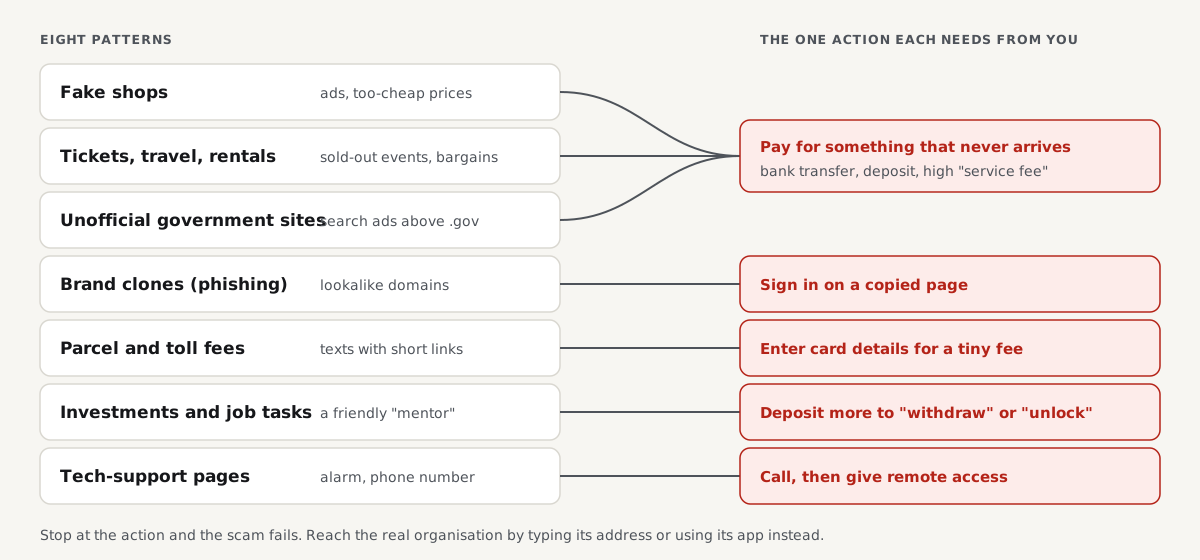
- Every scam site needs you to do one thing: pay, sign in, enter card details, install something or call a number. The visit itself is rarely the harm.
- Name the pattern. A parcel fee, a too-cheap shop, a guaranteed return or a "your PC is infected" page each has a known giveaway.
- Reach the real organisation another way. Type the address of your bank, carrier or tax office yourself, or use its app, and check there.
- Check the domain's age and the business. Most scam sites are weeks old and name no company you can find in a register.
- Report it. Google's phishing report form protects the next visitor through every major browser.
The eight patterns at a glance
| Pattern | How it reaches you | What it wants | The giveaway | The check that exposes it |
|---|---|---|---|---|
| Fake shop | Social media ads, search ads, price comparison | Payment for goods that never ship | Brand goods at 50 to 80% off, young domain | Domain age, company register, payment options |
| Brand clone (phishing) | Email, text message, search ad | Your login or card details | Lookalike domain, unexpected login page | Read the domain; open the real site yourself |
| Parcel or toll fee | Text message | A "small fee" that captures your card | Tiny amount, urgent deadline, short link | Track the parcel in the carrier's own app |
| Investment and crypto | Social media, messaging apps, dating apps | A deposit, then more "fees" to withdraw | Guaranteed high returns, a "mentor" who chats | Regulator's register of authorised firms |
| Tech support | Pop-up page, fake search result | Remote access and payment | "Your computer is infected, call this number" | Close the tab; real warnings never list a phone number |
| Tickets, travel and rentals | Social posts, classified ads, search ads | Payment for tickets or deposits that do not exist | Sold-out event or bargain flat, transfer only | Official ticket seller or the venue's own site |
| Unofficial government services | Search ads | High fees for free or cheap services, your ID data | Paid form for a visa waiver, passport or tax ID | Find the official service on the government's own domain |
| Job tasks | Messaging apps, job sites | You pay to "unlock" tasks or wages | Paid for liking or rating products, a deposit to continue | A real employer never asks you to pay to work |
The rest of this page goes through each pattern with the detail that matters.
1. Fake shops
Fake shops sell goods they do not have: designer brands, electronics, garden furniture in spring and heaters in autumn, always below every other seller. They are built from shop templates in hours, advertised on social media, and replaced with a new domain when they are reported. Some ship cheap counterfeits so the payment cannot be disputed as "nothing arrived".
The giveaway is a mismatch between the shop's story and its facts: "since 1998" on a domain registered last month, no company name or a borrowed one, and a checkout that ends in a bank transfer. Is this website legit? walks through the eight checks for a shop, with the exact fields to read.
2. Brand clones and phishing pages
A clone copies the login or checkout page of a real bank, shop, email provider or delivery company onto a lookalike domain. The page can be pixel-perfect; our own test of a copied shop page produced a byte-identical file on a lookalike domain, with a valid certificate. What the copy cannot have is the real domain.
You almost always reach a clone through a link, not by typing. So the defence is simple: never sign in through a link in a message. Is this link safe? shows how to read where a link really goes and expand short links without opening them. A dedicated guide to fake websites, later this week, covers the lookalike tricks one by one.
3. Parcel, toll and "small fee" pages
A text message says a parcel is held, a toll is unpaid or a fine is due, and links to a page that asks for a small amount, often under 3 in your currency. The amount is the trick: it is low enough that you do not think twice, and the page captures your full card details for bigger fraud later, or signs you up to a subscription.
Carriers and toll operators do send texts, which is why the scam works. The check is to open the carrier's own app or site, typed by hand, and look up the tracking number there. If nothing is waiting, nothing is due.
4. Fake investment and crypto platforms
These are polished trading dashboards that show your "deposit" growing. Contact usually starts on social media or a messaging or dating app, often with a friendly stranger or "mentor" who guides you. Withdrawals then need a tax, a fee or a larger deposit, and the money never comes back. In 2024 the FBI's Internet Crime Complaint Center recorded 16.6 billion US dollars of reported losses to internet crime, with investment fraud the costliest category.
The check is the financial regulator's register: in the US, the SEC and FINRA BrokerCheck; in the UK, the FCA register; in the EU, your national supervisor. A platform that is not authorised to take investments where you live should not be taking yours, whatever its dashboard says.
5. Tech-support pages
A page suddenly fills the screen, plays an alarm, says your device is infected or locked, and gives a phone number. Sometimes it arrives through a fake search result for a company's "support number". The person who answers asks for remote access and then for payment to "fix" the problem.
Real security warnings from your operating system or browser never include a phone number. Close the tab (on a computer, Ctrl+W or Cmd+W; if the page blocks that, force-quit the browser) and do not call.
6. Fake tickets, travel and rentals
Sold-out concerts, cheap flights, holiday homes and city flats at below-market rent are advertised by sites and profiles that take a deposit and disappear. They cluster around big events and holiday seasons, when demand is high and people are used to paying quickly.
Buy tickets from the official seller the event names on its own site, and never pay a rental deposit before you have seen the property and a contract with a real landlord or agency. A bank transfer request to a private person for a bargain is the pattern.
7. Unofficial government-service sites
Some sites charge a high fee to fill in a form you can submit yourself for free or for a small official fee: visa waivers, passport renewals, driving licence records, tax identification numbers. Some are legal but misleading resellers; others take the money and your identity data and deliver nothing.
They usually reach you through search ads above the real government site. Find the official service through your government's own portal (in the US, a .gov address; in the UK, gov.uk) and compare the fee.
8. Job "task" sites
A recruiter contacts you on a messaging app with an easy remote job: rate products, like videos or "optimise" apps for commission. A slick dashboard shows your earnings. Then a task needs you to top up your account with your own money, often in crypto, to continue or to withdraw.
A real employer never asks you to pay to work or to receive your wages. The moment a job asks for a deposit, it is the scam.
What an automated website check can and cannot see
Several of the patterns above live on sites that look technically fine. To show where the line is, here is what getReport's checks report for the example-shop.hr fixture, a normal demo shop, from the snapshot our test suite runs on every change:
| What the report checks | Result on example-shop.hr | Does it expose a scam site? |
|---|---|---|
Hidden redirects for visitors from Google (hack-conditional-redirect) | pass | Yes, when a hacked real site sends some visitors to a scam page |
Spam links and cloaking (hack-spam-links, hack-cloaking) | pass | Yes, for hacked sites stuffed with scam links |
Privacy policy and contact links (privacy-policy-link, contact-page-link) | pass | No: a scam shop links to copied policies just as easily |
HTTPS on every page (https-enforced) | fail (served over plain HTTP in our lab) | No: scam sites nearly always have a free certificate |
Platform and versions (tech-stack) | info: the page announces WordPress 7.1 and loads WooCommerce styles | No: scam shops run on the same off-the-shelf software |
The pattern is clear: page-level checks catch hacked real sites well, because the hack leaves traces in the page. They do not catch a purpose-built scam site, because a scam site is technically a normal site with a false story. That is why the checks that work on scams are about the world outside the page: the domain's registration date (WHOIS lookup), the business register, independent reviews, the payment method and Google's unsafe-site lists.
Watch out
getReport does not yet query Google's Safe Browsing lists: that check is in our catalogue but not switched on. Use the Safe Browsing site status page for a list lookup.
How to report a scam website
Reporting takes two minutes and protects the next person.
- Google Safe Browsing: the "Report phishing page" form adds the site to the lists behind Chrome, Firefox and Safari warnings once Google confirms it.
- Your national fraud service: in the US, reportfraud.ftc.gov and the FBI's ic3.gov for losses; in the UK, the NCSC's suspicious website reporting service.
- The platform that showed it to you: report the ad or post on the social network or search engine, and the text message to your carrier (in many countries by forwarding it to 7726).
- The brand being copied: most banks and large shops have a phishing reporting address on their own site.
If you lost money, contact your bank or card issuer first, then report. Google Safe Browsing: check your site and clear a flag explains the lists from the other side, for site owners whose real site was flagged after a hack.
How we tested
The report table is the current snapshot of getReport's security, SEO and practices checks on the example-shop.hr fixture, produced by packages/checks (the practices checks on a real Chromium render) on 13 November 2026. The copied-shop result mentioned in pattern 2 is the lab test described in is this website safe?: the same fixture page served over TLS on its own name and on a lookalike, fetched with curl 8.5.0 and compared with sha256sum.
Not tested: real scam websites (we never run or name one), Google Safe Browsing, regulators' registers and the reporting services, whose steps follow their own published instructions. The loss figure is the FBI's, not ours.
Questions people ask
How do I find out if a website is a scam?
Check four things: the domain's creation date in a WHOIS or RDAP lookup, the company name and number in the official business register, reviews of the domain on independent sites, and the payment options at checkout. A site that is weeks old, names no company you can find, has no outside reviews and wants a bank transfer or crypto is a scam in nearly every case. Add a Google Safe Browsing lookup for known phishing.
What are the most common scam websites?
Fake online shops and copies of real brands' login pages are the most common, followed by parcel or toll "small fee" pages sent by text message. Fake investment platforms are less common but cause the largest losses: the FBI's 2024 internet crime report put investment fraud at the top of reported losses. Tech-support pop-ups, fake ticket and rental sites, unofficial government-service sites and job task platforms make up most of the rest.
Why do scam websites look so professional?
Because building a convincing site costs almost nothing. Shop templates, stolen product photos, copied policies and free certificates take a scammer an afternoon, and a clone of a real site can be an exact copy of its files. Design quality therefore proves nothing about honesty. Judge a site by facts that cannot be copied: its domain, the domain's age, a business register entry and how it takes payment.
Can you get your money back from a scam website?
Often yes, if you paid by card or through a payment service with buyer protection: ask your card issuer for a chargeback or open a dispute, and do it quickly. Bank transfers, gift cards and cryptocurrency are much harder to recover, which is why scam sites push them. Report the loss to your bank and to the police or national fraud service either way, and keep every email and receipt.
Are scam websites illegal to visit?
No, visiting a scam website is not illegal; the scammer is the one breaking the law. The risk is practical, not legal: entering details, paying or downloading something on the site. If you landed on one by accident, close it without typing anything. Visiting to report it is fine, but do not try to fight back by filling forms with fake data, since some scam sites log your device and address.
How long do scam websites stay online?
Usually weeks to a few months. Once a scam site is reported to its registrar, host and browser blocklists, it gets blocked or taken down, and the operators move the same template to a fresh domain. That cycle is why a very young domain is one of the strongest warning signs, and why a scam you were warned about last month may now run under a different address.
Sources
- FBI Internet Crime Complaint Center: 2024 Internet Crime Report (published April 2025)
- US Federal Trade Commission: How to spot, avoid and report tech support scams (accessed November 2026)
- US Federal Trade Commission: Job scams (accessed November 2026)
- US Federal Trade Commission: Online shopping (accessed November 2026)
- Google Safe Browsing: Report phishing page (accessed November 2026)
- UK National Cyber Security Centre: Report a scam website (accessed November 2026)
- FINRA BrokerCheck: check a broker or investment firm (accessed November 2026)