A website is legit when a real business you can identify stands behind it: a company name and address that appear in an official register, a domain old enough to match its story, policies written for that shop, reviews on independent sites and a checkout that lets you get your money back. If any of those contradict each other, treat the site as fake until proven otherwise. This guide is the shop-buyer's part of is this website safe?, which covers malware lists and the address bar; here we go deeper on the eight checks that separate a real online shop from a convincing fake.
Quick answer
- Find the company and check it. Look for a legal name, address and company or VAT number, then search that number in the official business register.
- Compare the domain's age with the shop's story. A WHOIS or RDAP lookup gives the registration date. "Since 2005" on a domain from last month is a lie.
- Read the policies, not just their links. Real shops write returns, delivery and privacy terms for their own business. Copied ones name another company or no company at all.
- Search for outside reviews. The domain name plus "reviews" or "scam" in a search engine, and an independent review platform. No mentions at all is a warning.
- Pay only with protection. Card or a known payment service; never bank transfer, gift cards or crypto to a shop you do not know.
The eight checks, in the order to run them
Each check takes under a minute. They are ordered so the fastest, most decisive ones come first.
| # | Check | Where to look | Legit looks like | Red flag |
|---|---|---|---|---|
| 1 | Domain | Address bar | The brand's own domain, spelt exactly | Extra words, a different ending, a subdomain of something else |
| 2 | Company identity | Footer, "About", "Imprint", terms | Legal name, address, company or VAT number | Only a contact form or a free email address |
| 3 | Register entry | National business register, EU VIES for VAT | The number exists and matches name and address | No result, or a company in another trade |
| 4 | Domain age | WHOIS or RDAP lookup | Creation date fits the shop's story | Registered weeks ago, "family business since 1998" |
| 5 | Prices | Compare with two other sellers | Within normal discounts | Brand goods at 50 to 80% off, everything in stock |
| 6 | Policies | Returns, delivery, privacy pages | Specific times, costs and an address for returns | Another shop's name, placeholder text, no return address |
| 7 | Reviews | Search engine, independent platforms | A history of mixed but real reviews | None outside the site, or a burst of five-star reviews in one week |
| 8 | Payment | Checkout, before entering details | Cards and known payment services | Bank transfer only, gift cards, crypto, payment to a private person |
1. The domain
Start with the address bar, because a fake shop can copy everything but the domain. Read the part before the first single slash, and make sure the brand's name is the last part before the ending (.com, .hr, .co.uk), not a subdomain of something else. brand.shop-outlet-sale.example belongs to shop-outlet-sale.example. The pillar guide shows seven addresses parsed by a browser's URL engine and where each one really goes.
2. The company behind it
A legitimate shop tells you who you are buying from. In the European Union this is a legal duty: the e-Commerce Directive (2000/31/EC, article 5) requires the business name, geographic address, email address, trade register and number, and VAT number where one applies. Look in the footer, the terms, an "About us" or "Imprint" page, and the order confirmation template if the shop shows it.
A shop that lists only a contact form, a free webmail address or a phone number on a messaging app has not told you who it is.
3. The register entry
Take the company or VAT number and check it outside the site. For EU VAT numbers, the European Commission's VIES service confirms whether a number is valid; most countries have a free company register (Companies House in the UK, the court register in Croatia, a state register in the US). The name and address in the register should match the site. A real company number belonging to a different business is a common trick, because a valid number looks convincing at a glance.
4. The domain's age
Look the domain up in a WHOIS or RDAP service such as ICANN's lookup and read the creation date. A WHOIS lookup explains each field. Compare it with the shop's claims. Fake shops are typically weeks or months old, because they are reported and blocked and then move to a new domain.
Age is evidence, not proof. An old domain can expire and be bought by someone else, which is why a site that sold garden furniture last year and sells sneakers now deserves a second look in the Internet Archive.
5. The prices
Check two other sellers for the same product. Real shops discount, but rarely to a third of the price on brand goods with every size in stock. Fake shops compete on price because the price is the bait: there is no stock to lose.
6. The policies
Open the returns, delivery and privacy pages and read a paragraph of each. Copied policies often name a different shop, a different country's law or a placeholder like "[Company Name]". A real returns policy gives a deadline, says who pays return shipping and gives an address to send goods to. The getReport report checks that a page links to a privacy policy and a contact page:
Those two checks tell a site owner something is missing. For a buyer, the link is the start, not the answer: a fake shop can link to a copied policy, as our test below shows.
7. Reviews outside the site
Search for the domain with "reviews" and "scam", and look on at least one independent review platform. Reviews on the shop's own pages prove nothing. Fake review text is also against the law in the US: the Federal Trade Commission's rule on fake reviews and testimonials, in force since 21 October 2024, bans buying, writing or displaying fake ones. That rule helps after the fact, not at checkout.
8. The payment step
Go to the checkout, but stop before entering anything. A legitimate shop offers card payments or a known payment service, because it has a merchant account that someone checked. A shop that only takes bank transfers, asks for payment to a private person, adds a discount for crypto or suddenly asks you to pay by gift card is removing your chance of a chargeback.
What the padlock and certificate tell you about a shop
The padlock tells you the connection to the domain is encrypted. It does not tell you the shop is legitimate, and the certificate details show why. There are two kinds that matter for shoppers:
- Domain-validated (DV) certificates name only the domain. The issuer checked that the requester controls the domain, nothing more. They are free and automatic; Let's Encrypt issues only this kind.
- Organisation-validated (OV) certificates also carry the company's legal name and country, which the issuer verified against official records under the CA/Browser Forum's Baseline Requirements.
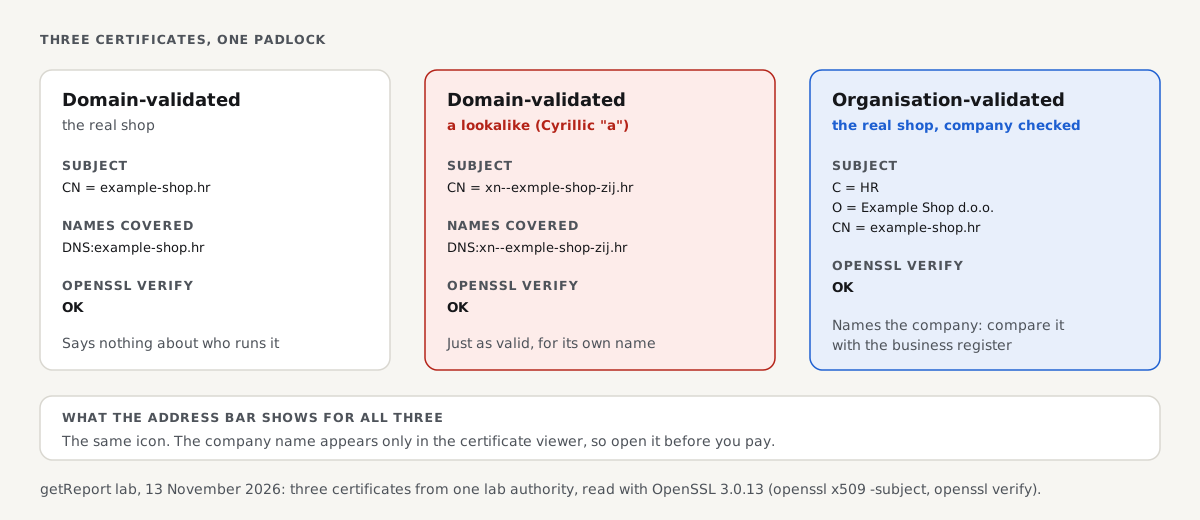
We issued both kinds in a lab on 13 November 2026, plus a DV certificate for a lookalike domain, and read them with OpenSSL:
# Terminal: openssl x509 -noout -subject -ext subjectAltName -in <cert>.pem; openssl verify -CAfile ca.pem <cert>.pem
== DV, the real shop
subject=CN = example-shop.hr
    DNS:example-shop.hr
real.pem: OK
== DV, a lookalike (Cyrillic "a")
subject=CN = xn--exmple-shop-zij.hr
    DNS:xn--exmple-shop-zij.hr
fake.pem: OK
== OV, the real shop
subject=C = HR, O = Example Shop d.o.o., CN = example-shop.hr
    DNS:example-shop.hr
ov.pem: OK
All three verify. The lookalike's certificate is exactly as valid as the real shop's, because it is valid for the lookalike's own name. Only the OV certificate carries a company name (O = Example Shop d.o.o.), and browsers show it only when you open the certificate viewer: the address bar looks the same for all three. So an OV certificate with a company name that matches the register is a real plus, but a DV certificate is normal for honest small shops and says nothing either way.
The SSL checker shows a site's certificate, issuer and chain from outside:
We copied a shop: what a fake can and cannot fake
To see which of the eight checks survive a careful copy, we served the example-shop.hr fixture homepage twice over HTTPS on 13 November 2026: on its own name and on the lookalike above. curl fetched both and sha256sum compared the bodies:
# Terminal: both pages fetched over TLS 1.3, both certificates verified
5ca96d1d7322ae14279525e3bf3a0998cff46454fadc23466bdf9ce3665bf16e  page-8711.html   (example-shop.hr)
5ca96d1d7322ae14279525e3bf3a0998cff46454fadc23466bdf9ce3665bf16e  page-8712.html   (xn--exmple-shop-zij.hr)
The copy was byte-identical, contact link and privacy link included. Of the eight checks, the copy passes 5 (prices) and 6 (policy links) by construction, and fools a quick look at 2 (it shows the real company's name and number). It fails 1 (the domain), 3 (the register's address leads to the real shop, not to whoever runs the copy), 4 (a new domain), 7 (no outside reviews mention this domain) and 8 (the copier cannot get a card merchant account under the real company's name). The checks that work are the ones about the world outside the page.
Legit shops on young domains, and other honest exceptions
Not every warning sign means fraud. A new shop has a new domain, few reviews and no history. Small businesses often use a DV certificate and a webshop platform's checkout. A shop from another country may have its register in a language you cannot read.
In those cases, lean on the checks that a scammer cannot pass: a register entry that matches, a real returns address, and a payment method with buyer protection. If those hold, a young domain is just a young business. If you are the owner of a new shop, the trust signals that make this easy for buyers are covered in the pillar's section on your own site, and the CMS detector shows buyers and you what the shop is built on:
If you already ordered from a shop that is not legit
- Paid by card: call your card issuer, say the goods did not arrive or the merchant is fraudulent, and ask for a chargeback. Most card schemes give you months, not days, but act now.
- Paid with a payment service: open a dispute in your account under its buyer protection.
- Paid by bank transfer: call your bank at once and ask for a recall; the chance is small and falls by the hour.
- Shared a password: change it, and everywhere you reused it.
- Report the shop: to your national consumer or fraud authority (in the US, reportfraud.ftc.gov) and to Google's phishing report form if it copies a real brand.
How we tested
The getReport team ran the certificate and copy tests on 13 November 2026 on Linux with OpenSSL 3.0.13 and curl 8.5.0. A lab certificate authority issued three certificates: DV-style for example-shop.hr, DV-style for the Cyrillic lookalike xn--exmple-shop-zij.hr, and OV-style with O = Example Shop d.o.o. and C = HR in the subject. openssl s_server served the example-shop.hr fixture homepage under the two DV certificates, and curl fetched both with --cacert and --resolve. The contact and privacy results come from getReport's check snapshot of the same fixture.
Not tested: real certificate authorities and their OV validation process, real business registers, VIES, review platforms, payment providers and card chargeback rules, which vary by bank and country. We never name or test a real shop as fake.
Questions people ask
How do I check if a shopping website is legit before I order?
Find the company's legal name and registration or VAT number on the site, then look the number up in the official business register and check that the name and address match. Next, check the domain's creation date in a WHOIS or RDAP lookup, search the domain with "reviews", and confirm the checkout takes cards or a known payment service. Five minutes of this rules out nearly every fake shop.
What makes a website legitimate in the eyes of the law?
In the European Union, a website that sells must show who runs it: the business name, geographic address, email address, trade register number and VAT number, under article 5 of the e-Commerce Directive. Consumer law adds returns and pricing duties. Other countries have similar rules. A site missing all of these is not just suspicious, it is breaking the law where it claims to trade.
Is a shop safe if it has an SSL certificate?
No. An SSL certificate only means the connection to that domain is encrypted. Free certificates are issued automatically to anyone who controls a domain, so fake shops nearly always have one. Open the certificate details: if the subject names a company (an organisation-validated certificate) that matches the business register, that is a real point in the shop's favour. A certificate that names only the domain tells you nothing either way.
Can a website be legit if it was created recently?
Yes. Every business starts with a new domain, and a young domain alone is not proof of fraud. What matters is whether the rest holds up: a register entry that matches the name and address, specific returns terms with a real return address, and card payment. Be wary of a young domain that claims a long history, or sells famous brands far below their usual price.
Why do fake shops show real company numbers?
Because a valid-looking number is convincing and costs nothing to copy. Scammers often borrow the number, name and address of a real business, sometimes the one whose site they copied. The test is to compare the register entry with everything else: the address, the trade, the domain and where returns go. A shoe shop using a registered plumbing company's number has borrowed it.
What should I do if a website I paid turns out to be fake?
Contact whoever handled the payment first, because time limits apply: your card issuer for a chargeback, your payment service for a buyer-protection dispute, or your bank for a transfer recall. Keep the order confirmation, emails and screenshots of the site. Then report the shop to your national fraud or consumer authority, and change any password you entered on it.
Sources
- EUR-Lex: Directive 2000/31/EC on electronic commerce, article 5 (general information to be provided) (accessed November 2026)
- European Commission: VIES VAT number validation (accessed November 2026)
- CA/Browser Forum: Baseline Requirements for TLS server certificates (domain and organisation validation) (accessed November 2026)
- Let's Encrypt FAQ: which certificate types it issues (accessed November 2026)
- ICANN Registration Data Lookup Tool (RDAP) (accessed November 2026)
- eCFR: 16 CFR Part 465, the FTC rule on consumer reviews and testimonials (2024) (accessed November 2026)
- US Federal Trade Commission: Online shopping (accessed November 2026)