A link is safe to open when its real destination, after every redirect, is a domain you recognise, nothing along the way is on an unsafe-site list, and it does not land on a login, payment or download page you were not expecting. You can check all three without clicking: read the address behind the link, expand it hop by hop with a redirect checker, and look the final domain up on Google's Safe Browsing status page. This is the link-level part of is this website safe?, and it takes about a minute.
Quick answer
- See the real address first. Hover over the link on a computer, or press and hold it on a phone, and read the address that appears, not the link's text.
- Find the domain. It is the part right before the first single
/. Anything before an@is ignored by the browser, and anything after the first/is just a path. - Expand short links without opening them. A redirect checker or
curl -sILshows every hop to the final page. - Look the final domain up. Paste it into Google's Safe Browsing site status page; "Dangerous" means do not open it.
- Distrust any link that ends on a login page. If a message asks you to sign in, type the site's address yourself instead.
Step 1: see where the link really points
The text of a link and its destination are two different things. A message can show example-shop.hr/racun as blue underlined text and point anywhere. Before judging a link, look at the real address:
| Where you see the link | How to read the real address |
|---|---|
| Email on a computer | Hover the mouse over the link; the address shows in the bottom corner of the window or in a tooltip |
| Email or chat on a phone | Press and hold the link until a preview or menu shows the address; do not tap it |
| Text message (SMS) | The address is the text itself; copy it with a long press instead of tapping |
| QR code | Use a camera app that shows the address before opening it, and read it there |
| Social media post | Long-press or right-click and choose "Copy link", then paste it somewhere harmless, such as a notes app |
| A button in a PDF or document | Hover over it, or right-click and copy the link address |
Copy-paste is your friend here. Paste the address into a notes app or into the redirect checker below, never into the browser's address bar, until you have decided it is safe.
Step 2: read the domain the way a browser does
Browsers follow strict rules to decide which server an address belongs to, and phishing links are written to make people read it differently. We parsed four links with Node.js 22's URL parser, which follows the same WHATWG URL Standard as browsers:
# Node.js 22: new URL(link).hostname
https://example-shop.hr/racun                              -> host example-shop.hr
https://example-shop.hr.secure-checkout.example/racun      -> host example-shop.hr.secure-checkout.example
https://example-shop.hr@login-verify.example/racun         -> host login-verify.example  (user part "example-shop.hr" ignored)
https://login-verify.example/example-shop.hr/racun         -> host login-verify.example
Three tricks in three lines:
- The brand as a subdomain.
example-shop.hr.secure-checkout.exampleis a page onsecure-checkout.example. The domain is always the end of the host name, so read the host from the right. - The brand before an
@. Everything betweenhttps://and an@is a user name, which the browser ignores for ordinary web pages. RFC 3986 calls it "userinfo"; the URL standard keeps it only for old systems. A real link almost never has one. - The brand in the path. After the first single
/, the rest is a folder on whatever server came before.login-verify.example/example-shop.hr/is stilllogin-verify.example.
Lookalike letters are the fourth trick, and the hardest to see. Is this website safe? shows a Cyrillic "a" that turns example-shop.hr into xn--exmple-shop-zij.hr behind the scenes.
Step 3: expand short links and redirects, hop by hop
Short links (from link shorteners, newsletters, ad trackers and social networks) send you through one or more redirects before you reach a page. Most are harmless, and some legitimate senders use three or four hops for click tracking. But a short link hides its destination completely, which is why scam text messages use them.
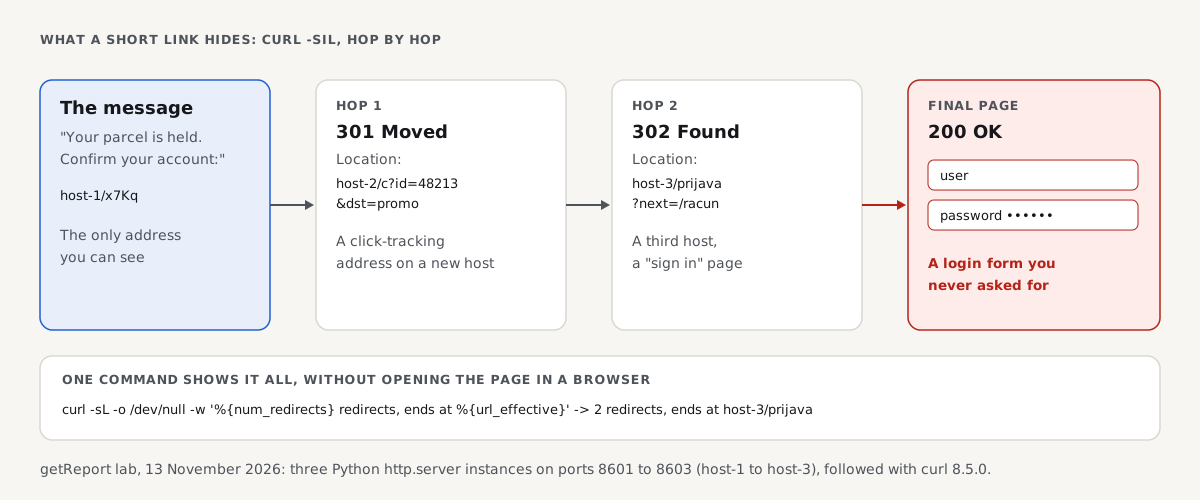
You can follow every hop without opening the page in a browser. We built a three-hop chain in a lab on 13 November 2026: a short link that redirects (301) to a click-tracking address, which redirects (302) to a login form on a third host. Here is what curl shows:
# Terminal: the first hop only (what the short link says)
curl -sI http://127.0.0.1:8601/x7Kq
HTTP/1.0 301 Moved Permanently
Location: http://127.0.0.1:8602/c?id=48213&dst=promo

# Terminal: every hop, without rendering any page (-I asks for headers only, -L follows redirects)
curl -sIL http://127.0.0.1:8601/x7Kq
HTTP/1.0 301 Moved Permanently
Location: http://127.0.0.1:8602/c?id=48213&dst=promo
HTTP/1.0 302 Found
Location: http://127.0.0.1:8603/prijava?next=/racun
HTTP/1.0 200 OK

# Terminal: one line with the hop count and the final address
curl -sL -o /dev/null -w '%{num_redirects} redirects, ends at %{url_effective}, status %{http_code}\n' http://127.0.0.1:8601/x7Kq
2 redirects, ends at http://127.0.0.1:8603/prijava?next=/racun, status 200
The short link named none of the three hosts, and the page at the end (/prijava, "sign in") was a username and password form. That is the shape of most phishing chains: a harmless-looking first hop, then a login page on an unrelated domain.
Two limits of this test are worth knowing. curl -I sends a HEAD request, and a few servers answer it differently from a normal visit, so if the chain looks odd, repeat with curl -sL -o /dev/null -w '%{url_effective}\n', which downloads the final page without running it. And a redirect done in JavaScript or a <meta http-equiv="refresh"> tag does not show in headers at all; meta refresh and JavaScript redirects explains how those work.
The free redirect checker does the same from our servers, so the link never touches your device, and lists each hop with its status code:
It follows HTTP redirects and reports the final address. It does not tell you whether that address is dangerous; for that, take the last host to step 4.
Step 4: check the final domain against unsafe-site lists
Paste the final domain into Google's Safe Browsing site status page. It tells you whether Google has found malware, phishing or unwanted software there. The same lists drive the red warning pages in Chrome, Firefox and Safari, so a listed site would also be blocked in your browser, but checking first means you never load it.
A clean result is not a green light. Phishing pages are often hours old when the message reaches you, and lists catch them only after detection or reports. Combine the list result with what you saw in steps 2 and 3.
getReport does not yet query the Safe Browsing lists itself: the Web Risk check exists in our catalogue but is not switched on. Google Safe Browsing: check your site and clear a flag explains how the lists work from a site owner's side.
Step 5: judge where the link lands
Even a clean, recognisable link deserves one more question: what does the final page want from you?
| Lands on | Risk | What to do |
|---|---|---|
| An article, product or news page | Low | Fine to open if the domain is the one you expect |
| A login page | High if unexpected | Close it; open the site from a bookmark or by typing the address and sign in there |
| A payment page ("customs fee", "pay 1.99 to release your parcel") | High | Do not pay; check the delivery in the carrier's own app or site |
A file download (.zip, .exe, .apk, .iso, an Office file asking to "enable content") | High | Do not open it unless you asked for that exact file |
| A request to allow notifications | Medium | Block it; notification spam is a common follow-up |
| A "your device is infected, call this number" page | High | Close the tab; real security warnings never come with a phone number |
A legitimate company that emails you about your account will also be reachable by typing its address. Choosing your own way in is the one habit that defeats nearly every phishing link, however well it is disguised.
What if I already clicked the link?
Clicking alone usually does little harm on an up-to-date phone or computer. The damage comes from what you do on the page that opens.
- You only opened it and closed it: no action needed beyond deleting the message. If your browser or system has pending updates, install them.
- You typed a password: change it on the real site now, and on every site that used the same password. Turn on two-factor sign-in.
- You typed card or bank details: call your bank or card issuer and tell them; they can block the card and watch for fraud.
- You downloaded a file: do not open it. Delete it and run a full scan with your device's security software.
- You allowed notifications: remove the site in your browser's notification settings.
A dedicated guide to phishing links, later this week, covers each of these in more depth.
Links on your own site and emails
If you send newsletters or run a site, the same checks apply to you in reverse. Long redirect chains through several tracking domains look exactly like phishing to a cautious reader, and every hop costs load time. Redirects without chains shows how to keep your own links to one hop. A link on your site that suddenly redirects some visitors to a spam domain is a sign of a hack: hacked website redirects covers that case.
How we tested
The getReport team built the redirect chain on 13 November 2026 on Linux: three Python 3.11 http.server instances on local ports 8601 to 8603, answering with a 301, a 302 and a 200 page containing a login form. curl 8.5.0 followed the chain with the commands shown. The address table comes from Node.js 22.23's WHATWG URL parser (new URL()).
Not tested: real URL shorteners, Google Safe Browsing (our sandbox cannot reach it), QR code apps, email clients' hover previews on each platform (the table follows each vendor's documented behaviour), JavaScript redirects and real phishing pages.
Questions people ask
How can I check if a link is safe without clicking it?
Copy the link instead of tapping it, read the domain right before the first single slash, and paste the address into a redirect checker to see every hop to the final page. Then look the final domain up on Google's Safe Browsing site status page. If the link ends on a login or payment page you did not expect, do not open it, and reach the site by typing its address yourself.
Are shortened links dangerous?
Not by themselves. Shortened links are used every day by newsletters, social networks and marketers, and most are harmless. The risk is that they hide the destination, so you cannot judge them by reading them. Expand a short link with a redirect checker before opening it, and be most careful with short links in unexpected text messages, where scammers use them to hide lookalike domains.
Can you get hacked just by clicking a link?
Rarely, on a device with current updates. Attacks that take over a device from a page load alone exist, but they depend on unpatched browser or system flaws and are expensive, so they are aimed at specific targets. For everyone else, the real damage comes after the click: a password typed into a fake login page, a downloaded file that gets opened, or a payment made.
How do I check a QR code link before opening it?
Scan it with a camera app that shows the address first, and read the domain before tapping it, exactly as you would a link in an email. QR codes on parking meters, posters and parcels are sometimes stickers over the real code. If the address is not the organisation's own domain, or it asks you to sign in or pay, close it and use the official app or website instead.
Why does a link show a different address when I hover over it?
Because the text you see and the address it points to are separate parts of a link. Senders often show a short, friendly text and link to a longer tracking address, which is normal for newsletters. It is a warning sign when the visible text is itself an address and the real address is a different domain, because that only happens when someone wants you to believe you are going elsewhere.
Is a link with https safe to click?
No, https only means the connection to that domain will be encrypted. Phishing sites use free certificates like any other site, so most phishing links start with https. Judge a link by its domain, its redirect chain and where it lands, not by the "s". A link that starts with plain http on a page that asks for a password is a stronger warning sign, but the reverse is not true.
Sources
- RFC 3986: Uniform Resource Identifier, section 3.2.1 (userinfo) (accessed November 2026)
- WHATWG URL Standard: URL parsing and the host (accessed November 2026)
- Google Transparency Report: Safe Browsing site status (accessed November 2026)
- US Federal Trade Commission: How to recognize and avoid phishing scams (accessed November 2026)
- US Federal Trade Commission: Scammers hide harmful links in QR codes (December 2023)
- curl manual: -I, -L and --write-out (accessed November 2026)