Before someone fills in your form, pays in your shop or books a call, they look for two things: who is behind the site, and what happens to their data. The privacy policy and the contact page answer both. They are also legal requirements in much of the world, and payment providers and ad networks check for them. This guide covers what the report looks for, what the pages should say, and where the links belong. Plan an hour for the links and the contact page; the policy itself takes longer.
Quick answer
- Link Privacy policy and Contact from the footer of every page, in every language the site has.
- The policy names who you are, what you collect and why, the legal basis, who else receives it, how long you keep it, the visitor's rights and how to use them, and the date.
- The contact page has a working email or form, and a postal address where the law requires one (the German and Austrian Impressum, for example).
- Keep the policy in line with reality: list the trackers and cookies the cookie scanner actually finds, no more and no fewer.
- A generator is a fine start for a brochure site. Shops, health, children's services and data sent outside the EU deserve a review by someone qualified.
Why the links matter
The law. Under the GDPR, anyone who collects personal data from people in the EU must tell them, at the time of collection, who is collecting it, for what, on what legal basis, who receives it, how long it is kept and what rights they have. A contact form, a newsletter signup or an analytics cookie is collection. On a website, that notice is the privacy policy, and it has to be easy to reach. The EU's e-commerce rules separately require businesses to show their name, geographic address and email address, which is where the contact page and, in German-speaking countries, the imprint come in.
The gatekeepers. Ad networks such as AdSense require a privacy policy that discloses their cookies. Payment providers review a merchant's website for contact details and policies before approving an account. App stores and marketplace listings ask for a privacy policy URL.
The visitors. People do look, most of all before paying or sharing something personal. A missing contact route is the first sign of a site that will not answer when something goes wrong. Google's search quality rater guidelines ask raters to check who is responsible for a site and how to reach them, with stricter expectations for shops.
How getReport checks it
Every getReport tool runs the full report, so both checks appear in the Best practices module whichever tool you start from. They read the page after the browser has rendered it, JavaScript included:
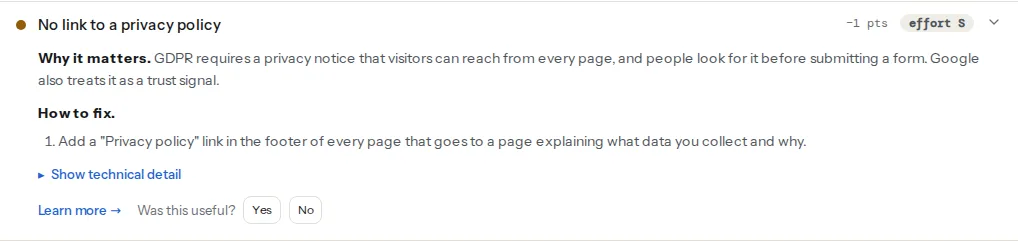
The check looks at every link on the rendered page and joins its text, its aria-label and its href. It passes when that contains "privacy" (English), "Datenschutz" (German), "privatnost" or "politika privatnosti" (Croatian), in any case. A French footer link reading "Politique de confidentialité" to /confidentialite/ is not recognised; one to /privacy/ is.
The same method with "contact", "kontakt" or "impressum". Because the href counts, a mailto:[email protected] link passes too, and so do "Contacto" and "Kontakt".
This one is information, not a score. The banner is detected either by the consent platform's script (Cookiebot, OneTrust, Usercentrics, CookieYes, Complianz, Didomi, Quantcast, Iubenda, Termly, Osano, Klaro, Borlabs Cookie) or by a visible block whose id or class contains "cookie", "consent", "gdpr" or "privacy-banner". The banner should link to the privacy policy; the policy should describe what the banner controls.
What the checks cannot tell you
They find a link. They do not open it, read the policy, or judge whether it is complete, current or true. A link that is only inside a closed mobile menu still counts, because it is in the page. And a site with ten pages gets ten answers only if you test ten pages: each report checks the page you give it.
| The report checks | The law and good practice ask | |
|---|---|---|
| Privacy policy | A link on this page mentioning privacy | A complete, current notice, reachable from every page and at the point of collection |
| Contact | A link on this page mentioning contact, kontakt or impressum | A working contact route; name, address and email for businesses; an imprint in some countries |
| Cookie banner | Whether a banner exists, and which platform | Consent before non-essential cookies, a reject option, and a policy that lists them |
Step by step
1. Take an inventory of what the site collects
You cannot describe data you have not listed. Walk through the site and write down:
- Forms: contact, quote, newsletter, account, checkout. What fields, where the submissions go (email, CRM, the CMS database).
- Cookies and trackers: run the cookie scanner on the home page and one page per template. It lists every cookie with its owner, category and lifetime, and every known tracker before and after "Accept". That list is your cookie section.
- Services that process data for you: hosting, email delivery, the newsletter tool, the payment provider, the CRM, analytics, chat, embedded videos and maps.
- Where they are: note any service that stores data outside the EU, because transfers need to be described.
2. Write the policy
For a small site, one page in plain language with these sections is enough:
- Who we are: the business name, address and an email for privacy questions (and the data protection officer, if you have one).
- What we collect and why: one short paragraph per purpose (answering enquiries, sending the newsletter, processing orders, measuring visits), with the data involved.
- Legal basis for each purpose: consent, contract, legal obligation or legitimate interest.
- Who receives it: the services from step 1, by name or category, and any transfer outside the EU with the safeguard used.
- Cookies: the categories and the main cookies from the scanner's list, or a link to a separate cookie policy, and how to change the choice.
- How long we keep it: per purpose, in months or years, or the rule that decides it.
- Your rights: access, correction, deletion, restriction, portability, objection, withdrawing consent, and complaining to the data protection authority, with how to exercise them.
- Changes: the date of this version.
Generators produce a usable draft of this structure for a brochure site or a blog. Once you sell, process health data, address children, run profiling or send data outside the EU, have the draft reviewed by someone qualified in your jurisdiction.
3. Build the contact page
- An email address that someone reads, and a response time ("we answer within two working days").
- A form, if you want one, with a visible
<label>for every field, a submit button that works with the keyboard, and a confirmation message. Send a test once a month. - A postal address and company details where required. In Germany and Austria, businesses need an Impressum with the name, address, contact details and registration numbers; other countries have similar rules for companies. The contact page can hold them, or a separate imprint page linked next to it.
- A phone number, if you answer it.
4. Link both from every page
The footer is the place: it appears on every page, and it is where people look. It is also on the pre-launch website checklist for that reason. In a template:
<!-- Site footer, in the theme's footer template -->
<footer>
  <nav aria-label="Legal">
    <ul>
      <li><a href="/privacy-policy/">Privacy policy</a></li>
      <li><a href="/contact/">Contact</a></li>
    </ul>
  </nav>
</footer>
Then add the policy link where data is collected: under the newsletter field, next to the contact form's submit button, in the checkout, and in the cookie banner. On a multilingual site, each language's footer links to that language's policy, and the link text is in that language.
5. Keep policy and banner in step
After any change to tags, plugins or embeds, run the cookie scanner again and compare its list with the policy. Remove services you dropped; add the ones you started. The banner's categories and the policy's cookie section should use the same names. Getting the banner itself right (a reject button, sensible lifetimes, consent mode) is covered in a cookie banner that passes, and why trackers must wait for consent in cookies before consent.
Platform notes
WordPress
Settings → Privacy lets you choose the privacy policy page or create one from a template, and its Policy Guide tab collects suggested text from WordPress and from plugins that declare what they store. Once the page is set, many themes show it in the footer and WordPress links it on the login screen. In a classic theme's footer.php, the template tag prints the link only when a policy page is set:
<?php // footer.php in a child theme
if ( function_exists( 'the_privacy_policy_link' ) ) {
    the_privacy_policy_link( '<p class="privacy-link">', '</p>' );
}
?>
In a block theme, add the page to the footer's Navigation block in Appearance → Editor.
Shopify
Settings → Policies holds the privacy, refund, shipping and terms pages, with templates to start from. Shopify links the policies in the checkout; add them to the footer menu yourself in the theme editor, together with a contact page (Shopify's default contact form template is enough for most shops).
Squarespace and Wix
Create the policy and contact pages as normal pages, then add them to the footer so they appear site-wide. If the site uses the platform's own cookie banner, check that the policy names the analytics and marketing tools you turned on in the platform's settings.
Verify
- The report shows "The page links to a privacy policy" and "The page links to a contact page" on the home page and one page per template.
- The same holds in each language version of the site.
- Both links are visible in the footer on a phone, without opening a menu.
- The cookie scanner's list of cookies and trackers matches the policy's cookie section.
- A test message sent through the contact form arrives.
Common mistakes
- A copied policy that describes someone else's site. It mentions services you never used and misses the ones you run. Build the list from the cookie scanner and your own forms.
- No contact route at all, or only a form that silently fails. Add an email address and test the form monthly.
- The link only in the hamburger menu on mobile. The check still passes, because the link is in the page, but visitors on phones do not find it. Put it in the footer, visible.
- The policy as a PDF. Hard to read on a phone, not updated when the site changes, and often out of date. Publish it as a page.
- One language only on a multilingual site. A visitor on the German pages gets an English policy they may not understand. Translate it, and link each version from its own footer.