A cookie banner can appear on time, look right and store every answer correctly, and still change nothing: if Google Analytics and the Meta Pixel have already run by the time it draws, the visitor's choice arrives too late. This guide shows how to see what your page does before anyone clicks, what the rules ask for in plain words, and how to make each common setup wait. Plan an hour, most of it testing.
Quick answer
- Test in a fresh browser: the cookie and consent scanner, or an incognito window with DevTools open before the page loads.
- Before the click, only strictly necessary cookies are allowed in the EU and UK: session, cart, security and the consent cookie itself.
_ga,_gid,_fbp,_gcl_auand_hj…are not. - Google tags: set Consent Mode v2 defaults to
deniedbefore any tag loads, and let the consent platform send the update. - Everything else (Meta, Hotjar, TikTok, LinkedIn): block it in the consent platform, or fire it in Tag Manager only after the consent event.
- Put "Reject all" on the first layer, as easy to find as "Accept all".
- Keep consent-based cookies at 13 months or less.
Why consent before cookies matters
What the law actually requires
In the EU, the ePrivacy Directive says that storing anything on a visitor's device, or reading it back, needs their consent first. The only exception is storage that is strictly necessary for the service the visitor asked for. That covers cookies, but also local storage, tracking pixels and fingerprinting. The GDPR then defines what consent means: a clear, active choice that is informed, specific and free, and as easy to withdraw as to give. Carrying on scrolling is not consent, and pre-ticked boxes do not count either (the EU Court of Justice said so in Planet49, 2019).
"Strictly necessary" is narrower than most vendors suggest. A login session, a shopping cart, a load-balancer cookie, bot protection and the cookie that remembers the visitor's consent answer qualify. Analytics and advertising cookies never do, whatever the tag calls itself.
The UK's PECR has the same rule. A 2025 amendment adds a narrow exemption for some first-party statistics cookies, never for advertising, so check the ICO's current guidance before relying on it.
The United States has no federal cookie rule. California's CCPA, as amended by the CPRA, works the other way round: tracking may start before any choice, but you must offer a "Do Not Sell or Share My Personal Information" option and honour the browser's Global Privacy Control signal, and ad pixels usually count as sharing. Several other states have similar laws. If you have visitors in the EU, their rules apply to them wherever your company sits.
Why a banner alone is not enough
The banner and the tags are separate scripts. Tag Manager containers and hard-coded snippets fire as soon as the page loads; the banner only writes the visitor's answer into a cookie. Unless something reads that answer before each tag runs, the tracking cookies exist within the first second, often before the banner has even appeared. That is also how complaint organisations and auditors test: a clean browser, the home page, the developer tools open.
How getReport checks it
The scanner opens your page in a fresh Chromium session, like a first-time visitor: no cookies, nothing accepted. It then works in three steps.
- Before. It waits for the page to settle and records every cookie in the browser, first- and third-party, whether a header or a script set it, plus every request the page made.
- Find the buttons. It looks for the accept button of 18 consent platforms by their own element ids and classes (Cookiebot, OneTrust, CookieYes, Complianz, Usercentrics, Didomi, iubenda, Borlabs and others). If none matches, it takes any visible button or link whose whole label is an accept phrase in about 20 languages, such as "Accept all", "Alle akzeptieren", "Tout accepter" or "Prihvaćam", searching inside the banner first when it knows where the banner is. It looks for a visible reject control the same way.
- After. It clicks accept, waits about 2.5 seconds for the network to go quiet, and records the new cookies and requests, marked "after consent".
Cookies are classified by name: the consent platforms' own cookies and session, cart and security cookies count as necessary, _ga and _gid as analytics, _fbp as advertising, and so on for Hotjar, Clarity, TikTok, LinkedIn and others. An unknown cookie on your own domain is listed as unknown and not held against you; an unknown third-party cookie is treated as advertising. Requests are matched against 25 analytics, advertising, session-replay and social trackers. Privacy-friendly analytics that set no cookies, such as Plausible, are not on that list.
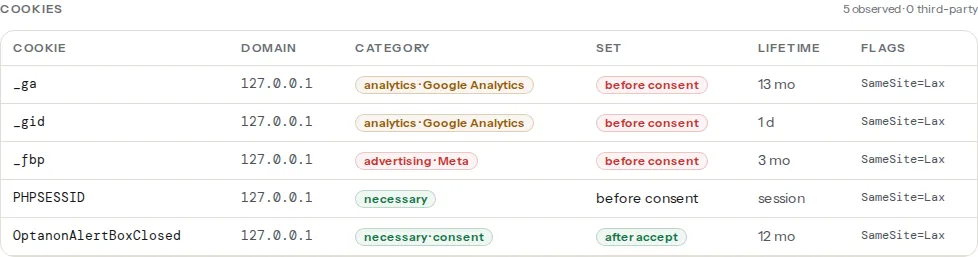
Three things to know when you read the result:
- Google Tag Manager itself is not a tracker. The container script (
gtm.js) sets no cookies, so it is not listed; what it loads is. If the trackers finding names Google Analytics or the Meta Pixel, a tag inside the container fired before the consent event. - Consent Mode has two modes. In basic mode, Google's tags do not load until consent, and both findings pass. In advanced mode, the tag loads and sends cookieless pings before consent; the scanner recognises the Consent Mode default on the page and, as long as no Google cookie was set before the click, reports those pings as allowed rather than as a finding. Whether cookieless pings are acceptable before consent in your country is still a question for your privacy adviser.
- The scanner only clicks accept. If the banner was not found or could not be clicked, the result shows the before state only, which is the half that matters most. Testing "Reject" is a manual step (see Verify).
The same scan also reads the Secure, HttpOnly and SameSite flags of each cookie; cookie flags explained covers those findings.
Step by step
1. Reproduce it by hand
Open an incognito or private window, open DevTools (F12) and only then type the address, so nothing is missed.
- Network tab: tick "Preserve log". Filter for
collect,gtag,fbeventsorhotjarto find tracker requests. - Application tab (Firefox: Storage) → Cookies → your domain: the cookies that exist right now.
Load the page and do not touch the banner. Everything you see now happened before consent. Then click accept and watch the new entries appear. Chrome's incognito mode blocks third-party cookies by default, so advertising cookies on other domains may be missing even when the requests are there; the requests are the evidence. To test again, Application → Storage → "Clear site data", then reload.

2. Find out what loads each tracker
Each tracker comes from one of three places: your Tag Manager container, a snippet pasted into the theme or a "header scripts" box, or a plugin or app. In the Network tab, the Initiator column shows which script started the request. gtm.js means the fix is in Tag Manager; the page itself means a hard-coded snippet; a file under /wp-content/plugins/<slug>/ names the plugin. Fix each source, or the tracker you blocked in one place keeps firing from another.
3. Google tags: Consent Mode v2 with denied defaults
Consent Mode tells Google's tags what the visitor agreed to. The defaults must be set before the Tag Manager or gtag snippet, as the first script in the <head> of every page:
<!-- In <head>, above the Google Tag Manager or gtag.js snippet -->
<script>
  window.dataLayer = window.dataLayer || [];
  function gtag(){dataLayer.push(arguments);}
  gtag('consent', 'default', {
    ad_storage: 'denied',
    ad_user_data: 'denied',
    ad_personalization: 'denied',
    analytics_storage: 'denied',
    wait_for_update: 500
  });
</script>
When the visitor accepts, the consent platform calls gtag('consent', 'update', { … 'granted' }) for you. Most platforms can also set the defaults themselves, through a Consent Mode switch in their settings or their Tag Manager template from the Community Template Gallery. Use one method, not both. Google's Consent Mode documentation lists the parameters, and the Consent Mode learn page has the short version.
4. Everything else: make it wait for the consent platform
Meta, Hotjar, TikTok, LinkedIn and other non-Google tags ignore Consent Mode. They have to be held back.
In Google Tag Manager, open each tag → Advanced Settings → Consent Settings → "Require additional consent for tag to fire" and add ad_storage (advertising) or analytics_storage (analytics). Or replace its "All Pages" trigger with the consent event your platform pushes, for example Cookiebot's cookie_consent_marketing or OneTrust's OneTrustGroupsUpdated.
In the page's HTML, the usual pattern is to change the script type to text/plain, so the browser does not run it, and label its category. The consent platform switches it back to JavaScript after the matching consent:
<!-- Cookiebot: runs only after "marketing" consent -->
<script type="text/plain" data-cookieconsent="marketing">
  !function(f,b,e,v,n,t,s)
  {if(f.fbq)return;n=f.fbq=function(){n.callMethod?
  n.callMethod.apply(n,arguments):n.queue.push(arguments)};
  if(!f._fbq)f._fbq=n;n.push=n;n.loaded=!0;n.version='2.0';
  n.queue=[];t=b.createElement(e);t.async=!0;
  t.src=v;s=b.getElementsByTagName(e)[0];
  s.parentNode.insertBefore(t,s)}(window, document,'script',
  'https://connect.facebook.net/en_US/fbevents.js');
  fbq('init', '000000000000000'); // your pixel id
  fbq('track', 'PageView');
</script>

<!-- OneTrust: runs only after the targeting group (C0004) is accepted -->
<script type="text/plain" class="optanon-category-C0004"
        src="https://static.hotjar.com/c/hotjar-0000000.js?sv=6"></script>
Cookiebot's automatic blocking mode, CookieYes and Complianz block many well-known scripts on their own. Scripts they do not know, and anything loaded by another script, still need the manual pattern, a rule in the platform's script settings, or Tag Manager.
5. Put "Reject" on the first layer
Consent is only free if saying no is as easy as saying yes. The French CNIL fined Google €150 million and Facebook €60 million in January 2022 for making refusal harder than acceptance. The Danish and Austrian data protection authorities have taken the same line, and in the EDPB's 2023 cookie banner taskforce report most EU authorities agreed that a banner with "Accept all" but no refuse option on the same layer breaks the rules.
In OneTrust, CookieYes and most other platforms this is a switch in the banner's layout or content settings, named "Reject all", "Deny" or "Decline". Give it the same size and visual weight as accept. getReport counts a reject control only when it is visible on the first layer, so "Reject" behind "Settings" does not pass.
6. Shorten cookie lifetimes
The French and Spanish guidance caps consent-based cookies at 13 months. Google Analytics sets _ga for 2 years by default. Shorten it in GA4 under Admin → Data streams → your web stream → Configure tag settings → Override cookie settings, or in code, in seconds:
// gtag.js config on every page (in Tag Manager: the Google tag's configuration parameter cookie_expires)
gtag('config', 'G-XXXXXXXXXX', { cookie_expires: 395 * 24 * 60 * 60 }); // 395 days
For cookies your own code sets, use Max-Age or Expires. Chrome caps every cookie at 400 days, so a two-year _ga shows as 400 days in the table. That is still just over the 397-day line, which is why the finding lists it; the months in the finding are rounded.
Platform notes
WordPress
Many plugins print their tag themselves, bypassing Tag Manager: analytics plugins such as Site Kit or MonsterInsights, pixel plugins, chat and popup plugins. Check each one for a "wait for consent" or consent-integration setting. The WP Consent API plugin lets consent plugins such as Complianz and CookieYes pass the visitor's choice to plugins that support it, and Site Kit uses it for Consent Mode. A plugin with no consent option either goes into your consent platform's script blocking or gets replaced. Test logged out: several analytics plugins skip their tag for administrators. What your WordPress plugins cost visitors shows which plugins load on each page.
Shopify
Shopify has its own cookie banner under Settings → Customer privacy, and pixels added under Settings → Customer events respect the visitor's choice. Tracking code pasted into the theme or loaded by older apps does not; move it into a custom pixel or remove it.
Static sites / custom
Load the consent platform's script first in the <head>, then the Consent Mode defaults, then Tag Manager, and keep every other tag inside Tag Manager so there is one place to control it.
Verify
- Re-run the scanner. The findings read "No trackers load before consent" and "Only necessary cookies before consent", and trackers now appear as loaded after the accept click.
- Test "Reject" by hand: a new incognito window, click reject, reload, open a second page. No analytics or advertising cookies should appear, and no tracker requests beyond Tag Manager itself (and Google's cookieless pings in advanced Consent Mode).
- Check that visitors can change their mind: a "Cookie settings" link, usually in the footer, reopens the banner. Withdrawing must be as easy as accepting.
Common mistakes
- Banner inside an iframe. Some consent platforms draw the banner in an iframe the scanner cannot look into, so the result says no banner was found. It is still a banner; the before-consent findings are still accurate, and the reject check is yours to do by hand.
- Testing in your everyday browser. You accepted months ago, or you are logged in to the CMS, so you see no banner and no trackers while visitors see both. Always test in a fresh incognito window, logged out.
- A cookie wall. Hiding the content until the visitor accepts does not produce freely given consent under the EDPB's guidance. Let visitors read the page with necessary cookies only.
- Loading Google Analytics through a proxy and assuming it is invisible. The scanner matches trackers by path as well as by host (
/gtag/js?id=,/gtm.js?id=,/g/collect), and_gais recognised by its name wherever it is set. A proxy changes where the data goes, not whether it needs consent. - Fixing Tag Manager but not the theme. The tag is blocked in the container, and a second copy in the theme header keeps firing. Search the page source for the tag id (
G-,fbq('init') and remove every copy outside Tag Manager.
If a developer or agency makes the change, send them the fixes straight from the report so they see the same evidence you do.