Brotli compression is a way for your server to shrink text files (HTML, CSS, JavaScript, JSON, SVG) before sending them, so visitors download a fraction of the bytes; the browser unpacks them on arrival. It is the successor to gzip: every current browser supports both, Brotli makes files noticeably smaller, and the best setup sends Brotli to browsers that ask for it and gzip to everything else. It belongs to the delivery settings covered in the pillar guide, HTTP/2 and HTTP/3 explained, and it is the cheapest speed win among them: usually one setting on the server or CDN.
This guide is for site owners and developers who see "Enable text compression" or an uncompressed-files finding in a report. It shows how to check what your server sends, gzip vs Brotli in numbers, what to compress and what to leave alone, and the configuration for each common server. Allow about 15 minutes.
Quick answer
- Compress text: HTML, CSS, JavaScript, JSON, XML, SVG, plain text and old font formats (TTF, OTF). Expect files around 75-85 % smaller.
- Do not compress images, video, PDFs, ZIPs or WOFF2 fonts: they are compressed already.
- Use Brotli where you can, with gzip as the fallback. Level 4-6 for compressing on the fly, 11 for files compressed at build time.
- Send
Vary: Accept-Encodingso caches keep compressed and uncompressed versions apart. - Cloudflare and most managed hosts compress for you; check it is not switched off or bypassed.
- Check with the HTTP/2 test, or
curl -H "Accept-Encoding: br, gzip"and look forContent-Encoding.
How text compression works
A typical page ships 50-100 KB of HTML, a few hundred KB of CSS and often over a megabyte of JavaScript. Text is repetitive (the same tag names, class names and keywords over and over), which is exactly what compression algorithms are good at.
The browser asks for it with a request header listing what it can unpack, for example Accept-Encoding: gzip, deflate, br, zstd. The server picks one and answers with Content-Encoding: br (or gzip). No Content-Encoding in the response means the file travelled uncompressed.
On a fast office connection the difference is hard to feel. On a phone with a weak signal, 300 KB saved on render-blocking CSS and scripts can be a second or more before the first paint. It also costs visitors less data and you less bandwidth. The server spends a few milliseconds of CPU per response; for files compressed in advance, nothing at all.
Gzip vs Brotli
Both are supported by every current browser. The differences:
| gzip | Brotli | |
|---|---|---|
| Typical saving on text | about 78 % | about 82 % |
| Levels | 1-9 (5-6 is the usual choice) | 0-11 (4-6 on the fly, 11 at build time) |
| Browsers | all, over HTTP and HTTPS | all current, over HTTPS only |
| Servers | built into every web server | Apache 2.4.26+, an nginx module, CDNs; Caddy for pre-compressed files |
The savings are the medians from Akamai's comparison of the HTML, CSS and JavaScript on the top 1,000 sites, which found Brotli files 14 % smaller than gzip for JavaScript, 17 % for CSS and 21 % for HTML. Brotli has a built-in dictionary of common web words, which is part of why it does better on small files.
zstd (Zstandard) is the newest option, covered in the next section. At mid levels it compresses about as well as Brotli and faster. getReport's check counts it as compressed.
The practical answer: turn on Brotli and gzip together (and zstd if your server offers it), and let the server pick whichever the browser asks for.
zstd compression: Zstandard support in 2026
Zstandard (zstd) is a compression format from Meta, standardised for the web in RFC 8878. It compresses text about as well as Brotli at mid levels and does it faster, which suits responses compressed on the fly, such as HTML from PHP or JSON from an API. A browser that accepts it says so in Accept-Encoding, and the server answers with Content-Encoding: zstd.
Browser support as of October 2026:
| Browser | Content-Encoding: zstd |
|---|---|
| Chrome and Edge | Since version 123 (2024) |
| Firefox | Since version 126 (2024) |
| Safari | Since 26.3, on iOS, iPadOS and macOS Tahoe 26.3 or later; not on older macOS, because support comes from the system's networking stack (WebKit's Safari 26.3 notes) |
| Samsung Internet | Not yet, per caniuse.com |
Like Brotli, browsers only offer zstd over HTTPS. Browsers that do not offer it get Brotli or gzip, so turning it on never breaks a visitor, as long as Brotli and gzip stay on.
How to switch it on:
- Caddy: built in.
encode zstd gzip, as in the Caddy section below. - Cloudflare: per Cloudflare's compression docs, the Free plan compresses with zstd by default for browsers that accept it; on paid plans you turn it on with a Compression Rule.
- nginx: not in nginx itself. The third-party
zstd-nginx-moduleaddszstd on;,zstd_comp_levelandzstd_types, much like the Brotli module. - Apache: no zstd module ships with Apache; keep Brotli and gzip there, or let the CDN in front add zstd.
To see whether a page arrives with zstd, ask for it and read the response header:
curl -s -o /dev/null -D - -H "Accept-Encoding: zstd, br, gzip" https://example.com/ | grep -i content-encodingcontent-encoding: zstd means it works. In Chrome or Firefox, open DevTools, Network, click the page request and read Content-Encoding under Response Headers; the request headers show the Accept-Encoding your browser sent.
How getReport checks it
The HTTP/2 test loads the page in Chromium and looks at every response: the page itself, its stylesheets and scripts, JSON requests, the manifest and SVG images. Each text response without a Content-Encoding of br, gzip, deflate or zstd is counted, and the list names each file with its size. Responses from the browser cache and failed requests are skipped.
Read the list before fixing anything. If the page's own HTML, CSS and scripts are listed, compression is off on your server or CDN. If only third-party files are listed (a chat widget, a font service, a tracking script), your server is fine and the vendor has to fix theirs.
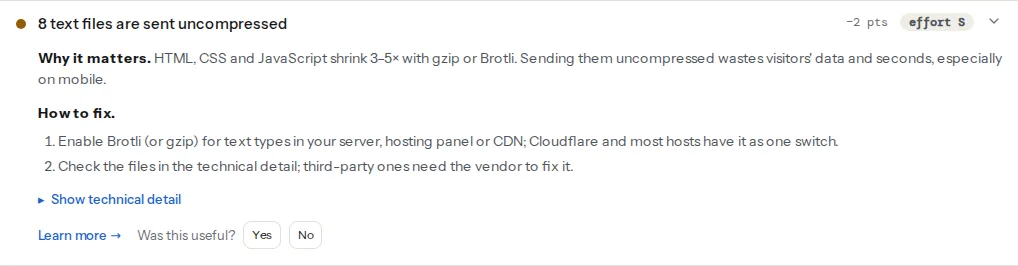
The full report's speed module adds Lighthouse's view. Lighthouse used to report every uncompressed text file in an audit called "Enable text compression"; current versions check only the HTML document, inside the "Document request latency" insight. getReport shows that result as the finding below, so use the HTTP/2 test for the full list:
What to compress, and what not
| Compress | Leave alone |
|---|---|
| HTML | JPEG, PNG, GIF, WebP, AVIF |
| CSS | Video and audio |
| JavaScript, JSON and source maps | WOFF2 fonts (Brotli inside already) |
| SVG, XML, RSS | WOFF fonts (zlib inside already) |
Plain text, robots.txt, web manifests | PDF, ZIP, other archives |
| TTF, OTF and ICO files |
Compressing an already compressed file wastes CPU and can make it slightly larger. Very small responses (under about 1 KB) gain little, which is why most servers have a minimum size setting.
How to enable text compression
1. Check what the server sends today
Run the HTTP/2 test on your home page and a typical inner page. From a terminal, make a normal GET, throw the body away and print the headers:
curl -s -o /dev/null -D - -H "Accept-Encoding: br, gzip" https://example.com/ | grep -i -E "content-encoding|vary"Expect content-encoding: br (or gzip) and vary: Accept-Encoding. Repeat for a CSS and a JS file from the page. (curl -I sends a HEAD request, which some servers answer differently, so a GET is the safer test.)
2. nginx
gzip is built into nginx. Many distributions ship with gzip on;, but nginx only compresses text/html unless you list the other types. In the http block:
# /etc/nginx/conf.d/compression.conf
gzip on;
gzip_vary on;              # sends Vary: Accept-Encoding
gzip_comp_level 5;
gzip_min_length 1024;
gzip_proxied any;          # also compress responses to requests via a proxy/CDN
gzip_types
    text/css text/plain text/xml text/javascript
    application/javascript application/json application/ld+json
    application/xml application/rss+xml application/manifest+json
    image/svg+xml font/ttf font/otf image/x-icon;
# text/html is always compressed; listing it again only produces a warning
Brotli needs the ngx_brotli module. On Debian and Ubuntu it is packaged as libnginx-mod-http-brotli-filter and libnginx-mod-http-brotli-static; elsewhere, build it as a dynamic module. With the module installed:
# /etc/nginx/conf.d/brotli.conf
brotli on;
brotli_comp_level 5;
brotli_min_length 1024;
brotli_static on;          # serve pre-compressed .br files when they exist
brotli_types
    text/css text/plain text/xml text/javascript
    application/javascript application/json application/ld+json
    application/xml application/rss+xml application/manifest+json
    image/svg+xml font/ttf font/otf image/x-icon;
Test and reload: sudo nginx -t && sudo systemctl reload nginx.
3. Apache
mod_deflate provides gzip and is enabled on most installs; mod_brotli ships with Apache since 2.4.26. On Debian and Ubuntu, enable them with sudo a2enmod deflate brotli and restart. Then, in the virtual host or in .htaccess at the site root:
# Brotli for browsers that ask for it, gzip (DEFLATE) for the rest
<IfModule mod_brotli.c>
    AddOutputFilterByType BROTLI_COMPRESS;DEFLATE text/html text/plain text/css text/xml text/javascript application/javascript application/json application/ld+json application/xml application/rss+xml application/manifest+json image/svg+xml font/ttf font/otf image/x-icon
</IfModule>

# Servers without mod_brotli: gzip only
<IfModule !mod_brotli.c>
    <IfModule mod_deflate.c>
        AddOutputFilterByType DEFLATE text/html text/plain text/css text/xml text/javascript application/javascript application/json application/ld+json application/xml application/rss+xml application/manifest+json image/svg+xml font/ttf font/otf image/x-icon
    </IfModule>
</IfModule>
Both modules add Vary: Accept-Encoding themselves. mod_brotli's default quality is 5, which suits on-the-fly compression.
4. Caddy
zstd and gzip are built into Caddy; Brotli is not compressed on the fly, but Caddy serves Brotli files you compressed in advance. In the Caddyfile:
example.com {
    encode zstd gzip

    # Static site: also serve pre-compressed .br / .zst / .gz files when present
    root * /srv/site
    file_server {
        precompressed br zstd gzip
    }
}
For a reverse proxy, encode zstd gzip above reverse_proxy app:3000 is all it takes; it is what getreport.app runs.
5. Cloudflare and other CDNs
Cloudflare compresses text responses to visitors by default (zstd, Brotli or gzip, depending on the plan and what the browser accepts), whether or not your origin did. Two things can stop it: a Cache-Control: no-transform header from the origin, which tells every proxy not to modify the response, and Compression Rules someone changed. Other CDNs vary: some compress at the edge, some only pass on what the origin sends, in which case compression has to be on at the origin. What a CDN is and what it fixes covers the rest of the edge setup.
6. Pre-compress static files at build time
For CSS and JavaScript that only change on deploy, compress once at the highest level and let the server send the ready-made file:
# Creates app.js.br and app.js.gz next to each file (brotli and gzip CLIs)
find dist -type f \( -name '*.js' -o -name '*.css' -o -name '*.svg' -o -name '*.html' \) \
  -exec brotli -f -q 11 {} \; -exec gzip -k -f -9 {} \;
nginx's brotli_static on; and gzip_static on;, and Caddy's precompressed, then serve app.js.br whenever a browser asks for app.js with Brotli support. The server does no compression work, and you get level 11 for free.
Platform notes
- WordPress does not compress; the web server or CDN does, and most managed hosts have it on. On Apache hosting, caching plugins such as WP Rocket add compression rules to
.htaccess. Keep one layer of compression: PHP'szlib.output_compressionor a separate "gzip" plugin on top adds CPU work and one more thing to debug. On nginx hosting without access to the config, ask support to enable gzip for all text types, not just HTML. - Shopify compresses storefront files automatically. Listed files come from apps or third-party scripts.
- Static hosts (Netlify, Vercel, GitHub Pages, Cloudflare Pages) compress for you; a listed file usually comes from another domain.
How to verify
- Re-run the HTTP/2 test: the finding reads "Text files are compressed", or lists only third-party files.
curl -s -o /dev/null -D - -H "Accept-Encoding: br, gzip" https://example.com/showscontent-encodingandvary: Accept-Encoding.curl -s -o /dev/null -w '%{size_download}\n' -H "Accept-Encoding: br" https://example.com/app.css, then the same without the header: the first number should be about a quarter of the second or less.- In Chrome DevTools, Network panel, with large request rows on, the Size column shows the transferred size above the resource size; for text files the first is much smaller.
Common mistakes
- Compressing images and fonts. Higher CPU, no smaller files. List only text types.
- No
Vary: Accept-Encoding. A cache or CDN may serve a compressed file to a client that did not ask for it. Usegzip_vary on;in nginx; Apache's modules add it themselves. - Compression off at the origin behind a pass-through CDN. The site looks fine from the server and uncompressed from outside. Test from outside with
curl. - Pre-compressed files without the header. The browser shows gibberish or downloads the file. Serve
.brand.gzfiles throughbrotli_static,gzip_staticorprecompressed, which setContent-Encodingcorrectly. - Reflecting user input on pages with secrets. The BREACH attack can guess a secret such as a CSRF token in a compressed HTTPS response that also echoes attacker-controlled text. Use a framework that masks tokens per request, as most do; turning compression off everywhere is not necessary.
Note
Compression reduces what travels over the network, not the work the browser does after unpacking. A 1 MB JavaScript bundle compressed to 250 KB is still parsed and run as 1 MB. The compression learn page has the short version, and browser caching makes sure repeat visitors do not download the file at all.
Questions people ask
Should I use gzip and Brotli at the same time?
Yes. Turn both on and let the server choose per request: browsers that send br in Accept-Encoding get Brotli, and anything else (old clients, some bots, plain-HTTP requests) gets gzip. Each file is compressed with one of them, never both. Add Vary: Accept-Encoding so caches and CDNs keep the two versions apart.
What Brotli compression level should I use?
Use level 4 to 6 for responses compressed on the fly, such as HTML from PHP: they compress well and cost a few milliseconds of CPU. Level 11 gives the smallest files but is far too slow per request, so use it only for static CSS and JavaScript compressed once at build time and served as ready-made .br files.
Why does my browser not get Brotli over HTTP?
Because browsers only advertise Brotli on HTTPS connections. Over plain HTTP they ask for gzip and deflate only, so the server correctly falls back to gzip. Serve the site over HTTPS, which you need anyway for HTTP/2 and for browser security warnings, and Brotli starts working without further changes on the server.
Is zstd better than Brotli?
Not by much for websites. zstd compresses about as well as Brotli at mid levels and faster, which helps servers compressing many responses on the fly, and Chrome, Edge, Firefox and Safari 26.3 support it. For static files compressed once at build time, Brotli at level 11 is still as small or smaller. Offer zstd where your server or CDN supports it, alongside Brotli and gzip.
How do I enable Brotli on Apache?
Enable mod_brotli, included since Apache 2.4.26: on Debian and Ubuntu run sudo a2enmod brotli and restart Apache. Then add an AddOutputFilterByType BROTLI_COMPRESS line listing the text MIME types to the virtual host or .htaccess, as in the Apache section above, keeping mod_deflate for gzip. Shared hosts that do not load the module need to enable it for you.