A WHOIS lookup shows a domain's public registration record: which registrar it was bought through, when it was created and when it expires, which nameservers answer for it, and which status codes protect it from being transferred or deleted. It answers the questions DNS cannot (is this name taken, when does it lapse, who do I write to about abuse) because it describes the renting of the name, not what the name points to. If you want the pointing half, the plain-language guide to how DNS works covers it; this page is about reading the record of ownership, running lookups yourself, and understanding why most of the contact details now say REDACTED FOR PRIVACY.
Quick answer
- Terminal:
whois example.comworks out of the box on macOS and Linux; Windows needs Microsoft's Sysinternalswhoisor a web lookup. - Web: ICANN's own lookup at
lookup.icann.orgqueries RDAP, the structured successor to WHOIS; every registrar runs a lookup page too. - Four fields are still public and worth reading on any domain: registrar, creation date, Registry Expiry Date and nameservers.
- Contact names, emails and addresses have been redacted on most domains since the GDPR took effect in May 2018:
REDACTED FOR PRIVACYis normal, not an error. - A status of
clientTransferProhibitedis good news: the domain is locked against transfers at the registrar. - Since 28 January 2025, ICANN no longer requires gTLD registrars and registries to run the old WHOIS service at all: RDAP is the required protocol, though many still answer WHOIS voluntarily.
How to run a WHOIS lookup
Three ways, and they can return slightly different amounts of detail for the same domain.
The whois command ships with macOS and most Linux distributions (apt install whois on Debian and Ubuntu if it is missing). It speaks the original WHOIS protocol (RFC 3912, plain text over port 43, a design from the internet's first decade) and prints whatever the responsible server returns:
whois example.comWindows has no built-in equivalent; Microsoft's free Sysinternals whois utility fills the gap, or use a web lookup. One caveat has grown since 2025: a registry or registrar that has retired its port-43 service answers the command with nothing, even though the domain is fine; the protocol is optional for gTLDs now, so an empty answer means "try RDAP", not "the domain does not exist".
ICANN's lookup page at lookup.icann.org is the canonical web option for generic TLDs such as .com, .org and .app. It queries RDAP under the hood and shows the merged registry and registrar data with each field labelled.
Registrar and registry lookup pages cover the rest. Country-code TLDs (.de, .uk, .hr and the other two-letter domains) are not bound by ICANN's contracts: each registry decides what to publish and where, and several show very little, web-only, behind a rate limit or a CAPTCHA. When a ccTLD stonewalls the whois command, the registry's own site is the answer.
Reading a WHOIS record, field by field
Here is the shape of a .com record as the registry returns it, with realistic values:
Domain Name: EXAMPLE.COM
Registry Domain ID: 2336799_DOMAIN_COM-VRSN
Registrar WHOIS Server: whois.registrar-example.com
Registrar URL: https://www.registrar-example.com
Updated Date: 2026-03-14T09:02:41Z
Creation Date: 2019-08-02T11:12:04Z
Registry Expiry Date: 2027-08-02T11:12:04Z
Registrar: Registrar Example, LLC
Registrar IANA ID: 9999
Registrar Abuse Contact Email: abuse@registrar-example.com
Registrar Abuse Contact Phone: +1.5555550199
Domain Status: clientTransferProhibited https://icann.org/epp#clientTransferProhibited
Name Server: NS1.EXAMPLE-DNS.NET
Name Server: NS2.EXAMPLE-DNS.NET
DNSSEC: signedDelegation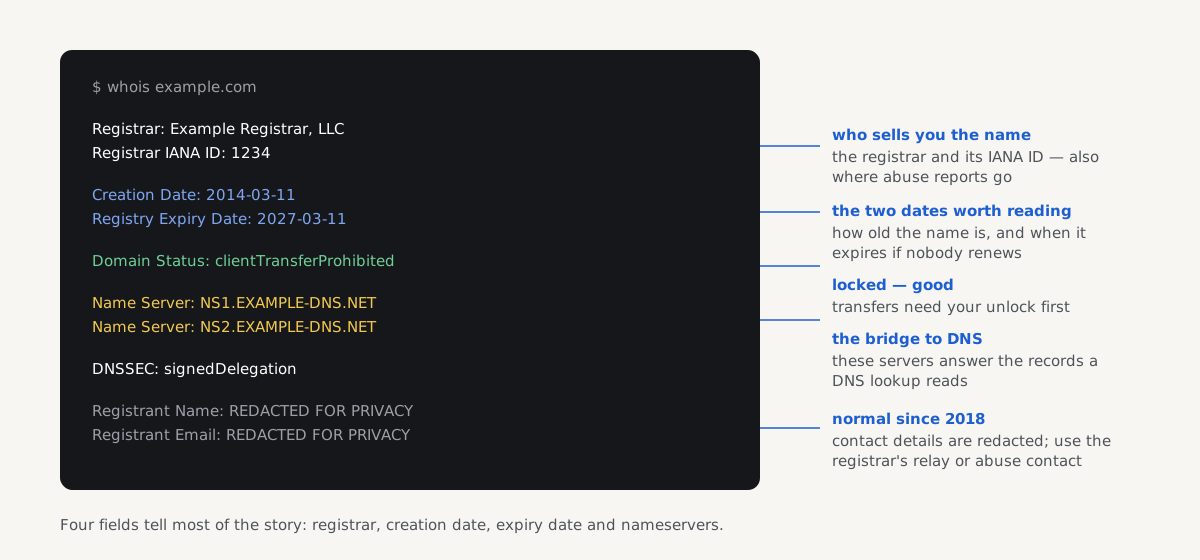
Top to bottom:
- Registrar is the company the domain is rented through: where it is renewed, unlocked and transferred. This is the single most useful field when a site you depend on breaks: the registrar, not the web host, controls whether the name exists at all. The Registrar IANA ID pins it down exactly, because registrar brand names blur across resellers.
- Creation Date is when the name was first registered in its current continuous registration. It survives transfers between registrars, but if the domain ever expired fully and was re-registered, the clock restarted: more on what that means for "domain age" below.
- Registry Expiry Date is when the current registration runs out at the registry. Read it with one caveat: most registrars auto-renew, and a lapsed gTLD domain is not immediately available; it typically passes through a registrar grace period, then about 30 days of
redemptionPeriod(the owner can still pull it back, for a fee), then five days ofpendingDeletebefore anyone else can register it. - Updated Date is the last change to the registration data itself: a renewal, a transfer, a nameserver change. It says nothing about the website's content.
- Domain Status lists EPP status codes, each linking to ICANN's definition. The ones you want to see are the locks:
clientTransferProhibited,clientDeleteProhibitedandclientUpdateProhibitedare set by the registrar (usually on by default) and stop transfers, deletion and silent changes.server-prefixed versions are the registry's own locks, common on high-value names. A bareokmeans no protection is on. The alarming ones areclientHoldorserverHold(the domain has been removed from the DNS zone, so the site and mail are down) andredemptionPeriodorpendingDelete, which mean the registration has lapsed. - Name Server lines name the authoritative DNS servers the registry delegates to: the same servers
dig example.com NSreturns. This is the bridge between the two worlds: WHOIS records who rents the name and where its DNS lives; a DNS lookup reads what those servers actually answer. - DNSSEC: signedDelegation means a DS record is published at the registry, linking the domain into the DNSSEC chain of trust;
unsignedmeans none is. - Registrar Abuse Contact Email and Phone are mandatory for gTLD registrars, and they are the right address for reporting a domain used for phishing or malware: the registrar can act on the registration itself.
.com and .net are thin registries: Verisign's registry record stops at the fields above, and whatever contact data exists is held by the registrar (the Registrar WHOIS Server line says where to ask). Most other gTLDs are thick, with contact fields in the registry record itself. The once-planned move of .com to thick was shelved after the GDPR made collecting less data, not more, the direction of travel. Either way, the contact fields you get back mostly look like this:
Registrant Name: REDACTED FOR PRIVACY
Registrant Organization: REDACTED FOR PRIVACY
Registrant Email: Please query the RDDS service of the Registrar of Record
Which deserves its own section.
Why WHOIS says REDACTED FOR PRIVACY
Until 2018, WHOIS published registrants' names, postal addresses, emails and phone numbers to anyone who asked: a spam and harassment goldmine that the EU's GDPR made legally untenable. ICANN's Temporary Specification, rushed in for 25 May 2018, let registrars redact personal data, and its permanent successor, the Registration Data Policy, has required minimised, redacted-by-default publication since 21 August 2025. On top of the legal redaction, many owners also pay for (or get free) privacy proxy services, which replace their details with the proxy's forwarding address.
So "who owns a domain" is no longer answered by reading a name off the record, and any tutorial that says otherwise predates 2018. What still works:
- Organisation and country sometimes survive redaction: legal-person (company) data is not personal data, so some registrars leave
Registrant Organizationand country visible. - Every record keeps a contact route. Registrars must provide a way to reach the registrant (an anonymised relay email or a web contact form linked from the record) without revealing who they are.
- Abuse goes to the registrar, via the abuse contact in the record, not to the registrant.
- The site itself usually says more than WHOIS: a legal notice or privacy policy page names the operating company, and for "who runs the server" questions, IP-based lookups still work; that path is covered in the guide to finding who hosts a website.
From WHOIS to RDAP
The WHOIS protocol has no structure (every registry formats its text differently), no authentication, no language tags and no standard way to say "this field was redacted". Its successor, RDAP (Registration Data Access Protocol, an IETF standard since 2015), serves the same registration data as JSON over HTTPS, with consistent field names, proper status values and room for tiered access.
The transition has a hard date behind it: gTLD registries and registrars have been required to run RDAP since 2019, and on 28 January 2025 (the "WHOIS sunset") ICANN's contracts stopped requiring them to run WHOIS at all. RDAP is now the only registration-data service a gTLD registrar must provide. In practice, as of 2026, many registries and registrars still answer port 43 voluntarily, so the whois command keeps working more often than not, but every year a few more go dark, and RDAP is the answer that cannot disappear. ccTLDs, again, set their own pace; some have adopted RDAP, some never will.
You rarely need to speak RDAP by hand (lookup.icann.org and modern registrar pages do it for you) but it is just HTTPS:
curl https://rdap.verisign.com/com/v1/domain/example.comreturns the .com registry's record as JSON; IANA's bootstrap registry maps each TLD to its RDAP base URL, which is how clients find the right server.
What a WHOIS lookup is actually good for
Is the name taken? A lookup that returns a record means yes; "No match" or an RDAP 404 means it is available to register (or in the deletion pipeline: check again in a week). This is also the honest availability check when a registrar's search page is pushing upsells.
Is a domain about to lapse? The Registry Expiry Date on your own domains (and on domains you depend on) is cheap insurance. An expired domain takes email down with the website, and the WHOIS record announces the date a year in advance. Check your own after every renewal, and before moving a site to a new domain, confirm the old name's registration will outlive every redirect you need it for.
Who do I contact? For abuse (phishing, malware, a scam shop) use the Registrar Abuse Contact in the record. To make an offer on a taken domain, use the record's contact relay or form; expect silence more often than a reply.
How old is this domain, really? The creation date is evidence, but weaker than it looks. It proves the current registration's start, not continuous ownership (the name may have changed hands or lapsed and restarted) and it says nothing about what was on it. On the SEO folklore: Google's search team has said for years that domain age itself is not a ranking factor; older domains tend to rank better because they have accumulated links and content, not because of the date in WHOIS. Treat a 2009 creation date as "not a brand-new domain" and nothing more. Where recency genuinely bites is email: receivers filter mail from very young domains harder in their first weeks.
Due diligence before you buy or trust. WHOIS cannot prove a site is legitimate, but a creation date of three weeks ago on a shop claiming ten years in business is a fact no scammer can redact.
Registration data and your DNS records
A WHOIS lookup tells you a domain is rented, locked and delegated to the right nameservers. Whether those nameservers hold the right records is the other half of domain health, and the half that breaks silently: above all for email, where one missing or malformed record costs deliverability without any visible outage:
To be precise about the boundary: the check reads DNS, not WHOIS; it queries your MX, SPF, DMARC, MTA-STS, TLS-RPT and BIMI records from public nameservers, follows every SPF include, tries 27 common DKIM selectors and checks DNSSEC. Registration data such as your registrar or expiry date never appears in DNS, so it is not checked here; the overlap is the nameservers (listed in WHOIS, answering in DNS) and DNSSEC, where the WHOIS signedDelegation line and the DNS DS record describe the same chain of trust from two sides.
Questions people ask
What does a WHOIS lookup show?
A WHOIS lookup shows a domain's public registration record: the registrar it is rented through, the creation, last-updated and expiry dates, EPP status codes such as clientTransferProhibited, the delegated nameservers, whether DNSSEC is enabled, and the registrar's abuse contact. Contact details for the owner are usually redacted for privacy. It describes the registration of the name only; what the domain points to lives in DNS, not WHOIS.
How do I find out who owns a domain?
Rarely from WHOIS alone any more: personal details have been redacted on most domains since the GDPR in 2018. Run the lookup anyway (the registrant organisation and country sometimes remain visible for companies) then check the site's own legal or privacy pages, which usually name the operating company. Every WHOIS record also keeps a contact route, an anonymised relay email or web form, so you can reach the owner without learning who they are.
Why does WHOIS say REDACTED FOR PRIVACY?
Because publishing registrants' names, addresses and phone numbers became legally untenable under the GDPR in May 2018, and ICANN's rules (the Temporary Specification, then the Registration Data Policy in force since August 2025) have made redaction the default. Many owners add a privacy proxy service on top. It is normal on legitimate domains and says nothing suspicious by itself; use the record's relay contact or the registrar's abuse address instead.
What is RDAP and does it replace WHOIS?
RDAP is the Registration Data Access Protocol: the same registration data WHOIS serves, delivered as structured JSON over HTTPS with consistent field names. For generic TLDs it has formally replaced WHOIS; since 28 January 2025, ICANN requires gTLD registries and registrars to run RDAP and no longer requires WHOIS at all. Many still answer the old protocol voluntarily, so the whois command keeps working for now. ICANN's lookup at lookup.icann.org uses RDAP.
Can I see when a domain expires?
Yes: the Registry Expiry Date field in any WHOIS or RDAP lookup shows when the current registration runs out, for your own domains and anyone else's. Two caveats: most registrars auto-renew before that date, and an expired gTLD domain is not instantly available; it usually passes through a grace period, about 30 days of redemptionPeriod and five days of pendingDelete first. Watching the expiry date of domains you depend on is cheap insurance.
Is WHOIS data accurate?
Mostly, for the registry-managed fields: registrar, dates, statuses and nameservers come from the registration system itself and are reliable. Contact data is weaker; it is self-declared, redacted or replaced by privacy proxies, and although ICANN requires registrars to verify an email or phone number and to suspend domains with knowingly false data, that bar is low. Trust the dates and statuses; treat any visible contact details as claims, not facts.