Some people cannot look at a parallax hero or a zooming page transition without feeling dizzy or sick. Their operating system has a switch for that, "Reduce motion", and every current browser passes it to your CSS and JavaScript as prefers-reduced-motion. Honouring it is one media query and a few decisions about which animations to keep. This guide covers what the law and WCAG require, the two ways to write the query, what to reduce and what can stay, how the common animation libraries handle it, and the overlap with page speed, where motion also costs Core Web Vitals.
Quick answer
- Add a global reduce block so every animation and transition becomes instant when the visitor asks:
@media (prefers-reduced-motion: reduce) {
  *, *::before, *::after {
    animation-duration: 0.01ms !important;
    animation-iteration-count: 1 !important;
    transition-duration: 0.01ms !important;
    scroll-behavior: auto !important;
  }
}- For new work, do the opposite: write animations inside
@media (prefers-reduced-motion: no-preference)so the default is still. - Anything that moves by itself for more than 5 s needs a visible pause button (WCAG 2.2.2, level A). Autoplaying background video counts.
- Nothing may flash more than three times a second (WCAG 2.3.1, level A).
- Reduce, do not delete: keep hover feedback and short fades; remove parallax, auto-advancing carousels, scroll-jacking and large zooms.
- Test with the OS switch or DevTools' rendering emulation, then run the speed test: animations that move layout show up as CLS and long tasks.
Why motion matters
Vestibular disorders, migraine, some forms of ADHD and plain motion sickness make certain screen movement physically unpleasant: the content moves while the eyes and inner ear report that the body is still. Triggers are large areas moving, movement tied to scrolling (parallax, scroll-jacking), zooms and spins, and anything that keeps going. Small, brief, user-initiated movement (a button that darkens on hover, a 150 ms fade) rarely bothers anyone. The affected group is a meaningful share of adults, and it includes people who never mention it and simply close the tab.
There is a second audience. Animation that runs while the page loads, or on every scroll, burns CPU on phones, and animation that changes layout (height, margin, top) forces the browser to re-lay out the page. Those show up as Cumulative Layout Shift and as long tasks on the main thread, which are speed findings with ranking consequences.
How getReport checks it
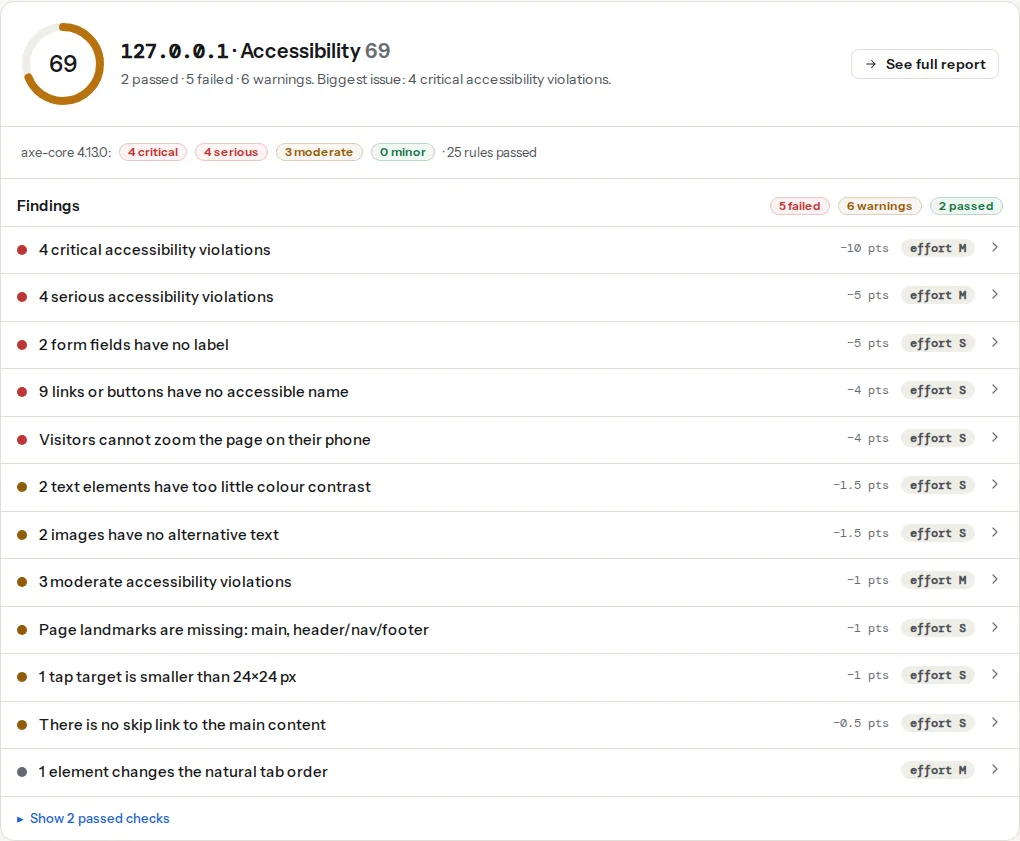
Say it plainly: there is no automated check for reduced motion. axe-core, which the accessibility checker runs on the rendered page, has no rule that detects animation, parallax, or whether the prefers-reduced-motion query exists in your CSS. The report cannot tell whether your site respects the preference. What it can measure are three side effects:
This one counts <video> elements that carry the autoplay attribute in the rendered DOM (the video autoplay page has the thresholds). It does not see videos started by JavaScript, or embedded players from YouTube and Vimeo, so a pass here is not proof that nothing autoplays.
CLS is measured in the Lighthouse lab run. Entrance animations that slide content in from margin-top: 40px, banners that push the page down, and elements whose height animates on load all register as layout shift; so do the fonts and images the finding's fix mentions. An animation that only changes transform and opacity does not.
The moderate group is where the mechanical parts of a carousel or a video component tend to land: a region without a name, a scrollable slider that keyboard users cannot reach. The animation itself is invisible to it.
What WCAG requires
The criteria people cite, and what each actually demands at level AA (the level the European Accessibility Act points to):
| Criterion | Level | What it requires |
|---|---|---|
| 2.2.2 Pause, Stop, Hide | A | Moving, blinking or scrolling content that starts automatically, lasts more than 5 s and sits beside other content must have a way to pause, stop or hide it |
| 2.3.1 Three Flashes or Below Threshold | A | Nothing flashes more than three times in one second |
| 2.3.3 Animation from Interactions | AAA | Motion triggered by an action (scroll, click) can be turned off unless it is essential |
So at AA, the hard rules are a pause control for anything that moves by itself and no flashing. Respecting prefers-reduced-motion is how you meet 2.3.3 and it is the accepted way to meet the spirit of the rest; it is not, strictly, an AA requirement. Do it anyway: it is one media query.
Step by step
1. Pick a strategy: opt-out or opt-in
Opt-out (global reduce). The snippet in the quick answer, placed at the end of your CSS. Every animation and transition finishes in 0.01 ms, which is effectively instant, and smooth scrolling becomes a jump. 0.01ms rather than 0 because some JavaScript waits for transitionend and animationend, and a zero duration never fires those events in every browser. animation-iteration-count: 1 stops infinite loaders spinning forever at 0.01 ms per cycle, which would peg the CPU.
The trade-off: it is blunt. A modal that fades in now snaps in; a loading spinner becomes a static icon, which is fine; a progress bar that animated to 60 % now jumps to 60 %, which is also fine. Its one real cost is that a state you only conveyed through motion ("the item flew into the cart") is now conveyed by nothing. Add text or a colour change for those.
Opt-in. Write the animation inside a no-preference query, so visitors who asked for reduced motion get the static version by default:
.hero-image {
  opacity: 1;
}
@media (prefers-reduced-motion: no-preference) {
  .hero-image {
    animation: rise 600ms ease-out both;
  }
  @keyframes rise {
    from { opacity: 0; transform: translateY(16px); }
  }
}
This is the better pattern for new code and for the big effects. Most sites end up with both: the global block as a safety net, and opt-in for the effects you design deliberately.
2. Decide what to reduce and what to remove
Reduce to a fade or a static state:
- Parallax backgrounds and layers moving at different scroll speeds. Show the layers still.
- Auto-advancing carousels. Stop on the first slide; keep the arrows.
- Background videos. Show the poster frame.
- Scroll-jacking and scroll-snapped full-page sections with animated transitions. Plain scrolling.
- Large zoom or slide transitions between pages or views. A 150 ms cross-fade, or nothing.
- Infinite loaders, animated gradients, floating decorations. Static.
Can stay, even under reduce:
- Hover and focus feedback: colour, underline, a 1–2 px shift.
- Short opacity fades under 200 ms.
- Progress indicators that show state (a bar filling), ideally without easing flourishes.
The distinction is size and duration: a large part of the screen moving, or anything moving for seconds, goes; small and brief stays.
3. Give autoplaying video and carousels a pause button
WCAG 2.2.2 applies whether or not the visitor set a preference. A background video needs a visible control:
<div class="hero">
  <video id="bg" autoplay muted loop playsinline poster="/img/hero.jpg" aria-hidden="true">
    <source src="/video/hero.webm" type="video/webm">
    <source src="/video/hero.mp4" type="video/mp4">
  </video>
  <button type="button" id="bg-toggle" aria-pressed="true">Pause video</button>
</div>const video = document.getElementById('bg');
const toggle = document.getElementById('bg-toggle');
const reduce = window.matchMedia('(prefers-reduced-motion: reduce)');
function setPlaying(playing) {
if (playing) video.play(); else video.pause();
toggle.textContent = playing ? 'Pause video' : 'Play video';
toggle.setAttribute('aria-pressed', String(playing));
}
// Do not autoplay at all for visitors who asked for reduced motion
if (reduce.matches) {
video.removeAttribute('autoplay');
setPlaying(false);
}
toggle.addEventListener('click', () => setPlaying(video.paused));
reduce.addEventListener('change', (e) => { if (e.matches) setPlaying(false); });The poster is what reduced-motion visitors see, so make it a real frame, not black. Keep the file small and the muted attribute; Video on landing pages without killing LCP covers the speed side.
A carousel that respects the preference:
const reduce = window.matchMedia('(prefers-reduced-motion: reduce)');
let timer = null;

function startAutoplay() {
  if (reduce.matches || timer) return;
  timer = setInterval(next, 6000);
}
function stopAutoplay() {
  clearInterval(timer);
  timer = null;
}

startAutoplay();
document.getElementById('carousel-pause').addEventListener('click', () => {
  timer ? stopAutoplay() : startAutoplay();
});
// Pause while the visitor interacts, per WCAG 2.2.2
carousel.addEventListener('mouseenter', stopAutoplay);
carousel.addEventListener('focusin', stopAutoplay);
4. Tell your animation library
- GSAP:
gsap.matchMedia()runs a setup function only when a media query matches, and reverts its animations when it stops matching:
const mm = gsap.matchMedia();
mm.add('(prefers-reduced-motion: no-preference)', () => {
  gsap.from('.card', { y: 24, opacity: 0, stagger: 0.1 });
});- Framer Motion / Motion: the
useReducedMotion()hook returnstruewhen the preference is set, and<MotionConfig reducedMotion="user">makes every animation in the tree respect it, keeping opacity changes and dropping transforms. - Lottie: the web player has no switch of its own. Check
matchMediabefore creating the animation and load it withautoplay: false, showing the first or last frame instead. - requestAnimationFrame loops (particle backgrounds, custom scroll effects): wrap the start in the same
matchMediacheck, and stop the loop when the tab is hidden. A loop that runs at 60 frames a second on every page view is a long-task generator on phones.
5. Scroll-driven animations and view transitions
CSS scroll-driven animations (animation-timeline: scroll() or view()) are parallax by another name; put them inside no-preference. The View Transitions API animates between page states; disable its default cross-fade and any custom group animations under reduce:
@media (prefers-reduced-motion: reduce) {
  ::view-transition-group(*),
  ::view-transition-old(*),
  ::view-transition-new(*) {
    animation: none !important;
  }
}
6. Test it
Turn the setting on and reload:
- macOS: System Settings → Accessibility → Display → Reduce motion.
- iOS: Settings → Accessibility → Motion → Reduce Motion.
- Windows: Settings → Accessibility → Visual effects → Animation effects off.
- Android: Settings → Accessibility → "Remove animations" (the label varies by manufacturer).
- Chrome DevTools without touching the OS: More tools → Rendering → "Emulate CSS media feature prefers-reduced-motion".
Then scroll the whole page, open the menu, open a modal, and watch for anything that still moves by itself.
7. Measure the speed side
Run the speed test on the same page. If the CLS finding names an element with an entrance animation, change the animation to transform and opacity only; those do not move layout. If the long-tasks finding lists your animation script, the loop is running too often or on too many elements; Long tasks and main-thread work has the diet. Fixing motion for accessibility and fixing it for speed are usually the same edit.
Platform notes
WordPress. Elementor's Motion Effects and entrance animations, Divi's scroll effects and most theme "animate on scroll" options are CSS classes with JavaScript triggers; test the page with the OS setting on. If the effects still run, add the global reduce block under Appearance → Customize → Additional CSS (core), or Elementor's Site Settings → Custom CSS with Pro. Autoplaying hero videos in these builders usually have a "Play on mobile" toggle worth switching off, and a poster image field that should be filled.
Webflow. Interactions are JavaScript-driven; check them with the emulation and gate the big ones with a custom-code matchMedia check, or make the animated state the initial state so nothing moves when the script does not run.
Squarespace and Wix. Site-wide animation settings exist (Squarespace 7.1 has an Animations section in Site styles with a "None" option); you cannot add the media query to the platform's own effects, so prefer the least motion the theme allows and avoid auto-playing galleries.
Static sites and custom. Put the global block in your base stylesheet; pass matchMedia results into your components once and read them, rather than checking in every animation.
Verify
- With Reduce motion on, nothing on the page moves without a click: no carousel advancing, no video, no parallax, no entrance animations.
- Every autoplaying element has a visible pause control that works with the keyboard.
- The speed test's CLS finding is at or below 0.1 and the video-autoplay finding passes (or lists only the video with a pause button).
document.getAnimations().lengthin the console with the preference on is close to zero after load.
Common mistakes
- Setting
animation: noneglobally. Scripts that wait foranimationendnever continue; elements stuck at their "from" state stay invisible. Use0.01msdurations. - Hiding the carousel under
reduceinstead of stopping it. The content disappears for exactly the people who asked for less movement. Show the first slide with arrows. - Autoplay video with no poster. Reduced-motion visitors get a black rectangle. Provide a real frame.
- A pause button that only appears on hover. Keyboard and touch users cannot reach it. Make it always visible or visible on focus.
- Treating the OS switch as the only signal. Most visitors never find that setting. Keep the large effects short and optional for everyone, not only for those who opted out.