A video above the fold is the most expensive thing a landing page can ask a phone to do before the visitor has read a word. A YouTube embed pulls in hundreds of kilobytes of scripts before a frame appears; a self-hosted autoplay clip competes with the page for the same bandwidth its hero image needs. Both push Largest Contentful Paint past 2.5 s and, done carelessly, add layout shift on top. This guide shows what the browser counts as the LCP element when video is involved, and the three patterns that let you keep the video and pass the metric.
Quick answer
- Give every video a poster image and make that poster the LCP element: a compressed WebP or AVIF sized to the viewport, with
fetchpriority="high"where it is an<img>and no lazy loading. - YouTube and Vimeo above the fold: never load the real player on page load. Show a thumbnail with a play button and load the iframe on click (a "facade"). Below the fold,
loading="lazy"on the iframe is enough. - Self-hosted autoplay loops: muted,
playsinline, under 1 MB, no audio track, and off for visitors who asked for reduced motion. - Run the speed test and read the LCP element line: if it names the video or its poster, that file decides the metric.
Why video hurts LCP
What the browser counts
Largest Contentful Paint is the time at which the biggest image, text block or video in the viewport has finished rendering. For a <video> element, Chrome uses whichever comes first: the poster image once it has loaded, or the first frame of the video once it is presented, which since 2023 includes autoplaying video. In practice that means one of three things becomes your LCP element:
- The poster image, if there is one and it is big. This is the case you want, because a poster is a plain image and every LCP image technique applies.
- The first video frame, for an autoplaying clip without a poster. The browser has to download enough of the file to decode a frame, which on a 4 MB MP4 over 4G is seconds.
- Something else entirely when the player is an iframe. A YouTube embed is not content the browser can measure, so LCP falls to the largest headline or image around it, while the embed's scripts delay everything by competing for the network and the main thread. Google's LCP documentation lists which elements are candidates.
Where the seconds go
A standard YouTube iframe loads the player page, its stylesheets, several scripts and the thumbnail before the play button responds, typically well over 500 KB across a dozen requests, most of it JavaScript that has to parse and run on the phone. Vimeo is lighter but the same shape. None of it is your content, and all of it happens before or alongside your hero image.
A self-hosted <video autoplay> is cheaper in scripts and worse in bytes. The browser starts fetching the file immediately, at the same time as the hero image, the fonts and the stylesheet. On a slow connection everything arrives later, and the LCP image finishes after the video's first frame did.
Late players add a third cost. A YouTube iframe without dimensions, or a video widget that injects its player after a script loads, pushes the content below it down, and that jump is Cumulative Layout Shift.
How getReport checks it
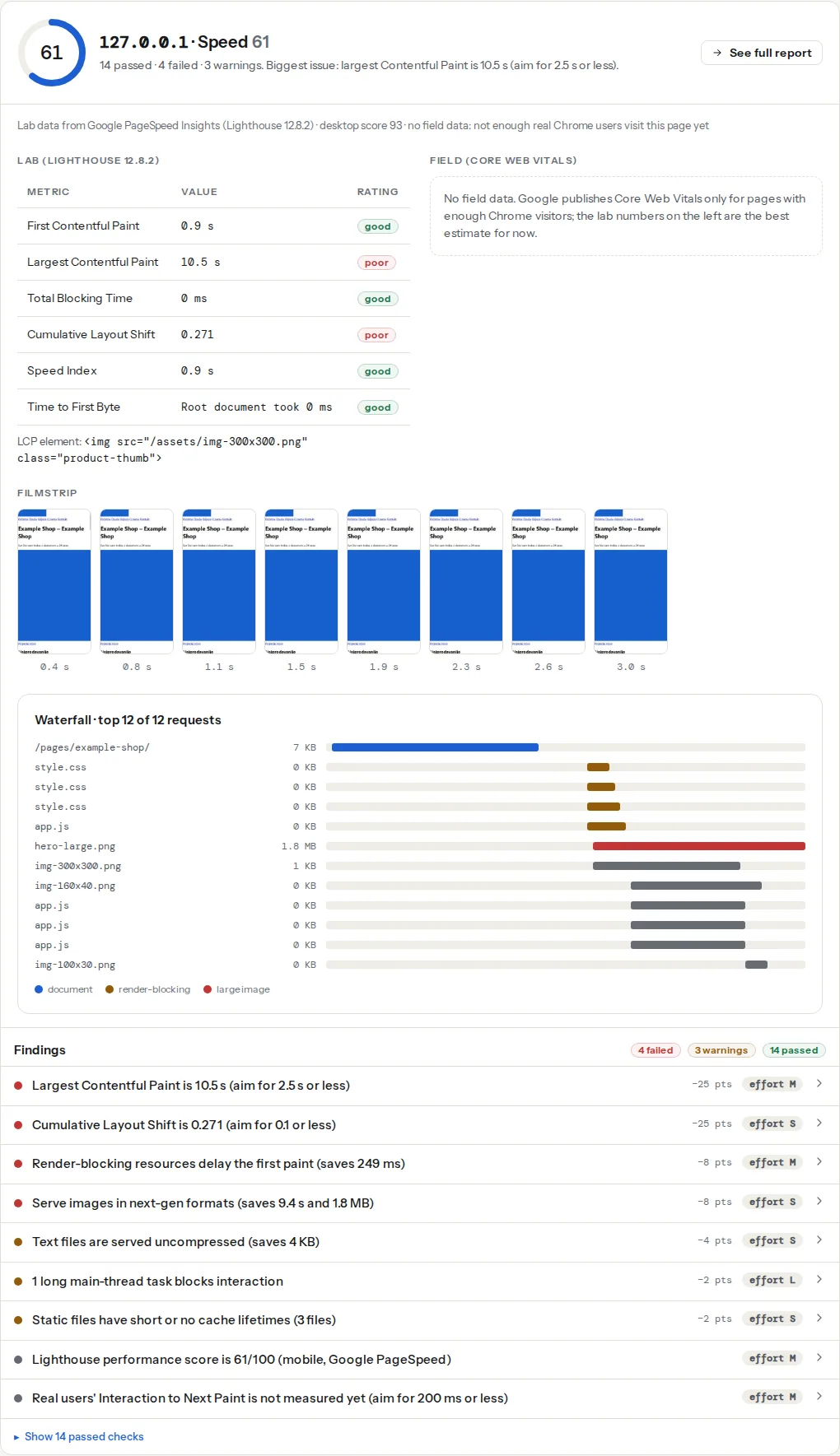
The speed module runs Lighthouse on a throttled mobile connection and names the LCP element under the lab table, so you can see whether the poster, the video or the headline decided the metric:
The third-party finding is where a YouTube or Vimeo embed shows up, listed by company with the bytes transferred and the main-thread time it blocked:
Two checks from the best-practices module, which loads the page in Chromium, cover the self-hosted case:
The autoplay check counts <video> elements that carry the autoplay attribute after the page has rendered, so a player added by a script is counted too. It is a low-weight warning by design: a muted background loop under 1 MB is acceptable, and the finding is there to make you check the size.
The image weight finding counts every image the browser downloaded while loading the page. A 900 KB poster shows here as the largest image; a poster served at 4000 px for a 400 px phone screen is the same mistake as an oversized hero photo, and the LCP guide has the sizing steps.
Step by step
1. Make the poster the LCP element
Every <video> gets a poster. Export it as WebP or AVIF at the size it is displayed (1200 px wide is enough for phones and most laptops; 100–200 KB), and give it width and height so the space is reserved before anything loads:
<video
  poster="/media/hero-poster.webp"
  width="1280" height="720"
  preload="none"
  controls
  playsinline>
  <source src="/media/hero.webm" type="video/webm">
  <source src="/media/hero.mp4" type="video/mp4">
</video>
preload="none" tells the browser not to fetch any of the video until the visitor presses play; preload="metadata" fetches only the headers and duration, which is fine for a video with controls and a visible length. Either way the poster is the only thing that downloads on page load, so it is the LCP candidate, and it loads at normal image priority.
To get the poster fetched earlier, preload it from <head>; a poster attribute has no fetchpriority, so the preload is how you raise it:
<link rel="preload" as="image" href="/media/hero-poster.webp" fetchpriority="high">An alternative that gives you full control is to render the poster as a normal <img> with a play button over it, and swap in the <video> on click. Then fetchpriority="high" goes straight on the <img>, srcset and sizes work as they do for any hero image, and nothing video-related loads until asked.
2. Autoplay loops: small, muted, inline, optional
Background loops can autoplay without hurting LCP if they are small enough not to compete with the poster:
<video
  class="hero-loop"
  poster="/media/loop-poster.webp"
  width="1280" height="720"
  autoplay muted loop playsinline
  preload="metadata">
  <source src="/media/loop.webm" type="video/webm">
  <source src="/media/loop.mp4" type="video/mp4">
</video>
The rules that keep this cheap:
- Under 1 MB. A 6–10 s loop at 720p, no audio track, encoded at a low bitrate, lands at 500–900 KB. Anything longer belongs behind a play button.
mutedandplaysinline. Browsers only autoplay muted video, and iPhones only play inline withplaysinline; without it the clip opens full screen or not at all.- Still give it a poster. The poster paints first and becomes the LCP element while the first frame is still decoding.
- Respect reduced motion. Visitors who set "reduce motion" in their OS asked for no moving backgrounds. Stop the loop and keep the poster:
// After the DOM is ready
if (window.matchMedia('(prefers-reduced-motion: reduce)').matches) {
  document.querySelectorAll('video.hero-loop[autoplay]').forEach((v) => {
    v.removeAttribute('autoplay');
    v.pause();
  });
}
3. YouTube and Vimeo: load a facade, not the player
A facade is a thumbnail and a play button that look like the player and load it only on click. The visitor who never plays the video (most of them) never pays for it. The lightest option is the lite-youtube-embed web component: one small script and stylesheet, the thumbnail from YouTube's image CDN, and the real iframe only after the click:
<link rel="stylesheet" href="/assets/lite-yt-embed.css">
<script src="/assets/lite-yt-embed.js" defer></script>

<lite-youtube videoid="dQw4w9WgXcQ" playlabel="Play: Product tour"
  style="background-image: url('/media/tour-poster.webp');">
</lite-youtube>
Self-hosting the poster (the background-image line) lets you serve a compressed WebP instead of YouTube's JPEG and keeps the LCP element on your own domain. Without a library, a plain thumbnail and button with a few lines of JavaScript does the same:
<button class="yt-facade" data-id="dQw4w9WgXcQ" aria-label="Play video: Product tour">
  <img src="/media/tour-poster.webp" width="1280" height="720" alt="" fetchpriority="high">
</button>
<script>
  document.querySelectorAll('.yt-facade').forEach((btn) => {
    btn.addEventListener('click', () => {
      const iframe = document.createElement('iframe');
      iframe.src = `https://www.youtube-nocookie.com/embed/${btn.dataset.id}?autoplay=1`;
      iframe.width = 1280; iframe.height = 720;
      iframe.allow = 'autoplay; encrypted-media; picture-in-picture';
      iframe.allowFullscreen = true;
      iframe.title = btn.getAttribute('aria-label');
      btn.replaceWith(iframe);
    });
  });
</script>
A real <button> keeps it keyboard-reachable; youtube-nocookie.com avoids setting cookies before the click, which matters for consent as well as speed. Set the same dimensions on the button's <img> and the iframe so nothing shifts when they swap.
4. Embeds below the fold: lazy-load the iframe
For a video the visitor has to scroll to, the browser's own lazy loading is enough and needs no script:
<iframe
  src="https://www.youtube-nocookie.com/embed/dQw4w9WgXcQ"
  width="1280" height="720"
  loading="lazy"
  title="Product tour"
  allowfullscreen></iframe>
loading="lazy" on iframes is supported in every current browser. The width and height keep the aspect ratio reserved; add style="aspect-ratio: 16 / 9; width: 100%; height: auto" in CSS for a fluid layout without shift. Never lazy-load an iframe or poster that is visible on load; that is the lazy-loading mistake that makes LCP worse.
5. Hosting and formats
Serve self-hosted video from the CDN, not from the web server's disk; a 40 MB file streaming from a shared host slows every other request on the site. Provide two encodings: H.264 MP4 plays everywhere, and a WebM (VP9 or AV1) source listed first is 30–50 % smaller for browsers that support it. Videos over about a minute should not be a single progressive file at all: use a service (Mux, Cloudflare Stream, Vimeo, Bunny Stream) that serves HLS or DASH, so the player fetches the first seconds at a bitrate the connection can handle.
For the loop itself, encode with a two-pass bitrate target rather than a quality setting, at 24 fps, and strip the audio track:
ffmpeg -i loop-source.mov -an -vf "scale=1280:-2,fps=24" -c:v libx264 -b:v 900k -pass 1 -f null /dev/null
ffmpeg -i loop-source.mov -an -vf "scale=1280:-2,fps=24" -c:v libx264 -b:v 900k -pass 2 -movflags +faststart loop.mp4
-movflags +faststart moves the file's index to the front so playback can start before the whole file is down.
Platform notes
WordPress
- Video block (block editor): the sidebar has Autoplay, Loop, Muted, Play inline, Preload (Auto, Metadata, None) and Poster image. Set Preload to None or Metadata and always choose a poster; the block outputs a plain
<video>, so everything above applies. - Embed block for YouTube and Vimeo: WordPress outputs the provider's iframe. Since WordPress 5.7, iframes in post content that have
widthandheightgetloading="lazy"automatically, which covers embeds below the fold but does nothing for one in the hero. For an above-the-fold embed use a facade plugin (WP YouTube Lyte and Lazy Load for Videos both replace the iframe with a thumbnail) or WP Rocket's "Replace YouTube iframe with preview image" under Media. - Elementor Video widget: it has a Lazy Load switch in the video options that shows the thumbnail and loads the player on click, and a separate "Image Overlay" setting where you can supply your own compressed poster. Turn both on for hero videos.
- Theme hero videos set in the Customizer are usually
<video autoplay>with the original upload as the source. Re-encode the file with the ffmpeg lines above before uploading, and add a poster.
Shopify
The Video section in Online Store 2.0 themes accepts a Shopify-hosted file or a YouTube/Vimeo URL and lets you set a cover image; upload a compressed cover rather than relying on the generated frame. YouTube and Vimeo added this way load the provider's iframe, so place them below the fold or use a theme that supports a click-to-play thumbnail. Apps that inject video sliders are a third-party cost like any other app.
Static sites and custom builds
Use the facade pattern from step 3 as a component, and self-host the poster through your image pipeline so it gets the same srcset and format conversion as every other image. Frameworks with an image component (Astro, Next.js, Nuxt) can render the poster <img> with fetchpriority="high" and correct dimensions out of the box.
Verify
- The speed test's LCP element line names your poster image (or the headline, if that is bigger), not a video source and not a YouTube domain.
- The third-party finding no longer lists YouTube or Vimeo on page load; it reappears only after you click play, which the test never does.
- The autoplay finding either passes or lists one muted loop, and the image weight finding shows the poster under about 200 KB.
- In the waterfall of the speed panel, no
.mp4or.webmrequest starts before the poster image finishes. - The Core Web Vitals field bars, on the Core Web Vitals checker, move within a month: real visitors on slow connections are the ones the video was hurting most.
Common mistakes
- Autoplay video without a poster. Symptom: LCP element is the video, LCP over 4 s on mobile. Fix: add a compressed poster and preload it.
- Poster exported from the video frame at full resolution. Symptom: image weight finding names a 1–2 MB PNG poster. Fix: WebP or AVIF at 1200 px, about 80 % quality.
- YouTube iframe in the hero with
loading="lazy". Symptom: nothing improves, because the iframe is in the viewport and loads immediately anyway. Fix: a facade for the hero, lazy loading only below the fold. - A facade that swaps in an iframe of a different size. Symptom: CLS spike on click. Fix: identical
widthandheighton the thumbnail and the iframe, or anaspect-ratiocontainer around both. - Two lazy-video plugins, or a plugin plus the theme's own facade. Symptom: two thumbnails, or a player that needs two clicks. Fix: keep one, deactivate the other, re-test.