A shop fails Core Web Vitals because of one hero image. A publisher fails them because of forty things that each arrive late and each move the page a little: the leaderboard that pops in above the headline, the consent banner that inserts itself at the top, the tweet embed that grows when it renders, the related-articles widget that loads after the text, and the ad-tech scripts that keep the main thread busy while a reader tries to tap a link. This guide goes source by source with the fix for each, then measures by template, and is honest about the one thing nobody says in a vendor deck: some layout shift is the price of some ad formats, and the decision is a revenue decision, not a technical one.
Quick answer
- Reserve space for every ad slot with a
min-heightper breakpoint, and tell the ad server to collapse the slot only when nothing fills it. - Consent banners are overlays (
position: fixed), never blocks inserted above the content. - Every embed gets an
aspect-ratiobox, and heavy ones (YouTube, tweets, Instagram) get a facade until clicked. - Images carry
widthandheight; the CMS should emit them (WordPress does). - Load consent and ad loaders off the critical path, cap header bidding timeouts, and count the ad networks: fewer is faster.
- Measure per template (article, section, home, live blog); the article template is most of the traffic and gets fixed first.
Why publishers fail differently
The three Core Web Vitals measure three things a news page does in an unusual way. Cumulative Layout Shift adds up every unexpected movement of content during the visit, not just the load, and a news page keeps inserting things for as long as the reader scrolls: ads, recirculation modules, newsletter prompts, "live" updates. Largest Contentful Paint on an article is usually the lead image or the headline, which competes with ad slots above it for the first bytes. And Interaction to Next Paint is measured when the reader taps, which on a publisher site happens while consent management, header bidding, analytics and three ad networks are all running JavaScript on the same main thread.
The sources, roughly in order of how much CLS they cause on the sites we see:
- Ad slots without reserved space. The ad server decides the size after the auction, the slot starts at 0 px tall, and the article jumps by 250 px when the creative lands.
- Consent banners inserted as a block at the top of the page after the page has rendered.
- Embeds (tweets, YouTube, Instagram, TikTok) that start as a small placeholder and grow when their script renders them.
- Related-content and recirculation widgets injected by a script, often above the fold on mobile.
- Sticky headers and anchor ads that push content instead of overlaying it.
- Web fonts on headlines that rewrap when the font arrives.
- Infinite scroll that appends content while the reader is at the bottom.
- Images without dimensions in hand-coded parts of the template.
INP has a shorter list: the consent script, the ad loaders and header bidding, analytics, and whatever the tag manager fires on the first scroll.
How getReport checks it
The Core Web Vitals checker reads the field values (Chrome UX Report, 28 days, 75th percentile) for the URL and for the whole origin, and runs Lighthouse for the lab values, then rates each against Google's thresholds. On a publisher the field and lab numbers often disagree, and both are right: the lab run loads the page once with no consent given and no scroll, while field data covers readers who scrolled through three ads and an embed. Field data vs lab data explains how to read the gap.
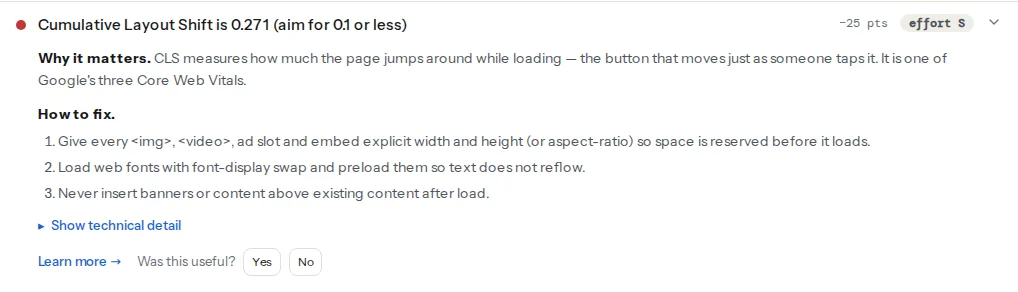
The CLS card gives the number and the fix families; it does not name the element that moved. For that, the filmstrip in the speed panel shows when the jump happened (a shift at 1.2 s after a blank slot fills is an ad; one at 0.4 s when text changes shape is a font), and Chrome DevTools → Performance → the Layout Shifts track names the element and the shift score. The third-party finding names the vendors:
Each entity is listed with its transferred bytes and its main-thread blocking time; on a publisher that list is the ad stack.
Step by step
1. Reserve every ad slot
The rule: the slot occupies its final height before the ad server has answered. With Google Publisher Tag (Ad Manager), define sizes per breakpoint with size mapping, give the container a min-height for the size you expect at that breakpoint, and collapse only empty slots:
<!-- Slot container: reserve the tallest size you will serve at this breakpoint -->
<div id="div-gpt-ad-leaderboard" class="ad-slot ad-slot--leaderboard"></div>.ad-slot { display: block; contain: layout; }
.ad-slot--leaderboard { min-height: 100px; } /* 320×100 on phones */
@media (min-width: 768px) { .ad-slot--leaderboard { min-height: 90px; } } /* 728×90 */
@media (min-width: 1024px) { .ad-slot--leaderboard { min-height: 250px; } } /* 970×250 */// GPT setup, before any defineSlot
googletag.cmd.push(function () {
var mapping = googletag.sizeMapping()
.addSize([1024, 0], [[970, 250], [728, 90]])
.addSize([768, 0], [[728, 90]])
.addSize([0, 0], [[320, 100], [320, 50]])
.build();
googletag.defineSlot('/1234567/leaderboard', [[970, 250], [728, 90], [320, 100], [320, 50]], 'div-gpt-ad-leaderboard')
.defineSizeMapping(mapping)
.addService(googletag.pubads());
googletag.pubads().collapseEmptyDivs(true, true); // collapse before fetch, expand only when filled
googletag.pubads().enableSingleRequest();
googletag.enableServices();
});Two decisions hide in that snippet. Reserving 250 px for a slot that then serves 728×90 leaves 160 px of white space; reserving 90 px and serving 250 shifts the page. Pick the size you serve most often, or restrict the slot to one size per breakpoint. And collapseEmptyDivs(true, true) collapses the slot before the request, so an unfilled slot above content moves the page up when it expands; below the fold that is harmless, above the fold reserved-and-empty is better than collapsed-then-expanded.
AdSense responsive units decide their own height; give the container a min-height matching the most common height for that width, and set data-full-width-responsive="false" on units where the auto-expansion would shift content.
2. Sticky and anchor ads: overlay, do not push
A sticky header that appears after scroll, or an anchor ad that slides in at the bottom, must be position: fixed or position: sticky in a container whose height is already accounted for. The failure is an anchor unit that inserts itself into the flow at the bottom of the viewport and pushes the article up by 50 px. Overlays are not counted as layout shift because nothing in the flow moves; blocks are.
.anchor-ad {
  position: fixed;
  inset-block-end: 0;
  inset-inline: 0;
  height: 50px;
  z-index: 100;
}
body { padding-block-end: 50px; } /* so the last paragraph is never covered */
3. The consent banner is an overlay too
Consent management platforms default to a bottom or top bar that inserts into the flow. Configure yours as an overlay: a fixed bar or a centred modal, both outside the document flow. The TCF loading order (the CMP's stub script first, then the CMP itself, then vendors) is right for compliance and for shifts as long as the banner does not reflow content when it appears or disappears. When the reader accepts, the banner is removed and the flow must not change either; a top bar that pushed content down and then vanishes counts twice. Most CMPs have a "banner position" setting with a floating or overlay option. Test it on a phone: accept, decline, and watch the headline.
4. Embeds in aspect-ratio boxes, with facades
A tweet, a YouTube player, an Instagram post: each is an <iframe> or a script that replaces a <blockquote>, and each starts small and grows. Give the wrapper the final size and let the embed fill it:
<div class="embed embed--video">
  <iframe src="https://www.youtube-nocookie.com/embed/VIDEO_ID" title="Interview with the minister"
          loading="lazy" allowfullscreen></iframe>
</div>.embed--video { aspect-ratio: 16 / 9; width: 100%; }
.embed--video iframe { width: 100%; height: 100%; border: 0; }
.embed--tweet { min-height: 350px; } /* the typical rendered height; tall media tweets still grow */For YouTube, a facade is better than a lazy iframe: lite-youtube-embed renders a thumbnail with a play button and loads the real player (and its 500 KB of script) only when clicked. For tweets, render a static version at publish time (the text, the name, the date, a link) and load the live widget only on click; the static version never changes size. Related fixes for chat widgets and other third parties are in the third-party scripts guide.
5. Images with dimensions, fonts with size-adjust
Every <img> needs width and height attributes so the browser reserves the box; CSS can still make it responsive. WordPress adds them to images inserted through the editor, and most publisher CMSs do the same; check the hand-coded parts of the template (author photos, logos in the header, the lead image in a custom block) with the images table in a report. The finding lists any image without them.
Headlines in a web font shift when the font arrives. font-display: swap plus a fallback with size-adjust so the two fonts wrap the same way removes most of it; the recipe is in fix Cumulative Layout Shift and the deeper version in the web fonts guide.
6. Recirculation and infinite scroll
Widgets injected by script ("More from …", "Recommended") land above the fold on mobile and push the article down. Render them server-side in their final position, or reserve the height with a min-height on the container and let the script fill it. A widget that sometimes returns nothing is a candidate for placement below the fold, where a collapse does not move what the reader is looking at.
Infinite scroll appends the next article while the reader is at the bottom of the current one, which moves the footer and any element they were about to tap. A "Load more" button is the reliable fix: the shift happens after a tap, which the metric allows. If infinite scroll stays, reserve the next article's typical height before appending.
7. INP: get the ad stack off the main thread
Interaction to Next Paint is poor on publishers because the reader taps while scripts are running long tasks. In order of effect:
- Count the networks. Every ad network, every analytics vendor and every A/B tool runs code on the reader's phone. The third-party finding lists them with blocking time; the ones under 5 % of revenue rarely justify their share of blocking.
- Cap header bidding. Prebid's
bidderTimeoutdecides how long the auction may run; 1,000 ms is common, and bidders that regularly miss it are cost without revenue. Set it and remove the chronic timeouts. - Load the consent script early but small. The CMP stub must be first (it queues consent calls); the full CMP UI can load later.
- Defer ad loading below the fold. GPT's lazy loading (
enableLazyLoadwithfetchMarginPercentandrenderMarginPercent) fetches slots as they approach the viewport instead of all at once on load. - Yield inside your own long tasks. Where your code processes something on scroll or click, break it up.
scheduler.yield()(Chrome 129 and later) hands control back to the browser mid-task so a tap can be handled:
async function renderRecirculation(items) {
  for (const item of items) {
    appendCard(item);
    if ('scheduler' in window && 'yield' in scheduler) await scheduler.yield();
  }
}
The general treatment of long tasks is in long tasks and main-thread work.
8. Measure by template, then by page
Field data comes per URL and per origin, and on a publisher the origin number is dominated by the article template. Run the Core Web Vitals checker on one representative URL of each template: a recent article, a section front, the home page, a live blog. Then use the Core Web Vitals history tool for the origin: it shows 40 weeks of the same data, so the week a new ad unit or a CMP change landed is visible as a step, and so is the week you fixed it. Fix the article template first; it is most of the traffic.
9. The money question
Some ad formats shift content by design: expanding units, interstitials in the flow, "in-read" video that grows when it plays. Reserving space for them costs a little white space when they do not fill; removing them costs the revenue. Nobody outside the publisher can make that call, and accepting a CLS of 0.15 on a section front because the unit pays the newsroom is a legitimate choice. Paying that price by accident, on a standard leaderboard that could have been reserved at no revenue cost, is not; that slot is most of the CLS on most news sites.
AMP was one answer to all of this; if you still run AMP pages, AMP: keep it or remove it covers what changed when Google stopped requiring it.
Checklist per template
Article. Lead image with dimensions and fetchpriority="high"; every slot reserved; consent overlay; embeds in aspect-ratio boxes with facades; recirculation below the fold; fonts with size-adjust; ad loading lazy below the first screen.
Section front. Card images with dimensions from the CMS; one reserved slot per row rather than one per card; no infinite scroll, a "Load more" button; sticky header as overlay.
Home page. The most slots and the most widgets: reserve each, and audit monthly, because new units land here first. LCP is the top story's image; it must not be lazy-loaded.
Live blog. New posts prepend at the top; insert them only after the reader taps "N new updates", never automatically above the current scroll position. Embeds per post in aspect-ratio boxes. Polling scripts must not run long tasks on the main thread while the reader scrolls.
Verify
- The CLS finding for the article URL reads under 0.1 on both the lab and the field value, and the field value moves within a few weeks (CrUX is a 28-day window).
- A DevTools Performance recording of load plus a scroll shows no layout shift after the first 500 ms, apart from the ones you decided to keep.
- The third-party finding lists fewer vendors and lower blocking time than the before report.
- INP in the Core Web Vitals checker moves from poor towards good over the following 28 days; TBT in the lab run drops immediately.
- The Core Web Vitals history for the origin shows the week of the change as a step down.
Common mistakes
- Reserving space for the smallest size. Symptom: CLS stays high on desktop. The slot is reserved at 90 px and serves 250. Reserve for the size you serve most, or restrict the slot.
- Collapsing above-the-fold slots. Symptom: the headline jumps up when a slot goes unfilled. Collapse only below the fold; above it, an empty reserved box is the lesser evil.
- A CMP bar in the flow. Symptom: every reader's first shift is the consent banner. Set the banner position to overlay.
- Lazy-loading the lead image. Symptom: LCP over 4 s on articles. The image at the top loads eagerly with
fetchpriority="high"; everything below it is lazy. - Measuring the home page only. Symptom: the origin still fails after the home page is green. Articles are the traffic; fix that template first.