Google Search Console and getReport answer different questions about the same site. Search Console is Google's record of what it did with your pages: which queries showed them, which URLs it indexed and which it skipped, how real visitors experienced them over the last month. getReport is a checkup you run on one public URL, today, without an account, and it comes back with the findings and the fixes. Used together they cover the whole loop: notice, diagnose, fix, confirm. This guide says which one to open for each question and how to hand off between them.
Quick answer
| Question | Open |
|---|---|
| Is this page in Google's index? | Search Console → URL Inspection |
| Can it be indexed, and if not, why? | getReport SEO audit → "The page cannot be indexed" finding |
| How do people find my site (queries, clicks, impressions)? | Search Console → Performance, nothing else has this |
| Is the site fast for real users? | Both show the Chrome UX Report; getReport adds the lab diagnosis per page, instantly |
| What is broken on this page today? | getReport |
| What did Google see last week? | Search Console |
| Is a competitor's site faster than mine? | getReport (any public URL; Search Console only shows your own) |
| Is the site hacked? | Search Console → Security issues, plus the getReport hacked site checker |
| Is the structured data right? | Search Console enhancement reports (what Google read) plus the getReport schema validator (what is missing and why) |
| Is the sitemap working? | Search Console → Sitemaps (fetch status) plus the getReport sitemap validator (what is wrong inside it) |
Why the difference matters
People lose weeks in the gap between the two. A typical story: Search Console shows a drop in "Good URLs" under Core Web Vitals, the owner opens PageSpeed Insights, sees a green lab score, and concludes the report is wrong. Or a page is missing from search, the owner submits the sitemap again and waits, when a noindex tag from a plugin has been on the page since a theme update, visible in one run of any checker.
The two tools also have different delays. Search Console's Performance data lags a couple of days and its Core Web Vitals report is built from 28 days of field data, so a fix you deploy today shows up there over the following weeks. A getReport report is a fetch of the page right now. Knowing this stops you from waiting for a confirmation you could have in a minute, and from expecting a 28-day average to move the day after a change.
How getReport checks it
The SEO audit runs the full report and opens it at the SEO module. Three findings there are the ones people usually go to Search Console for, and get an answer from faster here:
The technical detail behind this finding lists the three conditions separately, HTTP status, noindex, robots.txt, so you see which one fails. Search Console's URL Inspection tells you the page is "Excluded by noindex tag"; this finding tells you the same and adds where the tag comes from (meta tag or X-Robots-Tag header), which is what a developer needs.
The speed side is where the two tools overlap most. The report's Core Web Vitals panel shows the same Chrome UX Report data Search Console uses, for this page when Google has enough visitors for it and for the whole site otherwise, next to the lab values from the Lighthouse run:
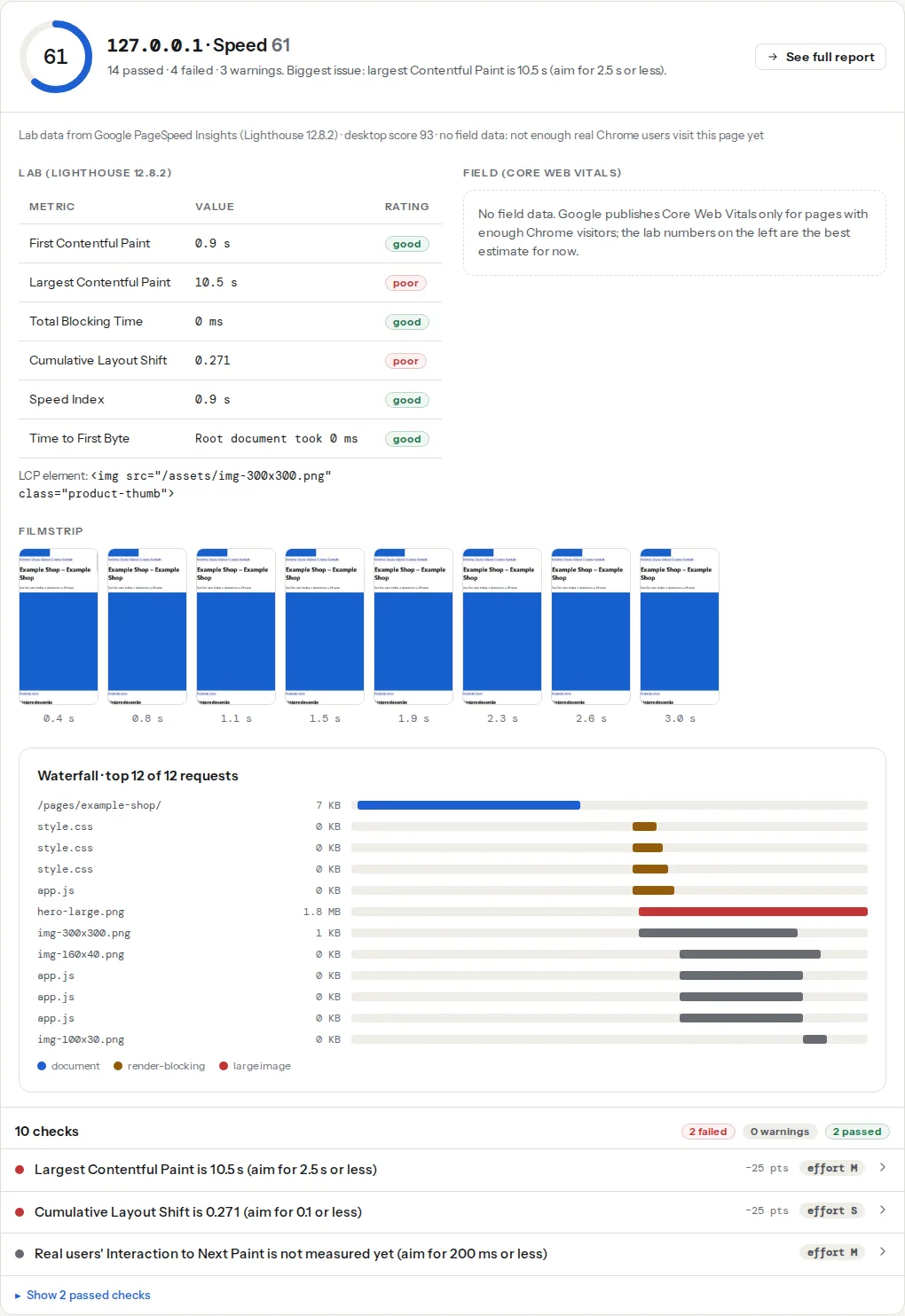
When the panel says "no field data", Google does not publish Core Web Vitals for that page yet, and Search Console will not have a row for it either. The lab numbers are then the best estimate for both of you.
Step by step
The four workflows below are how the two tools hand off to each other. Each starts where the signal appears and ends where the fix is confirmed.
1. Monthly: new "not indexed" URLs → SEO audit on each
Open Search Console → Pages (under Indexing). The lower table lists the reasons pages are not indexed: "Excluded by noindex tag", "Blocked by robots.txt", "Page with redirect", "Not found (404)", "Crawled – currently not indexed", "Discovered – currently not indexed". Sort by the date the reason was last updated and look for URLs you want indexed.
For each one that matters, run the SEO audit on the exact URL. The indexability finding gives you the cause in one line:
- noindex directive: the page or its template has the tag. Open the technical detail; it says whether it is the meta tag or a header, and the fix on the card says where to look in WordPress.
- blocked by robots.txt: the robots.txt finding names the rule and the user agents it blocks.
- HTTP 301/302/404: the URL you want indexed is not the URL that serves the page. Google indexes the destination, so update the sitemap and the internal links to the final address.
"Crawled – currently not indexed" and "Discovered – currently not indexed" are different: the page is technically fine and Google chose not to index it, or has not got round to it. getReport cannot see Google's choice, but it can show you what Google saw: thin content, a duplicate title, a canonical pointing elsewhere. The guide on Discovered – currently not indexed covers that case.
2. A Core Web Vitals drop in Search Console → speed test on an affected URL
Search Console → Core Web Vitals shows URL groups rated poor or needing improvement, with an example URL per group. Copy one of those URLs and run the Core Web Vitals checker on it, mobile first, because the mobile report is the one that usually turns red.
Read the field bars first: they should match Search Console's numbers for the group, give or take, since both come from the Chrome UX Report. Then read the lab findings underneath. The LCP finding names the element, the CLS finding names what moved, the TBT finding lists the scripts. That is the diagnosis Search Console cannot give you. If the lab run is green while the field is red, Field data vs lab data explains the four combinations and what each means.
3. After a fix: re-run today, validate in Search Console for the weeks after
Deploy the change, then press Re-run on the getReport report (the same URL is otherwise served from the 12-hour cache). The finding should now pass; the report link is your before/after evidence for the client or the ticket.
Then go back to Search Console and press "Validate fix" on the affected issue. Validation is a 28-day process: Google re-crawls a sample and moves URLs out of the issue as it confirms them. It is the right place to confirm the fix at Google's end; it is the wrong place to find out whether the fix worked, because you already know.
For an indexing fix, use URL Inspection → "Request indexing" after the re-run passes. That asks Google to crawl the page sooner than it would on its own schedule.
4. A new site: pre-launch checklist, then verification and sitemap
Before a site goes live, Search Console has nothing to show; getReport does. Run the report on the staging URL and again on the live one, following the pre-launch website checklist. Fix indexability, the canonical, the sitemap and the security headers first.
Once the site is public, verify it in Search Console. The DNS record method (a TXT record at the domain) covers every subdomain and protocol at once; the HTML tag method is fine for a single site and is what the SEO plugins offer. Then submit the sitemap under Sitemaps and check that its status reads "Success" a day later. The getReport sitemap findings tell you whether robots.txt declares it, which is how every other crawler finds it without being told.
The limits, stated plainly
getReport cannot see:
- Queries, impressions, clicks and positions. Only Google has them.
- The canonical Google selected, as opposed to the one your page declares. URL Inspection shows "Google-selected canonical".
- Manual actions and security issues raised by Google's own systems.
- Crawl statistics: how often Googlebot visits and what it fetched.
Search Console cannot tell you:
- Why a page is slow, which element is the LCP, which script blocks the main thread.
- Which security header is missing, whether HSTS is set, whether cookies have their flags.
- Anything about a page it has not crawled, or about a site you do not own.
- Anything today. Its data lags days, and the Core Web Vitals report is a 28-day window.
Sharing
A getReport link is a public page that works for 12 months, so it goes into a ticket, a chat or a proposal as is; the person on the other end needs no account. Search Console access is granted per property under Settings → Users and permissions; "Full" lets someone validate fixes and submit sitemaps, "Restricted" is read-only. Give a developer the report link for the fix and restricted Search Console access for the confirmation.
Platform notes
WordPress. Yoast SEO and Rank Math both have a field for the Search Console verification code under their webmaster tools settings, and Google's Site Kit plugin verifies the site and shows the Performance report inside wp-admin. Settings → Reading → Discourage search engines is the switch behind most noindex findings on new WordPress sites; see Discourage search engines, explained.
Shopify. Verification is a meta tag added in the theme's theme.liquid head, or through the Google & YouTube channel app, which also submits the sitemap. The sitemap is always at /sitemap.xml and cannot be edited.
Static sites. Add the DNS TXT record at your registrar; the sitemap is whatever your generator writes, so run the validator on it once and add the Sitemap: line to robots.txt by hand.
Verify
- Search Console → Pages shows the URL you fixed under "Indexed" after the next crawl (URL Inspection → "Test live URL" shows the crawl result immediately).
- The getReport SEO audit passes indexable-status and robots-meta-noindex on the same URL.
- Search Console's Core Web Vitals report moves the URL group out of "poor" within 28 days of the field bars in getReport turning green.
- Sitemaps in Search Console reads "Success" with the expected number of discovered URLs; the getReport sitemap validator reports no protocol errors.
Common mistakes
- Comparing Search Console's 28-day field data with one lab run. They measure different things. Compare the field bars in the getReport panel with Search Console; use the lab findings for the diagnosis only.
- Reading "Good URLs" as a page count. Search Console groups similar URLs and reports the group; the number moves when a group is reclassified, not when one page changes. Fix the template, not the example URL.
- Waiting for Search Console to confirm a fix you can verify in a minute. Re-run the report the moment the change is live. Use "Validate fix" to close the loop at Google's end, not to find out.
- Re-submitting the sitemap to fix an indexing problem. If the page is
noindexor blocked, the sitemap changes nothing. Fix the indexable-status finding first. - Assuming a missing Search Console row means a problem. Pages with too few Chrome visitors have no field data anywhere. That is normal for small sites; the lab numbers are your guide until traffic grows.