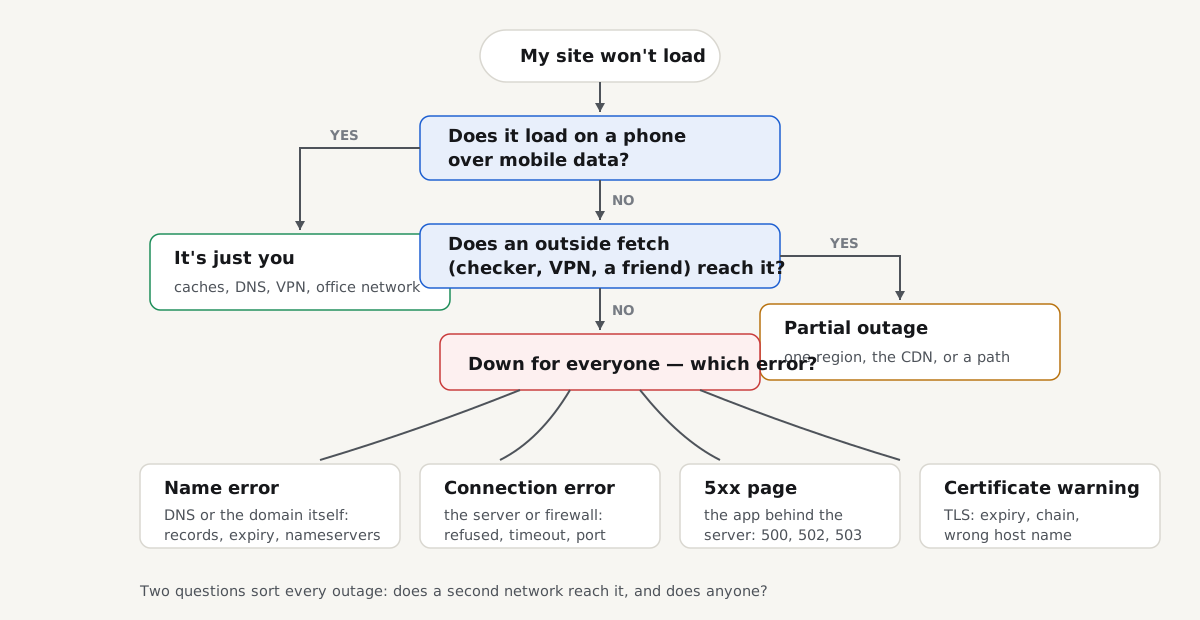
Your site will not load, and the next five minutes decide whether you fix the right thing or change things at random. A website down checker answers only the first question: down for everyone, or just for you? This guide is the owner's version of that check, done with things you already have: a phone, a second network, the right status pages, and the error on your screen. If that error is "This site can't be reached", the sub-code under it routes you to the exact fix; if visitors say your site "does not exist", the failing layer is the DNS lookup that turns your domain into an address. Here is the triage in order, then the first 10 minutes of a real outage.
Quick answer
- Load the site on a phone over mobile data first. One test that swaps your device, network and DNS resolver at once.
- Then fetch it from outside your region: a "down for everyone or just me" checker, a VPN exit, or a friend elsewhere.
- Check status pages before debugging: your host's first, Cloudflare's if it sits in front of you, your registrar's if DNS fails.
- Read what kind of down it is. A name error, a connection error, a 5xx page and a certificate warning point at four layers.
- "Works for me" usually means a cache, an allowlisted office IP, a logged-in session or a stale CDN copy is flattering your view.
- In a real outage: host status, certificate expiry, domain expiry, last change; in that order, before any new deploy.
Step 1: load it from a second network
Take your phone, turn Wi-Fi off, and open the site over mobile data. This is the single most informative step in the triage, because it changes everything at once: a different device with no browser cache, a different network with a different route and firewall, and a different DNS resolver. One reload splits the world in half.
If the site loads on mobile data, it is up, and the problem sits on your side: your machine, router, office network or its DNS. If it fails there too, two independent networks cannot reach it, and a real outage is now the likeliest answer.
Step 2: is the website down for everyone?
Two networks in the same city can still share a blind spot, so confirm with a fetch from somewhere genuinely outside:
- A "down for everyone or just me" checker. Several free sites request your URL from their own servers and report what came back. Any of them will do; what you want is the status code or error they saw, not just a red cross.
- A VPN exit in another country. Connect, reload, and you are a visitor from that region: useful when a block or CDN problem hits only part of the world.
- A person. Ask someone in another city for the exact error text, not just "it doesn't work". The wording is the diagnosis.
Outside fetches succeeding while yours fails means something between you and the site (DNS, a firewall, a proxy) is the problem. Outside fetches failing too means it is down for everyone, and the error they report says where to dig.
Step 3: read the status pages before you debug
Before touching your stack, spend one minute checking whether the outage is even yours:
- Your hosting provider's status page. When a host has an incident, thousands of sites go down together and there is nothing to fix on your side. Bookmark it today; during an outage you do not want to be searching for it.
- Cloudflare's status page, if Cloudflare sits in front of your site. An edge incident can take your site offline while your origin server hums along untouched.
- Your registrar's status page, when the failure is at the name layer: rare, but a registrar or DNS-host incident takes the domain down everywhere at once.
A listed incident changes your job from "fix it" to "wait, and tell your visitors": frustrating, but you can stop debugging.
Step 4: name the kind of down
"Down" is not one condition. The text on the error page routes you to the right fix:
- A name error: DNS_PROBE_FINISHED_NXDOMAIN, "server IP address could not be found". The domain is not resolving: expired domain, changed name servers or a missing record. The NXDOMAIN guide has the owner's checklist, starting with
whois. - A refused connection: the server answered "no": nothing is listening on the port, or a firewall rejects it. Fixing ERR_CONNECTION_REFUSED covers it.
- Silence: the request timed out: a firewall dropping packets, a dead machine, or DNS pointing at an address where nothing lives. Fixing ERR_CONNECTION_TIMED_OUT works through the suspects.
- A 5xx page: 502, 503 or 504 means the web server is up and the application behind it is not. The 502 Bad Gateway guide shows how to read the log that names the cause.
- A certificate warning: "Your connection is not private" means the site is reachable but HTTPS failed, very often because the certificate expired.
One more distinction worth 30 seconds: slow-but-up is not down. A page that renders after 20 seconds has a capacity or performance problem; a different playbook from a hard failure, and flooding it with retries makes it worse.
The "works for me" traps
The most dangerous outage is the one you cannot see. Each of these makes a broken site look fine from your desk:
- Your browser's cache. The page renders from disk while the server is unreachable. Test in a private window, or hard-reload with Ctrl+Shift+R.
- Your DNS cache. After a DNS change, your machine can keep resolving the old, working address for hours while visitors get the new, broken one, or the reverse. Ask a public resolver what the world sees: a DNS lookup against
1.1.1.1takes one command. - Your office IP is allowlisted. A firewall or WAF rule that allows your IP and blocks everyone else means you never see what visitors see from the office. This is why step 1 uses mobile data.
- You are logged in. WordPress maintenance mode shows the real site to logged-in admins while everyone else gets "Briefly unavailable", and cache plugins bypass the cache for admins, so a broken cached copy is served to every visitor except you. Test logged out, in a private window.
- A CDN is serving stale copies. "Serve stale" features keep your cached home page up while the origin is dead: until a visitor hits anything uncacheable. If search, login or checkout fails while the home page "works", suspect a dead origin behind a polite CDN.
The first 10 minutes of a real outage
Outside fetches fail, no host incident is listed, it is really yours. The temptation is to deploy something: resist it. A deploy during an undiagnosed outage adds a variable, can overwrite the evidence, and is itself the most common cause of outages. Four cheap checks first:
- The server's basic signs. Can you SSH in? Is the machine out of disk? A full disk takes sites down in strange, partial ways.
- The certificate. If visitors report a privacy warning, read the certificate's expiry date from the browser's padlock. An expired certificate is a 5-minute fix and a classic 3 a.m. cause: automate renewal, then monitor it so it never recurs.
- The domain. A whois lookup shows the Registry Expiry Date and status in seconds. An expired domain takes everything down (site and email) while your server runs on, untouched.
- The last change. The question that solves most outages: what changed last? A deploy, a plugin update, a DNS edit. If the timing matches, roll that change back; one targeted revert, not a stream of hopeful fixes.
Then say something. One line on your status page or social channel ("we know, we're on it") stops the support flood. Visitors forgive downtime far faster than silence.
A website down checker only tells you once
Every check above is manual: it answers "is it down now?". Nobody runs a website down checker at 3 a.m.; you find out from a customer, hours later. Two kinds of watching help, and they do different jobs.
Uptime monitoring requests your site on a fixed schedule from several locations and alerts you when it stops answering. On getReport's roadmap this is a funded unlock: a probe every 5 minutes from 3 regions, alerting after two failed checks in a row, switched on for everyone once donations cover it.
Change monitoring watches what a page says, not whether it answers:
The change monitor reads a page's visible text once a day and emails you the added and removed lines (up to 25 of each) the day they change. Nothing is watched until you confirm by email, you can watch up to 5 pages per address, and it stays silent when nothing changed. It is not an uptime alert: no email is sent when a page cannot be read, so it will not tell you the site is down; it tells you when a page's words change under you, a different 3 a.m. surprise. It is a funded unlock too: built and tested, it switches on for everyone once donations cover the daily checks.
Until automated eyes are on your site: bookmark your host's status page, put the domain on auto-renew, and keep this triage where you can find it with the site down.
Questions people ask
How do I check if my website is down for everyone?
Fetch it from somewhere that is not you: load it on a phone over mobile data, run it through a checker that requests the page from its own servers, or ask someone on another network for the exact error text. If outside fetches fail too, it is down for everyone and the fix is server-side; if they succeed while yours fails, the problem is your device, network or cache.
Why is my website down for others but working for me?
Because you are not seeing what they see. Your browser may serve a cached copy, your DNS cache may hold a working address visitors no longer get, your office IP may be allowlisted through a firewall that blocks everyone else, or you are logged in and bypassing a maintenance page or broken cache. Test like a stranger: logged out, in a private window, on a phone over mobile data.
What should I do first when my website goes down?
Confirm it is really down from outside, then check four things before changing anything: your host's status page, your certificate's expiry date, your domain's expiry date, and what changed last; a deploy, a plugin update, a DNS edit. Most outages trace back to one of those. If the timing matches the last change, roll it back; never push new "fixes" onto an undiagnosed outage.
How do I get alerted when my website goes down?
Use an uptime monitor: a service that requests your site on a schedule from several regions and alerts after consecutive failures, so a single blip does not wake you. getReport's change monitor does a different job; it emails you when a page's visible text changes, and stays silent when the page cannot be read, so it does not replace an uptime alert. Uptime monitoring with 5-minute probes is planned on getReport as a funded unlock.
Can my domain expiring take my website down?
Yes, and it is one of the most complete outages there is. An expired domain is pulled from DNS, so every visitor gets DNS_PROBE_FINISHED_NXDOMAIN while your server keeps running untouched, and email on the domain stops with it. Run whois yourdomain.com and read the Registry Expiry Date; renewing usually restores DNS within hours. Then set auto-renew with a payment card that works.