ERR_CONNECTION_TIMED_OUT is the error for pure silence: the browser had the site's address, sent its connection request, and nothing came back (no page, no refusal, no reset) until it gave up waiting. It is one of the sub-codes behind Chrome's "This site can't be reached" page, and the hardest to read, because silence never says who stayed quiet: a firewall dropping packets, a server down or drowning, a dead address, or a lossy path. This guide covers what exactly times out, the visitor pass, and the owner's hunt for what swallows the packets.
Quick answer
- Timed out means no answer of any kind. The browser sent a connection request (a TCP SYN) and nothing replied before the clock ran out. ERR_CONNECTION_REFUSED is the opposite: an instant "no".
- Visitor: load the site on a phone over mobile data. Works there? Pause the VPN and proxy, restart the router, then work through the umbrella guide's checklist.
- Owner, in rough order: a firewall or cloud security group dropping ports 80 and 443, DNS pointing at an old address, an overloaded server dropping handshakes, filtering set to drop, or a broken IPv6 record.
- Diagnose with
curl -v --connect-timeout 10from outside your network, andmtr --tcp -P 443to see where the path goes quiet. - A timeout with an error page is a 504: a proxy reached the site and gave up on the app behind it. Here, no server answered at all.
What ERR_CONNECTION_TIMED_OUT actually is
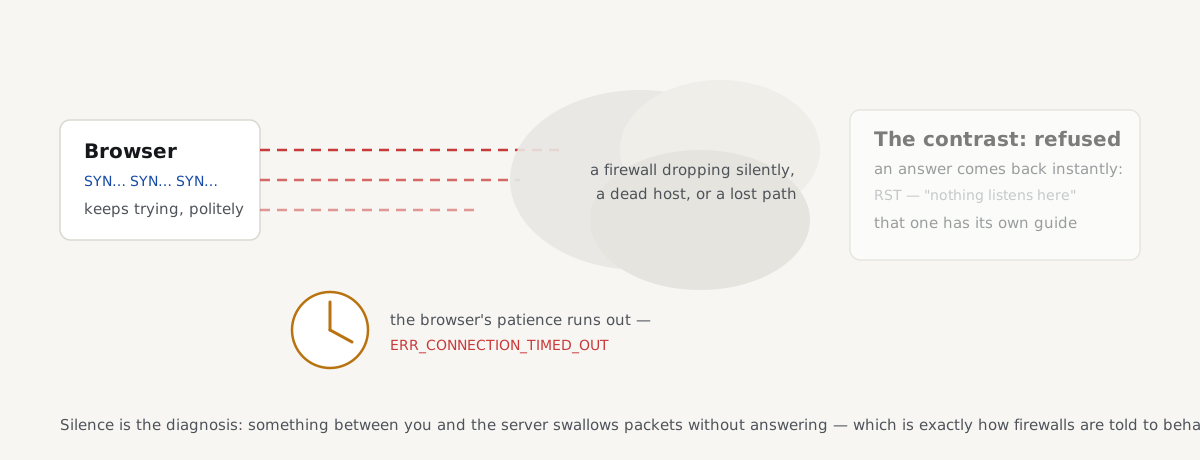
Every page load starts with a TCP handshake: the browser sends a connection request, a SYN packet, to the site's IP address on port 443 (or 80), and a healthy server answers within milliseconds. ERR_CONNECTION_TIMED_OUT means that answer never came; the operating system resent the SYN with growing gaps (Linux retries six times over roughly two minutes), and the browser eventually stopped waiting.
Only three things produce that silence: the packets never arrive (the host is down, the address wrong, the route broken); they arrive and are deliberately discarded, which is what a firewall's DROP rule does; or the replies are lost on the way back.
The sharpest contrast is with connection refused: there the machine answered (a TCP reset, within a second) so something is at the address, just not listening, and the refused guide chases that machine. A timeout cannot even tell you whether anything exists at the address. The other look-alike lives a layer up: with a 504 gateway timeout your connection worked, and a proxy that gave up on the application behind it sent a real HTTP response. A 504 sends you hunting for slow application code; a connection timeout, to firewalls, routing and DNS.
If you're a visitor: the short pass
The quickest split: load the site on a phone with Wi-Fi off, over mobile data. If it times out there too, it is unreachable for everyone; tell the owner, with the time and your location. If the phone loads it fine, the silence sits on your side, and three suspects cause most of it:
- VPN and proxy. Both route every request through a server that can drop what your direct line would deliver. Disconnect the VPN, switch the proxy off, reload.
- The router. It carries routes and the DNS cache for every device behind it; power it off for 30 seconds.
- A network that filters. Corporate, school and hotel firewalls (and some country-level filters) drop packets for blocked sites rather than showing a block page, so "blocked here" looks exactly like "down everywhere".
The remaining steps (flushing DNS, switching resolvers, pausing antivirus web protection) are shared with every sub-code and written once, in full, in the umbrella checklist. One suspect you can mostly cross off is MTU: a packet-size mismatch lets the small handshake packets through and stalls later, as pages hanging half-loaded, not as a timeout on the first step.
If you own the site: what swallows packets
A timeout reported from outside means packets die quietly somewhere between your visitors and your server. The usual suspects, in order:
A firewall that drops instead of rejecting
The verb decides the error. A REJECT rule answers back, so the attempt fails instantly: usually as connection refused. A DROP rule discards the packet and says nothing, so the visitor waits out the entire timeout:
sudo iptables -A INPUT -p tcp --dport 443 -j DROP     # silence: visitors time out
sudo iptables -A INPUT -p tcp --dport 443 -j REJECT   # an answer: visitors fail instantly
ufw has the same split: ufw deny drops, ufw reject answers. Cloud firewalls are the trap: an AWS security group has no reject at all; anything without an allow rule is silently dropped, which is why freshly moved sites time out from everywhere while answering fine over SSH. Check both layers (sudo iptables -L -n or sudo ufw status verbose on the server, plus the security group in the cloud console) and allow TCP 80 and 443 from anywhere, not just your own IP.
Stale DNS after a move
If the A record still carries the old server's IP address (or visitors' resolvers still cache it) browsers connect to an address where nothing answers. Old machine switched off means timeout; address recycled to another tenant usually means refused. Compare dig +short example.com against the server's real IP.
A server too overloaded to accept connections
The kernel queues incoming handshakes for the application to collect; under extreme load (or a SYN flood) the queue fills and new SYNs are dropped: silence from a machine that is up. The giveaway is flicker: some visitors connect while others time out, worst at peaks. Two Linux commands show it:
ss -ltn                      # Recv-Q close to Send-Q on :443 = the accept queue is full
nstat -az | grep -i listen   # ListenOverflows / ListenDrops counting up
The durable fix is capacity, not queue tuning, and the monitoring section below catches the slide weeks earlier.
Filtering that drops on purpose
Geo-blocking, rate limits and bot rules (at the CDN, WAF or server) can be set to drop matching traffic instead of answering it. Those visitors simply time out, and nothing reaches your logs. If reports cluster by country, network or user agent, read those rules with that lens, and prefer a visible 403 block over a silent drop: a rule that answers is diagnosable, one that drops looks like an outage.
IPv6 published but not answering
An AAAA record with nothing listening on IPv6 sends IPv6-preferring visitors' handshakes into the void. Browsers mostly hide it by racing IPv4 and IPv6 in parallel (Happy Eyeballs, RFC 8305); curl, monitors and older clients do not. If curl -6 https://example.com times out while curl -4 works, make the server answer on IPv6 or remove the AAAA record until it does.
How to diagnose a connection timed out error
curl shows which step hangs. Give it a short limit:
curl -v --connect-timeout 10 https://example.com/Output stopping at Trying 203.0.113.7:443... and ending in Connection timed out (exit code 28) means the handshake never completed; a connection that opens and stalls later is a slow server instead. The output also names the IP curl tried; stale DNS unmasks itself right there. For a per-stage view, curl -o /dev/null -sS -w 'connect %{time_connect}s tls %{time_appconnect}s first byte %{time_starttransfer}s\n' times each layer; the first number that never completes names the broken one.
traceroute and mtr, read honestly. mtr --tcp -P 443 example.com probes with TCP on the real port, because many routers ignore the ICMP and UDP probes traceroute sends. Then resist the common misreading: a middle hop showing 100% loss while later hops answer is a router deprioritising probe replies, not packet loss; loss is only real when it continues to the end. If the trace dies at the same hop every time, that hop is where to point your host or provider.
Test from outside your own network. Your desk is the worst vantage point: an office-IP allow rule, a VPN or a warmed cache can flatter the result. Use a phone on mobile data, a server elsewhere, or the outside URL check in the umbrella guide. "Times out from outside, works at my desk" is a firewall whitelisting you while dropping the world.
Timeouts in monitoring: two kinds of patience
In monitoring, a connection timeout has no HTTP status code at all: the server never said anything to have one. A monitor that logs 504s is seeing the other patience run out: the connection worked and a proxy gave up on the application behind it, the 504 guide's territory. Same word, different clock: the browser's patience for a handshake versus the proxy's for an answer.
Overload timeouts rarely arrive out of nowhere: before the accept queue overflows, the server answers ever more slowly, and time to first byte is the early warning:
The TTFB test requests your page from Frankfurt and shows the server's first-byte time next to Lighthouse's and real Chrome users'. A first byte drifting from 200 ms toward full seconds is the same overload curve that ends in dropped handshakes. Two report findings track it:
Watch the pages that do real work (search, filters, checkout) where the drift begins long before the cached home page feels anything.
Questions people ask
What does ERR_CONNECTION_TIMED_OUT mean?
It means the browser sent a connection request to the site's address and received no reply of any kind before it gave up: no page, no refusal, no reset. The silence can come from a firewall dropping packets, a down or overloaded server, a DNS record pointing nowhere, or a filtering network. A phone on mobile data tells you which side owns the problem.
How do I fix ERR_CONNECTION_TIMED_OUT?
As a visitor: test on a phone over mobile data, pause the VPN, switch the proxy off, restart the router, then run the umbrella guide's checklist. As the owner: allow ports 80 and 443 in every firewall layer including the cloud security group, check with dig that DNS points at the right address, and test with curl from outside your network.
What is the difference between a connection timeout and connection refused?
An answer versus none. Connection refused means the machine replied instantly with a TCP reset: it is reachable, and nothing listens on that port, or a firewall rejects it. A connection timeout means no reply ever came: the packets were dropped, lost or sent to a dead address. Refused points at the machine itself; a timeout at drop rules, routing, DNS or the path.
Can a firewall cause ERR_CONNECTION_TIMED_OUT?
Yes: a firewall that drops is the most common server-side cause. A DROP rule (iptables DROP, ufw deny) discards packets without answering, so visitors wait out the full timeout, and cloud security groups always drop what they do not allow. Allow TCP 80 and 443 in both the OS firewall and the cloud layer. A reject rule produces an instant connection refused instead.
Why does my site time out only for some visitors?
Because the silence sits on a path only they use: a geo or bot rule dropping one country or network, a broken IPv6 setup hitting IPv6-preferring networks such as many mobile carriers, a filter on their side, or stale DNS still handing out the old address. An affected visitor's country, network and exact error usually name the cause.