An accessibility statement is one page that tells visitors how accessible your site is, what does not work yet, and how to reach you when something blocks them. Written honestly, it takes an afternoon and protects you better than any badge; written as a boast, it becomes the first thing a complaint quotes back at you. This guide covers who needs one, what goes in it, a template to fill in, and the monthly routine that keeps it true.
Quick answer
- Public sector bodies in the EU and the UK must publish one in a set format. Businesses covered by the European Accessibility Act must publish information on how their service meets the accessibility requirements, and a statement page is the usual way to do it. Everyone else can publish one voluntarily.
- Say which standard you measure against (WCAG 2.2 level AA), whether you meet it fully, partly or not, and list what does not work with a plan and a date.
- Name the method: self-evaluation, an external audit, and the tools you used. An automated scan covers part of WCAG, so say so.
- Give a contact route with a response time, and date the statement.
- Put it at
/accessibility, link it from the footer of every page, and review it at least once a year and after every redesign.
Why an accessibility statement matters
Who must publish one
- EU public sector. The Web Accessibility Directive (EU) 2016/2102 requires public sector websites and apps to publish a statement following the model in Commission Implementing Decision (EU) 2018/1523: compliance status, non-accessible content and why, how the statement was prepared, a feedback mechanism and a link to the enforcement procedure.
- UK public sector. The Public Sector Bodies (Websites and Mobile Applications) (No. 2) Accessibility Regulations 2018 require a statement with much the same content, and GOV.UK publishes a sample to follow.
- Businesses under the European Accessibility Act. Since 28 June 2025, providers of the services in scope (e-commerce, consumer banking, transport ticketing, e-books and others) must make public how their service meets the accessibility requirements. The exact form depends on national law; a statement page linked from the footer is the common answer. European Accessibility Act: what small sites must do covers who is in scope.
- Everyone else. No obligation, but a statement with a working contact route turns a frustrated visitor into an email you can answer instead of a lost customer or a public complaint.
What it does for visitors
A blind shopper who hits an unlabelled payment field needs to know that the problem is known, whether there is another way to order, and who to write to. The statement is where they look. For your team, it is the list of known problems in one public place, which is a strong reason to keep that list short.
How getReport checks it
The statement itself is text; no tool can grade it. What the accessibility checker gives you is the evidence behind its claims. It renders the page in Chromium, runs axe-core against WCAG 2.0, 2.1 and 2.2 at levels A and AA plus axe's best-practice rules, and groups the violations by impact. The axe-core version is printed next to the counts; note it in your statement's method section.
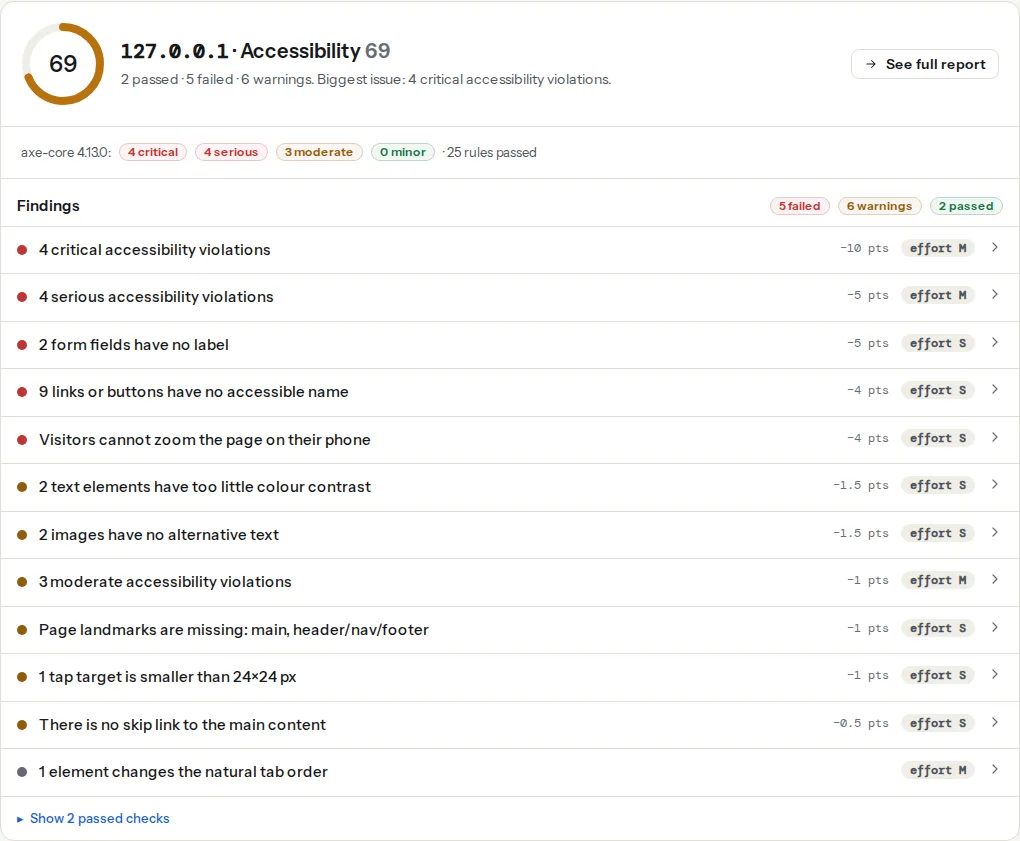
The count in these two titles is the number of axe rules that failed, not the number of elements; the technical detail lists each rule with its element count. A rule that fails on one template usually fails on every page built from it, which is exactly the level at which a statement's "known limitations" should be written: "the date picker on the booking form", not "43 elements".
Contrast and form labels are the two findings that appear most often, and the two you can usually fix in a day. Fixing them before publishing is cheaper than writing them up. Colour contrast: fixing the most common finding and Form labels: every input needs one have the steps.
What the scan can and cannot back up
| Claim in your statement | Automated check covers it? |
|---|---|
| Text contrast meets 4.5:1 | Yes, for text axe can measure; not text over images |
| Every form field has a label | Yes |
| Links and buttons have names | Yes, that a name exists; not that it makes sense |
| Page language is set | Yes |
| Landmarks and a skip link exist | Yes |
| Tap targets are at least 24×24 px | Yes |
| Pinch zoom is not disabled | Yes |
| Images have alt text | That it exists, not that it is right |
| Keyboard focus is always visible | No |
| Content reads in a meaningful order | No |
| Videos have accurate captions | No |
| Error messages explain how to fix the error | No |
| Content is understandable | No |
Automated tools catch roughly a third of WCAG problems, the ones accessibility basics walks through. A statement that says "we tested with an automated tool" is honest; one that says "fully conformant" on that basis is not.
Step by step
1. Decide the scope
One statement per site or per app. List what it covers ("www.example.com and the booking app on iOS and Android") and what it does not ("the job board run by a third party at jobs.example.com"). Content you do not control still affects visitors; name the provider and how to reach them.
2. Test the templates that matter
Run the checker on each distinct template, not on every page: home, a content page, a listing or category, a product or service page, the contact form, the cart and checkout if you sell, and search results. Then do a manual pass: the whole task with the keyboard only (Tab, Shift+Tab, Enter, Space, Escape) and a short run with a screen reader. Testing with a screen reader shows how to do the second part in half an hour.
Write every problem down with the template, what fails, which WCAG success criterion it breaks, and who fixes it.
3. Choose your conformance status honestly
- Fully conformant: every page in scope meets every WCAG 2.2 A and AA criterion. Rare, and only believable after a full manual audit.
- Partially conformant: some content does not meet the standard. This is the honest answer for most sites, and it is not an admission of failure; it is the format the EU model uses.
- Non-conformant: most content does not meet it. Say so, and put the plan up front.
Use WCAG 2.2, the current W3C Recommendation since October 2023. Stating 2.1 is acceptable where a regulation or standard still references it, but name the version you actually tested against.
4. Write it
The W3C's accessibility statement generator walks through the same sections as the template below. Fill in the brackets, delete what does not apply, and keep the sentences short. Write in plain language and the second person, without legal phrasing, and make no claim you cannot point to a test for.
# Accessibility statement for [Example Shop]

[Example Shop] wants everyone to be able to use [www.example.com].
This statement covers [www.example.com and its checkout]. It does not
cover [the job board at jobs.example.com, run by (provider)].

## How accessible this site is

This site is [partially conformant] with the Web Content Accessibility
Guidelines (WCAG) 2.2 level AA. [Partially conformant] means that some
parts do not fully meet the standard yet. They are listed below.

## What does not work yet

- [The date picker on the booking form cannot be used with a keyboard.
  Type the date into the text field instead.] We plan to fix this by
  [31 January 2027].
- [Some older PDF price lists are not tagged for screen readers.
  Email us and we will send the information in another format.]
  We will replace them by [31 March 2027].
- [Product videos published before 2025 have no captions.] We are
  adding captions, most-viewed first, by [30 June 2027].

## How we tested

We last tested this site on [25 September 2026]. We used:
- an automated scan of [8] page templates with axe-core [4.x]
  (via getReport's accessibility checker), which covers part of WCAG;
- a manual keyboard test of every template;
- a screen reader test with [NVDA on Windows and VoiceOver on iOS]
  on [the home page, a product page and the checkout].
[An external audit by (company) on (date) / No external audit yet.]

## Tell us about a problem

If something on this site does not work for you, or you need
information in another format, contact us:
- email: [[email protected]]
- phone: [+385 1 234 5678], [Monday to Friday, 9:00 to 17:00]
We reply within [5 working days].

## Enforcement

[Public sector and EAA only: name the national body you can complain
to if our answer does not satisfy you, with a link.]

This statement was prepared on [25 September 2026] and last reviewed
on [25 September 2026].
Two details make it credible. Each known limitation gives a workaround where one exists, because a visitor reading it wants to finish their task today. And every date is real: a plan with no date is a wish.
5. Publish it where people look
Use a short, predictable address such as /accessibility, and link it from the footer of every page with the link text "Accessibility" or "Accessibility statement". Keep it as an HTML page, not a PDF, and run the checker on the statement page itself; a statement that fails its own scan does not inspire confidence.
6. Keep it true
Put a monthly recurring task in your calendar:
- Re-run the accessibility checker on the key templates and save each report link in your tracking sheet next to the date.
- Compare the findings with the "What does not work yet" list. New failures are either fixed within the month or added to the list; fixed items come off the list.
- Repeat the keyboard pass on anything that changed (a new form, a new menu, a new checkout step).
- When the list changes, update the "last reviewed" date.
A full review, including the screen reader pass, belongs in the calendar once a year and before every redesign goes live.
Platform notes
WordPress
Create the statement as an ordinary page, then add it to the footer menu under Appearance → Menus, or in the footer template part in the Site Editor for block themes. Some plugins generate a statement for you; read every sentence before publishing, because some templates declare conformance that nobody has tested. Delete any claim you cannot back up.
Overlay widgets
A toolbar or overlay that changes fonts or colours does not change the underlying code that WCAG is measured against, so it cannot turn a non-conformant site into a conformant one. A statement that claims conformance because an overlay is installed is untrue. If you keep an overlay, the statement should describe the site's own status and leave the widget out of the conformance claim.
Shopify, Squarespace, Wix and Webflow
The platform owns the checkout or parts of the theme you cannot edit. Test them anyway, and list problems in platform-controlled parts as known limitations with "we have reported this to [platform]", plus the workaround you offer (phone orders, email).
Statement or VPAT?
In US procurement, buyers ask for a VPAT: the Voluntary Product Accessibility Template from the Information Technology Industry Council, which once filled in becomes an Accessibility Conformance Report (ACR). It is a criterion-by-criterion table for a product, written for a buyer. A statement is a page for visitors. Software companies that sell to the US public sector often need both; the ACR's findings then feed the statement's known limitations.
Verify
- The statement is reachable from the footer of every page, including the checkout and error pages.
- It names WCAG 2.2 AA (or the version you tested), a conformance status, a test date and a review date within the last 12 months.
- Every item in "What does not work yet" has a workaround or a date, and the latest accessibility checker reports show no failed finding that is missing from the list.
- The contact address works: send a test message and time the answer against the response time you promised.
Common mistakes
- "This site is fully WCAG compliant." Written after an automated scan or because an overlay was installed. Symptom: the first complaint quotes it. Fix: state partial conformance and list what is known.
- No contact route. A statement without an email or phone number leaves blocked visitors with nowhere to go. Fix: a monitored address and a stated response time.
- No date. An undated statement from 2021 reads as abandoned. Fix: the prepared and last-reviewed dates, updated after each review.
- WCAG 2.0 in 2026. It signals nobody has looked since the statement was written. Fix: test against WCAG 2.2 AA and say so.
- A statement nobody can find. Linked only from the sitemap or buried in the terms. Fix: a footer link labelled "Accessibility" on every page, pointing at an HTML page.