A sighted visitor finds the content of a page in a glance: the header is at the top, the menu is the row of words under the logo, the article is the big block in the middle. A screen reader user gets the same page as a stream of text, and the only way to skip the forty menu links on every page is to know where the content starts. Landmarks (<header>, <nav>, <main>, <footer>) give the page that map, and a skip link gives keyboard users a one-keystroke shortcut to the content. Both are a few tags in one template. This guide explains the roles, the rules for using them, the CSS for the skip link, and where WordPress themes and page builders lose them. Half an hour for most sites.
Quick answer
- Wrap the page in four elements:
<header>(logo, main menu),<nav>(each menu),<main>(the content, exactly one),<footer>(the bottom area). - Give repeated landmarks names:
<nav aria-label="Main">,<nav aria-label="Footer">. - Add
<a href="#main" class="skip-link">Skip to content</a>as the first thing in<body>, give<main>id="main"andtabindex="-1", and hide the link until it receives focus. - Do not put
<main>inside<header>, nest one<header>in another, or hide the skip link withdisplay: none. - Run the accessibility checker: the landmarks and skip link findings both pass when the structure is in place.
Why landmarks and skip links matter
How people use them
Screen readers have a landmark navigation mode. In NVDA, pressing D jumps to the next landmark; in JAWS it is R; in VoiceOver the rotor lists them by name. A user landing on a product page presses one key, hears "main", and is at the content. Without landmarks the same user hears "banner" nothing, "main" nothing, and falls back to reading from the top or hunting for the first heading. On a page with a mega-menu, that is a hundred items before the product name.
Keyboard users who can see have the parallel problem. Tab moves through every link in order, so reaching the "Add to cart" button on a page with a 40-link header takes 40 presses, on every page. A skip link is the first Tab stop; it appears when focused and, when activated, moves focus past the header. That is one press instead of forty, and it is the first thing a keyboard user looks for.
What the standards say
WCAG 2.4.1 (Bypass Blocks, level A) requires a way to skip repeated content; a skip link or landmarks both satisfy it, and having both is the norm. 1.3.1 (Info and Relationships) covers structure being expressed in markup rather than only visually, which is what landmarks do. Neither costs anything in design terms: the elements are invisible unless you style them.
Why it goes missing
Landmarks disappear for boring reasons. A theme from 2014 uses <div id="header"> and <div id="content">. A page builder wraps every section in nested <div>s with no semantic element anywhere. A React layout renders the header as a component that outputs a <div>. The skip link is deleted by a designer who saw it flash on Tab and thought it was a bug. None of these needs a rewrite; each is one tag or one setting.
How getReport checks it
The report renders the page in Chromium and counts landmarks in the live DOM, so elements added by JavaScript count too. It counts <header> or role="banner", <nav> or role="navigation", <main> or role="main", <footer> or role="contentinfo", plus <aside>, role="search" and <form> for the evidence line. The finding warns when there is no <main> at all, or when header, nav and footer are all missing. It does not fail a page for two <main> elements or an unlabelled second <nav>; those come through as moderate axe violations instead (landmark-one-main, landmark-unique, landmark-no-duplicate-banner).
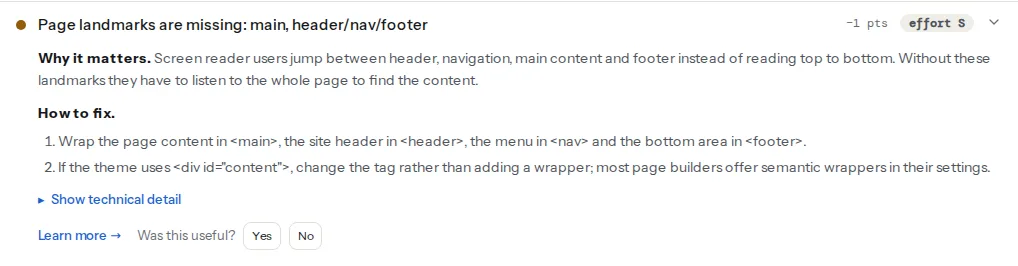
For the skip link, the report looks at the first three focusable elements on the page. It passes when one of them is a link to an anchor on the same page (#main, #content) whose text or aria-label contains "skip". A skip link that is the fifth focusable element, after a cookie banner and two utility links, is not found, and a keyboard user would not find it there either.
The moderate axe summary is where landmark quality problems appear: two banners, two <main>s, navigation regions without distinct names, and a <section> used as a region without a label:
Step by step
1. Map the page to the roles
Every landmark role has an HTML element that gives it for free. Use the element; add a role attribute only when you cannot change the tag.
| Area of the page | Element | Role it gets | Rule |
|---|---|---|---|
| Logo, site name, main menu, search | <header> | banner | One per page. A <header> inside <article> or <section> is not a banner, which is correct |
| Any menu or list of links for navigation | <nav> | navigation | As many as you need; name each when there is more than one |
| The unique content of this page | <main> | main | Exactly one, not inside another landmark |
| Related but separate content: sidebar, related posts | <aside> | complementary | Name it if there are several |
| Copyright, footer links, contact details | <footer> | contentinfo | One per page; <footer> inside <article> is not a landmark |
| The site search | <search> or role="search" on the form | search | Wrap the search form; <search> is new in HTML and supported by current browsers, role="search" covers the rest |
| A form that matters on its own (checkout, contact) | <form aria-label="…"> | form | Only a landmark when it has a name |
| A distinct section worth jumping to | <section aria-labelledby="…"> | region | Only a landmark when it has a name; do not label every section |
The header and footer contain navigation, so <nav> goes inside them. <main> starts after the header and ends before the footer. Everything a visitor can see belongs in one landmark; text floating between landmarks is text a landmark user never reaches.
2. Change the tags in the layout template
The fix lives in one file: the theme's header.php and footer.php, the layout component in a JavaScript framework, theme.liquid on Shopify. Replace the wrappers; do not add new wrappers around the old ones, which leaves the CSS targeting #header untouched but doubles the DOM. A complete skeleton:
<body>
  <a class="skip-link" href="#main">Skip to content</a>

  <header>
    <a href="/"><img src="/logo.svg" alt="Example Shop home" width="140" height="32"></a>
    <nav aria-label="Main">
      <ul>
        <li><a href="/shoes/">Shoes</a></li>
        <li><a href="/jackets/">Jackets</a></li>
      </ul>
    </nav>
    <search>
      <form action="/search/" role="search">
        <label for="q">Search</label>
        <input id="q" name="q" type="search">
        <button type="submit">Search</button>
      </form>
    </search>
  </header>

  <main id="main" tabindex="-1">
    <h1>Alpina Pro trekking shoe</h1>
    …
  </main>

  <aside aria-label="Related products">…</aside>

  <footer>
    <nav aria-label="Footer">…</nav>
    <p>© Example Shop</p>
  </footer>
</body>
If the CSS relies on ids or classes (#header, .site-footer), keep them on the new elements; the tag change does not affect selectors that use them. If the CSS uses the tag name div directly, it is time to add a class.
3. Name repeated landmarks
Two <nav> elements are announced as "navigation" and "navigation". With aria-label they become "Main navigation" and "Footer navigation", and a user can pick the one they want from the list. Do not include the word "navigation" in the label; the screen reader adds the role. If a visible heading already names the region, point at it instead of repeating the text:
<nav aria-labelledby="footer-links-heading">
  <h2 id="footer-links-heading">Customer service</h2>
  <ul>…</ul>
</nav>
The same applies to several <aside> elements and to any <section> you want to expose as a region. A <section> without a name is not a landmark at all, which is usually what you want for the twelve sections of a landing page.
4. Add the skip link
The link is the first element inside <body>, before the header, so it is the first Tab stop. Its target is the <main> element's id. tabindex="-1" on <main> lets every browser move keyboard focus into it when the link is activated, so the next Tab goes to the first link in the content instead of back to the top; without it, some browsers scroll but leave focus where it was.
<a class="skip-link" href="#main">Skip to content</a>
…
<main id="main" tabindex="-1">
The CSS keeps it off-screen until it has focus, then shows it where a sighted keyboard user will notice:
.skip-link {
  position: absolute;
  top: -100%;
  left: 1rem;
  z-index: 1000;
  padding: 0.75rem 1.25rem;
  background: #0b57d0;
  color: #ffffff;
  font-weight: 600;
  text-decoration: none;
  border-radius: 0 0 4px 4px;
}

.skip-link:focus {
  top: 0;
  outline: 3px solid #ffffff;
  outline-offset: 2px;
}

/* the focused <main> should not get a focus ring of its own */
main:focus {
  outline: none;
}
Two things not to do: display: none or visibility: hidden on the link (both remove it from the tab order, so it never appears), and a target that is a <div> deep in the content rather than the <main> element (the jump then lands in an unpredictable place).
A sticky header can cover the target when the page scrolls to it; add scroll-margin-top to main equal to the header's height so the content lands below it.
5. Check the order of focus
Load the page, press Tab once. The skip link should appear. Press Enter; the next Tab should land on the first link or button inside the content. If a cookie banner opens on load and takes focus first, that is acceptable, but the skip link should still be the first Tab stop once the banner is dismissed. If the site has a fixed "back to top" or chat widget that is injected at the start of <body> by a script, move the skip link before it or move the widget to the end.
Platform notes
WordPress
Block themes (Twenty Twenty-Two onward and most themes built for the Site Editor) get a skip link from core: when the template contains a <main> element, WordPress prints a "Skip to content" link and its CSS automatically. Check the <main> tag exists in the Group block that wraps the content (Group block → Advanced → HTML element → <main>), and use the same setting to make the header and footer blocks output <header> and <footer>. Navigation blocks output <nav> and have an "Accessible label" setting in their block options for the aria-label.
Classic themes vary. The bundled Twenty Twenty-One and earlier all include a skip link in header.php and semantic wrappers. Older commercial themes often do not. Edit header.php and footer.php in a child theme: change <div id="masthead"> to <header id="masthead">, <div id="content"> to <main id="content" tabindex="-1">, <div id="colophon"> to <footer id="colophon">, and add the skip link after the opening <body> tag (after wp_body_open()). WordPress's .screen-reader-text class plus a :focus rule does the show-on-focus part.
Elementor. The Hello theme wraps content in <main id="content"> and has a skip link. Header and footer built with Theme Builder are containers, and each container has an HTML Tag setting (Layout → HTML Tag: div, header, footer, main, article, section, aside, nav). Set the header template's outer container to header, the footer's to footer, and the menu's wrapper to nav. Other builders (Bricks, Beaver Builder, Divi) have an equivalent setting per row or section; the report's evidence line tells you which landmarks are still at zero.
Shopify
Dawn and the themes derived from it include a skip link (<a class="skip-to-content-link" href="#MainContent">), <header>, <main id="MainContent"> and <footer> in layout/theme.liquid. If a customised theme lost them, that file is where they go back. Third-party apps that inject a bar at the top of <body> can push the skip link out of the first three focusable elements; check the order after installing one.
Static sites and frameworks
Put the skeleton from step 2 in the layout component (layout.tsx, _app, BaseLayout.astro, default.html). In React, <main> is a normal element; the common mistake is a <div id="root"> with the whole app inside a single <div>, and the fix is the same tag change. Single-page apps should also move focus to <main> after a client-side route change, so the skip link and landmark navigation work on the second page as well as the first.
Verify
- Keyboard: load the page, press Tab once. A "Skip to content" link appears. Press Enter, then Tab: focus is on the first control inside the content.
- Screen reader: open the landmarks list (NVDA: Insert+F7 → Landmarks; VoiceOver: rotor → Landmarks). It shows one banner, one main, one content info, and each navigation with its own name. The routine is in Testing with a screen reader.
- DevTools: in the Elements panel, search for
<mainand confirm there is exactly one. Or in the console:document.querySelectorAll('main, [role="main"]').lengthprints1. - Re-run the accessibility checker: "Page landmarks are in place" and "A skip link leads to the main content" both pass, and the moderate summary lists no
landmark-*rules.
Common mistakes
- Two
<main>elements. Symptom: axe reportslandmark-one-main; the theme has one in the layout and a plugin template adds another. Fix: remove the inner one, or make it a<div>. <header>around the whole page. Symptom: the banner contains the main content, so "jump to main" lands inside the header. Fix: close<header>after the menu.- Skip link hidden with
display: none. Symptom: pressing Tab shows nothing; the report says no skip link. Fix: the off-screen CSS above. - Skip link target is
#contentbut nothing has that id. Symptom: the link appears, Enter does nothing. Fix: match the id to the<main>element. - Unnamed second navigation. Symptom: the landmarks list shows "navigation" twice. Fix:
aria-labelon each. - Landmarks added with a wrapper
<div role="main">around the old<div id="content">. Symptom: it works, but every page carries an extra element and the CSS grows. Fix: change the tag instead. Readers who also need to fix the heading outline should see One H1 and a sane heading order; landmarks and headings together are the page's whole map.