A site in three languages has three copies of every page and one company behind them. Structured data has to say both things at once: this page is the German product page with German text and a euro price, and the shop that sells it is the same shop the English page describes. Get the first part wrong and Google shows the wrong language in a rich result; get the second wrong and it sees two or three organisations with slightly different names. This guide gives the rules, the JSON-LD to copy, and the two checks that show whether a language version is right.
Quick answer
- Each language version carries its own JSON-LD, written in that page's language, describing that page only. Never list every translation's URL or text inside one block.
- The Organization is one real-world thing: same
@id(an absolute URL on the main domain), samesameAslist and samelogoon every version. Translate the display name only throughalternateName. - Put
inLanguageonWebPage,ArticleandWebSitewith a BCP 47 code (de,en-GB,pt-BR) that matches the<html lang>and the hreflang tag of that page. Productkeeps the sameskuandgtineverywhere; translatenameanddescription, and giveoffersthe currency the visitor actually sees.- hreflang connects the versions, schema does not. Run the schema validator on two language versions and the hreflang checker on one.
Why multilingual schema matters
Google reads structured data per URL. When the French page carries an English description, the French rich result can show English text, or Google drops the rich result because the markup does not match the visible page. Google's general structured data guidelines require the markup to describe the content on the page; a mismatch is the most common reason a translated site loses the stars and prices its original language earns.
The second failure is invisible until you look for it. The English home page declares "name": "Example Shop", the Croatian one declares "name": "Example Shop d.o.o.", each with its own @id or none at all. From Google's side those are two organisations that happen to share a logo. Knowledge panel signals, reviews and sameAs profiles split between them, and neither ends up as strong as one entity would be.
The third is money. A Product block that says priceCurrency: "EUR" on a page showing prices in Swiss francs is a mismatch Google can detect from the page, and it can cost the price rich result on every product in that market.
How getReport checks it
The validator parses every JSON-LD block on the page, flattens @graph and top-level arrays into root entities, and runs the schema checks on them. The schema checks read only the URL you enter, so run the validator once per language version and compare.
The types list is the first comparison: the German page should declare the same set as the English one. A Product on one and none on the other means the translation plugin dropped a block.
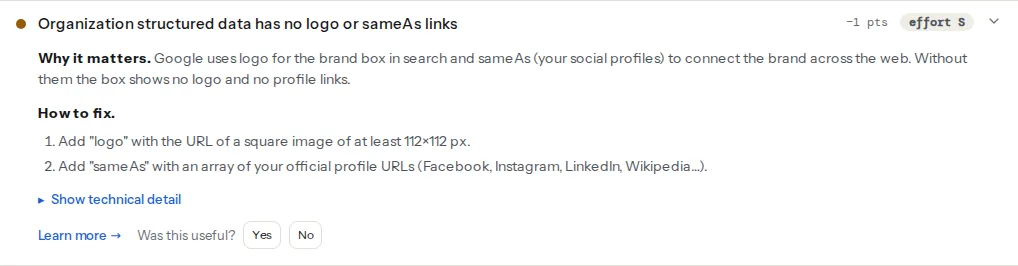
The finding applies to Organization and LocalBusiness roots. Its technical detail prints the entity's type and name and whether the logo and sameAs are present, which is the quickest way to see whether the name drifts between languages: open the finding on two versions and compare.
This check warns when one page has more than one root Organization or more than one root WebSite, and when any other type appears twice with the same name and the same url or @id. It is the check that catches a translation plugin or theme adding a second Organization block next to the SEO plugin's one. It does not compare pages; that part is yours.
The hreflang checker validates the codes on the page, then fetches up to 50 alternates and confirms each one links back. It is the structural half of a multilingual site; schema is the descriptive half.
The principles
Structured data describes the page it is on
A JSON-LD block is metadata for one URL. The German page's WebPage has the German name, the German description and "inLanguage": "de". The url property of every entity that has one points at the German URL. There is no property that says "this page also exists in English"; that is what <link rel="alternate" hreflang> is for, and putting the alternates' URLs into the JSON-LD only creates entities Google will treat as separate pages.
The Organization is one entity
Use the same @id on every language version, on every host. The @id is an identifier, not a link the visitor follows, so the Croatian site on example-shop.hr and the German one on example-shop.de can both declare "@id": "https://example-shop.com/#organization". Keep the name in the brand's canonical form, keep sameAs byte-for-byte identical, and put localised names in alternateName. The properties of the block itself are covered in Organization and WebSite schema and on the Organization schema learn page.
inLanguage uses BCP 47 and matches the page
inLanguage takes a language tag: en, en-GB, de-AT, pt-BR. The value must agree with the page's <html lang> and with the hreflang tag that points at this page; three different answers on one page tell Google the site does not know what language it is. inLanguage is a property of CreativeWork types (WebPage, Article, WebSite, FAQPage); Product has no inLanguage, so the language of a product page is carried by the WebPage that contains it and by the localised url.
hreflang connects, schema describes
Nothing in the JSON-LD should try to do hreflang's job. If the versions are not connected in search, the fix is in the <head> or the sitemap, and hreflang return links explains that side.
Step by step
1. Give the Organization one id and put it in every version
The block below goes on every language version, unchanged except for alternateName. On WordPress the SEO plugin emits it from its site settings; on a custom site it lives in the base template.
{
  "@context": "https://schema.org",
  "@type": "Organization",
  "@id": "https://example-shop.com/#organization",
  "name": "Example Shop",
  "alternateName": "Example Shop Hrvatska",
  "url": "https://example-shop.hr/",
  "logo": "https://example-shop.com/assets/logo-512.png",
  "sameAs": [
    "https://www.facebook.com/exampleshop",
    "https://www.instagram.com/exampleshop",
    "https://www.linkedin.com/company/exampleshop"
  ]
}
url may point at the local home page; @id, logo and sameAs stay on the primary domain. The logo is a square of at least 112×112 px, the size the finding asks for.
2. Give each page a WebPage with inLanguage
Reference the Organization by its @id rather than repeating it, so the page has one Organization root and the duplicate-entities check stays green:
{
  "@context": "https://schema.org",
  "@graph": [
    {
      "@type": "WebSite",
      "@id": "https://example-shop.hr/#website",
      "url": "https://example-shop.hr/",
      "name": "Example Shop",
      "inLanguage": "hr",
      "publisher": { "@id": "https://example-shop.com/#organization" }
    },
    {
      "@type": "WebPage",
      "@id": "https://example-shop.hr/tenisice/",
      "url": "https://example-shop.hr/tenisice/",
      "name": "Tenisice za trčanje",
      "inLanguage": "hr",
      "isPartOf": { "@id": "https://example-shop.hr/#website" }
    },
    {
      "@type": "Organization",
      "@id": "https://example-shop.com/#organization",
      "name": "Example Shop",
      "logo": "https://example-shop.com/assets/logo-512.png",
      "sameAs": ["https://www.facebook.com/exampleshop"]
    }
  ]
}
Google's site-name documentation puts WebSite on the home page and supports site names per domain or subdomain, not per subfolder. So a ccTLD or subdomain per language carries its own WebSite with the localised name and its own inLanguage. Languages in subfolders of one host (/de/, /fr/) share that host's WebSite: keep one @id for it on every version. Never stretch one WebSite across several hosts.
3. Translate the Product, keep the identifiers
{
  "@context": "https://schema.org",
  "@type": "Product",
  "@id": "https://example-shop.de/laufschuhe/blau/#product",
  "name": "Laufschuh Blau",
  "description": "Leichter Laufschuh mit atmungsaktivem Obermaterial.",
  "sku": "RS-1001-BLU",
  "gtin13": "3856012345678",
  "image": "https://example-shop.com/media/rs-1001-blu.jpg",
  "url": "https://example-shop.de/laufschuhe/blau/",
  "brand": { "@id": "https://example-shop.com/#organization" },
  "offers": {
    "@type": "Offer",
    "url": "https://example-shop.de/laufschuhe/blau/",
    "price": "89.90",
    "priceCurrency": "EUR",
    "availability": "https://schema.org/InStock"
  }
}sku, gtin13 and image are identical across languages; they are how Google knows it is the same product. price and priceCurrency are what the visitor sees on this page in this market, which may differ by country even for the same language.
4. LocalBusiness: one per physical location, in the local format
A shop with a store in Zagreb and one in Vienna has two LocalBusiness entities, each with its own @id, the real address, the local phone number and currenciesAccepted for that country. Both carry "parentOrganization": { "@id": "https://example-shop.com/#organization" }. The Croatian page lists the Zagreb store; the Austrian page lists the Vienna one. Listing both on both pages is not wrong, but the address must not be translated: street names are proper nouns.
5. Localise the small blocks too
BreadcrumbList item names are visible navigation, so they follow the page's language and the item URLs are the localised ones. FAQPage questions and answers are translated together, with the same number of questions on each version. Article translates headline and description, keeps author and publisher ids, and sets inLanguage.
6. Compare two versions in the validator
Run the validator on the English and the translated page. The types list should match; the Organization finding's technical line should show the same type and name; the duplicate-entities finding should pass on both. Then run the hreflang checker on one of them to confirm the versions link to each other. That is the whole audit for one template; repeat for the product, category and article templates.
What to translate and what to keep
| Property | Translate | Keep identical |
|---|---|---|
Organization.name | yes, brand form | |
Organization.alternateName | yes, per market | |
Organization.@id, logo, sameAs | yes | |
WebSite.name, inLanguage | yes | |
WebPage.name, description, url | yes | |
Product.name, description | yes | |
Product.sku, gtin, image, brand | yes | |
Offer.price, priceCurrency, url | per market | |
LocalBusiness.address, telephone | yes, local format | |
BreadcrumbList item names and URLs | yes | |
FAQPage questions and answers | yes | |
Article.headline, description | yes | |
author, publisher (@id references) | yes |
Platform notes
WordPress
WPML with Yoast SEO or Rank Math translates the per-post entities automatically because the plugins read the translated post's title, excerpt and featured image. The Organization name, logo and social profiles come from the SEO plugin's site settings, which WPML's String Translation can translate per language; that is where a second Organization name is usually born. Open the translated home page in the validator and read the name on the Organization finding. The WPML, Polylang and hreflang guide covers the hreflang side of the same setups.
Polylang works the same way for per-post schema; site-level strings are under Languages → Translations. TranslatePress translates the rendered HTML rather than the post, so whether a JSON-LD string gets translated depends on the plugin picking it up; after translating, check a product page in the validator to confirm the description changed with the page and the @id did not.
Two plugins both emitting an Organization block (a theme's "site info" schema and the SEO plugin) is the same problem in any language; duplicate entities: two plugins, one graph sorts that out first.
Shopify
Shopify Markets serves localised URLs (/de-at/, or a separate domain per market) with the market's currency and translated content. Whether the product JSON-LD follows depends on the theme, so do not assume it: run the validator on a localised product URL and confirm priceCurrency equals the currency the page displays and name is in the page's language. If the theme's Organization block has no @id, add one in the theme file that emits it, so every market shares it.
Static sites and custom code
Keep one JSON file with the Organization and generate the page blocks from the localised content at build time, with inLanguage taken from the same variable as <html lang>. If the site has a language switcher rendered from JavaScript, make sure the JSON-LD is in the served HTML; the validator reads the fetched page.
Verify
- The validator on each language version lists the same structured data types.
- The Organization finding's technical line shows the same type and name on every version, with the logo present and the same
sameAscount. - "Structured data entities are unique" passes on every version.
inLanguage,<html lang>and the self-referencing hreflang agree on every page you sample.- The hreflang checker reports every alternate linking back.
Common mistakes
- Translated page, untranslated description. The
WebPageorProductdescription stays in the source language because the translation plugin skips SEO fields. Symptom: an English snippet under a German rich result. Fix: translate the SEO description field per language, not only the body. inLanguagemissing or"en"everywhere. A base template hardcodes the value. Take it from the same source as<html lang>.- Different Organization names per language. "Example Shop", "Example Shop GmbH" and "Example Shop d.o.o." become three entities. Keep one
name, move the local forms toalternateName, and share the@id. - Currency mismatch. The block says
EURwhile the market showsCHF. GeneratepriceCurrencyfrom the market, never from a site-wide setting. - One block listing every language. A
WebPagewhoseurlis an array of the English, German and French URLs, or aProductwith threeoffersfor three languages on one page. Each page gets one block with its own URL; hreflang does the linking.