Rank Math ships with more switches than any other free SEO plugin: a modules screen, four settings areas and a template for every content type and archive. Most of the defaults are good. A few are set for the widest compatibility rather than the cleanest site, and a few modules cost server time for a feature you may never open. This guide goes through the free plugin (version 1.0.2xx) screen by screen, says what to keep, what to switch off and why, and ends with the report findings that confirm it. Plan 30 minutes; every change here is reversible, with one exception flagged below.
Quick answer
| Screen | Setting | Recommendation |
|---|---|---|
| Dashboard → Modules | Sitemap, Schema, Image SEO, Instant Indexing | On |
| Dashboard → Modules | Local SEO & Knowledge Graph | On for a business; it holds the Organization logo and profiles |
| Dashboard → Modules | 404 Monitor, Analytics, Role Manager, Content AI, WooCommerce | Off unless you use them (WooCommerce on for a shop) |
| General Settings → Links | Redirect Attachments | On, with an orphan target |
| General Settings → Links | Strip Category Base | Off on an existing site |
| General Settings → Breadcrumbs | Enable breadcrumbs function | On, with the trail placed by the theme |
| Titles & Meta → Global Meta | Separator, OpenGraph Thumbnail, Twitter Card Type | A dash; a 1200×630 px image; Summary Card with Large Image |
| Titles & Meta → Authors, Misc Pages | Author archives, date archives | Off on a single-author site; date archives off |
| Titles & Meta → Tags | Tag robots meta | No Index unless tags are curated |
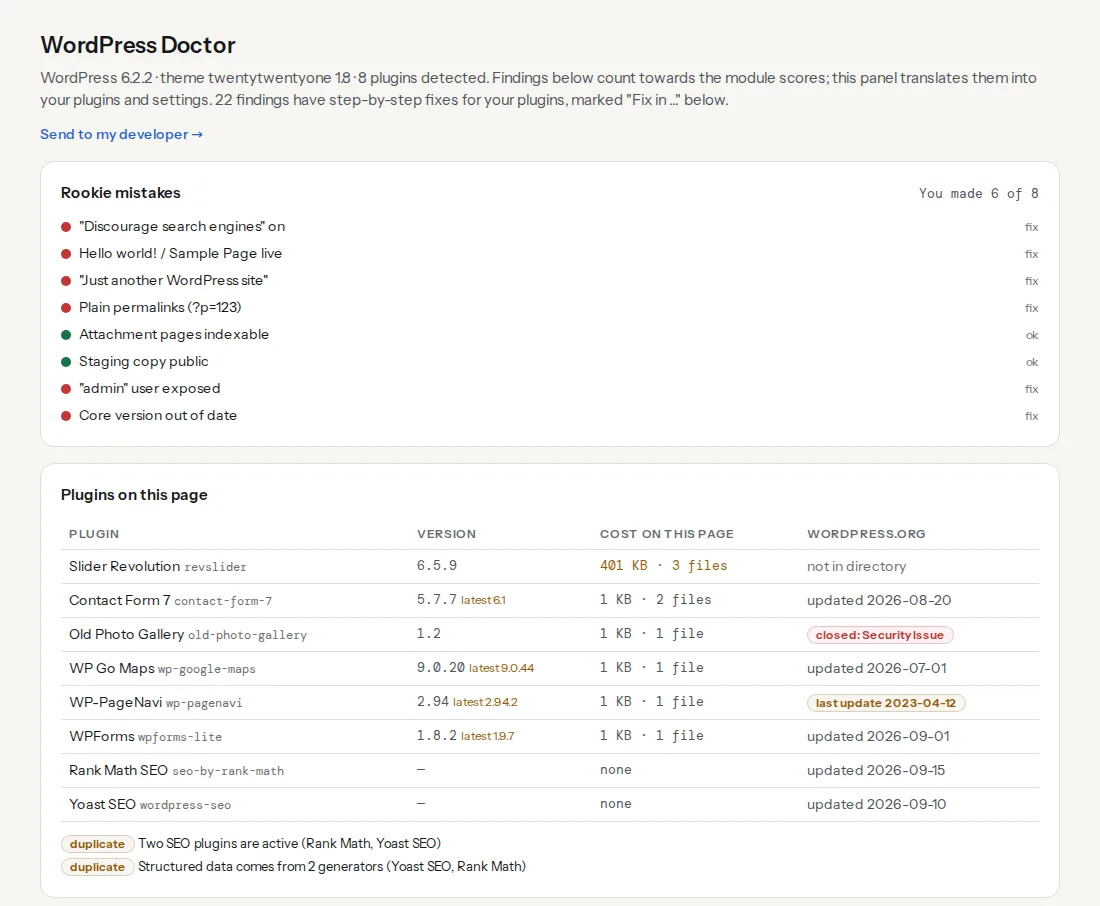
Then run the WordPress checker and read the WordPress Doctor panel.
Why the settings matter
Every SEO plugin says the same five things to Google on every page: what the page is called, which URL is the real one, whether to index it, who publishes it and what it looks like when shared. Rank Math says them well when its settings agree with the site. When they do not (an Organization with no logo, a tag archive for every tag, a sitemap the robots.txt never mentions), Google resolves the contradiction itself and the setting was wasted.
Rank Math's modules add a second dimension: each one runs code on every request or every save. The 404 Monitor writes a database row for every missing URL a bot asks for; the Analytics module fetches Search Console data on a schedule; Content AI calls an external service. None of these is wrong to run. They are wrong to leave running when nobody looks at the result.
How getReport checks it
The check reads only what the page reveals. Rank Math is recognised from its own HTML comment ("Search Engine Optimization by Rank Math") and from asset paths under /wp-content/plugins/seo-by-rank-math/. The report then reads robots.txt, the tags and the JSON-LD in <head>, requests the attachment sitemap address, and adds the WordPress Doctor panel after the top fixes. Findings that Rank Math can fix get a "Fix in Rank Math SEO" card with the screen and the control, tested on version 1.0.230.
These four findings correspond to settings in this guide:
Rank Math fix cards also exist for the canonical, missing description, noindex, title length, Open Graph image, Twitter card and duplicate-SEO-plugin findings.
Step by step
1. Dashboard → Modules
Switch Advanced Mode on at the top of the dashboard first; Easy Mode hides half the screens below.
Keep on: Sitemap (the XML sitemap at /sitemap_index.xml), Schema (Structured Data) (the JSON-LD graph), Image SEO (fills missing alt attributes at output time, see step 3), Instant Indexing (submits changed URLs through IndexNow to Bing and others; Google is not part of IndexNow), and Local SEO & Knowledge Graph, which despite its name is where a business's Organization data lives. Redirections on if you manage redirects here; it is the best free redirect manager among the SEO plugins. Link Counter is harmless. WooCommerce on for a shop only.
Leave off unless used: 404 Monitor (turn it on for a week after a migration, export the list, turn it off), Analytics (only if you want Search Console data inside wp-admin; it stores a copy in your database), Role Manager, Content AI, AMP, bbPress, BuddyPress, Podcast, Web Stories. SEO Analyzer is a one-off tool, not a runtime cost; run it if you like.
2. General Settings → Links
Strip Category Base removes /category/ from category URLs. On a new site it is a matter of taste; on an existing site it changes every category URL, and Rank Math's redirect covers the old ones only while the plugin is active. Leave it off on a site that already ranks; this is the one change in this guide that needs a redirect plan to undo.
Redirect Attachments: switch on. Every attachment page redirects to the post the image belongs to, attachments leave the sitemap, and the attachment finding above passes. Set Redirect Orphan Media to your home page or a media page for images not attached to any post. If you need attachment pages for a gallery plugin, leave the redirect off and noindex them instead; WordPress attachment pages covers that path.
Nofollow External Links: off. Blanket nofollow on every outbound link is a 2008 habit; link normally, mark paid links as sponsored per link. Nofollow Image File Links: on, harmless. Open External Links in New Tab: off; it is a usability choice that annoys keyboard and screen-reader users, and it has no SEO effect.
3. General Settings → Images, Breadcrumbs, Webmaster Tools, robots.txt
Images: Add missing ALT attributes gives every image without one an alt at output time, built from the format field (the file name or the post title). It is a floor, not a fix: an alt of "IMG_4471" from the file name helps nobody. Keep it on and still write real alt text for the images that matter.
Breadcrumbs: switch Enable breadcrumbs function on, set the separator and the home label, and switch Show Category(s) on for posts. Rank Math adds BreadcrumbList to its schema output; the visible trail appears only where the theme, the [rank_math_breadcrumb] shortcode or a builder widget places it. The breadcrumb finding looks for both the markup and the structured data; the breadcrumbs learn page shows what Google does with them.
Webmaster Tools: paste the verification codes for Google Search Console and Bing here instead of installing a plugin per service.
Edit robots.txt: the box edits WordPress's virtual robots.txt and is greyed out when a physical file exists in the site root. Rank Math adds the sitemap line itself; if the finding says robots.txt does not declare one, a physical file is hiding it. Add this line to that file:
Sitemap: https://example.com/sitemap_index.xmlOthers: the RSS before/after fields add a source link to feed items; useful against scrapers.
4. Titles & Meta → Global Meta
Robots Meta: Index ticked, No Index unticked. Noindex Empty Category and Tag Archives: on. Noindex Paginated Pages: off; page 2 of a category should be crawlable so its posts are found. Noindex Search Results and Noindex Password Protected Pages: on. Separator Character: a dash. Capitalize Titles: off; it rewrites your titles. OpenGraph Thumbnail: a 1200×630 px image, the share fallback for every page without its own. Twitter Card Type: Summary Card with Large Image.
5. Titles & Meta → Local SEO and Social Meta
Under Local SEO choose Company for a business and fill in name, URL and a square Logo of at least 112×112 px. The address and phone fields are for a LocalBusiness with a physical location; leave them empty for an online-only business. Under Social Meta, enter the Facebook page URL, the X username and one profile URL per line for the rest (Instagram, LinkedIn, YouTube, Wikipedia). Rank Math builds the Organization's logo and sameAs from these two screens, which is exactly what the logo-and-sameAs finding reads. Organization and WebSite schema shows the complete block and how Google uses it.
6. Titles & Meta → Homepage, Posts, Pages
Homepage (when the front page shows latest posts): a hand-written title and description. Posts and Pages: the title template is %title% %sep% %sitename% and the description template %excerpt%; both are right. Drop %sep% %sitename% if the site name is long. Schema Type for posts: Article (or NewsArticle for a news site); for pages: none or WebPage. Custom Robots Meta: off, so pages inherit Global Meta; switch it on only for a type that should be noindexed.
Custom post types the theme registers (portfolio, team, testimonials) get their own tab. If a searcher should never land on a single testimonial, set that type's Custom Robots Meta to No Index and exclude it from the sitemap in step 8.
7. Titles & Meta → Categories, Tags, Authors, Misc Pages
Categories stay indexed; give each a description in Posts → Categories so the %term_description% template has something to print. Tags: on most sites tags are hundreds of two-post archives. Switch Custom Robots Meta on for Tags and tick No Index, unless you curate tags as landing pages. Keep Include in Sitemap consistent in step 8.
Authors: on a single-author site set Author Archives to Disabled; Rank Math redirects /author/name/ to the home page. On a multi-author site keep them and set Author Robots Meta to index. Misc Pages: Date Archives Disabled; the search results and 404 titles can stay as they are, both are noindexed.
8. Sitemap Settings
General: the default Links Per Sitemap is fine. Images in Sitemaps on only if image search matters to you; it doubles the size of every sitemap. Leave Exclude Posts and Exclude Terms empty unless you have a reason. Under each content type, Include in Sitemap should match the robots setting from steps 6 and 7: a type or taxonomy set to No Index has no business in the sitemap, and Google flags the contradiction in Search Console. The Attachments tab only appears while Redirect Attachments is off; if you see it, switch its Include in Sitemap off.
9. What not to do
Do not chase the 100/100 content score. It is a checklist for one page, not a ranking model. Do not set a focus keyword on every page just to make the light green; pages without a search purpose (thank-you pages, legal pages) do not need one. Do not install Rank Math next to another SEO plugin for one feature; every plugin writes a full set of tags, and two SEO plugins together explains what breaks. And do not add custom schema through the per-page Schema tab on top of what a WooCommerce or events plugin already prints; two Product entities get rich results withheld, not doubled.
Platform notes
Managed WordPress hosts
The host's page cache and any CDN serve old HTML after a settings change. Purge both, then re-run the report. If the robots.txt box is greyed out and you cannot find the physical file, the host may generate one; its panel usually has a field for extra lines.
WooCommerce
Switch the WooCommerce module on. It adds Product schema settings and a Products tab under Titles & Meta; keep Remove base options off on an existing shop for the same reason as Strip Category Base. Rank Math extends WooCommerce's own Product block rather than replacing it, so price and availability still come from the product's fields.
Sites moving from Yoast
Rank Math's Setup Wizard offers to import Yoast's titles, descriptions, robots settings and redirects on its first step, and Status & Tools → Import & Export offers the same later. Import first, check three pages, then deactivate Yoast; the order matters.
Verify
- Re-run the WordPress checker. "Attachment pages are not exposed to search engines", "robots.txt declares a sitemap", "Organization structured data has a logo and sameAs links" and "Breadcrumb navigation found" pass.
- Open
https://example.com/sitemap_index.xml: one sitemap per type you kept, no attachment sitemap, no tag sitemap if tags are noindexed, no author sitemap on a single-author site. - View the home page source: one
<title>, one description, one canonical, one Rank Math comment, anapplication/ld+jsonblock whose Organization haslogoandsameAs. - Open Google's Rich Results Test on a post two levels deep: Breadcrumbs listed, Article listed once.
Common mistakes
- Strip Category Base on a live site. Every category URL changes; rankings wobble for weeks and the redirects vanish if the plugin is ever deactivated. Leave it off unless the site is new.
- Leaving 404 Monitor on for a year. Bots probing for
wp-login.phpvariants fill the table with thousands of rows. Enable it for audits, then switch it off and clear the log. - Noindexing tags but keeping them in the sitemap. Search Console reports "Submitted URL marked noindex" for every tag. Make the sitemap setting match.
- Redirect Attachments on, but image blocks linking to the attachment page. Visitors land on the parent post instead of the lightbox. Set image links to "Media file" or none.
- Trusting "Add missing ALT attributes" as the alt text fix. The file name becomes the alt on every image. Write real alt text for product and content images; keep the setting as a safety net.
- Rich snippets from two sources. Rank Math's Schema plus a dedicated schema plugin, or plus a builder's own Product block, gives Google two entities. Keep one.