"Page builders are slow" is true often enough to be repeated and vague enough to be useless. A builder costs a specific number of kilobytes and a specific number of DOM elements on a specific page, and the report measures both. This guide explains what the builder-weight check counts, gives honest ranges for each builder, shows where the cost lands in the other findings, and lays out the options: keep the builder and tune it, use it only where it earns its weight, or rebuild. It ends with how to measure your own site so the decision is made on your numbers.
Quick answer
- The report attributes CSS and JavaScript bytes and DOM elements to the builder it detects and warns when the builder is half or more of either (with minimums of 100 KB and 600 elements).
- Core blocks in a block theme load a few KB of CSS per block used and no framework JavaScript. Elementor, Divi and WPBakery load a framework on every page: typically hundreds of KB of CSS and JS before your content. Bricks and Oxygen sit in between.
- The cost lands in four findings: render-blocking resources, unused CSS, DOM size and long tasks.
- Keep the builder if clients edit pages and design freedom pays; then switch on its performance settings, which usually halve the cost.
- Converting a builder site to blocks is a rebuild. Cost it as one. The middle path: blocks for posts and content pages, the builder for the handful of landing pages that need it.
Why the weight matters
A page builder does two things a theme does not. It ships its own framework (grid, animations, widgets, a slider library, icon fonts) on every page, whether the page uses a slider or not. And it wraps every element in containers: a heading becomes a section containing a column containing a widget wrapper containing the heading. The first is bytes the browser downloads and parses before it can paint; the second is elements it has to lay out, style and keep in memory on a phone.
Both compound with everything else you try to fix. When the builder is 60 % of the CSS, "remove unused CSS" has 40 % to work with. When it is 70 % of the DOM, an oversized image or a slow font is a smaller share of the problem than the markup itself. That is why the report singles out the builder's share rather than folding it into the totals: it tells you how much of the page is negotiable.
How getReport checks it
The report recognises the builder from its markup (elementor-section, et_pb_section, vc_row, brxe-, ct-section, fl-row) or from its plugin path, then loads the page in a browser and attributes every request to a plugin. For the builder it adds up the transfer size of the stylesheets and scripts that come from its own paths: Elementor and Elementor Pro plus the generated CSS under /uploads/elementor/; Divi's theme, the Divi Builder plugin and its et-cache files; WPBakery's js_composer; Bricks; Oxygen; Beaver Builder and its uploads. It counts DOM elements whose class carries the builder's prefix (elementor-, et_pb_, vc_, brxe-, ct-, fl-). The result is two shares: bytes of all CSS and JS, and elements of all elements in <body>.
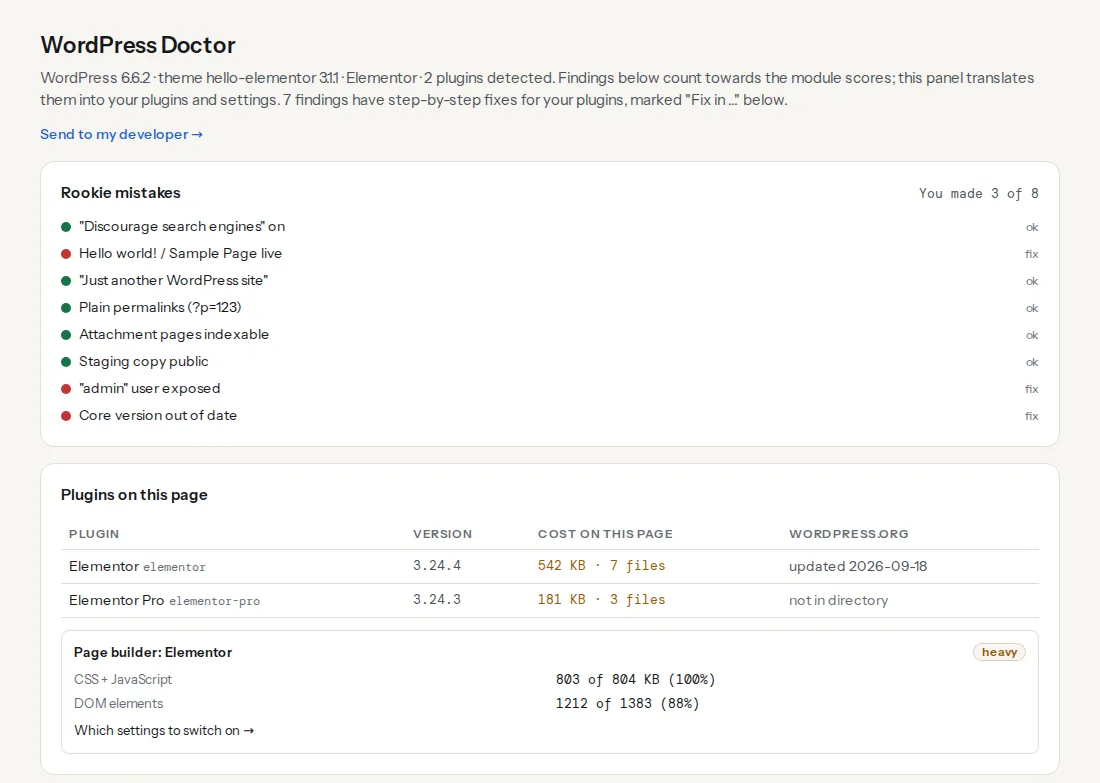
The warning threshold is half: the builder is at least 50 % of the CSS and JavaScript and at least 100 KB, or at least 50 % of the elements and at least 600 of them. Below that the finding passes and still shows the numbers, which are the ones to track after every change. Core blocks are recognised too (wp-block- classes) but never counted as a builder.
The honest comparison
Numbers for a simple page (a heading, a paragraph, three columns with an image each, a button), on a fresh install, uncompressed transfer as the browser sees it after gzip or Brotli. They depend on the version, the widgets used and the performance settings, so treat them as ranges, not a league table.
| Builder | CSS + JS the framework adds to a simple page | Extra elements per widget | Notes |
|---|---|---|---|
| Core blocks, block theme | 5–30 KB CSS, no framework JS | 0–1 | Block styles load per block used |
| Core blocks, classic theme | 50–100 KB CSS (the full block library), no framework JS | 0–1 | The theme decides |
| Core blocks + a block library (Kadence, Spectra, GenerateBlocks) | plus 20–100 KB, per-block CSS where the library supports it | 1–2 | Varies by library and settings |
| Elementor + Pro | 300–600 KB with frontend, swiper, Pro and per-post CSS; less with the Performance settings on | 3–4 | Icon fonts and animations add more |
| Divi | 200–500 KB; the static CSS file is large, Dynamic CSS cuts it | 3–4 | Performance tab makes the difference |
| WPBakery | 250–500 KB, jQuery-based, older architecture | 3–4 | Add-on packs load everywhere |
| Bricks | 50–150 KB, minimal framework | 1–2 | Class-based, external CSS files |
| Oxygen | 50–150 KB, disables the theme entirely | 1–2 | Bloat Eliminator settings |
| Beaver Builder | 100–250 KB, cached per page | 2–3 | Asset caching on by default |
The right-hand columns matter as much as the bytes. Four wrappers per widget is what turns a 400-element page into a 1,600-element page, and the DOM-size finding starts warning at 1,500. See why 3,000 nodes is a problem for what that costs on a phone.
Where the cost lands in the report
- Render-blocking resources: the framework CSS and often its JavaScript are in
<head>and block the first paint. The evidence line lists the builder's files by name. - Unused CSS: on a page using three widgets, 80–90 % of the framework stylesheet is unused. The saving in the finding is mostly the builder's file.
- DOM size: the wrappers. The finding shows the count, the depth and the widest parent; builders push all three.
- Long tasks and Total Blocking Time: the builder's front-end script initialises every widget on load (sliders, counters, animations, sticky headers), which is main-thread work before the visitor can tap.
- Cumulative Layout Shift: entrance animations that move elements in, sliders that resize once their script runs, and icon fonts that swap in late.
None of these are separate problems; they are the same weight seen from four angles. Fixing the builder's share moves all of them.
Step by step
1. Measure your own site, not the demo
Run the speed test on the home page and on a plain post. The WordPress Doctor panel shows the builder card on both; a builder that is 65 % of the home page and 40 % of a post you never opened in the builder is loading its framework everywhere. That page-wide load is the first thing the builder's own settings address.
2. Switch on the builder's performance settings
Each builder has a settings page that changes the numbers more than anything else you can do without rebuilding, and the finding names it:
- Elementor → Settings → Performance: Optimized CSS loading, Optimized DOM output, Improved asset loading, Inline font icons, then Tools → Regenerate CSS & Data. The Elementor performance guide walks through each.
- Divi → Theme Options → General → Performance: Dynamic CSS, Critical CSS, Dynamic JavaScript libraries, Dynamic Icons; Google Fonts off if self-hosted. See Divi performance settings.
- WPBakery → Role Manager: switch off the elements the site does not use.
- Bricks → Settings → Performance: Cache query loops, Disable jQuery migrate, CSS loading method External files.
- Oxygen → Settings → Bloat Eliminator: emoji script, embeds and block library CSS off; Universal CSS cache on.
- Beaver Builder → Settings → Advanced: Enable Asset Caching on, unused modules off.
Re-run the report. On most Elementor and Divi sites this alone takes the builder from 60–70 % of the code to 35–50 %, and the render-blocking list gets shorter.
3. Remove what the page does not use
Add-on packs ("Ultimate Addons", "Essential Addons", "Divi Supreme") load their own CSS and JS on every page. The plugin cost table in the same panel shows each one's kilobytes. Deactivate the ones whose widgets appear on two pages, and rebuild those two widgets with the builder's own elements. Entrance animations: off on everything above the fold, because they are a layout shift by design.
4. Decide per page type
Compare two pages on the same site: a landing page built in the builder and a post written in the block editor, both with the settings from step 2. Their builder share, DOM count and render-blocking list are your own before-and-after. If the post is fast and the landing page is not, the practical answer is usually not "remove the builder" but "stop the builder loading where it is not used". Elementor's Improved asset loading and Divi's Dynamic CSS do that partially; a per-page asset manager (Perfmatters, Asset CleanUp) does it completely, at the cost of one more plugin to maintain.
5. Cost the rebuild honestly
Converting a builder site to core blocks is a rebuild, not a migration: there is no converter that produces clean block markup from Elementor or Divi sections. Count the templates (header, footer, home, landing pages, archive, single), the widgets that have no block equivalent (advanced forms, sliders, mega menus) and the people who will edit pages afterwards. A 10-page brochure site is a few days; a 200-page site with custom post types is a project. The result is a site with 5–30 KB of CSS where there were 400, and a block editor that clients find either liberating or limiting, depending on the client.
6. Or take the middle path
Block theme plus a light block library for content; the builder for the five landing pages that need a designer's freedom; the builder's framework loaded only on those five. That is what most agencies converge on, and it is what step 2's asset settings and a per-page asset manager make possible.
Platform notes
Block themes and Full Site Editing
Since WordPress 5.9 a block theme (Twenty Twenty-Four, Twenty Twenty-Five, Kadence, GeneratePress with its block variant) loads block styles only for blocks present on the page, which is where the "5–30 KB" line comes from. A classic theme loads the whole block library stylesheet regardless. If you are on a classic theme and comparing with a builder, the classic theme's fixed cost is part of the comparison.
WooCommerce
Product templates built in a builder multiply the wrappers by the number of products in a grid. A category page with 24 products at four wrappers per element is where DOM counts pass 3,000. Use the builder for the storefront and WooCommerce's own templates (or blocks) for the catalogue.
Divi as a theme
Divi is a theme and a builder in one, so "removing the builder" means changing the theme as well. Its Performance tab is correspondingly the biggest lever short of that.
Verify
- The builder-weight finding passes: the builder is under half of the CSS and JavaScript and under half of the elements, and the KB figure on the card has dropped after step 2.
- DOM size on the home page is under 1,500 elements, or trending down with every removed add-on.
- The render-blocking list no longer contains the builder's whole framework, only files you decided to keep.
- Field data, not only the lab score: after a month, LCP and INP in the Core Web Vitals history move in the same direction as the lab findings.
Common mistakes
- Comparing a builder home page with a blank Gutenberg page. Compare pages of similar content; the empty page wins against everything.
- Judging by the Lighthouse score alone. The score mixes the builder with images, fonts and the host. The builder card and the DOM count are the builder's share; field data is the visitor's experience.
- Every performance setting off because "it broke something once". Switch them on one at a time and regenerate the CSS; most breakages are a stale generated file.
- Adding a page cache and expecting the builder to matter less. Caching fixes the first byte. The bytes and the elements arrive at the browser unchanged.
- Three add-on packs for six widgets. Each pack costs on every page; six widgets can usually be rebuilt with core elements in an afternoon.
- Rebuilding for the score when nobody complained. If the field data is green and the client is happy, the builder is doing its job. Tune it, and keep the rebuild for the redesign.