Every "security headers" plugin for WordPress does the same thing: it runs header() on a WordPress hook and gives you a settings page for the values. You can do that in ten lines yourself, and in most setups you can do better by setting the headers one layer up, where they also cover static files and cached pages. This guide lists the places a WordPress site can send headers, from best to worst, gives the exact values that do not break wp-admin, the customizer or WooCommerce, and shows how to check the result from outside.
Quick answer
- Best place: the web server (nginx server block, Apache or LiteSpeed
.htaccess, Caddy). Next: Cloudflare Transform Rules. Then the host's panel. Last: a mu-plugin onsend_headers. - Values that work with WordPress:
Strict-Transport-Security: max-age=300
X-Content-Type-Options: nosniff
X-Frame-Options: SAMEORIGIN
Referrer-Policy: strict-origin-when-cross-origin
Permissions-Policy: camera=(), microphone=(), geolocation=()
Content-Security-Policy: frame-ancestors 'self'; upgrade-insecure-requests- Raise HSTS to
max-age=31536000; includeSubDomainsafter a week with no problems. Addpreloadonly after every subdomain is verified on HTTPS. - A full CSP on WordPress is a project because core and plugins print inline scripts. Start with the two safe directives above, add a report-only policy, read what it reports.
- Purge the page cache after every change, and check with the security headers checker or
curl -I, never from inside wp-admin.
Why the layer matters
A header set in PHP is sent only when PHP runs. On a WordPress site with a page cache, the HTML most visitors receive is a file served by the web server or by the cache plugin's drop-in before WordPress loads, and the theme's CSS, the uploads and the JavaScript never touch PHP at all. So a plugin (or your own snippet) covers the uncached page view and nothing else, and the report, which fetches the page like a first-time visitor, may see a cached copy without the headers you just added.
Set the headers at the web server or the CDN and every response carries them: pages, cached pages, images, fonts, the REST API, error pages. That is also why the "security headers" plugins usually end up as a settings UI on top of the same send_headers hook, with the overhead of another plugin and the same gap. Use the PHP route when you have no access to anything else, and know what it covers.
How getReport checks it
The checker fetches the page as a browser would, follows redirects and reads the final response headers. It grades each header separately, so a site can pass HSTS and fail framing protection, and it reads the version strings in Server and X-Powered-By in the same pass. A CSP in report-only mode counts as present (the check passes and says so), but frame-ancestors is only honoured from an enforcing policy, so a report-only CSP does not satisfy the framing check.
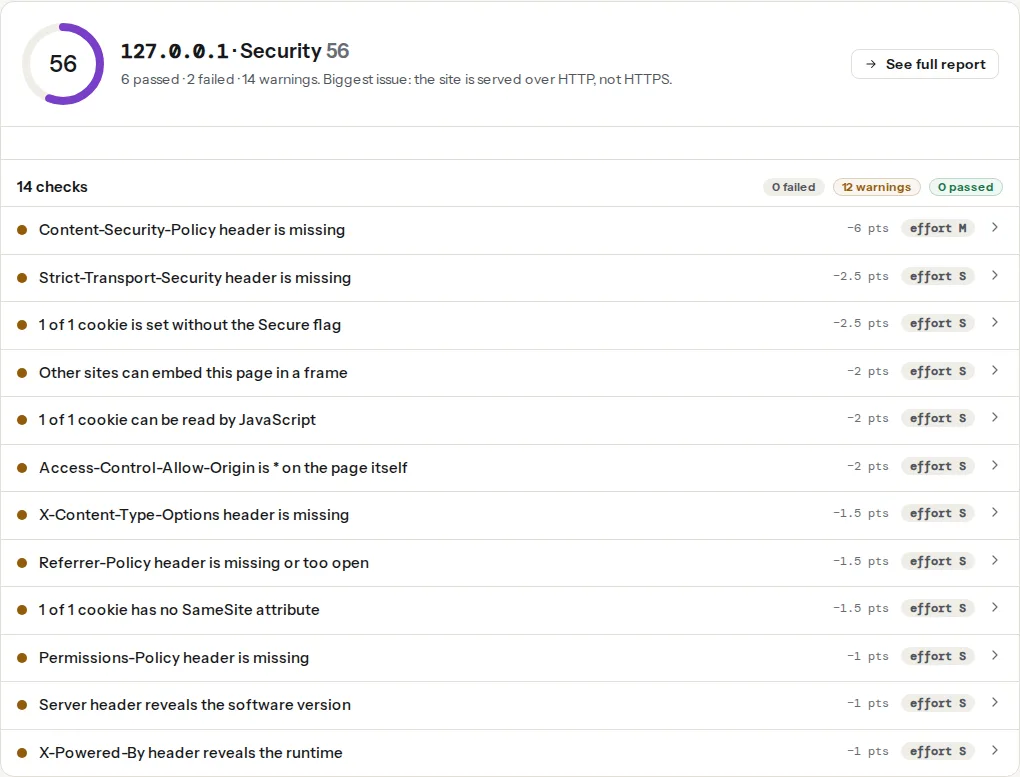
The WordPress checker runs the HSTS and HTTPS findings inside its WordPress health check, so a client who only ran that tool has already seen the first of these.
Step by step
1. Pick the highest layer you can reach
| You have | Set the headers in | Covers |
|---|---|---|
| Root or a VPS | nginx, Apache, LiteSpeed or Caddy config | Everything |
| cPanel or Plesk on Apache/LiteSpeed | .htaccess at the site root | Everything on that site |
| Cloudflare in front (free plan) | Rules → Transform Rules → Modify Response Header | Everything proxied through Cloudflare |
| A managed WordPress host | The host's panel, if it has a headers section; otherwise support | Everything the host serves |
| Only wp-admin | A mu-plugin on send_headers | Front-end pages that reach PHP |
If Cloudflare is in front and the origin also sets a header, the visitor gets both. Two X-Frame-Options values confuse browsers; keep one source per header.
2. Add the four safe headers
These break nothing on a normal WordPress site. SAMEORIGIN rather than DENY: the customizer and the site editor load your pages in an iframe from the same origin, and DENY blanks them.
nginx, in the server block, with always so error pages get them too:
add_header X-Content-Type-Options "nosniff" always;
add_header X-Frame-Options "SAMEORIGIN" always;
add_header Referrer-Policy "strict-origin-when-cross-origin" always;
add_header Permissions-Policy "camera=(), microphone=(), geolocation=()" always;
server_tokens off;
Apache and LiteSpeed, in .htaccess at the site root, above the # BEGIN WordPress block (mod_headers is enabled on nearly every host):
<IfModule mod_headers.c>
    Header always set X-Content-Type-Options "nosniff"
    Header always set X-Frame-Options "SAMEORIGIN"
    Header always set Referrer-Policy "strict-origin-when-cross-origin"
    Header always set Permissions-Policy "camera=(), microphone=(), geolocation=()"
    Header unset X-Powered-By
</IfModule>Caddy:
example.com {
    header {
        X-Content-Type-Options "nosniff"
        X-Frame-Options "SAMEORIGIN"
        Referrer-Policy "strict-origin-when-cross-origin"
        Permissions-Policy "camera=(), microphone=(), geolocation=()"
        -Server
    }
    php_fastcgi unix//run/php/php-fpm.sock
    file_server
}Cloudflare: Rules → Transform Rules → Modify Response Header → Create rule, "All incoming requests", one "Set static" line per header. Cloudflare also has a managed transform that adds a standard set in one toggle; use one or the other, not both.
mu-plugin, when nothing above is available. Save as wp-content/mu-plugins/security-headers.php; must-use plugins load automatically and cannot be deactivated from the plugins screen by accident:
<?php
/**
 * Plugin Name: Security headers
 * Description: Sends security headers on front-end responses. Server config is better when available.
 */
add_action( 'send_headers', function () {
    header( 'X-Content-Type-Options: nosniff' );
    header( 'X-Frame-Options: SAMEORIGIN' );
    header( 'Referrer-Policy: strict-origin-when-cross-origin' );
    header( 'Permissions-Policy: camera=(), microphone=(), geolocation=()' );
    header( "Content-Security-Policy: frame-ancestors 'self'; upgrade-insecure-requests" );
    if ( is_ssl() ) {
        header( 'Strict-Transport-Security: max-age=300' );
    }
} );
send_headers runs for front-end page requests. It does not run for wp-admin, wp-login.php or REST API responses, which take different code paths, and it never runs for files the web server serves directly. That is the gap the server config closes.
3. HSTS: short first, then a year
Start with max-age=300 (five minutes). Browse the site, the admin, any subdomain (shop., mail., staging.) over HTTPS. If everything works for a week, raise it:
add_header Strict-Transport-Security "max-age=31536000; includeSubDomains" always;includeSubDomains locks every subdomain to HTTPS, including ones you forgot: a mail.example.com webmail on plain HTTP becomes unreachable until the max-age expires in the visitor's browser. Add preload and submit at hstspreload.org only when you are sure; HSTS: enabling it safely has the checklist. Rollback is max-age=0, which tells browsers that have seen the header to forget it; the report flags that value as a warning because it is the "off" state, so leave it in place only for as long as you need.
4. A CSP that works with WordPress
WordPress core, most themes and most plugins print inline <script> blocks and inline style attributes: the emoji loader, block editor settings, jQuery Migrate notices, every slider's init call. A strict CSP (script-src 'self' with nonces or hashes) blocks all of it, and adding 'unsafe-inline' back gives you a header that passes the presence check and protects little. Be honest about where most WordPress sites land: a partial CSP that enforces the directives that cannot break anything, plus a report-only policy to learn from.
Enforce this now (already in the mu-plugin above):
add_header Content-Security-Policy "frame-ancestors 'self'; upgrade-insecure-requests" always;frame-ancestors 'self' is the modern form of X-Frame-Options: SAMEORIGIN and is what the framing check reads from a CSP. upgrade-insecure-requests turns the leftover http:// image and script URLs in old posts into https:// before the browser fetches them, which is the cheapest mixed-content fix there is.
Then add a report-only policy beside it and watch the browser console for "would be blocked" messages over a week:
add_header Content-Security-Policy-Report-Only "default-src 'self'; script-src 'self' 'unsafe-inline' https://www.googletagmanager.com; style-src 'self' 'unsafe-inline' https://fonts.googleapis.com; img-src 'self' data: https:; font-src 'self' https://fonts.gstatic.com; connect-src 'self'; frame-src https://www.youtube.com" always;Each message names an origin to add. Moving from there to an enforced policy without 'unsafe-inline' in script-src needs nonces on every inline script, which means a plugin that injects them or a theme built for it; Content-Security-Policy from report-only to enforced covers that road. Until then the report's csp-unsafe-inline finding stays open, and that is an accurate description of the site.
5. Hide the versions
Server: Apache/2.4.29 and X-Powered-By: PHP/8.1.2 are in the same panel. On nginx, server_tokens off;. On Apache, ServerTokens Prod in the main configuration (it is not allowed in .htaccess), and Header unset X-Powered-By as above. For PHP itself, expose_php = Off in php.ini or the host's PHP settings page. Behind Cloudflare the Server header is Cloudflare's own and reveals nothing.
6. Purge, then check from outside
Every caching layer between you and the visitor may hold a copy of the page with the old headers: the plugin's page cache, a LiteSpeed or Varnish server cache, Cloudflare's edge if HTML caching is on. Purge all of them, then:
curl -sI https://example.com/ | grep -i -E "strict-transport|content-security|x-frame|x-content-type|referrer|permissions|^server|x-powered"Then run the security headers checker on the home page and on one post. Two pages, because a cached home page and an uncached post can answer differently.
Platform notes
WooCommerce
Permissions-Policy: payment=() blocks the Payment Request API that Apple Pay and Google Pay buttons use through gateways such as Stripe. On a shop, leave payment out of the header or allow the gateway's origin, for example payment=(self "https://js.stripe.com"). Everything else above is safe for the checkout.
Multisite and subdomain installs
includeSubDomains applies to every site in a subdomain network. Verify each one on HTTPS before raising the HSTS max-age. X-Frame-Options: SAMEORIGIN treats blog.example.com and example.com as different origins, so cross-site embeds inside your own network need frame-ancestors with both listed.
Managed hosts
Kinsta, WP Engine, SiteGround and similar run nginx or their own stack and ignore .htaccess or restrict it. Most have a headers section or add them on request; the mu-plugin is the fallback until they do.
Verify
- The checker shows HSTS, framing protection, Referrer-Policy and CSP as passed, and no version in
ServerorX-Powered-By. curl -Ion the home page, a post and a CSS file all show the headers (the CSS file is the proof that the server layer, not PHP, is sending them).- wp-admin loads, the customizer preview renders, the block editor saves, a test order goes through.
- Nothing in the browser console starts with "Refused to" on the enforced policy.
Common mistakes
- Headers in
functions.phpof the parent theme. The next theme update deletes them. Use a mu-plugin or the server. X-Frame-Options: DENYon WordPress. The customizer and the site editor go blank.SAMEORIGIN.- Checking from wp-admin or while logged in. Logged-in requests bypass the page cache and always reach PHP, so the headers look present while visitors get the cached page without them. Check with
curlor the tool. - HSTS with
includeSubDomainsbefore checking the subdomains. Webmail, staging or a partner tool on plain HTTP becomes unreachable until the max-age passes. - A full CSP copied from a tutorial, enforced on day one. The site loses its slider, its analytics and its embedded map within the hour. Enforce
frame-ancestorsandupgrade-insecure-requests, report on the rest. - Forgetting to purge. The report keeps showing the old headers from the cached copy, and the change looks like it did nothing.