A WordPress staging site solves one problem and creates two. It lets you test the theme update or the redesign without touching the live site. In return, it is a full copy of your site, often reachable by anyone who guesses staging. in front of your domain, and it carries a database that will one day be pushed back over production with everything you changed on it, including the checkbox that hides it from Google. This guide ranks the staging options for WordPress, lists the traps in order of how expensive they are, and gives you a wp-config snippet that makes a staging copy safe on the strength of its hostname alone. The general rules for any staging site are in staging sites: testing changes before they go live; this is the WordPress layer.
Quick answer
- A public staging copy needs both HTTP basic auth (or an IP allow-list) and noindex. Auth keeps people and bots out; noindex covers the day auth is off.
- The report probes
staging.,dev.andtest.in front of your domain. A copy that answers 200 without noindex is a security finding on the live site's report. - Managed-host staging is the least work and the safest push; a plugin clone lives on your own server and is public unless you protect it; local tools are for developers.
- Never push the database from staging to live blindly: "Discourage search engines" (
blog_public), orders, comments and users created since the copy all travel with it. - Before push: run the WordPress checker on staging and expect noindex. After push: run it on production and expect "The page can be indexed".
- Key staging behaviour to the hostname in
wp-config.php: noindex, no outgoing email, no cron, no WooCommerce webhooks.
Why the staging trap is a WordPress trap
Other platforms keep "is this site public to search engines" in configuration. WordPress keeps it in the database, as blog_public in wp_options, edited through Settings → Reading → "Discourage search engines from indexing this site". When you tick it on staging, the staging database gains blog_public = 0. When you push that database to production, production gains it too, and every page on the live site starts sending <meta name="robots" content="noindex, nofollow">. Nothing looks different in the browser. Traffic from Google fades over the following days, and it takes a report or a Search Console alert to notice.
The opposite failure is quieter. A copy at staging.example.com that nobody protected is crawled, indexed and shown in results next to the real site. It competes with your own pages for your own content, it usually runs older code, and it shows anyone who looks the redesign before launch. Both failures come from the same fact: a staging copy is a real WordPress site, with real settings, on a real hostname.
How getReport checks it
When the report recognises WordPress, it requests the home page of three hostnames built from yours: staging., dev. and test. in front of the domain (the www. is stripped first, so for www.example.com it tries staging.example.com). It reads at most the first 64 KB of each answer. A copy counts as open only if it answers HTTP 200 and neither the page's robots meta tag nor an X-Robots-Tag header contains noindex. A 401 from basic auth, a 403 from an IP rule, a 404 or a DNS failure all count as "not found", which is what you want. If your live site itself lives on a hostname starting with staging., dev. or test., the probe is skipped.
Two things follow from how the probe works. It only looks at those three prefixes, so a copy at stage.example.com, new.example.com or example.com/staging-a1b2/ is not found by it; run the checker on that address directly instead. And noindex alone makes the finding pass, because the check is about what Google can index, not about who can look. Auth is still required; see step 2. The learn page on staging sites has the short version of the finding.
On the staging copy itself, run the checker and read the same findings in reverse: you want them to fail.
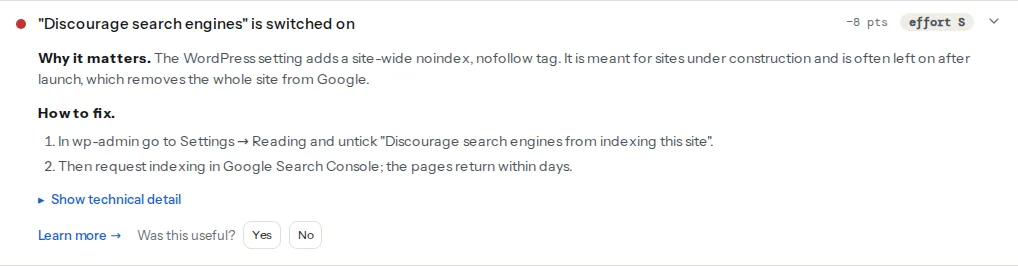
The discourage check looks for a robots meta tag that contains both noindex and nofollow, which is exactly what the setting emits. On staging that is correct. If you push the database to production and this finding appears on the live site's report, you have found the trap; WordPress "Discourage search engines" covers the recovery on a live site.
Step by step
1. Pick the staging option that matches who will use it
Managed-host staging (first choice for most sites). Most managed WordPress hosts create a staging copy with one click, on a subdomain of your domain or on a host-owned domain, and offer a push back to live. The good ones protect the copy with basic auth or a login wall and set noindex; check which of the two yours does, because it is often only one. The push is where to read the fine print: some hosts push files and database together, some let you choose, and a database push overwrites whatever production gained since the copy was made. Prefer "push files only" plus manual settings changes on live when the change is a theme or a plugin.
Plugins. WP Staging clones the site into a subfolder of the same install (with its own table prefix in the same database), so it uses the live server's disk and PHP and is public at that folder unless you protect it. Duplicator builds a package (archive plus installer) you deploy to any host, which is a migration tool doing staging duty. Both give you a copy fast; neither protects it for you.
Local (for developers). Local, DDEV and WordPress.com's Studio run a full copy on your machine. Nothing is public and nothing can be indexed, which makes them the safest option and the only one where the report cannot help, because it cannot reach your laptop.
| Option | Where the copy lives | Public by default | Push to live | Report can check it |
|---|---|---|---|---|
| Host staging | Host subdomain | Usually protected, verify | Built in, read the DB caveat | Yes |
| WP Staging | Subfolder of live site | Yes | Pro version | Yes, by full URL |
| Duplicator | Any server you choose | Yes | Manual | Yes |
| Local / DDEV / Studio | Your computer | No | Manual | No |
2. Protect the public copy twice
Basic auth first. On nginx, in the staging server block:
# /etc/nginx/sites-enabled/staging.example.com
server {
    server_name staging.example.com;
    auth_basic "Staging";
    auth_basic_user_file /etc/nginx/staging.htpasswd;
    # ... the rest of the WordPress config
}
On Apache, in the staging site's .htaccess:
AuthType Basic
AuthName "Staging"
AuthUserFile /var/www/staging.htpasswd
Require valid-user
Create the password file with htpasswd -c /etc/nginx/staging.htpasswd editor. With auth on, the probe gets a 401 and the finding passes.
Then noindex, for the day auth is switched off "just for the client to look" and forgotten. Tick Settings → Reading → "Discourage search engines" on staging, or better, let the snippet in step 4 do it by hostname so it can never be pushed to production by accident. Do not block staging in robots.txt: a page Google cannot fetch is a page whose noindex Google cannot read, and blocked-but-indexed URLs linger.
3. Know the eight things that go wrong on push
- The domain inside the database. Pushing a database copied from
staging.example.computs that hostname insiteurl,home, image URLs and builder data. Every host tool and plugin does a search-replace on push; confirm it handles serialized data, as described in the WordPress migration checklist. - "Discourage search engines" travels. The checkbox is a database row. Untick it before the push, or exclude
wp_optionsfrom the push, or key it to the hostname (step 4). - WooCommerce orders placed on staging. A test order on staging is a real row in the staging database. Push the database and it appears in production's order list; worse, pushing overwrites the real orders placed on live since the copy. Never push the database of a shop; push files, then repeat the settings change by hand.
- Scheduled posts and cron. WP-Cron runs on staging whenever someone loads a page there, so a post scheduled on the copy publishes on the copy, and plugins fire their scheduled jobs twice, once per site.
- Email from staging. Order confirmations, form notifications and password resets sent from the copy reach real people with staging links in them.
- Licence keys. Premium plugins and themes bind their key to a domain; many vendors allow a
staging.subdomain, some do not, and a copy that cannot update is a copy that tests the wrong version. - Uploads out of sync. Images added to live after the copy do not exist on staging, so a page built on staging references files that do exist and misses the new ones, and vice versa after a full push.
- Caching plugins on staging. A page cache copied with the site serves live's cached HTML, live URLs included, until purged. Purge on the copy after cloning and disable the cache while testing.
4. Make staging safe by hostname
One block in wp-config.php, above the line that says "That's all, stop editing", turns any copy at staging.example.com into a safe one and does nothing on production, even when the same file is pushed back:
// wp-config.php: staging behaviour keyed to the hostname, safe to push to live.
if (isset($_SERVER['HTTP_HOST']) && $_SERVER['HTTP_HOST'] === 'staging.example.com') {
    define('WP_ENVIRONMENT_TYPE', 'staging');
    define('DISABLE_WP_CRON', true);           // no scheduled posts or jobs firing on the copy
}
Then a must-use plugin, which loads before ordinary plugins and cannot be deactivated by accident, at wp-content/mu-plugins/staging-guard.php:
<?php
/**
 * Plugin Name: Staging guard
 * Description: noindex, no outgoing mail and no Woo webhooks when WP_ENVIRONMENT_TYPE is staging.
 */
if (wp_get_environment_type() !== 'staging') {
    return;
}

// Emit <meta name="robots" content="noindex, nofollow"> on every page (WordPress 5.7+).
add_filter('wp_robots', 'wp_robots_no_robots');

// The same instruction as a header, so feeds, images and cached responses carry it too.
add_action('send_headers', function () {
    header('X-Robots-Tag: noindex, nofollow', true);
});

// Short-circuit every email (WordPress 5.7+). Log the subject instead.
add_filter('pre_wp_mail', function ($null, $atts) {
    error_log('[staging] mail suppressed: ' . ($atts['subject'] ?? ''));
    return true;
}, 10, 2);

// Do not let WooCommerce deliver webhooks from the copy.
add_filter('woocommerce_webhook_should_deliver', '__return_false');
wp_get_environment_type() reads the constant from wp-config, so the guard is inactive on production even though the file is identical there. The wp_robots filter with wp_robots_no_robots is the documented way to emit noindex, nofollow, and the report reads it the same way it reads the "Discourage" setting. pre_wp_mail returning anything but null stops wp_mail() before it sends.
5. Pre-push and post-push routine with the report
Before pushing, on the staging URL (the checker cannot log in, so switch auth off for the ten minutes of the check and switch it back on; with the hostname guard in place the copy stays noindex meanwhile):
- The WordPress checker shows "Discourage search engines is switched on" or "The page is set to noindex". Good: it is still hidden.
- The rest of the report is your test result: the SEO, speed and accessibility findings of the new theme or plugin, before it reaches anyone.
After pushing, on the live URL:
- "The page can be indexed" and "Search engines are not discouraged in Settings → Reading". If either fails, Settings → Reading first, then the SEO plugin's per-page settings.
- The canonical in the technical detail carries the live domain, not
staging.. - The SEO audit on two deep pages, because "Discourage" is site-wide but a per-page noindex set while testing is not.
6. If staging got indexed
- Leave it reachable for now and add noindex (step 4 or the checkbox). A copy behind auth cannot show Google its noindex.
- In Search Console, add
staging.example.comas a property, verify it and use Removals → New request for the staging URLs that show up in results; that hides them within about a day while Google recrawls. - Once the Pages report for the staging property shows the URLs as excluded by noindex, put auth on. Not before.
- Add a canonical from staging to live only if you cannot do the above; noindex is the right tool for a copy that should not exist in search at all.
Platform notes
Managed hosts
Use the host's tool. Check two things in its documentation before the first push: whether the staging domain is behind auth or only noindex, and whether the push copies the database (then the eight traps apply) or only files. Most hosts let you choose per push.
Shared hosting with cPanel
There is usually no staging button. WP Staging into a subfolder is the pragmatic option; protect the folder with cPanel's "Directory Privacy" (which writes the Apache block from step 2) and install the guard from step 4 with the subfolder's hostname check adjusted to the path, for example str_starts_with($_SERVER['REQUEST_URI'], '/staging-a1b2/').
Sites with WooCommerce
Never push the database. Test on staging, write down every setting you changed, push files, and repeat the settings on live. WooCommerce Subscriptions detects a changed site URL and enters a staging mode that stops renewals from the copy; it does this on the copy, not for the orders you might push back.
Verify
- On the live site's report, the finding reads "No public staging copy found". Your copy is either behind auth (401) or answers with noindex, or does not exist.
- On the staging URL, the WordPress checker's first finding is the discourage or noindex finding, as a fail.
curl -sI https://staging.example.com/returns401with auth on, and with auth off returnsx-robots-tag: noindex, nofollow.- After a push, the live report reads "The page can be indexed" and the canonical shows the live domain.
Common mistakes
- Pushing the whole database because it is one click. Orders, comments, users and
blog_publicfrom staging replace production's. Push files; redo settings by hand. - Protecting staging with robots.txt only. Google cannot read a noindex on a page it may not fetch, so the URLs stay indexed as "blocked". Use noindex, then auth.
- Auth without noindex. The day someone turns auth off for a client preview, the copy is indexable. The hostname guard costs nothing and covers that day.
- Testing email on staging. A form notification from the copy reaches a real customer with a staging link. Short-circuit
wp_mailon the copy. - A staging copy left online after launch. It ages, its plugins go unpatched, and it is the same site with the same passwords. Delete it when the work is done; the probe keeps checking those three hostnames on every report.