A shop, a dental practice or a restaurant has facts a search engine cannot guess from prose: where it is, when it is open, what it costs, how to call. LocalBusiness structured data states them in a form Google reads directly and can show under the listing or in the knowledge panel. It is one JSON-LD block, usually on the home page or the contact page, and most of the work is copying facts you already have. This guide picks the subtype, writes a complete block with split opening hours and closed days, handles a business with several locations, and shows how to check it before Google does.
Quick answer
- Use the most specific subtype schema.org offers (
Dentist,Restaurant,Store,HairSalon), not plainLocalBusiness, and use it instead ofOrganizationfor a single-location business. - Give it
name,addressas aPostalAddresswith a two-letteraddressCountry,telephonein international format,url,image,geoandopeningHoursSpecificationwithdayOfWeek,opensandclosesin 24-hourHH:MM. - Copy the name, address and phone from your Google Business Profile so the three agree character for character.
- One block per location, on that location's page, each with its own
@id; not on every page of the site. - Run the schema validator: the required-properties, logo/sameAs and rich-result findings should all pass.
Why LocalBusiness schema matters
Google shows local results from two sources: the Business Profile you claim in Google Maps, and what it reads on your site. When the two agree, Google can show opening hours, the phone number and the address next to your listing and connect your site to the map pin. When they disagree, or the site says nothing, Google falls back to the profile alone and treats the site as a weaker source about the business.
The block also does the work Organization does on a company site: it carries the logo and the official profile links, so a search for the business name can show a branded box. For a business with premises, LocalBusiness is that entity; there is no need for a second Organization block describing the same company.
The opening hours are the part visitors notice. A "Closed now · Opens 9:00" line under a listing, or the right hours in an assistant's answer, comes from openingHoursSpecification. Hours written as free text in the footer ("Mon–Fri 9–6, Sat till 2") are read by people and by nobody else.
How getReport checks it
The validator parses every <script type="application/ld+json"> block on the page, flattens @graph arrays, and looks at each entity's @type. It recognises LocalBusiness and a list of common subtypes and applies the same rules to each: Restaurant, Store, Hotel, Bakery, CafeOrCoffeeShop, BarOrPub, Dentist, Physician, MedicalClinic, AutoRepair, HairSalon, BeautySalon, RealEstateAgent, LegalService, Attorney, ProfessionalService, TravelAgency and HomeAndConstructionBusiness. For these it requires name, address and telephone; a subtype outside the list (Plumber, Florist) is listed under the detected types but its properties are not checked, so pick from the list when you can, or accept that the validator will not confirm the block.
Because a LocalBusiness is a kind of Organization, the logo and sameAs finding applies to it too: the block needs a logo and at least one profile URL to pass. The eligibility finding then lists LocalBusiness (or the subtype) as eligible once nothing required is missing.
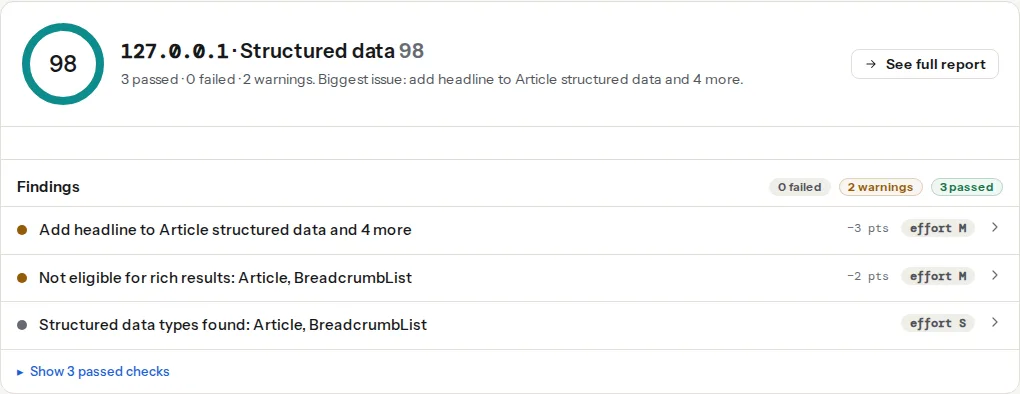
Google's own list is shorter: its LocalBusiness documentation marks name and address as required and the rest (telephone, url, image, geo, openingHoursSpecification, priceRange, aggregateRating) as recommended. The validator treats the phone number as required because a local block without it does very little.
Step by step
1. Pick the subtype
Open the list of more specific types at schema.org/LocalBusiness and choose the deepest one that is true. A dentist is a Dentist (under MedicalBusiness); a bakery is a Bakery (under FoodEstablishment); a clothes shop is a ClothingStore (under Store). If nothing fits, use the parent (Store, MedicalBusiness, FoodEstablishment) rather than inventing a type; an unknown @type is ignored by every consumer.
Use the subtype in place of Organization, not next to it. A site that prints both an Organization and a Dentist for the same practice has two entities for one business, and the validator reports that as a duplicate.
2. Collect the facts from one source
Open the Google Business Profile and copy from it:
- the business name exactly as it appears there (no "Ltd" if the profile has none, no keywords added);
- the street address, town, postcode and country;
- the phone number, written with the country code (
+385 1 234 5678); - the opening hours per day, including the days it is closed and any split hours (a lunch break, a restaurant with two services);
- the map position, from the profile or by right-clicking the pin in Google Maps, to five decimal places.
The point is consistency. Google compares the block with the profile and with the visible contact page; three slightly different spellings of the address weaken the match rather than strengthening it.
3. Write the block
A complete block for a shop with a lunch break on weekdays, shorter Saturday hours and a closed Sunday. It goes in the <head> or at the end of the <body> of the home page (or the contact page if the home page is a campaign landing page):
<script type="application/ld+json">
{
  "@context": "https://schema.org",
  "@type": "Store",
  "@id": "https://www.example-shop.hr/#business",
  "name": "Example Shop",
  "url": "https://www.example-shop.hr/",
  "logo": "https://www.example-shop.hr/images/logo-512.png",
  "image": "https://www.example-shop.hr/images/shopfront.jpg",
  "telephone": "+385 1 234 5678",
  "priceRange": "€€",
  "address": {
    "@type": "PostalAddress",
    "streetAddress": "Ilica 12",
    "addressLocality": "Zagreb",
    "postalCode": "10000",
    "addressCountry": "HR"
  },
  "geo": {
    "@type": "GeoCoordinates",
    "latitude": 45.81318,
    "longitude": 15.97094
  },
  "openingHoursSpecification": [
    {
      "@type": "OpeningHoursSpecification",
      "dayOfWeek": ["Monday", "Tuesday", "Wednesday", "Thursday", "Friday"],
      "opens": "09:00",
      "closes": "13:00"
    },
    {
      "@type": "OpeningHoursSpecification",
      "dayOfWeek": ["Monday", "Tuesday", "Wednesday", "Thursday", "Friday"],
      "opens": "14:00",
      "closes": "18:00"
    },
    {
      "@type": "OpeningHoursSpecification",
      "dayOfWeek": "Saturday",
      "opens": "09:00",
      "closes": "14:00"
    },
    {
      "@type": "OpeningHoursSpecification",
      "dayOfWeek": "Sunday",
      "opens": "00:00",
      "closes": "00:00"
    }
  ],
  "sameAs": [
    "https://www.facebook.com/exampleshop",
    "https://www.instagram.com/exampleshop"
  ]
}
</script>
The rules behind the hours, all from Google's LocalBusiness documentation:
opensandclosesare 24-hourHH:MMstrings. "9am" and "18h" are not read.- Split hours are two
OpeningHoursSpecificationobjects for the same days, one per interval. - A day the business is closed gets
opensandclosesboth00:00. Leaving the day out means "unknown", not "closed". - Open around the clock is
00:00to23:59. - Seasonal or holiday hours get
validFromandvalidThroughdates ("validFrom": "2026-12-24", "validThrough": "2026-12-26") on their own object.
priceRange is either currency signs (€€) or a range with numbers (€10–€30); Google ignores it beyond 100 characters. addressCountry is the two-letter ISO 3166-1 code: HR, DE, GB (not UK), US. image is a photo of the premises or the interior, not the logo; the logo has its own property.
4. Restaurants and cafés
FoodEstablishment and its subtypes (Restaurant, Bakery, CafeOrCoffeeShop, BarOrPub) take three more properties Google reads:
{
  "@type": "Restaurant",
  "servesCuisine": "Croatian",
  "menu": "https://www.example-restaurant.hr/menu/",
  "acceptsReservations": "https://www.example-restaurant.hr/book/"
}
menu is the URL of the menu page (a PDF works but a page is better). acceptsReservations is true, false or the URL where people book; false is worth stating for a walk-in place, because "unknown" and "no" show differently. Merge these into the block from step 3; the example is a fragment, not a second entity.
5. Several locations
One page per location, one LocalBusiness per page, each with its own @id, and the company itself as an Organization on the home page that the locations point back to:
{
  "@context": "https://schema.org",
  "@type": "Dentist",
  "@id": "https://www.example-dental.hr/zagreb/#business",
  "name": "Example Dental Zagreb",
  "url": "https://www.example-dental.hr/zagreb/",
  "telephone": "+385 1 234 5678",
  "address": {
    "@type": "PostalAddress",
    "streetAddress": "Ilica 12",
    "addressLocality": "Zagreb",
    "postalCode": "10000",
    "addressCountry": "HR"
  },
  "parentOrganization": {
    "@id": "https://www.example-dental.hr/#organization"
  }
}
The home page keeps the Organization block described in Organization and WebSite schema, with @id https://www.example-dental.hr/#organization, the logo and the sameAs links. Each location page has its own address, phone, hours and geo, and a name that includes the town so the entities are distinguishable. A location page should also be a real page: its own URL, its own visible address and hours, ideally its own Business Profile.
What not to do: one block on the home page with an array of five addresses. address accepts an array, but Google's local rich result describes one place, and five addresses on one entity match none of the five profiles.
6. Put it on the right pages
The block belongs on the page that represents the business: the home page for a single location, the location page for each branch. It does not belong on every blog post and product page. A site-wide template that prints the Dentist block on 400 pages is not wrong in the sense of invalid, but it repeats the entity on pages about something else and makes the validator's duplicate finding noisier than it needs to be. If the SEO plugin prints an Organization node in its graph on every page, that is fine; keep the local block to the pages about the place.
7. Validate before Google does
Paste the page into the schema validator. Read the findings in this order: JSON-LD parses (a stray comma voids the whole block), required properties (the technical detail lists Store: telephone style paths), logo and sameAs, then eligibility. Then run Google's Rich Results Test on the same URL; it shows the local business item with the properties it read. Google's list of what a rich result needs is the LocalBusiness structured data reference.
Platform notes
WordPress
Yoast SEO prints Organization in its graph from Settings → Site representation. Address and hours need the paid Local SEO add-on, which adds a location post type and outputs the LocalBusiness subtype with openingHoursSpecification and geo, and replaces the Organization node rather than adding to it.
Rank Math has a Local SEO module in the free plugin: Rank Math SEO → Dashboard → Modules → Local SEO & Knowledge Graph, then Titles & Meta → Local SEO, choose "Company", pick the business type, fill in the address, phone, hours and map position. It becomes the LocalBusiness node of Rank Math's graph. Several locations need Rank Math Pro.
Schema Pro and similar dedicated plugins output a LocalBusiness block from their own settings. Use them only if the SEO plugin is not already printing one; two generators means two entities, and Google picks one at random. The report's duplicate-entities finding shows when that has happened.
Shopify
Most themes print an Organization in layout/theme.liquid. For a shop with a physical store, add the LocalBusiness block through a Custom Liquid section on the contact or home page (Online Store → Themes → Customize → Add section → Custom Liquid) and paste the <script> from step 3 with your values. Leave the theme's Organization alone unless it duplicates yours; if it does, edit the theme block rather than adding a third.
Static sites and custom builds
Keep the facts in one data file (data/business.json, front matter, a config object) and render the block from it, so the visible contact page and the JSON-LD cannot drift apart. Hugo, Eleventy and Astro can all read a JSON file into a layout partial.
Verify
- The validator reads "Store structured data has every required property" (with your subtype), "Organization structured data has a logo and sameAs links" and "Eligible for rich results: Store" (or your subtype), and "Structured data entities are unique".
- The Rich Results Test shows one Local business item, with the hours listed per day and no warnings on the address.
- The address, phone and name in the block, on the visible contact page and in the Business Profile are identical. Open all three side by side once.
- Every URL in the block (
url,image,logo,menu,sameAs) loads in a private window without a redirect.
Common mistakes
LocalBusinesswith no subtype. Symptom: valid markup, no local rich result, and the knowledge panel does not know what kind of business it is. Pick a subtype from schema.org's list.- Opening hours as text. Symptom: hours in the footer, none in the search listing. Move them into
openingHoursSpecificationwithHH:MMvalues, and keep the footer for people. addressCountry: "UK"or a full country name. Symptom: warnings in the Rich Results Test on the address. Use the two-letter code (GB).- A phone number without the country code.
01 234 5678is ambiguous outside the country. Use+385 1 234 5678. - The same block on every page. Symptom: the validator lists the entity on a product page and again on the blog, and duplicate findings on pages that also print the SEO plugin's graph. Limit the block to the home or location page.
- Both
OrganizationandDentistfor one practice. Two entities for one business; the validator reports two root entities and Google chooses one. Use the subtype alone, or make theOrganizationthe parent of the location as in step 5.