Critical CSS was the answer to a specific problem: every stylesheet in <head> stops the browser from drawing anything, and on a slow connection a 200 KB stylesheet meant two seconds of blank screen. The fix was to inline the few rules the first screen needs and load the rest without blocking. Ten years later, HTTP/2, smaller bundles and preload have changed the maths, and the tooling has a reputation for breaking layouts. This guide says when it still pays, what it costs, what to try first, and how to measure the difference on your own page.
Quick answer
| Your situation | Do this |
|---|---|
| One or two stylesheets under 50 KB compressed, HTTP/2 on | Skip critical CSS. Preload the main stylesheet and stop. |
| A page builder or theme shipping 200 KB+ of CSS on every page | Remove unused CSS first; then, if First Contentful Paint is still over 1.8 s on mobile, add critical CSS. |
| Marketing landing pages, slow mobile field data, one template | Worth it: one template, large payoff, low maintenance. |
| A site with many templates and frequent design changes | Usually not: the extraction goes stale and the bugs cost more than the 200–500 ms. |
Whatever you decide, measure with the speed test before and after: the render-blocking finding shows the stylesheets and the estimated savings.
Why critical CSS matters
The problem it solves
A browser will not paint a page until it has downloaded and parsed every stylesheet linked in <head>, because any of them could change how the first pixel looks. On a fast connection that wait is tens of milliseconds. On a phone on a 4G connection with a slow first byte, one 150 KB stylesheet can be 500–1,000 ms of blank screen, and First Contentful Paint, Speed Index and Largest Contentful Paint all start after it.
Critical CSS breaks the dependency. The rules that style the visible part of the page (header, hero, first paragraph) are copied into a <style> block in the HTML. The full stylesheet is then loaded in a way that does not block rendering, and it takes over once it arrives. The browser can paint as soon as the HTML is there.
Why it matters less than it did
Three things have shrunk the gain:
- HTTP/2 and HTTP/3. Stylesheets no longer queue behind six connections per host; they download in parallel with everything else, and the first one arrives sooner. See HTTP/2 and HTTP/3.
- Smaller CSS. Component-scoped CSS, utility frameworks that purge unused classes, and per-template splitting mean many sites ship 20–40 KB compressed instead of 200 KB. A 30 KB file on HTTP/2 blocks for one round trip, which
preloadcan overlap with the HTML parse. - The first byte dominates. On most slow pages the server response, not the stylesheet, is what the visitor waits for. Inlining CSS does nothing for a 1.5 s TTFB.
When it still pays
The gain is real when CSS is large and the connection is slow: page builders (Elementor, Divi, WPBakery) and themes that load every widget's styles on every page, sites whose field data shows mobile FCP over 1.8 s, and landing pages where a 300 ms earlier paint is measurable in conversions. Those are also the sites where one template covers most of the traffic, which keeps the extraction manageable.
How getReport checks it
The speed module runs Lighthouse through Google's PageSpeed Insights on a throttled mobile profile. Two of its audits are the ones that decide whether critical CSS is worth your time:
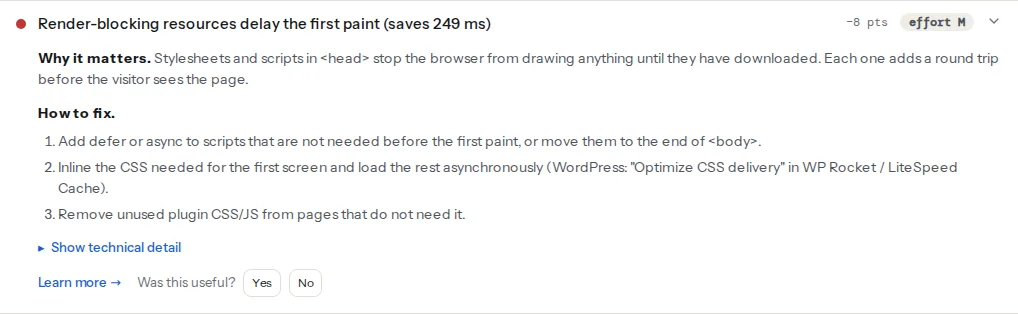
The list is your inventory. Every stylesheet in it is a candidate for inlining, deferring or deleting; every script in it is easier to fix with defer. The estimate in the title is Lighthouse's model of the saving if none of them blocked, which is an upper bound, not a promise.
This finding is the reason to try removal before inlining. If 80 % of a 200 KB stylesheet is unused on the page, the render-blocking problem is mostly a size problem, and shrinking the file helps every page, cached or not.
First Contentful Paint is the metric critical CSS moves. It is not a Core Web Vital, but LCP and Speed Index cannot start before it, so a later FCP drags both. The Speed Index and FCP guide explains how the two relate.
The waterfall further down the speed panel shows the same stylesheets as amber bars between the document and the first image. If they are short and start early, critical CSS will not buy much; if they are long or start late (a stylesheet loaded from a second domain, or through an @import), it will.
The costs, honestly
Critical CSS is a build step with ongoing maintenance, not a switch:
- Per-template extraction. The critical rules for a product page differ from the home page and the blog. A tool renders each template at a mobile viewport and keeps the rules that apply above the fold. Each template is a separate extraction to keep current.
- Cache invalidation. Change the stylesheet and every extracted block is stale. Old critical CSS with a new full stylesheet means the page paints with the wrong layout for a moment, then jumps.
- Content-dependent breakage. The extraction covers what was on the screen during extraction. A longer headline, a promo bar, a logged-in state or a different first block can fall outside it and render unstyled until the full CSS arrives.
- Flash of unstyled content and layout shift. Done wrong, the visitor sees unstyled text, then a reflow. That reflow counts towards Cumulative Layout Shift, which is a Core Web Vital, unlike FCP.
- Inlined CSS is not cached. It is sent with every HTML response. 15 KB of critical CSS on a page a visitor opens ten times is 150 KB of repeated bytes; the external file would have loaded once.
- The full stylesheet still loads. Critical CSS moves the first paint earlier; it does not reduce total bytes or parse time. Unused CSS remains unused.
A reasonable budget is 14 KB or less of inlined CSS per template, checked whenever the stylesheet changes.
Simpler things to try first
Each of these is cheaper than critical CSS and often enough on its own.
1. Remove unused CSS
Page builders load every module's styles on every page. Elementor's "Improved CSS Loading" experiment, Divi's "Dynamic CSS" and Perfmatters' per-page asset unloading all trim this at the source. In a build pipeline, PurgeCSS or the framework's own tree-shaking does the same. Aim for under 50 KB compressed per page.
2. Split by template
One stylesheet for the shell, one per template, loaded only where needed. A blog post should not download the checkout styles.
3. Preload the main stylesheet
The browser discovers a stylesheet when it parses the <link>. A preload in the first bytes of <head> (or a Link response header, which arrives even earlier) starts the download before the parser gets there:
<head>
  <meta charset="utf-8">
  <link rel="preload" href="/css/main.css" as="style">
  <link rel="stylesheet" href="/css/main.css">
It still blocks, but for less time. Preload, preconnect, prefetch covers when each hint helps.
4. Use the media attribute for what is not needed now
A stylesheet with a media attribute that does not match the current viewport downloads at low priority and does not block rendering:
<link rel="stylesheet" href="/css/print.css" media="print">
<link rel="stylesheet" href="/css/wide.css" media="(min-width: 1024px)">
Print styles and desktop-only layouts are the usual candidates. On a phone, wide.css no longer blocks the paint.
5. Defer the scripts in the list
Render-blocking scripts are in the same finding and are a one-word fix: defer on every <script src> that does not need to run before the first paint. Do this before touching CSS; scripts are usually the larger share of the estimate.
Step by step: adding critical CSS
If FCP is still slow after the list above, here is the pattern that works.
1. Extract the critical rules per template
In a build pipeline, the critical npm package (which uses Penthouse underneath) renders a page at a given viewport and writes the above-the-fold rules:
// build/critical.mjs — run after the CSS build
import { generate } from 'critical';

await generate({
  src: 'dist/index.html',          // the built page
  target: { html: 'dist/index.html' }, // rewritten in place: <style> inlined, CSS deferred
  inline: true,
  width: 412,                      // a mid-range phone
  height: 915,
  ignore: { atrule: ['@font-face'] }, // keep fonts external
});
Run it once per template, with the page that best represents it. In WordPress, the caching plugins do this on their servers: WP Rocket's "Optimize CSS delivery" (either "Remove Unused CSS" or "Load CSS asynchronously", which generates critical path CSS), LiteSpeed Cache's "Load CSS Asynchronously" with "Generate Critical CSS" under Page Optimization → CSS Settings, and Autoptimize's Critical CSS tab. Cloudflare has no critical CSS feature; its optimisations are about delivery, not what the page contains.
2. Inline the result and load the full stylesheet without blocking
The output looks like this in the served HTML:
<head>
  <style>
    /* critical: header, hero, first section — kept under 14 KB */
    .site-header{display:flex;align-items:center;padding:12px 16px}
    .hero{min-height:60vh;display:grid;place-items:center}
    /* … */
  </style>
  <link rel="preload" href="/css/main.css" as="style" onload="this.onload=null;this.rel='stylesheet'">
  <noscript><link rel="stylesheet" href="/css/main.css"></noscript>
</head>
The preload downloads the file at high priority without blocking; the onload handler turns it into a real stylesheet once it is there; the <noscript> fallback keeps the page styled when JavaScript is off. Google's own write-up of the pattern is Defer non-critical CSS. A simpler variant with the same effect uses a non-matching media query that is flipped on load:
<link rel="stylesheet" href="/css/main.css" media="print" onload="this.media='all'">Note
The onload trick depends on JavaScript. Screen-reader users and anyone with scripts blocked still get the styled page through the <noscript> line, so keep it. Without it, a JS error before the stylesheet swaps in leaves the page half-styled for everyone.
3. Keep fonts and layout-critical rules in the inline block
Anything that changes the size of above-the-fold elements must be in the critical block: the grid, the hero's min-height or aspect-ratio, the heading sizes. Leave it out and the page reflows when the full stylesheet lands, which is the layout shift the finding warns about. Fonts are the exception: keep @font-face external and preload the one file the headline uses.
4. Regenerate on every CSS change
Wire the extraction into the deploy, or into the plugin's cache purge (WP Rocket and LiteSpeed regenerate their critical CSS when you clear the cache). A stale critical block is worse than none.
Decision table
| Signal in the report | Decision |
|---|---|
| Render-blocking finding lists scripts only | Add defer; no critical CSS needed |
| Stylesheets under 50 KB total, estimate under 300 ms | Preload the main file; skip critical CSS |
| Stylesheets over 150 KB and unused CSS over 70 % | Remove unused CSS first, re-test |
| After removal, mobile FCP still over 1.8 s, one or two templates | Add critical CSS for those templates |
| Many templates, design changes weekly | Split per template, preload, accept the round trip |
| TTFB over 800 ms | Fix the server first; CSS is not the bottleneck |
Platform notes
WordPress
Use one plugin for CSS delivery, not two. WP Rocket, LiteSpeed Cache and Autoptimize each rewrite the <link> tags; two of them together produce stylesheets loaded twice or a <noscript> block that references the wrong file. Exclude the builder's above-the-fold styles from "Remove Unused CSS" if the hero renders unstyled, and test logged-out, because the extraction runs as an anonymous visitor.
Shopify
Themes ship a base stylesheet plus per-section CSS, and the platform serves it over HTTP/2 from a CDN. There is no supported way to inject critical CSS into theme.liquid without maintaining it by hand on every theme update, and the gain is small. Reduce app scripts instead; they are usually the larger blockers.
Static sites and frameworks
Astro, Next.js and Nuxt can inline the component-scoped CSS of the current route at build time (by default or with one build option, depending on the version), which is critical CSS without the extraction step. Check the render-blocking finding after enabling it; the framework's global stylesheet may still be a separate blocking file.
Verify
- Run the speed test before the change and keep the link. After the change, the render-blocking finding should no longer list the main stylesheet, and the lab FCP should be earlier by roughly the estimate.
- Open the page on a throttled connection in DevTools (Network → "Slow 4G") and watch the first paint: styled header and hero, no unstyled text, no jump when the full stylesheet arrives.
- Cumulative Layout Shift in the lab table did not go up. If it did, a layout rule is missing from the inline block.
- Switch off JavaScript in DevTools and reload: the page is still styled, via the
<noscript>fallback.
Common mistakes
- Critical CSS on top of 200 KB of unused CSS. Symptom: FCP improves, Speed Index and total bytes do not. Fix: remove unused CSS first; the inline block becomes smaller too.
- Extraction from the desktop viewport. Symptom: mobile pages render unstyled below the header. Fix: extract at a phone width (about 412 px) or both, and keep the union.
- Stale critical CSS after a redesign. Symptom: the page flashes an old layout and then reflows; CLS rises. Fix: regenerate on deploy or on cache purge, and check the finding after every CSS change.
- No
<noscript>fallback. Symptom: unstyled page for a visitor with scripts blocked or a JS error early in the page. Fix: add the fallback line under the preload. - Inlining the whole stylesheet. Symptom: a 120 KB HTML document, nothing cached, every page view pays again. Fix: keep the inline block under about 14 KB and load the rest deferred.