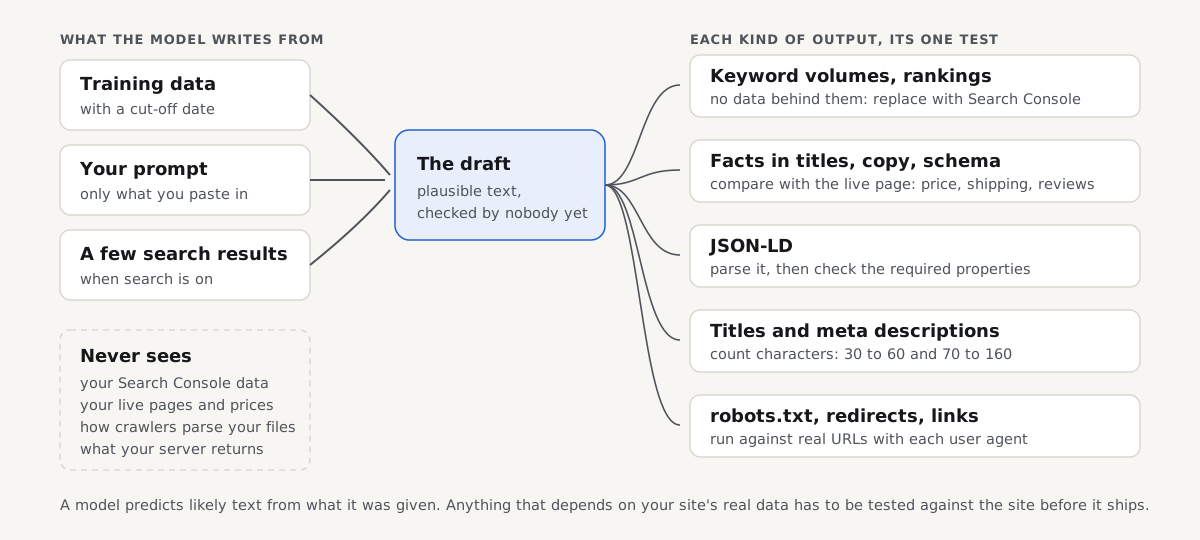
ChatGPT is good at the parts of SEO that are about language (keyword ideas, outlines, title drafts, first drafts of schema markup or robots.txt rules) and unreliable at anything that depends on data it cannot see: search volumes, rankings, your live pages and how crawlers actually read your files. Use it to draft, never to decide, and test every output that touches your site before it ships. ChatGPT is one of the AI tools that changed how search work gets done, part of the shift our guide to Google AI Mode and AI search maps out. This page is about using ChatGPT as an SEO assistant; if you want your site cited inside ChatGPT's answers, that is a different job, covered in how to rank in ChatGPT.
Quick answer
- Hand it language work: keyword ideas, grouping keywords by intent, outlines, rewrites, title and description drafts, regex for Search Console filters.
- Never take its numbers: search volumes, keyword difficulty and rankings it gives without a connected data source are generated text, not measurements.
- Check every fact it adds. Drafts pick up claims your page never makes: free shipping, review counts, prices.
- Test anything a machine will read: parse JSON-LD, count title characters, run robots.txt rules against real URLs per user agent, follow redirects with
curl -sIL. - Google's rule since 1 October 2026: manually fact-check and review all AI-generated content, and that review applies to titles, meta descriptions, structured data and alt text too.
- On our fixture, a typical generated robots.txt changed the verdict for 10 of 15 URL and crawler pairs, and a typical Product snippet failed to parse.
Is ChatGPT good for SEO?
Yes, for drafting, and no, as a source of truth. A language model writes the most likely next words given what it was trained on and what you put in the prompt. That makes it fluent at the things SEO shares with writing: phrasing a title five ways, guessing the questions a buyer asks, turning a messy list of keywords into topic groups. It also explains why it fails on the things SEO shares with measurement. OpenAI's own help centre says ChatGPT can produce incorrect or misleading output, can sound confident when it is wrong, can invent sources, and that you should check important information against reliable sources.
The useful mental model is the diagram above. ChatGPT sees three things: its training data (with a cut-off date), your prompt, and, when search is on, a handful of pages it fetched. It does not see your Search Console data, your live prices, your server's redirect rules or how Googlebot parses your robots.txt. Every output that depends on one of those is a guess shaped like an answer.
Google says the same, more firmly since October 2026. Its guidance on using generative AI content says AI can help with research and structure, that generating many pages without adding value can fall under its scaled content abuse policy, and, since the 1 October 2026 update, that it is "critical to manually factcheck and review all AI-generated content". The update spells out that the review also covers metadata: title elements, meta descriptions, structured data and alt text. Google announced no new penalty with that change; it is a reminder that the usual quality rules apply to every word, whoever drafted it.
Which SEO tasks can you trust ChatGPT with?
Here is how the common requests break down, ordered from safest to riskiest. "Reliable" means the draft is usually usable after a normal read-through; "test" means it must pass a check against your real site first.
| SEO task | How reliable | What goes wrong | How to check it |
|---|---|---|---|
| Keyword ideas and synonyms | Good | Misses your niche's real jargon | Confirm demand in Search Console queries or a keyword tool |
| Grouping keywords by intent | Good | Merges two intents into one page | Look at what ranks for each group |
| Outlines and content briefs | Good start | Generic, the same as every other page | Add first-hand detail only you have |
| Regex for Search Console filters | Good | Escaping mistakes | Run it on a sample of real queries |
| Title and meta description drafts | Mixed | Over-length, invented claims | Count characters; compare every claim with the page |
| Search volumes, difficulty, rankings | Not reliable | Numbers with no data behind them | Replace them with Search Console or keyword tool data |
| JSON-LD structured data | Mixed | Syntax errors, wrong value formats, invented reviews | Parse it, then validate the required properties |
| robots.txt rules | Risky | Groups that drop your existing rules, unsupported lines | Test real URLs for each user agent |
| Redirect rules (nginx, Apache, plugins) | Risky | Chains and loops with rules it cannot see | Follow the hops with curl -sIL or a redirect checker |
| Auditing a live page | Limited | Reads a fetched copy, guesses the rest | Run a crawler-based audit on the real URL |
The closer an output gets to something a machine executes, the more a small mistake costs. A clumsy outline costs an edit; a robots.txt group that drops your existing rules can open your checkout to a crawler without any visible sign.
Why ChatGPT's keyword numbers cannot be right
When you ask ChatGPT for "monthly search volume" without a connected data source, it has nothing to look the number up in. It still answers, because a number is the likely shape of the reply. Treat those figures the way you would treat a stranger's guess: maybe in the right range, never something to plan budgets or pages on.
Keyword ideas are a different matter. The model has read a lot of how people phrase questions, so lists of long-tail variants, questions and comparisons are often good raw material. Check the list in Search Console's Performance report or a keyword tool and keep only the ones with real impressions or volume.
The same applies to rankings: ChatGPT with search on can read a few results pages, but not personalised, local rankings or your click data.
What happens when you test ChatGPT-style outputs?
We wrote three outputs of the kind ChatGPT typically produces for a small shop and tested each against our fixture of the example-shop.hr demo shop, served locally. These are typical examples we wrote ourselves to show the common failure patterns; we did not query ChatGPT or any other AI engine for them. Every command and output below is real and you can rerun it on your own site.
Test 1: a typical generated robots.txt
The request was the kind people type every day: "Write a robots.txt for my shop that blocks the cart, checkout, sorted URLs and PDF downloads, hides tag pages, keeps products crawlable and blocks AI training." A typical answer looks like this:
# generated-robots.txt (typical example, not live)
User-agent: *
Disallow: /cart
Disallow: /checkout
Disallow: /*?sort=
Disallow: /downloads/*.pdf
Noindex: /tag/

User-agent: GPTBot
Disallow: /

User-agent: OAI-SearchBot
Allow: /shop/
It reads well. We compared it with the shop's live file (which only disallows /cart/ for every crawler and declares a sitemap) using a short script that follows RFC 9309, the robots.txt standard: a crawler obeys only the group that names it, the longest matching rule wins, and Allow wins a tie.
# robots_check.py: RFC 9309 matching (longest rule wins, Allow wins ties, * and $)
import re, sys, urllib.request

def groups(text):
    out, agents, rules, last = [], [], [], None
    for raw in text.splitlines():
        line = raw.split('#', 1)[0].strip()
        if ':' not in line:
            continue
        key, val = [x.strip() for x in line.split(':', 1)]
        key = key.lower()
        if key == 'user-agent':
            if last != 'ua' and agents:
                out.append((agents, rules)); agents, rules = [], []
            agents.append(val.lower()); last = 'ua'
        elif key in ('allow', 'disallow'):
            rules.append((key, val)); last = 'rule'
        else:
            last = 'other'  # Sitemap, Noindex, Crawl-delay...: not a rule
    if agents:
        out.append((agents, rules))
    return out

def allowed(text, agent, path):
    gs = groups(text)
    mine = [r for a, r in gs if agent.lower() in a] or [r for a, r in gs if '*' in a]
    best = ('allow', '')
    for rules in mine:
        for kind, pat in rules:
            if not pat:
                continue
            rx = re.escape(pat).replace(r'\*', '.*')
            rx = rx[:-2] + '$' if rx.endswith(r'\$') else rx
            if re.match(rx, path) and (len(pat) > len(best[1]) or
                    (len(pat) == len(best[1]) and kind == 'allow')):
                best = (kind, pat)
    return best[0] == 'allow'

live = urllib.request.urlopen(sys.argv[1] + '/robots.txt').read().decode()
new = open(sys.argv[2]).read()
for path in sys.argv[3:]:
    for agent in ('Googlebot', 'GPTBot', 'OAI-SearchBot'):
        a, b = allowed(live, agent, path), allowed(new, agent, path)
        flag = '' if a == b else '  <- changed'
print(f'{path:28} {agent:14} live:{"allow" if a else "BLOCK"} new:{"allow" if b else "BLOCK"}{flag}')$ python3 -I robots_check.py http://localhost:4101 generated-robots.txt \
/shop/sava-low/ /cart/ "/shop/?sort=price" /downloads/size-chart.pdf /tag/sale/
/shop/sava-low/ Googlebot live:allow new:allow
/shop/sava-low/ GPTBot live:allow new:BLOCK <- changed
/shop/sava-low/ OAI-SearchBot live:allow new:allow
/cart/ Googlebot live:BLOCK new:BLOCK
/cart/ GPTBot live:BLOCK new:BLOCK
/cart/ OAI-SearchBot live:BLOCK new:allow <- changed
/shop/?sort=price Googlebot live:allow new:BLOCK <- changed
/shop/?sort=price GPTBot live:allow new:BLOCK <- changed
/shop/?sort=price OAI-SearchBot live:allow new:allow
/downloads/size-chart.pdf Googlebot live:allow new:BLOCK <- changed
/downloads/size-chart.pdf GPTBot live:allow new:BLOCK <- changed
/downloads/size-chart.pdf OAI-SearchBot live:allow new:allow
/tag/sale/ Googlebot live:allow new:allow
/tag/sale/ GPTBot live:allow new:BLOCK <- changed
/tag/sale/ OAI-SearchBot live:allow new:allowTen of the 15 verdicts changed. Most changes are what was asked for, but three are not:
- The cart opened up to OAI-SearchBot. Because the file gives OAI-SearchBot its own group, that crawler ignores every rule under
User-agent: *. Its group only saysAllow: /shop/, so/cart/, sorted URLs and PDFs are all open to it. Groups do not inherit, and nothing on the page warns you. - Tag pages are not hidden.
Noindex:is not a robots.txt rule. Google stopped honouring it in September 2019, and RFC 9309 never defined it, so/tag/sale/stays crawlable and indexable for Google. A noindex belongs in a meta robots tag or anX-Robots-Tagheader. - The sitemap line is gone. The live file declares
Sitemap: http://localhost:4101/sitemap_index.xml; the generated one dropped it because the prompt never mentioned it. ChatGPT cannot see the file you already have unless you paste it.
The fix is mechanical once you see it: copy the * rules into the OAI-SearchBot group (or drop that group, since * already allows it), replace Noindex: with a noindex tag on the tag template, and keep your Sitemap line. Our AI crawlers and robots.txt guide covers which AI groups to write and why.
Test 2: a typical generated Product snippet
Asked for "Product schema for my Sava Low sneaker page", a typical draft fills in everything a Product can have, including facts the page does not show:
{
  "@context": "https://schema.org",
  "@type": "Product",
  "name": "Sava Low, white leather",
  "description": "Our everyday low-top in full-grain white leather with a natural rubber sole.",
  "brand": { "@type": "Brand", "name": "Example Shop" },
  "offers": {
    "@type": "Offer",
    "price": "€129",
    "availability": "In stock",
    "url": "https://example-shop.hr/shop/sava-low/"
  },
  "aggregateRating": {
    "@type": "AggregateRating",
    "ratingValue": "4.8",
    "reviewCount": "127"
  },
}
We parsed it with Python's JSON parser and checked the properties Google's Product documentation asks for:
$ python3 -I jsonld_check.py product.jsonld
PARSE ERROR: Expecting property name enclosed in double quotes: line 18 column 1 (char 508)
parsed after removing the trailing comma
- Product: no image (required for merchant listings)
- offers.price is '€129': must be a number, no currency symbol
- offers: no priceCurrency (ISO 4217, e.g. EUR)
- offers.availability is 'In stock': use https://schema.org/InStock
- aggregateRating: 127 reviews claimed; are they visible on the page?
The trailing comma after the last } makes the whole block invalid JSON, and Google ignores a block that does not parse. The other four lines are format errors schema.org and Google document: price is a number with the currency in priceCurrency, and availability takes a schema.org value such as https://schema.org/InStock.
The rating is the serious one. curl -s http://localhost:4101/shop/sava-low/ | grep -ci review returns 0: the page has no reviews, and no price either. The model filled the gap with plausible numbers. Google's review snippet guidelines require the rated reviews to be visible on the marked-up page, and marking up reviews that do not exist is exactly the kind of error Google's October 2026 guidance tells you to catch in review. For what structured data does and does not do for AI answers, see schema markup for AI search.
Test 3: generated titles and a meta description
Three typical title drafts for the same product page, measured with len():
86 Sava Low White Leather Sneakers | Handmade in Zagreb | Free EU Shipping | Example Shop
74 Buy Sava Low: Premium Handcrafted White Leather Sneakers for Men and Women
66 Sava Low white leather sneakers, handmade in Zagreb | Example Shop
All three are over the 60 characters getReport's title check aims for, and Google cuts long titles to fit the result. Two also add claims: the fixture's shipping page says "Free EU shipping over €80", not free shipping on everything, and nothing on the page mentions men or women. A typical generated meta description for the page came out at 192 characters, past the roughly 160 at which descriptions get cut. A version that keeps only true facts, Sava Low white leather sneakers | Example Shop, is 46 characters.
Language models work in tokens rather than letters, so treat any length a model states about its own text as a guess and count it yourself. The same goes for internal link suggestions: on the fixture, a suggested /blog/how-to-clean-white-sneakers/ returned 404 and the real care page lives at /care/. Check every suggested URL against your sitemap.
How to check ChatGPT's SEO output on your own site
Work through the outputs in order of risk: robots.txt and redirects first, because one wrong line affects every page, then structured data, then titles and descriptions.
robots.txt. Before you replace the file, save the generated version next to the live one and test your most important URLs (home page, a category, a product, the cart, a sorted URL) for Googlebot and for every crawler the file names. Once it is live, the robots.txt tester parses it with Google's rules and tells you whether a page is blocked for Googlebot or for all agents:
For the AI crawlers, the AI crawler check reads the same file for 18 AI user agents, so a group like the OAI-SearchBot one above shows up straight away:
Redirect rules. ChatGPT writes a redirect rule without seeing the ones you already have, so a new rule often stacks onto an old one. Deploy to staging, then follow the hops. On our redirect-chain fixture, this is what stacked rules look like:
$ curl -sIL http://localhost:4100/pages/redirect-chain/ | grep -iE "^HTTP|^location"
HTTP/1.1 301 Moved Permanently
location: /pages/redirect-chain/step-1
HTTP/1.1 302 Found
location: /pages/redirect-chain/step-2
HTTP/1.1 301 Moved Permanently
location: /pages/redirect-chain/step-3
HTTP/1.1 200 OK
Passing looks like one 301 or 308 and then a 200. A 302 in the middle tells search engines the move may be temporary. The /learn/redirects page explains which status to use.
Structured data. Paste a draft into Google's Rich Results Test, which accepts code, or rebuild it with our schema generator, which only outputs what you type. Once the page is live, run the schema validator on the URL; a passing result lists your Product with no critical issues, and every value matches what a visitor sees on the page.
Titles and descriptions. Count characters and read every claim against the page. The meta tags checker shows the live title and description with their lengths, so you can confirm the version that shipped is the one you approved.
To verify the whole set, run a full getReport report on the page after the change. A passing run shows robots.txt allowing the page, structured data found and parsed, and a title and description inside their ranges.
Prompts that make the drafts safer
You cannot prompt away missing data, but you can stop the model filling gaps:
- Paste the source. Give it the current robots.txt, the visible product facts or the existing redirect list, and ask it to change only what you name. Most of the errors above came from the model not seeing what already exists.
- Ask for unknowns to be marked. "If a value is not in what I pasted, write MISSING instead of inventing one" turns an invented review count into a visible gap.
- Ask for the test, too. "List the URLs I should test this rule against, and the expected result for each" gives you the checklist for Test 1 for free. You still run it yourself.
For where ChatGPT sits among dedicated software, our map of AI SEO tools shows what each kind of tool can and cannot see.
How we tested
Tested by the getReport team on 16 October 2026 with curl 8.5.0 and Python 3.11 (standard library only), against getReport's local fixtures: the example-shop.hr demo shop (port 4101: robots.txt, sitemaps, product, shipping and care pages) and the redirect-chain page (port 4100). The robots.txt file, Product snippet, titles and meta description are typical examples we wrote to match common generated output; we did not query ChatGPT or any other AI engine. Our robots.txt script follows RFC 9309 matching but is not Google's parser, and our JSON-LD script checks a handful of Product properties, not Google's full rich results rules. We did not test live sites, other CMSs, or how Google indexes the changed files over time.
Questions people ask
Can ChatGPT do keyword research?
Partly. ChatGPT is good at generating keyword ideas, question variants and topic groups, because it has read how people phrase things. It cannot tell you how often anything is searched unless a real data source is connected, so any volume or difficulty figure it gives on its own is generated text. Keep the ideas, then confirm demand in Search Console's Performance report or a keyword tool before you build pages on them.
Does Google penalise content written with ChatGPT?
No, not for being AI-written. Google ranks content on quality, not on how it was produced, but mass-producing pages without adding value can fall under its scaled content abuse policy. Since its 1 October 2026 guidance update, Google says it is critical to manually fact-check and review all AI-generated content, including titles, meta descriptions, structured data and alt text, before you publish it.
Can ChatGPT write schema markup that works?
It writes a reasonable first draft, but test it before it goes live. Typical problems are a trailing comma that breaks the whole block, prices with currency symbols, availability as plain text instead of a schema.org value, and ratings or reviews the page never shows. Parse the draft, validate it with the Rich Results Test or our schema validator, and remove any value a visitor cannot see on the page.
Can ChatGPT audit my website for SEO?
Only on the surface. With search or agent features on, ChatGPT can fetch a page and comment on its text and tags, but it does not crawl your whole site, measure speed, check your server's headers or test robots.txt the way Googlebot reads it. Use it to explain findings in plain language, and get the findings themselves from a crawler-based audit of the real URLs.
Is it safe to paste my robots.txt changes from ChatGPT?
Not without testing them first. A typical generated mistake is giving one crawler its own group, which makes that crawler ignore every rule under the asterisk group, so pages you meant to block open up. Generated files also add lines Google ignores, such as Noindex, and drop your Sitemap line. Test your key URLs for each named user agent before and after the change.
What are good ChatGPT prompts for SEO?
The best prompts give ChatGPT the source material and ask it to mark gaps instead of filling them. Paste the current file, page facts or redirect list, ask it to change only what you name, and tell it to write MISSING for any value you did not supply. Ask it to list the URLs to test and the expected result, then run those tests yourself.
Will ChatGPT replace SEO tools?
No. ChatGPT drafts and explains; SEO tools measure. Search volumes, rankings, crawl results, Core Web Vitals and structured data validation all need real data from search engines or from your live site, which a language model does not have on its own. The practical setup is both: ChatGPT for the first draft and the explanation, a tool for the test.
Sources
- Google Search Central: Google Search's guidance on using generative AI content on your website (updated 1 October 2026, accessed October 2026)
- OpenAI Help Center: Does ChatGPT tell the truth? (accessed October 2026)
- RFC 9309: Robots Exclusion Protocol (IETF, September 2022)
- Google Search Central blog: A note on unsupported rules in robots.txt (2 July 2019)
- Google Search Central: Product structured data (accessed October 2026)
- Google Search Central: Review snippet structured data (accessed October 2026)
- schema.org: price (accessed October 2026)