AI SEO tools are programs that either use AI to do SEO work, such as drafting content, or measure how AI systems like ChatGPT, Perplexity, Claude and Google's AI Mode read your site, cite it and send you visitors; no single tool does all of that, because each kind can observe only one step of how an AI answer is made. Google says AI Overviews and AI Mode have no extra technical requirements beyond normal search eligibility, as our guide to Google AI Mode explains. So the useful question is not "which tool is best" but "which step do I need to see". Below: the six kinds, what each can and cannot see, a checklist for choosing one, and a test you can run yourself.
Quick answer
- "AI SEO tool" covers six different products: prompt trackers, AI crawler checkers, log analysers, AI Overview and AI Mode trackers, content tools and writing assistants.
- Your own files and logs give exact answers; anything reporting what AI answers say is a sample of a moving target.
- Start with access: if robots.txt, a firewall or JavaScript-only text keeps AI crawlers out, every other number stays at zero.
- Judge a tracker by its method: how many prompts, which engines and how they are asked, how often each repeats, from where, and whether you see the answer text.
- Most jobs have a free option: Search Console, Bing Webmaster Tools, your analytics, your server log and getReport's free AI tools.
What counts as an AI SEO tool?
Two families share the name. One uses AI to do classic SEO work faster: writing assistants, content briefs, keyword clustering. The other does SEO for AI search: it checks whether AI crawlers can read you and samples what AI answers say about you. Most "best AI SEO tools" lists rank both families together, as if they did the same job.
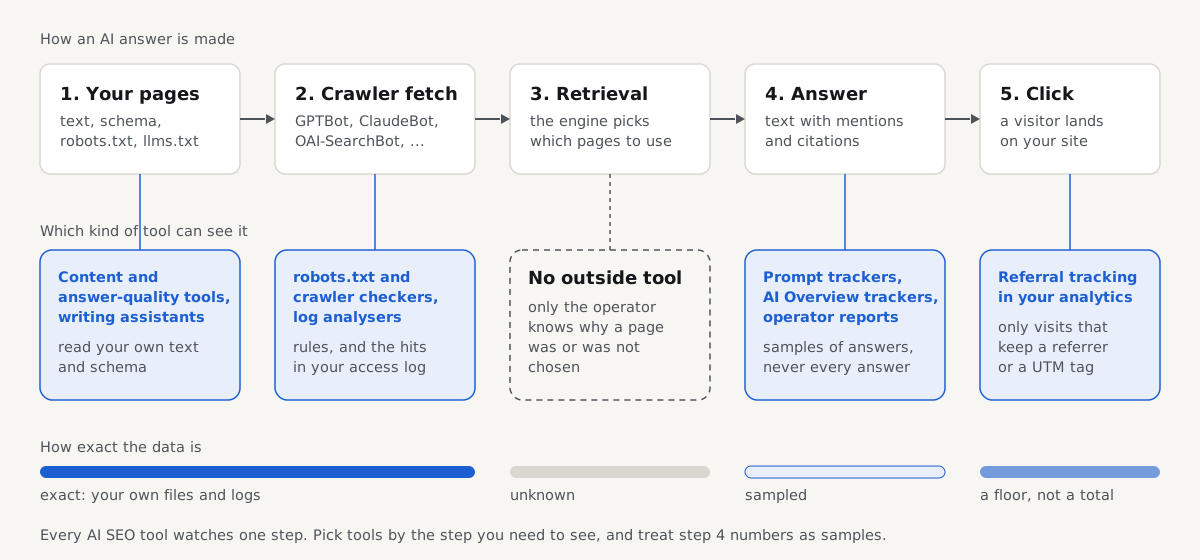
Follow one answer from start to finish. An AI crawler fetches your page (or is refused), the engine's retrieval picks a handful of pages for a question, a model writes the answer with mentions and citations, and some readers click through. Each kind of tool sits at one of those steps. The step that decides the most, retrieval, is the one no outside tool can observe. Google describes AI Mode as running many related searches for a single question (it calls this query fan-out), which makes that step even harder to see from outside.
The six kinds of AI SEO tools compared
| Kind | What it measures or does | Where its data comes from | What it cannot see | Free option |
|---|---|---|---|---|
| AI visibility and prompt trackers | Whether answers name your brand or cite your pages, for a list of prompts | The vendor sends your prompts to engines, by API or by automating the chat interface | Prompts nobody listed, personalised answers, what the model learned in training | Asking by hand monthly; getReport's brand mention and citation checkers (Claude only) |
| AI crawler and robots.txt checkers | Which AI bots your robots.txt allows, llms.txt, text that needs JavaScript | Your robots.txt and the HTML your server sends | Whether a bot obeys, and firewall or CDN blocks applied only to bots | getReport AI crawler check, robots.txt AI rules generator, Cloudflare AI bot checklist |
| Log analysers for AI bots | Which bots really fetched which URLs, and the status codes they got | Your server or CDN access log | Whether a fetched page was used in an answer | getReport log analyser and bot IP verifier |
| AI Overview and AI Mode trackers | Whether an AI Overview appears for a keyword and which links it shows | Trackers run searches from set locations; Search Console counts impressions | Clicks and queries in Search Console's AI report; personalised versions | Search Console's generative AI performance report |
| Content and answer-quality tools | How quotable a passage is; whether your facts agree across pages, schema and Wikidata | Your text, structured data and public databases | Whether an engine will pick the passage | getReport quotability, NAP consistency and Wikidata checkers, llms.txt generator |
| AI writing assistants | Draft, rewrite and summarise text | A language model and what you paste in | Facts you did not give it; whether its claims are true | getReport answer-first rewriter; general assistants |
Your analytics belongs next to this table: visits from chatgpt.com, perplexity.ai, claude.ai and similar referrers are the only view of the click step. Treat that count as a floor, because some apps send no referrer.
Where does each kind get its data?
Prompt trackers sample. A tracker sends your prompts to each engine and records the answers. Two details decide what the result is worth. How it asks: an API answer can use a different model and search settings from the consumer app, with no memory of the person asking. How often: the same prompt can cite other sources on the next run, so one run per month tells you little. A "position" in an answer is a sample dressed up as a ranking.
Crawler checkers and log analysers read your own files, which is why their answers are exact. One tells you what your rules say to each bot; the other tells you what each bot did. You need both, because a rule is a request, as the test below shows.
Operator reports are first-party but thin. Google added a generative AI performance report to Search Console in June 2026: impressions in AI features by page, country, device and date, with no clicks or queries, and no split between AI Overviews and AI Mode. Bing Webmaster Tools added an AI Performance report in February 2026, still a preview, counting how often Copilot and Bing's AI answers cite your pages, without showing where in an answer. As of October 2026 we found no comparable report from OpenAI, Anthropic or Perplexity. Combining these into one baseline is covered in what AI visibility is and how to measure it.
Content tools predict. A quotability score is a model of what engines tend to cite. It can point at a weak paragraph; it cannot promise a citation.
What can no AI SEO tool see?
- Retrieval: why one page was chosen over another stays inside each engine.
- Personalised answers: assistants use memory, location and history; a tracker sees a fresh, logged-out user in one place.
- Training data: what a model learned about you months ago shapes answers, and no report exposes it.
- AI clicks inside Google: a visit from an AI Overview carries a normal google.com referrer.
How to choose an AI visibility tool: the evaluation checklist
Get these six facts from the vendor's method page before you compare features or price.
- Sample size of prompts. How many prompts, and who writes them? 10 to 20 real buyer questions give a small site a baseline; 5 generic prompts do not. Generated prompts should be editable.
- Engines covered, and how. Which engines, and is each asked by official API or by automating the consumer interface? The two answer differently. Ask how AI Mode and AI Overviews are collected, since Google offers no public API for them.
- Sampling repeat. How many runs per prompt per period? One run is one draw; repeats show whether a mention is stable.
- Location and language. Which countries, which languages, logged in or out? A shop selling in Croatia learns little from answers sampled in the US in English.
- The full answer text. Can you read the answer and its citations, not only a score? Without the text you cannot tell a recommendation from a warning.
- Cost per prompt. Divide the monthly price by the answers it buys. 50 prompts on 3 engines once a week is about 50 × 3 × 4.3 = 645 answers a month.
Two more questions separate careful vendors: can you export the raw answers, and does the tool say what it cannot see?
Which getReport free tools cover which job?
All are free with no sign-up. Most make no AI engine call; three ask Claude, and those run under a funded unlock paid from donations.
| Job | getReport tool | Calls an AI engine? | Limits |
|---|---|---|---|
| robots.txt verdict for 18 AI crawlers, llms.txt, JavaScript-only text | AI crawler check | No | 10 sites every 10 minutes, 12-hour cache |
| robots.txt rules per AI bot | robots.txt AI rules generator | No, runs in your browser | 13 bots and tokens |
| Cloudflare AI bot settings | Cloudflare checklist | No, runs in your browser | 9 features |
| AI bot hits in your access log | Log analyser | No, the file stays in your browser | Optional reverse DNS for Googlebot and Bingbot |
| Is this bot real? | Bot IP verifier | No, uses operators' published IP lists | Lists cached 24 hours |
| Draft an llms.txt | llms.txt generator | No, reads your sitemap | Up to 500 pages |
| Passage quotability | Quotability checker | No, a heuristic in your browser | Reads English best |
| Facts across pages, schema and Wikidata | NAP consistency, Wikidata checker | No | Up to 3 pages |
| AI referrals in GA4 | AI referral tracking | No, runs in your browser | 7 assistants |
| Does an answer name your brand? | AI brand mention checker | Yes, Claude with web search | 3 a day, shared with the citation checker |
| Does an answer cite your page? | AI citation checker | Yes, Claude with web search | Shares the 3 a day |
| Rewrite a paragraph answer-first | Answer-first rewriter | Yes, Claude | 10 a day |
The three engine tools are a small sample by design: one engine, one locale you pick, and the same question in the same week answered from a shared cache. ChatGPT and Perplexity are not asked yet, and getReport does not query Google AI Overviews or AI Mode. Answers are kept for 7 days at their own link, and engine spending has a daily cap.
How to check what AI crawlers see on your site
Every other tool depends on this step. We ran it on our fixtures, served locally: a robots.txt test site (port 4100) and the example-shop.hr demo shop (port 4101). The test site blocks two training bots on purpose:
$ curl -s http://localhost:4100/robots.txt
User-agent: *
Disallow: /pages/noindex-meta/
Disallow: /private/

User-agent: GetReportBot
Disallow: /opted-out/
Allow: /

# AI crawlers (tool 28): two training bots blocked, everything else inherits the * group
User-agent: GPTBot
Disallow: /

User-agent: CCBot
Disallow: /

Sitemap: http://localhost:4100/sitemap.xml
A crawler obeys the group that names its product token and falls back to User-agent: * only when none does (RFC 9309, section 2.2.1). This script uses Python's standard robots.txt parser to show where each bot lands:
# robots_check.py (run: python3 robots_check.py https://your-site.example /private/)
import sys, urllib.robotparser as rp
base, path = sys.argv[1], sys.argv[2]
r = rp.RobotFileParser(base + "/robots.txt"); r.read()
for ua in ["GPTBot", "OAI-SearchBot", "ClaudeBot", "PerplexityBot"]:
    home = "allowed" if r.can_fetch(ua, base + "/") else "blocked"
    other = "allowed" if r.can_fetch(ua, base + path) else "blocked"
print(f"{ua:14} /: {home:8} {path}: {other}")$ python3 robots_check.py http://localhost:4100 /private/
GPTBot /: blocked /private/: blocked
OAI-SearchBot /: allowed /private/: blocked
ClaudeBot /: allowed /private/: blocked
PerplexityBot /: allowed /private/: blocked
$ python3 robots_check.py http://localhost:4101 /cart/
GPTBot /: allowed /cart/: blocked
OAI-SearchBot /: allowed /cart/: blocked
ClaudeBot /: allowed /cart/: blocked
PerplexityBot /: allowed /cart/: blockedGPTBot, OpenAI's training crawler, has its own group and is blocked everywhere. OAI-SearchBot, which lets ChatGPT search show your pages, inherits the * group; OpenAI documents the two as independent settings. ClaudeBot and PerplexityBot have no group either, so they share everyone's rules. The demo shop has no AI groups at all: every bot may read everything except the cart.
Now ask the server as GPTBot, the bot the rules just blocked:
$ curl -s -o /dev/null -w "%{http_code}\n" -A "GPTBot/1.3" http://localhost:4100/
200
The server answers 200 anyway. robots.txt is a request the crawler chooses to follow; your server does not enforce it. That is why a robots.txt checker and a log analyser answer different questions: what you asked for, and what happened. Enforcing a block takes a firewall or CDN rule; our guide to AI crawlers and robots.txt shows both.
Last, what a crawler reads once allowed in. Most AI crawlers do not run JavaScript, so they get the HTML your server sends:
$ curl -s -A "OAI-SearchBot/1.3" http://localhost:4100/pages/js-rendered/ | grep -o "<title>[^<]*</title>"
<title>Loading…</title>
In a browser, this fixture page shows a furniture shop's title, an H1 and about 800 words, all added by JavaScript. A crawler that skips it gets "Loading…".
Run the same checks on your site
The check reads your robots.txt for 18 AI crawlers grouped by purpose, validates your llms.txt and compares your HTML text with the text after JavaScript. It shows what your site tells each crawler, not how a crawler behaves; that is the log analyser's job. The same findings appear in every getReport report:
What passing looks like: every bot you meant to allow reads as allowed, the ones you chose to block (often only training bots) read as blocked, and the JavaScript finding says the visible text is present without JavaScript. A missing llms.txt is low stakes, since Google says its AI features need no special files. Background is on our AI crawler access and JavaScript rendering fix pages.
Do you need a paid AI SEO tool?
Work through problems in the order they usually turn up; pay only when free tools stop answering.
- Access. The most common reason a site never appears in AI answers is that crawlers cannot read it. Free tools cover this fully. The fix depends on your platform: on Cloudflare, check the AI bot settings and Bot Fight Mode; on Shopify, edit the
robots.txt.liquidtheme template; on WordPress, use your SEO plugin's robots.txt editor or the physical file in your web root. - Behaviour. Confirm in your access log that the bots you allowed really come, and are real. Detecting AI crawlers in your server logs shows what to count.
- Content. Pages that answer in the first sentence, with specific facts, get quoted. Content tools find weak paragraphs; they do not replace knowing the subject.
- Measurement. Search Console, Bing Webmaster Tools, an AI channel in analytics and a monthly hand check of 10 to 20 buyer questions cost nothing. A paid tracker earns its price when you need hundreds of prompts, several markets or client reports, and it passes the checklist above.
On writing assistants: Google's guidance judges the result, not the method. Helpful, original content is fine however it was made; mass-producing pages mainly to rank breaks its spam policies.
How we tested
Written by the getReport team. On 16 October 2026 we ran curl 8.5.0 and Python 3.11's urllib.robotparser against two getReport fixtures on our own machine: the example-shop.hr demo shop and the robots.txt test site, including its client-rendered page. Every command and output above is copied from that run. Python's parser gives the RFC 9309 result for these files but matches user agents more loosely than the RFC, so treat it as a quick check.
What we did not test: we did not run any commercial AI SEO tool, query any AI engine or Google's AI features, or call getReport's own engine tools for this page. Operator facts come from the documentation under Sources, checked in October 2026; tool limits come from each getReport tool page as of that date.
Questions people ask
What are the best free AI SEO tools?
The best free set covers each step of an AI answer: Google Search Console and Bing Webmaster Tools for AI impressions and citations, an AI channel in your analytics for clicks, your server log for crawler visits, and an AI crawler check for robots.txt and JavaScript problems. getReport's AI tools are free with no sign-up; the three that ask Claude have daily limits.
How do AI visibility trackers collect their data?
They send a fixed list of prompts to each AI engine on a schedule and record the answers and citations. Some use the engines' official APIs, others automate the consumer chat interface, and the two can give different answers. Ask each vendor how many times every prompt runs, from which location and language, and whether you can read the full answer text.
Can any tool track my site in Google AI Mode?
Only Google sees AI Mode fully. Search Console's generative AI performance report counts impressions of your pages in AI features, without clicks or queries, and does not separate AI Mode from AI Overviews. Third-party trackers run searches themselves from chosen locations and record what appears, so their numbers are samples. Ask any vendor exactly how it collects AI Mode results.
Is AI-written content bad for SEO?
Not by itself. Google says it rewards helpful, original content however it was produced, and treats generating many pages mainly to manipulate rankings as spam. The risk with AI writing tools is accuracy and sameness: they repeat what is common and can state wrong facts confidently. Use them for drafts, add your own facts and experience, and check every claim before publishing.
How many prompts should I track for AI visibility?
Start with 10 to 20 questions your buyers really ask, written in their words, for each market you sell in. That is enough to see a baseline and a monthly trend. Track more only when you have distinct products or regions to compare, and repeat each prompt several times, because a single answer can change on the next run.
Why do AI visibility tools give different results for the same prompt?
Because each one samples differently. The engine, model version, API or app, location, language, logged-out state and the moment of the run all change the answer, and the same engine can cite other sources a minute later. Two trackers that disagree may both be right about their own sample. Compare trends within one tool rather than numbers across tools.
Sources
- OpenAI: Overview of OpenAI crawlers (accessed October 2026)
- Anthropic: Does Anthropic crawl data from the web, and how can site owners block the crawler? (accessed October 2026)
- Perplexity: Perplexity crawlers (accessed October 2026)
- Google Search Central: AI features and your website (accessed October 2026)
- Google Search Central: Introducing Search Generative AI performance reports in Search Console (June 2026)
- Bing Webmaster Blog: Introducing AI Performance in Bing Webmaster Tools public preview (February 2026)
- Google Search Central: Google Search's guidance about AI-generated content (February 2023)
- IETF: RFC 9309, Robots Exclusion Protocol (September 2022)