Every page of a WooCommerce store, including the About page and every blog post, sends a request to the server after it loads: ?wc-ajax=get_refreshed_fragments. Its job is to keep the little basket count in the header correct. Its cost is a PHP request per visit that no cache can answer, on pages where most visitors never look at the basket. This guide explains what the script does, where it is genuinely needed, the honest ways to stop it elsewhere, and what changes when you do. Plan 20 minutes, plus a look at the header on the cart page.
Quick answer
cart-fragments.jsposts to/?wc-ajax=get_refreshed_fragmentson every page load to fetch the current mini-cart HTML. The response is never cached, so every visit costs a PHP request.- Keep it on the cart and checkout, and on any page with a live mini-cart that must update without a reload.
- WooCommerce has no switch for it. Use the "Disable cart fragments" option in Perfmatters or a similar performance plugin, or a 6-line snippet that dequeues
wc-cart-fragmentsoutside the cart, checkout and account pages. - The block-based Mini-Cart block does not use cart fragments; it talks to the Store API when the shopper opens it.
- After the change, a header count can be stale until the next page load. Adding to the basket on shop pages still works.
- Check with the WooCommerce checker and the browser's Network panel filtered on
wc-ajax.
Why cart fragments matter
A page cache serves the same HTML to everyone, which is why it is fast. A basket is personal, so a cached page cannot contain the right basket count. WooCommerce's answer is to leave the count out of the cached page and fetch it afterwards: cart-fragments.js runs after the page loads, sends a POST to ?wc-ajax=get_refreshed_fragments, and swaps the returned HTML fragments into the header. The request carries the session cookie, so the server has to boot WordPress, load WooCommerce, read the session and render the mini-cart template, typically a few hundred milliseconds of PHP on shared hosting.
That happens on a first visit with an empty basket, on a blog post, on the contact page. The visitor does not wait for it visibly, because it runs after the page is shown, but it competes with everything else the page still has to load, it holds a PHP worker on the server, and on a busy day those requests are a large share of all PHP work the store does. A store with 10,000 page views a day makes 10,000 uncacheable requests it did not need, and the cheapest hosting plans start queueing at exactly those moments.
The script also has a memory: it stores the fragments in the browser's sessionStorage and re-checks them on each page, which is why the count usually looks right even when the request is slow. That same cache is what lets you remove the request from most pages without a visible change.
How getReport checks it
The report first recognises WooCommerce from the page (the woocommerce body class, a wc-ajax reference, WooCommerce assets or a Product JSON-LD block). It then looks for the script in two places: a <script src> whose file name is cart-fragments.js or cart-fragments.min.js in the HTML, and the wc-ajax=get_refreshed_fragments request while the page loads in Chromium. Either one counts. On a cart, checkout, basket or account address (including the common translations of those slugs) the check passes without looking, because the script belongs there.
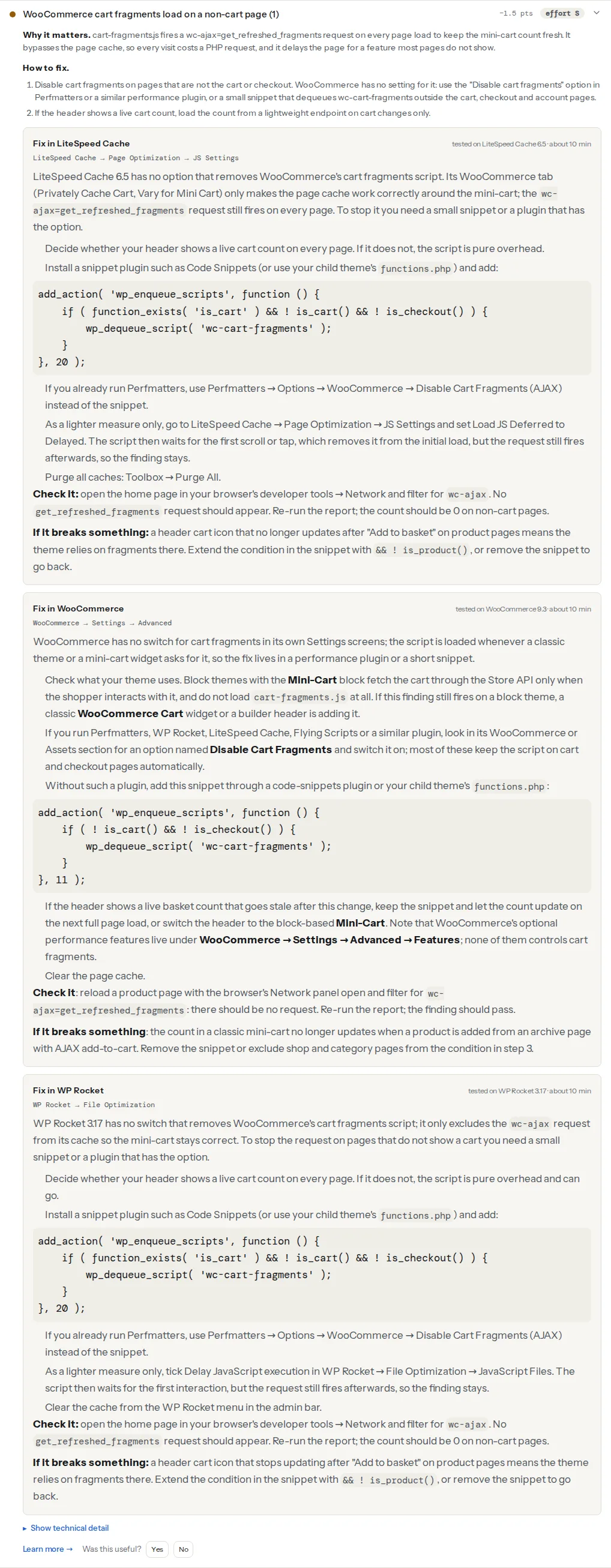
When the page reveals WP Rocket or LiteSpeed Cache, the finding also shows a "Fix in WP Rocket" or "Fix in LiteSpeed Cache" recipe card with the plugin version it was tested on, because the fix differs by plugin: neither of those two has a switch for cart fragments, and the recipe says what they can and cannot do instead. A WooCommerce recipe covers the snippet route.
Two more findings from the same report help you judge the effect:
The script file itself is static and versioned (cart-fragments.min.js?ver=9.3.3), so it should show a long browser cache lifetime; if the cache-lifetime finding lists it, the problem is the server's static-file rules, not WooCommerce. The request it makes is the opposite: uncacheable by design, and that is the cost. Cart fragments rarely appear as a long main-thread task, because the work happens on the server; if the long-tasks finding lists scripts, the cause is elsewhere (a builder, a slider, a tag manager), and the plugin cost table shows which.
Step by step
1. Measure it once
Open the home page in Chrome with the developer tools on the Network tab, reload, and type wc-ajax in the filter. You will see one request, ?wc-ajax=get_refreshed_fragments, method POST. Click it and open the Timing tab: "Waiting for server response" is the PHP time your server spent on it. Note the number. Then do the same on the cart page, where the request is legitimate; the numbers should be similar, which shows that the cost has nothing to do with the page and everything to do with the request.
2. Decide where the live mini-cart is needed
Walk through the store as a shopper and note where the basket count must change without a full page load:
- Cart and checkout: always. Quantity changes and coupon codes update the totals through fragments and related calls.
- Shop and category pages with AJAX add-to-cart (the default): when the shopper clicks "Add to basket" on a product tile, the response to that click carries new fragments, so the header updates even without the page-load request. That path keeps working after the change.
- Product pages: the "Add to basket" button posts the form and reloads the page unless a theme adds AJAX; a reload refreshes the header anyway.
- Everything else (home, blog, about, contact): the header shows whatever the last page showed, which the browser's
sessionStoragecopy of the fragments keeps correct in almost all cases.
If your header has no basket count at all, the script is pure overhead everywhere except the cart and checkout.
3. Check what kind of theme you have
Block themes that use the WooCommerce Mini-Cart block fetch the basket through the Store API only when the shopper opens the drawer; they do not enqueue cart-fragments.js. If the finding still fires on a block theme, a classic WooCommerce Cart widget, a page-builder header or a plugin is adding the script. Find which: view the page source and look at the scripts around cart-fragments, or search the theme and plugin folders for wc-cart-fragments.
Recent WooCommerce versions only enqueue the script when a classic cart widget or a template that needs it is present, but themes and header builders frequently enqueue it themselves on every page, which is what the finding usually catches.
4. Stop it outside the cart
WooCommerce has no setting for this in WooCommerce → Settings; the optional performance features under Advanced → Features do not include it. Three routes, pick one:
A performance plugin with the option. Perfmatters has a Disable Cart Fragments option in its WooCommerce section; Flying Scripts-type plugins and some caching plugins offer the same. These keep the script on the cart and checkout automatically. Use this if you already run such a plugin.
A snippet. Through the Code Snippets plugin or your child theme's functions.php:
<?php
// Dequeue WooCommerce cart fragments everywhere except cart, checkout and account pages.
add_action( 'wp_enqueue_scripts', function () {
    if ( ! function_exists( 'is_cart' ) ) {
        return; // WooCommerce not active
    }
    if ( is_cart() || is_checkout() || is_account_page() ) {
        return; // fragments belong here
    }
    wp_dequeue_script( 'wc-cart-fragments' );
}, 20 );
Priority 20 runs after WooCommerce and most themes have enqueued their scripts; if a header builder enqueues it later, raise the priority to 100. As a must-use plugin (wp-content/mu-plugins/cart-fragments.php) the snippet survives theme changes.
Delay instead of remove. WP Rocket's "Delay JavaScript execution" and LiteSpeed Cache's "Load JS Deferred: Delayed" hold the script until the first scroll or tap. That takes it out of the initial load, but the request still fires afterwards, so the server cost stays and the finding still fires. It is a lighter measure for stores that cannot risk a stale count.
5. Clear the cache and re-test
Purge the page cache so the cached pages stop including the script tag. Reload the home page with the Network filter on wc-ajax: no request. Reload the cart page: the request is there. Add a product from a category page: the header count updates.
Platform notes
WP Rocket and LiteSpeed Cache
Neither removes the script. WP Rocket excludes wc-ajax from its cache so the mini-cart stays correct; LiteSpeed's WooCommerce tab (Privately Cache Cart, Vary for Mini Cart) does the equivalent for its own cache. Use the snippet or Perfmatters alongside them. The report's recipe cards say exactly that for the version they were tested on.
Page builders and header plugins
Elementor Pro's Menu Cart widget, and similar header widgets, rely on fragments to update. With the snippet in place the widget shows the count from the last page and updates on the next reload; if the builder re-enqueues the script itself, the snippet needs a higher priority, or use the plugin's own "Mini Cart" setting to switch to the block-based cart where it offers one.
Multilingual stores
is_cart() and is_checkout() recognise the translated cart and checkout pages when they are set as such in WooCommerce → Settings → Advanced → Page setup per language (WPML and Polylang do this). Check a translated cart after the change.
Verify
- Re-run the WooCommerce checker on the home page and a category page. The finding reads "No cart-fragments request on this page".
- Run it on
/cart/: the finding passes with "This is a cart/checkout page; cart fragments belong here". - Network panel, filter
wc-ajax: nothing on the home page, one request on the cart. - A test purchase: add from a category tile, open the cart, change a quantity, check out. Every step shows the right count.
- Server load: on the host's panel or in the access log,
wc-ajax=get_refreshed_fragmentsrequests drop to roughly the number of cart and checkout views.
Common mistakes
- Dequeuing it on the cart page too. Quantity changes stop updating the totals. Keep the
is_cart()andis_checkout()exceptions. - Blocking
wc-ajaxat the CDN or firewall to "stop the requests". The script still fires and gets an error; the header cart breaks on every page. Dequeue the script instead. - Caching the
wc-ajaxresponse. A "cache everything" rule at the CDN returns one shopper's fragments to the next.wc-ajaxmust bypass every cache, as in the WooCommerce store checklist. - Expecting a speed score jump. The request runs after the page is painted, so Lighthouse barely notices; the gain is server load and first-byte time under traffic, which shows in what a slow server looks like rather than in the performance score.
- Removing it and then adding a "live cart count" plugin that polls the server every few seconds. That is cart fragments with a worse schedule. Use the Mini-Cart block, or let the count update on the next page load.