ERR_ADDRESS_UNREACHABLE is the sub-code Chrome shows under "This site can't be reached" when your device could not find any route to the site's address. DNS worked (the browser has an IP address in hand) but the network layer reported there is no way to send packets toward it. That report almost always comes from close by, which is why a leftover VPN route, broken IPv6 or a stale router causes most cases. This guide fixes it as a visitor first, then shows owners the server-side cause worth checking: an AAAA record the server does not actually serve.
Quick answer
- The error means "no route", not "no answer". The packet was never sent; your device or network gave up first.
- Disconnect the VPN completely: quit the app, don't just toggle it. A half-closed VPN leaves routes pointing into a dead tunnel.
- Test IPv6 vs IPv4: if
curl -4 -I https://example.comworks while the browser fails, your device is choosing an IPv6 path it cannot route. - Power-cycle the router: off for 30 seconds. Routers keep advertising IPv6 after their own uplink dies.
- On a phone, toggle airplane mode for a fresh data session; many carriers are IPv6-only, which surfaces broken AAAA records there first.
- Owner: run
curl -6 -I https://your-domainfrom outside. If it fails whilecurl -4works, fix the server's IPv6 or drop the AAAA record.
What ERR_ADDRESS_UNREACHABLE means
Chrome's three connection sub-codes are three different failures:
- ERR_CONNECTION_REFUSED: the packets arrived and the machine answered "no": nothing accepts connections on that port.
- ERR_CONNECTION_TIMED_OUT: the packets were sent and nothing came back. Silence.
- ERR_ADDRESS_UNREACHABLE: the packets could not even be sent. The operating system, or a router on the path, reported it has no route to that address; the server was never involved.
That decides where to look. A refusal or a timeout can be the server's fault; "address unreachable" is a routing statement, and routing problems live on the first few metres of the path. The big exception is dual stack: when a domain publishes both an IPv4 address (an A record) and an IPv6 address (an AAAA record), your device picks one; pick an IPv6 address with no working route, and a site healthy on IPv4 shows this error.
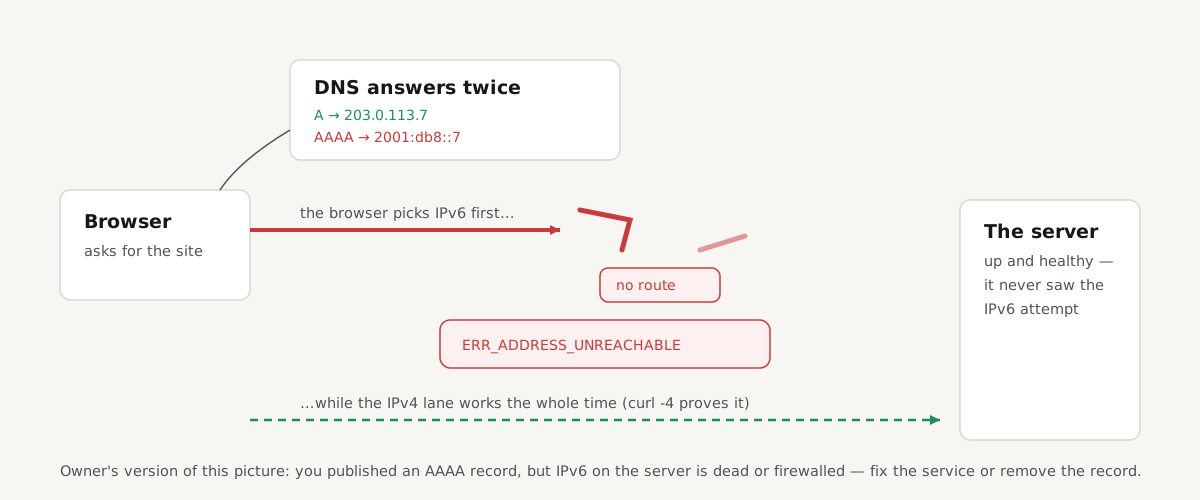
Chrome does try to protect you: it attempts IPv6 and falls back to IPv4 when the first attempt fails quickly ("Happy Eyeballs", RFC 8305). Seeing the error means the fallback had nothing left to try; every address the name resolved to was unroutable from where you sit. That is why a broken AAAA record errors on IPv6-only phone networks but goes unnoticed on dual-stack laptops.
Fix ERR_ADDRESS_UNREACHABLE as a visitor
Work through these in order and stop when the page loads. If the site fails on every device and network, including a phone on mobile data, skip to the owner section.
1. Disconnect the VPN or proxy completely
A VPN installs routes that steer traffic into its tunnel. When the client crashes, half-disconnects or updates, those routes can stay behind, pointing at a tunnel that no longer exists, and every packet sent down them fails as unreachable. The same goes for proxy software and some security agents. So don't just flip the switch: quit the VPN app entirely, and if the error persists, reboot so the routing table is rebuilt clean. If it returns when you reconnect, the VPN's network has no route to that site; use split tunnelling, or ask whoever runs it.
2. Test whether IPv6 is the problem
This test separates "my network" from "that site". Windows, macOS and Linux all ship curl: open a terminal (Command Prompt on Windows) and request the site both ways:
curl -4 -I https://example.com
curl -6 -I https://example.com
-4 forces IPv4, -6 forces IPv6, -I asks for headers only. Read the result like this:
-4works,-6fails with "no route to host" or "network is unreachable": you are getting an AAAA answer you cannot route. Your network's IPv6 is broken, or the site's; the owner section's test tells you which.- Both fail: not IPv6-specific; back to the VPN and router steps.
- Both work but the browser still errors: clear Chrome's host cache at
chrome://net-internals/#dns.
If forcing IPv4 works, confirm it by turning IPv6 off temporarily: press Win+R, run ncpa.cpl, right-click your adapter → Properties → untick Internet Protocol Version 6 (TCP/IPv6) → OK. Many routers have a similar switch. This is a diagnostic, not a fix (Microsoft recommends against leaving IPv6 disabled on Windows) so re-enable it once you have your answer.
3. Restart the router: properly
Your router owns the routes for your whole network, including the IPv6 prefixes it advertises. One whose IPv6 uplink has silently died can keep telling every device "I have IPv6, send it here": with nowhere to send it. Power it off, wait 30 seconds, power it on. If the error returns and the curl test points at IPv6, turn IPv6 off in the router until your provider confirms it works.
4. On a phone or mobile hotspot
Toggle airplane mode for a few seconds: that rebuilds the data session and clears most odd routing states on carrier networks. Tethered to a hotspot? Restart the tethering too. Phones matter for a structural reason: many carriers run IPv6-only networks, so a site with broken IPv6 can fail on every phone while desktops load it; more in the owner section.
5. On a work, school or hotel network
Managed networks sometimes block destinations by refusing to route them rather than showing a block page, and a misconfigured one can hit sites it never meant to. If the site loads on mobile data but not there, nothing on your device needs fixing: report it to whoever runs the network.
If you own the site: test your AAAA record from outside
One cause of ERR_ADDRESS_UNREACHABLE is squarely the owner's, and it is common: the domain publishes an AAAA record, but the server does not answer on IPv6; the address was never configured, the service listens only on IPv4, or the firewall silently drops IPv6. Dual-stack visitors mostly fall back and never tell you. IPv6-only visitors cannot, and many mobile carriers are exactly that: they translate IPv4-only sites automatically (DNS64/NAT64), but a domain with its own AAAA record gets no translation; the broken IPv6 address is the only path. The classic symptom: "your site doesn't work on my phone".
Test from outside, where local routes can't flatter the result. First see what you publish:
nslookup -type=AAAA your-domain.comNo AAAA record means IPv6 is not your problem: send that visitor the checklist above. Otherwise, request the site over each family from a machine with working IPv6, such as a cloud VM:
curl -4 -I https://your-domain.com
curl -6 -I https://your-domain.com
If -6 fails while -4 succeeds, you have two honest options:
- Fix the IPv6 service. Check the address is configured, the web server listens on it (
ss -tlnpon Linux should show::443), and (the most common miss) the firewall allows ports 80 and 443 over IPv6. On Linux, IPv6 often has its own rule set (ip6tables); in cloud consoles, IPv6 security-group rules are separate from their IPv4 twins. - Remove the AAAA record until IPv6 works. Carrier translation makes an IPv4-only site fully reachable from IPv6-only networks; advertising IPv6 you cannot serve is worse than not advertising it. Remove the record, wait out its TTL, and republish once the curl test passes.
Then check reachability like a stranger would:
Paste your key URLs and each one is requested from getReport's servers: an outside vantage point. Unreachable rows across the board mean a real server-side problem; all green points at the complaining visitor's network. One caveat: the checker reports whether each URL answers from outside, not which address family it used, so a green row does not prove your AAAA record works; pair it with the curl -6 test.
A geo-blocking note: some country blocks at the network edge answer with "destination unreachable" instead of a block page; indistinguishable from a broken site. If visitors in a blocked region report this error, look at the geo rules first.
Questions people ask
What does ERR_ADDRESS_UNREACHABLE mean?
It means your device found no route to the site's IP address: DNS resolved the name, but the packets could not be sent toward the destination. The server was never reached; the failure is a routing statement from your system, router or network. Leftover VPN routes, broken IPv6 and stale routers cause most cases; on the site's side, an AAAA record the server doesn't serve.
Why does ERR_ADDRESS_UNREACHABLE happen on my phone only?
Usually because many mobile carriers run IPv6-only networks. They translate IPv4-only sites automatically, but a site that publishes its own AAAA record must be reached over IPv6 directly: if its IPv6 is broken, the phone has no fallback, while dual-stack desktops quietly fall back. Toggle airplane mode first; if the error persists on mobile data but not Wi-Fi, suspect the site's IPv6.
Can IPv6 cause ERR_ADDRESS_UNREACHABLE?
Yes: broken IPv6 on either end is the classic cause. A router can keep advertising IPv6 after its own IPv6 uplink has failed, so your device picks an address it cannot route; on the site's side, a published AAAA record with no working server behind it strands IPv6-only visitors. If curl -4 -I https://example.com succeeds while curl -6 fails, IPv6 is your answer.
How do I test if my site's IPv6 is broken?
From a machine outside your network with working IPv6, run curl -6 -I https://your-domain.com and compare it with curl -4. If only -6 fails, your AAAA record points at an address that isn't answering; check the address is configured, the web server listens on it, and the firewall allows ports 80 and 443 over IPv6. Until it passes, removing the AAAA record is the honest stopgap.
Does a VPN cause ERR_ADDRESS_UNREACHABLE?
Often, yes. A VPN installs routes that steer traffic into its tunnel, and when the client crashes or half-disconnects, those routes can remain, pointing at a tunnel that no longer exists: every packet sent down them fails as unreachable. Quit the VPN application entirely rather than toggling it off, and reboot if the error persists; if it appears only while connected, use split tunnelling.
Should I disable IPv6 to fix ERR_ADDRESS_UNREACHABLE?
Only temporarily, as a test. Unticking IPv6 on your adapter or router confirms the diagnosis when the site then loads, but it is not the fix: Microsoft recommends against leaving IPv6 disabled on Windows. Re-enable it, then fix the real cause; a router whose IPv6 uplink is dead, a provider problem, or one site's broken AAAA record, which only its owner can repair.