"Is my schema valid?" has three different answers, and most confusion comes from asking one tool all three. A block can fail to parse at all; it can parse but use a misspelled property; or it can be perfect schema.org and still not qualify for the rich result you wanted. This guide separates the layers, shows which tool answers each, and gives you a local script that checks the first two on every build, so Google's Rich Results Test becomes the final confirmation instead of the debugging tool.
Quick answer
| Layer | Question | Tool |
|---|---|---|
| 1. Syntax | Does the JSON parse? | getReport's jsonld-parses finding, jq, node, the script below |
| 2. Shape | Are the types and properties real, and are the required ones present? | schema.org's Schema Markup Validator for vocabulary, getReport's required-properties finding for the common types |
| 3. Eligibility | Does Google offer a rich result for this, and does the page qualify? | Google's Rich Results Test, which is the only authority |
Work in that order. A syntax error hides everything after it; a missing required property makes eligibility moot. Run the schema validator first because it answers layers 1 and 2 on the live page in one pass.
Why validating in layers matters
A JSON-LD block with a single stray comma is ignored completely. Nothing warns you: the page looks fine, the plugin shows a green tick, and Google quietly reads no structured data from that block. A block that parses but misses offers.price is read and then earns nothing, because Google shows a product rich result only when the required properties are there. And a block that is complete can still be for a type Google no longer shows as a rich result on your kind of site (FAQ results, for example, are now limited to authoritative government and health sites; see FAQ and HowTo schema after Google's changes).
Each layer fails differently and is fixed by different people. Syntax errors come from templates and CMS filters, so developers fix them. Missing properties usually mean an empty field in the CMS (no price, no author, no image), so the content owner fixes them. Eligibility is a product decision: which rich results are worth pursuing for this page type. Knowing which layer failed tells you whom to ask. (For the concepts themselves, start with the structured data learn page.)
How getReport checks it
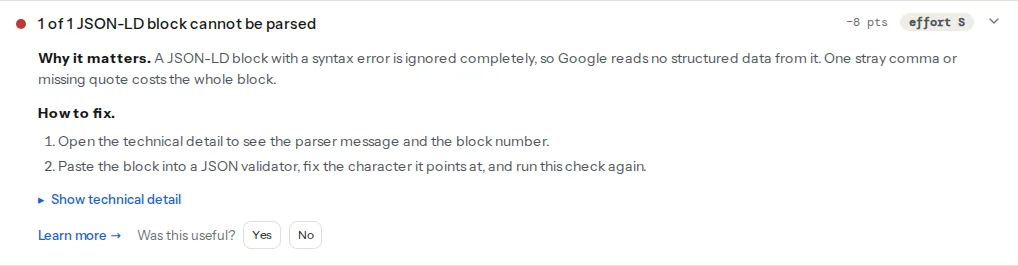
The schema validator reads every <script type="application/ld+json"> block in the HTML your server sends, parses each one, and flattens the result into top-level entities: a root object, the members of a top-level array, and the members of @graph. It then checks each entity against a small table of required properties and reports the result in four findings:
What the shape table covers
The required-property check knows these types and asks for these properties. Dotted paths look inside nested objects; an array must have the property on every element; empty strings and empty arrays count as missing.
| Type (and subtypes treated the same) | Required in getReport's table |
|---|---|
| Product | name, image, offers, offers.price or offers.lowPrice, offers.priceCurrency |
| Article, NewsArticle, BlogPosting (and TechArticle, ScholarlyArticle, Report) | headline, author, datePublished, image |
| BreadcrumbList | itemListElement; each item needs position and name, and item on every item but the last |
| FAQPage | mainEntity, mainEntity.name, mainEntity.acceptedAnswer.text |
| LocalBusiness (and Restaurant, Store, Hotel, Dentist and other local subtypes) | name, address, telephone |
| Event | name, startDate, location |
| Recipe | name, image |
| VideoObject | name, thumbnailUrl, uploadDate |
| Review | itemReviewed, author, reviewRating |
| AggregateRating | ratingValue, ratingCount or reviewCount |
| Organization (and Corporation, NGO and other organisation subtypes) | name, url |
| WebSite | name, url |
The table follows Google's documentation where Google documents a rich result, and schema.org's minimum otherwise. In places it is stricter than Google's own minimum: Google lists no required properties for Article and treats a LocalBusiness telephone as recommended, but they are what the result would display, so the check asks for them. Organization and WebSite are checked for completeness but do not count towards eligibility, because Google shows no rich result for them.
Three limits worth knowing. Types outside the table (JobPosting, Course, SoftwareApplication and many more) are listed by the types finding but not checked for properties. Nested entities (the author inside an article, the offer inside a product) are checked only through the parent's paths. And the eligibility finding is an approximation built from the same table: it says whether the required properties are present, not whether Google will actually show the result. It says as much in its fix: test the page with Google's Rich Results Test after the change.
Step by step
1. Fix syntax first
The parse finding lists each failed block as block N: followed by the parser's message and position, for example "Expected double-quoted property name in JSON at position 140 (line 6 column 1)". Count the blocks in the page source from the top to find block N; the position counts characters from the start of that block. The usual causes:
- A trailing comma after the last property or array item. JSON does not allow it.
- Smart quotes (“ ”) instead of straight quotes, from text pasted through a word processor or a CMS that "prettifies" quotes.
- HTML entities such as
"or“written into the block by a CMS filter. Inside a script element they are not decoded, so the parser sees an ampersand. - Unescaped characters in a string: a double quote inside a product name, or a literal line break in a description. Escape them as
\"and\n. - A
</script>inside a string, which ends the script element early and cuts the block in two. Write it as<\/script>, which JSON reads the same.
To check one block locally, save it to a file and run either of these; both print the line and column of the first error:
jq . block.json
node -e 'JSON.parse(require("fs").readFileSync(0, "utf8"))' < block.json
getReport strips an HTML comment (<!-- -->) or CDATA wrapper around the JSON before parsing, so those do not cause a parse failure here.
2. Check the vocabulary
A block that parses can still say "@type": "Prodcut" or "datepublished". Property names are case-sensitive, and an unknown one is silently ignored by everything that reads it. The Schema Markup Validator, run by schema.org, checks types and properties against the vocabulary and shows the parsed tree, which also makes nesting mistakes visible (an offers that ended up on the page instead of the product). It does not tell you what Google requires; that is layer 3.
3. Check required properties per template
Run the schema validator on one page per template (home, article, product, category, location) rather than on the home page only; each template prints different entities. For each missing property, fix the source: an empty price field, a post without a featured image, an author profile with no name. Schema markup validation walks through the finding for the common plugins.
4. Check for duplicates
Two blocks describing the same Organization or Product are a shape problem the per-entity checks cannot see. The validator's duplicate-entities finding flags more than one root Organization or WebSite, and any other type repeated with the same name and url or @id; on WordPress, the duplicate-schema finding names the plugins printing them. The fix is one @graph with one entity per @id: duplicate entities: two plugins, one graph.
5. Run the same checks locally and in CI
The script below does layers 1 and 2 for a URL or a built HTML file: it extracts every JSON-LD block, parses it, lists the top-level entities, checks a small required-properties map and notes repeated entities. It needs Node 18 or later and no packages. Save it as scripts/check-jsonld.mjs:
// check-jsonld.mjs: node check-jsonld.mjs <url-or-file> [more…]
// Exits with 1 when a block does not parse or a required property is missing.
import { readFile } from 'node:fs/promises';

// Keep this map in step with the types your templates print.
const REQUIRED = {
  Product: ['name', 'image', 'offers'],
  Article: ['headline', 'author', 'datePublished', 'image'],
  BlogPosting: ['headline', 'author', 'datePublished', 'image'],
  BreadcrumbList: ['itemListElement'],
  Event: ['name', 'startDate', 'location'],
  Organization: ['name', 'url'],
};

const load = (src) =>
  /^https?:\/\//.test(src) ? fetch(src).then((r) => r.text()) : readFile(src, 'utf8');

const blocksOf = (html) =>
  [...html.matchAll(/<script\b[^>]*type=["']?application\/ld\+json["']?[^>]*>([\s\S]*?)<\/script>/gi)]
    .map((m) => m[1].trim());

// Top-level entities: the root object, members of a top-level array, members of @graph.
function roots(node, out = []) {
  if (Array.isArray(node)) node.forEach((n) => roots(n, out));
  else if (node && typeof node === 'object') {
    if (node['@type']) out.push(node);
    if (Array.isArray(node['@graph'])) roots(node['@graph'], out);
  }
  return out;
}

const present = (v) =>
  v != null && !(typeof v === 'string' && !v.trim()) && !(Array.isArray(v) && !v.length);

let failed = false;
for (const src of process.argv.slice(2)) {
  const blocks = blocksOf(await load(src));
  console.log(`${src}: ${blocks.length} JSON-LD block(s)`);
  const seen = new Map();
  blocks.forEach((raw, i) => {
    let data;
    try {
      data = JSON.parse(raw);
    } catch (e) {
      failed = true;
      return console.log(`  block ${i + 1}: does not parse: ${e.message}`);
    }
    for (const entity of roots(data)) {
      for (const type of [].concat(entity['@type']).map((t) => String(t).replace(/^.*[/#:]/, ''))) {
        const id = entity['@id'] ?? entity.url ?? entity.name ?? '';
        seen.set(`${type} ${id}`, (seen.get(`${type} ${id}`) ?? 0) + 1);
        const missing = (REQUIRED[type] ?? []).filter((p) => !present(entity[p]));
        if (missing.length) failed = true;
        console.log(`  block ${i + 1}: ${type} ${missing.length ? `missing ${missing.join(', ')}` : 'ok'}`);
      }
    }
  });
  for (const [key, n] of seen) if (n > 1) console.log(`  note: ${key} appears ${n} times`);
}
process.exit(failed ? 1 : 0);
On a page with a valid @graph, a broken Article block and a second, incomplete Organization it prints:
page.html: 3 JSON-LD block(s)
  block 1: Organization ok
  block 1: Product ok
  block 2: does not parse: Expected double-quoted property name in JSON at position 140 (line 6 column 1)
  block 3: Organization missing url
  note: Organization https://example.com/#org appears 2 times
In CI, run it against the built pages of a static site, or against a staging URL for a server-rendered one. A GitHub Actions step:
- name: Check structured data
  run: node scripts/check-jsonld.mjs dist/index.html dist/blog/first-post/index.html dist/products/winter-boot/index.html
The step fails the build when a template starts printing broken JSON or drops a required property, which is exactly the regression nobody notices by eye. The map is deliberately small: add the types and properties your templates promise, not every property schema.org defines.
6. Confirm eligibility with Google, last
Once layers 1 and 2 pass, run the Rich Results Test on one URL per template. It renders the page like Googlebot, lists the rich result types it detected, and separates critical issues (the item is invalid and will not show) from non-critical ones (recommended properties that would make it richer). Only then check Search Console's rich result reports for the whole site over the following weeks.
Microdata and RDFa
getReport's validator parses JSON-LD fully and counts microdata: the microdata finding lists the itemtype values it found, as information only. RDFa is not parsed. Microdata still works for Google, but when you next touch the template, move the same data into one JSON-LD block and remove the attributes; it is easier to validate, and it cannot be broken by a designer moving a <div>.
Platform notes
WordPress
Yoast SEO, Rank Math and WooCommerce each print JSON-LD, and most syntax errors on WordPress come from content passing through a filter into the block (quotes in a product title, an HTML entity in a description). Test a product with a quote in its name. When two plugins both print an Organization, keep the schema output in one of them.
Sites that inject schema with JavaScript
getReport reads the HTML your server sends. A block added by a tag manager or a client-side framework after load does not appear in its findings, although Google may read it after rendering. To see what the browser ended up with, paste this into the DevTools console on the page:
[...document.querySelectorAll('script[type="application/ld+json"]')].forEach((s, i) => {
  try { JSON.parse(s.textContent); console.log(`block ${i + 1}: parses`); }
  catch (e) { console.log(`block ${i + 1}: ${e.message}`); }
});
Printing the block in the server HTML is the more reliable choice: every consumer sees it, not only the ones that run JavaScript.
Verify
- The schema validator shows "All N JSON-LD blocks parse", the required-properties finding as passed for each type, and the eligibility finding listing the types you expect.
node scripts/check-jsonld.mjs https://example.com/products/winter-boot/exits with0(echo $?prints0).- The Rich Results Test detects the same types with no errors, and Search Console's enhancement reports show valid items growing.
Common mistakes
- Validating the source when JavaScript injects the block. Symptom: your validator finds nothing, the Rich Results Test finds the block, or the reverse. Check the rendered DOM with the console snippet, and prefer server-printed JSON-LD.
- One entity per script versus a
@graph, mixed. Symptom: the same Organization appears in three blocks with slightly different names. Both styles are valid; pick one and give shared entities a single@id. - Trusting a plugin's green tick. Symptom: the plugin says schema is on, the parse finding says a block fails. Plugins check their settings, not the output after other plugins and filters have touched it.
- Treating non-critical issues as errors. Symptom: hours spent on "recommended" properties while a required one is missing. Fix required properties first; recommended ones make a result richer, not possible.
- Assuming valid means visible. None of these tools check that the marked-up content is real and visible on the page, which Google's structured data guidelines require. Ratings, prices and FAQs must match what a visitor sees.