A WordPress site collects structured data the way a kitchen drawer collects batteries: the SEO plugin prints an Organization and a WebSite, the theme prints another Organization, WooCommerce prints a Product, a review plugin prints a second Product with its own rating, and a page-builder FAQ widget adds an FAQPage. None of it is invalid on its own. Together it describes one business as two entities and one product with two prices, and Google, which has no way to know which is right, either picks one or shows no rich result at all. This guide shows how the duplicates get there, how to see them in about a minute, and how to reduce the page to one graph with one entity per thing.
Quick answer
- Run the schema validator. "Structured data repeats N entities" lists which types appear more than once; on WordPress, "Structured data comes from N generators" names the plugins.
- Keep the SEO plugin's graph as the single source of truth and turn schema output off everywhere else: the theme, a dedicated schema plugin, builder widgets.
- WooCommerce keeps printing
Product; let the SEO plugin extend it, not replace it, and keep reviews in one place. - Two SEO plugins is the extreme case: export the settings from one, deactivate it.
- Re-run until "Structured data entities are unique" and "One plugin generates the structured data" both pass.
Why duplicate entities matter
Structured data is a claim: "the organisation behind this page is X, with this logo and these profiles". Two claims about the same thing do not add up to a stronger claim. Google's documentation says it may use any of the markup it finds, which in practice means it picks one, and you do not get to choose which. When the two copies agree (same name, same logo), the damage is only wasted bytes. When they disagree, which is the normal case because they come from different settings screens filled in at different times, the search result can show the theme's old logo instead of the plugin's new one, or the review plugin's 4.2 stars instead of WooCommerce's 4.8.
For rich results the outcome is worse than a coin toss. Two Product entities on a product page, one with offers and one without, can make the page ineligible: the report's WordPress finding puts it as "rich results are withheld rather than doubled". And Google's structured data guidelines allow a manual action for markup that misrepresents the page; two different ratings for one product is exactly the kind of inconsistency that qualifies.
There is also a quieter cost. Every duplicate block is another few kilobytes on every page, another thing to keep in sync when the phone number changes, and another place for a future bug to hide.
How getReport checks it
The schema module parses every <script type="application/ld+json"> block, flattens @graph arrays, and lists each top-level entity with its type. Then it applies two rules. First, a page may have at most one root Organization and one root WebSite; a second of either is a duplicate even when both carry the same @id, because they still come from two generators and can drift. Second, any other type (Product, Article, LocalBusiness, FAQPage) that appears twice with the same name and the same url or @id is a duplicate. The finding's list names the type, the entity's name and how many times it appears.
On a WordPress site the schema module also reads the class WordPress plugins put on their script tag (yoast-schema-graph, rank-math-schema, aioseo-schema, seopress-schema, schema-pro-schema) and counts how many different generators are printing JSON-LD. WooCommerce is recognised but not counted, since its Product block is supposed to coexist with the SEO plugin's graph. Two or more SEO or schema plugins is the warning.
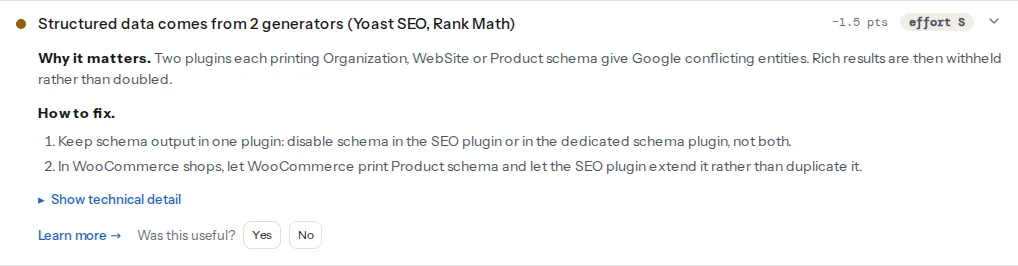
The WordPress module goes one step further and looks at the plugins themselves, read from asset paths and plugin comments in the page, never guessed. Two plugins from the SEO family (Yoast, Rank Math, All in One SEO, SEOPress, The SEO Framework, Squirrly) active at once is its own finding, because they duplicate the title, description and canonical as well as the schema.
A theme or a builder widget that prints its own block without a plugin class is not named by the generator finding, but its entity still shows up under duplicate entities. And the "types detected" row shows the count per type (Organization ×2), which is the quickest way to see the shape of the problem.
Step by step
1. Read the report and count the generators
Run the validator on the home page and on one inner page of each type (a post, a product). Note three things: the list under duplicate entities, the generators named in the WordPress finding, and the ×N counts in the types row. The home page usually shows site-wide duplicates (Organization, WebSite); the product page shows Product duplicates; the post shows Article or FAQPage.
To see the blocks themselves, view the page source and search for ld+json. Each <script> tag's class or the comment above it says who printed it: Yoast wraps its output in <!-- This site is optimized with the Yoast SEO plugin -->, Rank Math uses class="rank-math-schema", WooCommerce's block has no class but contains "@type":"Product" with offers. A block with no marker is the theme or a widget.
Google's Rich Results Test gives the same picture from Google's side: the "Detected items" list shows each entity it found, and two Organization items there is the confirmation.
2. Pick the source of truth
The SEO plugin's graph is almost always the right choice. It links entities with @id references (the Article points at the Organization as publisher, the WebSite points at the Organization), it is updated with the plugin, and it has settings screens for the logo, the profiles and the site name. A dedicated schema plugin is a reasonable choice only if it is the one printing the graph and the SEO plugin's schema is off.
Write down what each duplicate should be replaced by before turning anything off:
| Entity | Keep from | Turn off in |
|---|---|---|
| Organization, WebSite | SEO plugin | Theme options, schema plugin, second SEO plugin |
| Product | WooCommerce (extended by the SEO plugin) | Review plugin, schema plugin, theme product template |
| Article, BlogPosting | SEO plugin | Theme, schema plugin |
| FAQPage | Whichever prints the visible FAQ (SEO plugin block or builder widget), one only | The other |
| Review, AggregateRating | The plugin that holds the reviews (WooCommerce, or one review plugin) | Everything else |
3. Turn off the extra generators
Two SEO plugins. Keep one. Both Yoast and Rank Math have an import tool (Rank Math SEO → Status & Tools → Import & Export; Yoast SEO → Tools → Import and Export) that brings over titles, descriptions and per-post settings from the other. Import, spot-check ten pages, then deactivate the loser. Keeping it "just in case" keeps its output.
Rank Math alongside another schema source. Rank Math SEO → Dashboard → Modules turns the Schema (Structured Data) module off entirely; Titles & Meta → Posts → Schema Type set to "None" turns it off per post type while keeping the site-wide nodes.
Yoast alongside another schema source. Yoast has no toggle in the admin; a filter in the theme's functions.php or a small plugin disables its graph:
<?php
// Disable Yoast SEO's JSON-LD output entirely (keep this only if another plugin prints the graph).
add_filter('wpseo_json_ld_output', '__return_false');
More often you want the opposite: keep Yoast's graph and remove one node another plugin already prints. Yoast's wpseo_schema_graph_pieces filter drops individual pieces; the plugin's developer documentation lists the piece identifiers.
Theme options. Look for a "Schema", "Structured data" or "Rich snippets" switch under the theme's customizer or options panel. Themes from the big marketplaces usually have one; if there is none, the block is in header.php or a template part and a child theme can remove the action that prints it.
Builder widgets. Elementor Pro's accordion has an FAQ schema switch per widget; other builders have similar per-widget options. Keep the schema on the one widget that is the page's FAQ, or leave it to the SEO plugin's FAQ block, not both.
Review plugins. A reviews plugin that prints Product or AggregateRating on WooCommerce products duplicates WooCommerce's own rating. Most have a "disable schema output" setting; otherwise choose which plugin owns reviews.
4. Let WooCommerce and the SEO plugin share Product
WooCommerce prints a Product block with offers.price, offers.availability and, when reviews exist, aggregateRating. Yoast and Rank Math both know this. Rank Math's WooCommerce module replaces WooCommerce's block with its own, richer one, so the page has one Product; Yoast leaves WooCommerce's block in place and, with the Yoast WooCommerce SEO add-on, merges its details into the graph. Either way the result should be one Product entity; two means a third plugin is involved, or the theme's product template prints its own. The WooCommerce product schema finding checks that the remaining block has price, availability and rating.
5. Validate and re-run
After each change, view the source again and count the ld+json blocks, then re-run the validator. Do this on the home page and on a product or post, because site-wide and per-page duplicates come from different settings. The schema markup validation guide covers what the remaining single graph should contain.
Platform notes
WordPress
Caching plugins serve the old HTML until purged; after turning a generator off, clear the page cache (and Cloudflare's, if it caches HTML) before re-checking, or the report will still show two blocks. A site that runs a "delete unused plugins" clean-up first is easier to reason about: deactivated plugins print nothing, but plugins that are merely disabled in a settings screen sometimes still enqueue their schema on some templates.
Shopify
Duplicates come from the theme plus an app (a reviews app, an SEO app). The theme's Organization lives in layout/theme.liquid or the header section; apps inject theirs through the app embed. Turn the app's structured data off in its settings, or remove the theme's block, and keep one. The Rich Results Test's detected items are the quickest confirmation, since app-injected blocks can be hard to find in the theme code.
Static sites and custom builds
Duplicates are usually a layout that prints the site-wide graph and a page template that prints it again, or a component library that adds Organization on every page and a home page that adds it by hand. Print the site-wide nodes once, in the shared layout, and reference them by @id from page-level entities.
Verify
- The validator reads "Structured data entities are unique", "One plugin generates the structured data" (WordPress) and "One SEO plugin is active".
- The types row shows each site-wide type once:
Organization,WebSite, and on a product page oneProduct. - The Rich Results Test's detected items list one Organization and one item per rich-result type, with no conflicting warnings.
- The page source contains the number of
ld+jsonblocks you expect (typically one graph, plus WooCommerce'sProducton shop pages). - The rating shown by the Rich Results Test is the one from the plugin that holds the reviews.
Common mistakes
- Deactivating the second SEO plugin without importing. Symptom: every title and description reverts to the defaults. Import first, deactivate second.
- Merging two graphs by hand. Symptom: a valid graph today, two again after the next plugin update. Turn a generator off rather than editing its output.
- Turning schema off in the SEO plugin and keeping the theme's. The theme's block rarely has
@idlinks orsameAs, and theme updates change it. Keep the plugin's. - A review widget and WooCommerce both printing ratings. Symptom: two
AggregateRatingvalues, and the Rich Results Test warning about them. Keep reviews in one plugin, and only that plugin's schema. - Purging nothing after the change. Symptom: the report still shows two generators an hour later. Clear the page cache and any CDN cache, then re-run.
- Disabling the whole graph to silence one duplicate. Symptom: rich results disappear site-wide. Remove one node (the theme's
Organization, a widget'sFAQPage), not the graph.