Ask any web server for a page and it introduces itself: Server: Apache/2.4.29 (Ubuntu), X-Powered-By: PHP/7.2.24. Those two lines cost nothing to send and nothing to remove, and they are the first thing an automated scanner reads before deciding whether your site is worth attacking. This guide shows what the headers reveal, what removing them buys you (less than patching, more than nothing), and the exact setting for each server, in about fifteen minutes.
Quick answer
- Apache:
ServerTokens Prodin the main config (httpd.conforapache2.conf; it does not work in.htaccess) andServerSignature Off. Result:Server: Apache. - nginx:
server_tokens off;in thehttpblock. Result:Server: nginx. - PHP:
expose_php = Offinphp.ini. RemovesX-Powered-By: PHP/x.y.z. - Express:
app.disable('x-powered-by'). IIS/ASP.NET: remove the headers inweb.config. - Caddy sends
Server: Caddywith no version; Cloudflare replacesServerwithcloudflareat the edge. - Then patch anyway. A hidden version is still that version. Re-run the security headers checker to confirm.
Why version numbers matter
An attacker with a list of a million domains does not read them one by one. A script fetches the home page of each, reads the Server and X-Powered-By headers, and files the site under "Apache 2.4.29" or "PHP 7.2". Then a second script looks up which published vulnerabilities (CVEs) apply to those versions and tries only those. Your headers do the sorting for them. This is free reconnaissance, and it is exactly how mass exploitation campaigns pick their targets: not by interest in your site, but by matching a version string.
What the two headers typically say:
| Header | Example value | What an attacker learns |
|---|---|---|
Server | Apache/2.4.29 (Ubuntu) | Web server, exact version, operating system family, so probably Ubuntu 18.04 and its package set |
Server | nginx/1.18.0 | nginx from 2020, likely a distribution package that is behind upstream |
Server | Microsoft-IIS/10.0 | Windows Server 2016 or later |
X-Powered-By | PHP/7.2.24 | A PHP branch that stopped receiving security fixes in November 2020 |
X-Powered-By | ASP.NET plus X-AspNet-Version: 4.0.30319 | .NET Framework version |
X-Powered-By | Express | Node.js with Express; no version, still a hint for which exploits to try |
Notice that X-Powered-By: PHP/7.2.24 is worse than the Apache line: PHP 7.2 is out of support, so the header does not just narrow the search, it announces an unpatched runtime.
What hiding them does not do
Removing the header does not update PHP. A scanner that cannot read the version can still probe for the vulnerability directly, and many do, because probing is cheap. Fingerprinting also has other routes: the order and format of the remaining headers, error page markup, ETag format, the PHP session cookie name PHPSESSID, and for WordPress the ?ver= query strings on core scripts.
So the honest framing: hiding the version removes your site from the easy list. It buys you a place in the "unknown, try later" pile instead of the "PHP 7.2, exploit now" pile. That is worth ten minutes. It is not worth skipping the update.
How getReport checks it
The checker fetches the page like a browser, follows redirects, and reads the response headers of the final page. Two findings come from the version headers, and the rules are simple:
Serverwarns when the value carries a version-like number: a slash followed by a digit (nginx/1.18.0,Microsoft-IIS/10.0) or digits with a dot (Apache 2.4). A bare product name (Apache,nginx,cloudflare,LiteSpeed) passes, and so does noServerheader at all.X-Powered-Bywarns whenever the header exists, with or without a version.X-Powered-By: Expressis a warning too, because the header has no legitimate use for the visitor; the right fix is always to remove it.
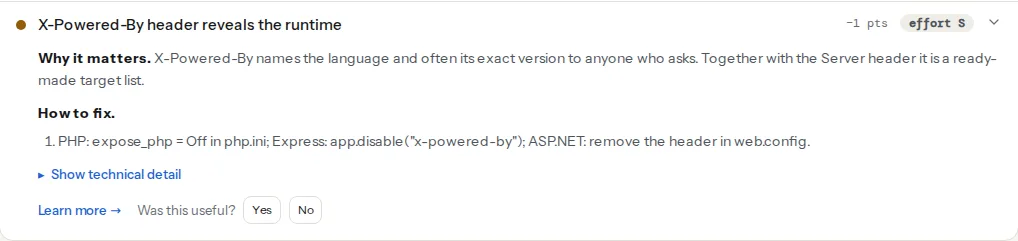
A third finding in the same module reads the version a CMS prints into the HTML rather than the headers. WordPress, Joomla and Drupal all announce themselves in a <meta name="generator"> tag, and the check compares that version with the current release:
Both kinds of leak are worth fixing, but note the difference in weight: an old CMS version is a real, exploitable condition; a version header is a signpost to one. Update first, then hide.
Step by step
1. See what you send today
From a terminal, from outside your own network so that any CDN or cache is included:
curl -sI https://example.com/ | grep -i -E "^(server|x-powered-by|x-aspnet-version|x-generator):"Also check an error page, because Apache and nginx print the version on their default 404 and 500 pages independently of the headers:
curl -s https://example.com/this-page-does-not-exist | grep -i -E "apache|nginx|php"2. Apache: ServerTokens and ServerSignature
ServerTokens is only valid in the server configuration, not in .htaccess (ServerSignature works in both, but keep them together). On Debian and Ubuntu that is /etc/apache2/conf-enabled/security.conf; on RHEL-family systems /etc/httpd/conf/httpd.conf:
# Server: Apache  (no version, no OS, no modules)
ServerTokens Prod
# No "Apache/2.4.29 (Ubuntu) Server at example.com Port 443" footer on error pages
ServerSignature Off
Reload Apache (sudo systemctl reload apache2). Apache cannot drop the Server header entirely without a third-party module; Apache alone passes the check and tells a scanner nothing it could not guess.
If PHP runs inside Apache or behind it and you cannot change php.ini yet, mod_headers can strip the runtime header from every response, including in .htaccess:
Header always unset X-Powered-By3. PHP: expose_php
expose_php is a system-level setting: it can only be changed in php.ini (or in the PHP-FPM pool config), never in .htaccess or with ini_set(). On most hosting panels it is under "PHP options" or "PHP configuration"; on a server you manage, find the loaded file with php --ini and set:
; php.ini
expose_php = Off
Restart PHP-FPM (sudo systemctl restart php8.3-fpm, adjust to your version) or reload Apache for mod_php. This removes X-Powered-By from every response PHP generates, whichever web server sits in front.
4. nginx: server_tokens
In /etc/nginx/nginx.conf, inside the http block:
server_tokens off;Then sudo nginx -t && sudo systemctl reload nginx. The header becomes Server: nginx and the version disappears from error pages too. Removing the header altogether needs the headers-more module (more_clear_headers Server;), which is packaged on Debian and Ubuntu as libnginx-mod-http-headers-more-filter. nginx alone already passes the check; do not compile a module for this.
When nginx proxies to PHP-FPM or a Node app, it passes their headers through. expose_php = Off and app.disable('x-powered-by') fix the source; if you cannot reach it, strip at the proxy:
location / {
    proxy_pass http://app:3000;
    proxy_hide_header X-Powered-By;
}
For PHP-FPM via fastcgi_pass the equivalent is fastcgi_hide_header X-Powered-By;.
5. Caddy, Express, IIS
Caddy sends Server: Caddy without a version and no X-Powered-By, so a Caddy site passes both checks with no change. To drop the header entirely, add header -Server inside the site block.
Express sets X-Powered-By: Express by default. In the app setup:
const express = require('express');
const app = express();
app.disable('x-powered-by');
The helmet package does the same and adds the other security headers in one call.
IIS and ASP.NET, in web.config:
<configuration>
  <system.webServer>
    <security>
      <requestFiltering removeServerHeader="true" />
    </security>
    <httpProtocol>
      <customHeaders>
        <remove name="X-Powered-By" />
      </customHeaders>
    </httpProtocol>
  </system.webServer>
  <system.web>
    <httpRuntime enableVersionHeader="false" />
  </system.web>
</configuration>
removeServerHeader needs IIS 10; enableVersionHeader="false" removes X-AspNet-Version.
6. Cloudflare and other CDNs
Cloudflare replaces the origin's Server header with Server: cloudflare on every proxied response, so the Server finding passes as soon as the orange cloud is on. X-Powered-By is passed through from the origin unless you remove it: Rules, Settings, Managed Transforms, switch on "Remove X-Powered-By headers", or a Transform Rule that removes the header by name. Other CDNs behave differently; test with curl against the public hostname, not the origin IP.
Platform notes
WordPress
WordPress reveals its version in four places, and the headers are not among them:
- The generator tag in every page's
<head>:<meta name="generator" content="WordPress 6.8">. This is what theoutdated-cms-versioncheck reads. - RSS and Atom feeds, which carry a
<generator>element with the version. readme.htmlin the site root, which prints the version in its heading. It is restored by every core update, so a server rule is better than deleting it.?ver=6.8on core stylesheet and script URLs, and?ver=1.2.3on each plugin's and theme's assets, which reveals plugin versions too.
One filter covers the first two; add it to a must-use plugin at wp-content/mu-plugins/no-generator.php:
<?php
/**
 * Plugin Name: Remove version disclosure
 */
// Generator tag in <head> and in feeds
add_filter('the_generator', '__return_empty_string');
remove_action('wp_head', 'wp_generator') does the head tag only; the filter does both. Block readme.html at the server:
location = /readme.html { return 404; }<Files "readme.html">
Require all denied
</Files>Be honest with yourself about the ?ver= strings: stripping them from asset URLs breaks cache busting after updates, and the version is still discoverable from the file contents. The real fix for a WordPress version leak is to be on the current version; then the generator tag advertises nothing an attacker can use. The WordPress checker reads the same passive signals a scanner would.
Shopify, Wix, Squarespace and other hosted platforms
The headers are set by the platform and are usually already clean (Server: cloudflare or a bare product name). There is nothing for you to change; run the checker to confirm.
Shared hosting with cPanel or Plesk
ServerTokens and server_tokens are set by the host, not you; many hosts already send a bare Server: Apache or LiteSpeed. expose_php is usually editable under "Select PHP Version" or "PHP Settings" in the panel. If the Server header still shows a version, ask support; it is a one-line change on their side.
Verify
- Re-run the security headers checker. Both findings should read "Server header does not reveal a version" and "No X-Powered-By header is sent".
curl -sI https://example.com/ | grep -i -E "^(server|x-powered-by):"showsServer: nginx(orApache,cloudflare,Caddy) and noX-Powered-Byline.curl -s https://example.com/this-page-does-not-exist | grep -i -E "apache/|nginx/"prints nothing: error pages no longer carry the version.- For WordPress,
curl -s https://example.com/ | grep -i generatorprints nothing, andcurl -sI https://example.com/readme.htmlanswers 404 or 403.
Common mistakes
- Putting
ServerTokens Prodin.htaccess. Apache answers 500 Internal Server Error for the whole site, because the directive is not allowed there. Move it to the main config and reload. - Setting
expose_phpwithphp_flagorini_set(). Silently ignored; the header stays. It isphp.inior the FPM pool config only. - Hiding the version and calling the site patched. The scanner that reads headers is the lazy one. Update PHP, the web server and the CMS; the version header is the last step, not a replacement. The generator side of this is covered in Outdated CMS versions: reading the generator tag.
- Testing from the server itself.
curl localhostbypasses Cloudflare and the cache, so you see the origin's headers, not the visitor's. Test the public hostname from outside. - Stopping at the two headers. The same reconnaissance pass looks for
/.env,/.git/HEAD,phpinfo.phpand open directory listings, which reveal far more than a version. Those are separate findings in the same module; see Directory listings and exposed files. The rest of the header set is in Security headers from zero to A.