Most advice about fixing a website report assumes WordPress. Joomla and Drupal run a large share of association, school, government and agency sites, and every finding in a report has a setting in them too; it is just in a different place. This guide explains how getReport recognises each CMS, then maps the findings to the screens that fix them, first for Joomla 4 and 5, then for Drupal 10 and 11, and ends with a lookup table. The menu paths are for administrators; the web server parts are for whoever manages hosting.
Quick answer
- Joomla: System → Global Configuration holds URLs (Site → SEO Settings), default metadata (Site → Metadata), HTML compression and HTTPS (Server). Security headers: the System - HTTP Headers plugin. Updates: System → Update.
- Drupal: URL aliases and Pathauto for URLs, Metatag for titles, descriptions and canonical tags, Configuration → Development → Performance for aggregation and page cache lifetime. Security headers: Security Kit or the web server. Updates: Reports → Available updates.
- In both, compression and cache lifetimes for CSS, JavaScript and images belong to the web server, not the CMS.
- Neither adds an XML sitemap by itself: install an extension (Joomla) or the Simple XML Sitemap module (Drupal).
- Run the SEO audit after each change; the full report adds the security and best-practice findings.
Why the CMS settings matter
A CMS decides what goes into every page's <head> and every URL it links to. One wrong setting repeats on thousands of pages: URLs with /index.php/ in them, a title pattern that puts the site name first everywhere, no canonical tag on category pages. The findings in a report look like page problems, but the fix is almost always one switch in the CMS, which is why it pays to know where the switches are.
Version and update state matter even more. Joomla and Drupal are open source and their security releases are public, so scanners know exactly which holes an old version has. Joomla 3 and 4 and Drupal 7 and 9 no longer receive security releases. A site on one of them is not just slow to update; it is running code that will never be fixed. CMS updates has the short version of why this matters.
How getReport checks it
The report recognises the CMS from what the page itself shows. For Drupal, that is the generator meta tag (Drupal 10 (https://www.drupal.org)), the X-Generator or X-Drupal-Cache response headers, drupalSettings in the page or file paths under /sites/default/files/. For Joomla, it is the generator tag (Joomla! - Open Source Content Management) or asset paths under /media/jui/ and /components/com_. The CMS and, where the page reveals it, the version appear in the "Detected technology" list at the top of the report.
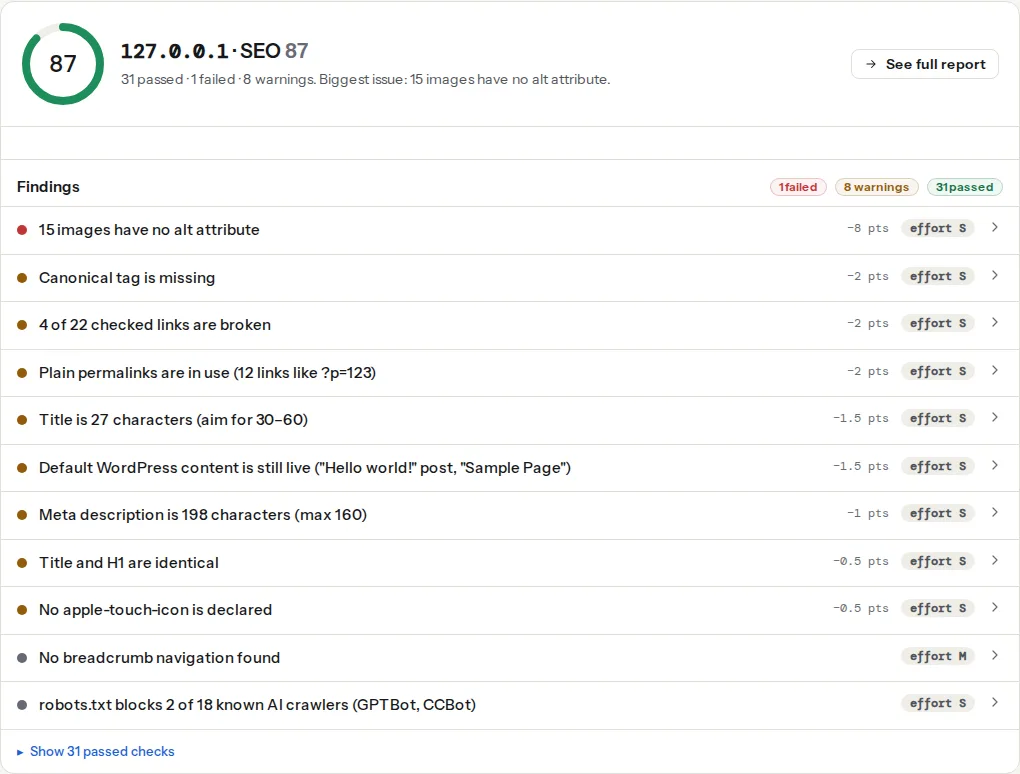
The out-of-date finding reads the generator meta tag, or the X-Generator header when there is no tag, and appears only when one of them carries a readable version. Joomla prints none unless "Show Joomla Version" is switched on, so on a default Joomla site the finding does not appear either way. Drupal prints its major version by default, and the finding compares it with Drupal 11: a Drupal 9 or 10 site gets it and a Drupal 11 site passes. Drupal 10 is still supported, so on a 10 site the warning means an upgrade is due, not an emergency. The finding compares major versions only, so a Joomla 5 site two security releases behind still passes. Treat it as a floor, and use the CMS's own update screen for security releases. Outdated CMS versions: reading the generator tag explains what the tag gives away.
These two come from loading the page in a browser: every text response is checked for compression, and every script, stylesheet, image and font for a cache lifetime. Both CMSs leave most of this to the web server.
Step by step
Joomla
Paths are for Joomla 4 and 5; Joomla 3 has most of the same options under slightly different menus.
1. URLs
System → Global Configuration → Site → SEO Settings:
- Search Engine Friendly URLs: Yes (the default).
- Use URL Rewriting: Yes, which removes
/index.php/from every URL. On Apache this only works after renaminghtaccess.txtin the Joomla root to.htaccess; on nginx the host adds atry_filesrule. Turn the option on before renaming and every page returns 404; rename without turning it on and nothing changes. - Add Suffix to URL: No.
.htmlendings add nothing. - Unicode Aliases: No, unless the site is in a script that needs them; transliterated URLs are easier to share.
- Site Name in Page Titles: After, so each title starts with the page's topic and ends with the site name.
2. Metadata and canonical tags
The same screen, Site → Metadata, holds the default meta description and robots value; each menu item has its own Metadata tab and a "Browser Page Title" field under Page Display, which is where the title and description findings are fixed page by page. Also set Show Joomla Version to No: it is the setting that adds the exact version to the generator tag.
For a canonical tag on every page, use an SEO extension from the Joomla Extensions Directory or a template override, then check the canonical finding. The same goes for an XML sitemap: Joomla has no sitemap of its own.
To remove the generator tag completely, add one line near the top of your template's index.php, ideally in a child template so updates do not overwrite it:
<?php
// templates/your-template/index.php, after the defined('_JEXEC') line
$this->setGenerator('');
3. Server settings
System → Global Configuration → Server:
- Force HTTPS: Entire Site, unless the web server already redirects; one redirect is enough.
- Error Reporting: None on a live site. Other values print PHP paths and notices into pages.
- Gzip Page Compression: Yes if the web server does not compress. It only compresses the HTML page Joomla builds, not CSS, JavaScript or images, so the compression finding may still list files; those need the server block in the Apache guide or the nginx one.
4. Cache, headers and updates
- Page cache: System → Global Configuration → System → System Cache (Conservative is the safe choice), and enable the System - Page Cache plugin under System → Manage → Plugins for full-page caching of guest visits.
- Security headers: System → Manage → Plugins → System - HTTP Headers. Its options cover HSTS, framing, Referrer-Policy and Content-Security-Policy, plus a list for any other header. It runs in PHP, so static files the web server sends directly do not get the headers; the page itself, which is what the report grades, does.
- Updates: System → Update → Joomla for the core, System → Update → Extensions for the rest. Take a backup first; Joomla's update component can check PHP and extension compatibility before a major upgrade.
Drupal
Paths are for Drupal 10 and 11 with the standard install profile.
1. URLs and redirects
Core's Path module gives each page an alias (Configuration → Search and metadata → URL aliases). The Pathauto module generates them from patterns (/news/[node:title]), so editors never publish /node/123. The Redirect module creates a 301 automatically when an alias changes, which keeps old links and search results working and stops redirect chains from growing.
2. Titles, descriptions and canonical tags
Drupal core prints a canonical link on content pages. The Metatag module extends it to every page type and adds page titles, meta descriptions, robots values and, with its Open Graph submodule, social previews, all set as patterns under Configuration → Search and metadata → Metatag, with per-page overrides. For a sitemap, Simple XML Sitemap is the widely used module.
3. Performance
Configuration → Development → Performance:
- Aggregate CSS files and Aggregate JavaScript files: on. Fewer, larger files load faster and compress better.
- Browser and proxy cache maximum age: the lifetime Drupal puts on pages for anonymous visitors. With "no caching", a CDN or reverse proxy cannot cache any page. The report's cache finding does not look at HTML, so this shows up as time to first byte, not as a cache warning.
The core Internal Page Cache (anonymous visitors) and Dynamic Page Cache (everyone) modules are on in the standard profile; keep them on. BigPipe streams the personalised parts of a page after the rest and is also on by default. In production, keep Twig debugging off (Configuration → Development → Development settings in recent versions) so templates are compiled once and cached.
4. Headers, generator and updates
Drupal core already sends X-Content-Type-Options: nosniff and X-Frame-Options: SAMEORIGIN. For HSTS, a Content-Security-Policy and the rest, use the Security Kit module or set them in the web server, as in Security headers from zero to A.
The generator tag only carries the major version, but it still advertises the CMS. Remove it from your theme's .theme file:
<?php
// themes/custom/yourtheme/yourtheme.theme
function yourtheme_page_attachments_alter(array &$attachments) {
  foreach ($attachments['#attached']['html_head'] as $key => $item) {
    if (($item[1] ?? '') === 'system_meta_generator') {
      unset($attachments['#attached']['html_head'][$key]);
    }
  }
}
Clear the cache afterwards (drush cr). The X-Generator header is removed at the web server: Header always unset X-Generator plus Header unset X-Generator on Apache, fastcgi_hide_header X-Generator; on nginx.
Updates are listed under Reports → Available updates (the core Update Status module), and Reports → Status report flags security releases at the top. Update with Composer (composer update "drupal/core-*" --with-all-dependencies, then drush updatedb) after a backup.
Platform notes
The web server layer
Compression, cache lifetimes for static files, the HTTP to HTTPS redirect and most security headers work the same for any PHP application, so they belong in the server configuration. On Apache, Drupal's own .htaccess sets a two-week Expires default for static files when mod_expires is enabled; Joomla's htaccess.txt is mainly rewrite rules. Everything else is in the Apache guide linked above and Nginx configuration for an A grade.
Where each finding is fixed
| Report finding | Joomla | Drupal |
|---|---|---|
| Canonical tag is missing | SEO extension or template override | Core on content pages; Metatag for all pages |
| Title or meta description length | Menu item → Page Display and Metadata tabs; Site Name in Page Titles | Metatag patterns and per-page fields |
Plain or /index.php/ URLs | Global Configuration → SEO Settings, rename htaccess.txt | URL aliases, Pathauto |
| Redirect chains | Components → Redirects | Redirect module |
| No XML sitemap | Sitemap extension | Simple XML Sitemap |
| Text files sent uncompressed | Gzip Page Compression (HTML only), then web server | Aggregation on, then web server |
| Static files have no cache lifetime | Web server | Web server (Apache: core .htaccess sets a default) |
| Security headers missing | System - HTTP Headers plugin | Security Kit module or web server |
| CMS out of date | System → Update | Reports → Available updates, Composer |
Verify
- Run the SEO audit on the home page, a content page and a category or listing page; the canonical, title and description findings should pass on all three.
- Open the full report ("See full report") for the security and best practices modules: the compression, cache and security header findings.
- View the page source and search for
generator: the tag should be gone, or at least show no exact version. curl -sI https://example.com/ | grep -i -E "x-generator|strict|content-security"shows nox-generatorand your headers.
Common mistakes
- "Show Joomla Version" left on. Symptom: the generator tag reads
Joomla! 4.4.1 - Open Source Content Management. Fix: set it to No in Global Configuration → Site → Metadata. - Joomla URL rewriting without the
.htaccess. Symptom: every page except the home page returns 404, or old/index.php/addresses keep working next to the new ones. Fix: renamehtaccess.txt, and redirect or canonicalise the old form. - Drupal's page cache lifetime at "no caching". Symptom: a CDN in front shows every page as a miss and TTFB stays high. Fix: set a lifetime (an hour is a common start) and purge on publish.
- Abandoned extensions and modules. Symptom: an extension with no release in years, often blocking the next major upgrade. Fix: replace it before the upgrade, not during.
- Old PHP. Symptom: the update screen refuses the next version. Joomla 5 needs PHP 8.1 or newer and Drupal 11 needs PHP 8.3; ask the host to switch before you start.