Nginx does exactly what its configuration says and nothing more, which is why a fresh install scores poorly on any report: TLS 1.0 may still be allowed, no security headers are sent, only HTML is compressed, and static files carry no cache lifetime. This guide builds one server block that passes every TLS, header, compression and caching check in getReport, explains each part, and then shows the whole file. It assumes nginx 1.25.1 or newer and a certificate from Let's Encrypt; allow an hour including testing.
Quick answer
listen 443 ssl;plushttp2 on;(thehttp2flag onlistenis deprecated since 1.25.1). Addlisten 443 quic reuseport;and anAlt-Svcheader for HTTP/3 if your build has the QUIC module.ssl_protocols TLSv1.2 TLSv1.3;and a modern cipher list.- Port 80 answers with one
return 301to the finalhttps://host; www redirects in the same single hop. - Security headers live in a snippet file you
includein every block that has its ownadd_header, because nginx drops inherited headers otherwise. gzipwithgzip_typesandgzip_vary on, Brotli through thengx_brotlimodule.Cache-Control: public, max-age=31536000, immutablefor versioned assets, a week for images,no-cachefor HTML.nginx -tbefore every reload, then check the result with the security headers checker.
Why the defaults cost you points
Nginx ships conservative so it runs anywhere. Distribution packages differ in what they enable, and most leave the security headers, cache lifetimes and anything beyond HTML compression to you. Each gap is its own finding in a report: TLS 1.0 accepted is a fail in the security module, a missing HSTS or CSP header is a warning, uncompressed CSS and JavaScript cost points in best practices, and static files without a lifetime are re-downloaded by every returning visitor.
None of these takes more than a few lines to fix. The difficulty is that nginx's configuration has inheritance rules that quietly undo work: a header set for the whole server disappears from any location that sets a header of its own. That one rule causes most "I added the header but the checker says it is missing" support threads, and the layout below is designed around it.
How getReport checks it
The security headers checker grades the final response after redirects. The TLS findings come from a separate handshake: getReport connects once with TLS 1.2 or newer, offering h2 and http/1.1, and records the protocol, version and certificate; then it tries a handshake limited to TLS 1.0 and 1.1 and expects the server to refuse it. The HTTP/2 test adds the Alt-Svc header check for HTTP/3 and loads the page in Chromium, which is where the compression and caching findings come from: every text response is checked for a Content-Encoding, and every script, stylesheet, image and font for a positive max-age, immutable or a future Expires.
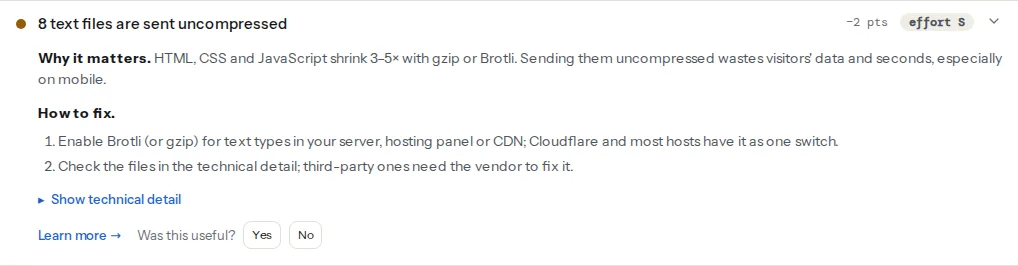
The technical detail under the finding lists each uncompressed file with its size. If your own HTML is on the list, compression is off entirely; if only CSS, JavaScript and SVG are, gzip_types is missing.
Step by step
The examples use example.com as the final host (no www) and Debian or Ubuntu paths: site files in /etc/nginx/sites-available/ linked into sites-enabled/, reusable pieces in /etc/nginx/snippets/. On other systems, put the site file in /etc/nginx/conf.d/example.com.conf.
1. TLS: protocols, ciphers, sessions
One snippet, included by every server that listens on 443:
# /etc/nginx/snippets/tls.conf
ssl_protocols TLSv1.2 TLSv1.3;
ssl_ciphers ECDHE-ECDSA-AES128-GCM-SHA256:ECDHE-RSA-AES128-GCM-SHA256:ECDHE-ECDSA-AES256-GCM-SHA384:ECDHE-RSA-AES256-GCM-SHA384:ECDHE-ECDSA-CHACHA20-POLY1305:ECDHE-RSA-CHACHA20-POLY1305;
ssl_prefer_server_ciphers off;
ssl_session_cache shared:SSL:10m;
ssl_session_timeout 1d;
ssl_session_tickets off;
The cipher list is the TLS 1.2 part of Mozilla's "intermediate" recommendation: forward secrecy and authenticated encryption only, and every browser from the last ten years is covered. TLS 1.3 ciphers are not configurable here and need no attention. The session cache lets a returning visitor skip part of the handshake. If several sites share the server, put these lines in the http block instead: for names on the same IP and port, nginx negotiates the protocol version with the settings of the default server, so one old site can re-enable TLS 1.0 for all of them. TLS versions explains why 1.0 and 1.1 had to go.
OCSP stapling used to be on every checklist. Let's Encrypt stopped running OCSP in 2025 and its certificates no longer name an OCSP server, so ssl_stapling on only produces a warning in the error log. With a commercial certificate that still has one, add ssl_stapling on;, ssl_stapling_verify on; and a resolver line.
2. HTTP/2 and HTTP/3
Since nginx 1.25.1, HTTP/2 is its own directive, http2 on;, and listen 443 ssl http2 prints a deprecation warning. HTTP/3 needs a build with the QUIC module; check with nginx -V 2>&1 | grep -o with-http_v3_module. If it is there:
listen 443 quic reuseport;
listen [::]:443 quic reuseport;
add_header Alt-Svc 'h3=":443"; ma=86400' always;
reuseport may appear only once per address and port across all server blocks, so other sites on the same machine use listen 443 quic; without it. Open UDP port 443 in the firewall too; QUIC is not TCP. Browsers only try HTTP/3 after they have seen the Alt-Svc header, which is why the HTTP/2 test reports h2 as negotiated on the first handshake and h3 as advertised.
3. One redirect to the final host
A request for http://www.example.com/page should reach https://example.com/page in one hop, not three. Two small server blocks do it:
server {
    listen 80;
    listen [::]:80;
    server_name example.com www.example.com;
    return 301 https://example.com$request_uri;
}

server {
    listen 443 ssl;
    listen [::]:443 ssl;
    http2 on;
    server_name www.example.com;
    ssl_certificate     /etc/letsencrypt/live/example.com/fullchain.pem;
    ssl_certificate_key /etc/letsencrypt/live/example.com/privkey.pem;
    include snippets/tls.conf;
    return 301 https://example.com$request_uri;
}
The certificate must cover both names. If your final host is www, swap the names. Certbot's --nginx plugin adds its own redirect if blocks; replace them with the port 80 block above so there is only one rule.
4. Security headers in a snippet
# /etc/nginx/snippets/headers.conf
add_header Strict-Transport-Security "max-age=31536000; includeSubDomains" always;
add_header Content-Security-Policy-Report-Only "default-src 'self'; script-src 'self'; style-src 'self' 'unsafe-inline'; img-src 'self' data: https:; font-src 'self'; connect-src 'self'; frame-ancestors 'none'; base-uri 'self'; form-action 'self'; object-src 'none'" always;
add_header X-Content-Type-Options "nosniff" always;
add_header X-Frame-Options "DENY" always;
add_header Referrer-Policy "strict-origin-when-cross-origin" always;
add_header Permissions-Policy "camera=(), microphone=(), geolocation=(), payment=()" always;
add_header Alt-Svc 'h3=":443"; ma=86400' always;
always adds the header to error responses too; without it, a 404 or 500 page goes out bare. Delete the Alt-Svc line if you have no QUIC build. The CSP starts in report-only mode, which the check counts as present; move to enforcing once the browser console is quiet.
Now the trap. nginx inherits add_header from the enclosing level only if the current level has no add_header of its own. A location that adds Cache-Control loses HSTS, CSP and the rest. The fix is to include snippets/headers.conf; again in every such location, which the full file below does.
For HSTS preload, raise the header to max-age=63072000; includeSubDomains; preload once every subdomain serves HTTPS, then submit the domain at hstspreload.org. Removal from the list takes months, so do this last.
Finally, in the http block of /etc/nginx/nginx.conf, server_tokens off; changes Server: nginx/1.26.2 to Server: nginx, which passes the version-leak finding.
5. Compression
Debian and Ubuntu already have gzip on; in nginx.conf, and declaring it twice is an error, so edit the "Gzip Settings" block there rather than adding a file:
# /etc/nginx/nginx.conf, inside http { }
gzip on;
gzip_vary on;
gzip_proxied any;
gzip_comp_level 5;
gzip_min_length 256;
gzip_types text/css text/plain text/xml application/javascript application/json application/xml application/rss+xml application/manifest+json image/svg+xml;
text/html is always compressed and listing it only earns a warning. gzip_vary on sends Vary: Accept-Encoding, so a proxy or CDN never hands a compressed copy to a client that cannot read it. Images, fonts in WOFF2, video and archives are compressed already; adding them wastes CPU.
For Brotli, install the module (libnginx-mod-http-brotli-filter on recent Debian and Ubuntu) and add the same list:
# /etc/nginx/nginx.conf, inside http { }, below the gzip block
brotli on;
brotli_comp_level 5;
brotli_types text/css text/plain text/xml application/javascript application/json application/xml application/rss+xml application/manifest+json image/svg+xml;
Browsers that ask for Brotli get it; everything else falls back to gzip. Text compression: gzip and Brotli compares the two.
6. Cache lifetimes by location
Files whose URL changes when their content changes (a hash in the name, or WordPress's ?ver= query) can be kept for a year. Unversioned images get a week. HTML is revalidated on every visit.
location ~* \.(?:css|js|mjs)$ {
    include snippets/headers.conf;
    add_header Cache-Control "public, max-age=31536000, immutable";
    try_files $uri =404;
}

location ~* \.(?:png|jpe?g|gif|webp|avif|svg|ico|woff2)$ {
    include snippets/headers.conf;
    add_header Cache-Control "public, max-age=604800";
    try_files $uri =404;
}
Use either add_header Cache-Control or expires, not both: expires 7d; writes its own Cache-Control and you end up with two. If your CSS and JS are not versioned, give them the week instead of the year.
7. WordPress: PHP-FPM, a page cache and the login
For a PHP site, try_files sends unknown paths to index.php and a FastCGI cache keeps rendered pages for anonymous visitors. The cache zone is declared once in the http context:
# /etc/nginx/conf.d/fastcgi-cache.conf
fastcgi_cache_path /var/cache/nginx/wordpress levels=1:2 keys_zone=WORDPRESS:50m inactive=60m max_size=512m;
fastcgi_cache_key "$scheme$request_method$host$request_uri";
limit_req_zone $binary_remote_addr zone=wplogin:10m rate=6r/m;
The server block then skips the cache for POST requests, query strings, admin and cart paths, and anyone with a login, password-post or cart cookie, and rate-limits wp-login.php to six attempts a minute per IP. The full file shows both. Rate limiting and bot protection covers xmlrpc.php and what to do at the CDN.
8. The whole file
# /etc/nginx/sites-available/example.com  (ln -s into sites-enabled/)
server {
    listen 80;
    listen [::]:80;
    server_name example.com www.example.com;
    return 301 https://example.com$request_uri;
}

server {
    listen 443 ssl;
    listen [::]:443 ssl;
    http2 on;
    server_name www.example.com;
    ssl_certificate     /etc/letsencrypt/live/example.com/fullchain.pem;
    ssl_certificate_key /etc/letsencrypt/live/example.com/privkey.pem;
    include snippets/tls.conf;
    return 301 https://example.com$request_uri;
}

server {
    listen 443 ssl;
    listen [::]:443 ssl;
    listen 443 quic reuseport;          # remove both quic lines without the QUIC module
    listen [::]:443 quic reuseport;
    http2 on;
    server_name example.com;

    ssl_certificate     /etc/letsencrypt/live/example.com/fullchain.pem;
    ssl_certificate_key /etc/letsencrypt/live/example.com/privkey.pem;
    include snippets/tls.conf;

    root /var/www/example.com;
    index index.php index.html;

    include snippets/headers.conf;      # applies wherever a location adds no header

    # Never serve dotfiles (.env, .git), but keep /.well-known/ for ACME and security.txt
    location ~ /\.(?!well-known/) {
        deny all;
    }

    # WordPress page cache: skip for anything personal
    set $skip_cache 0;
    if ($request_method = POST) { set $skip_cache 1; }
    if ($query_string != "") { set $skip_cache 1; }
    if ($request_uri ~* "/wp-admin/|/wp-login\.php|/xmlrpc\.php|/cart/|/checkout/|/my-account/") { set $skip_cache 1; }
    if ($http_cookie ~* "wordpress_logged_in|wp-postpass|comment_author|woocommerce_items_in_cart|wp_woocommerce_session") { set $skip_cache 1; }

    location / {
        include snippets/headers.conf;
        add_header Cache-Control "no-cache";
        try_files $uri $uri/ /index.php?$args;
    }

    location = /wp-login.php {
        limit_req zone=wplogin burst=5 nodelay;
        limit_req_status 429;
        include snippets/fastcgi-php.conf;
        fastcgi_pass unix:/run/php/php8.3-fpm.sock;
    }

    location ~ \.php$ {
        include snippets/fastcgi-php.conf;
        fastcgi_pass unix:/run/php/php8.3-fpm.sock;
        fastcgi_cache WORDPRESS;
        fastcgi_cache_valid 200 301 10m;
        fastcgi_cache_bypass $skip_cache;
        fastcgi_no_cache $skip_cache;
        include snippets/headers.conf;
        add_header X-Cache $upstream_cache_status;
    }

    location ~* \.(?:css|js|mjs)$ {
        include snippets/headers.conf;
        add_header Cache-Control "public, max-age=31536000, immutable";
        try_files $uri =404;
    }

    location ~* \.(?:png|jpe?g|gif|webp|avif|svg|ico|woff2)$ {
        include snippets/headers.conf;
        add_header Cache-Control "public, max-age=604800";
        try_files $uri =404;
    }

    error_page 404 /404.html;
    location = /404.html {
        internal;
    }
}
The /wp-login.php location has no add_header, so it inherits the server-level headers. For a static site, drop the PHP parts and the set/if lines, and change the first try_files to $uri $uri/ =404 so the custom 404.html answers missing paths; WordPress renders its own 404 through index.php. Match the PHP-FPM socket to your installed version (ls /run/php/), and create the cache folder with mkdir -p /var/cache/nginx/wordpress.
9. Test, then reload
sudo nginx -t && sudo systemctl reload nginxnginx -t catches syntax errors and duplicate directives before they take the site down; reload keeps existing connections alive.
Platform notes
Behind Cloudflare or another CDN
Visitors see the CDN's TLS, HTTP/3 and compression, not yours; the report grades what the edge sends. Keep the headers here (the CDN passes them through), set the CDN to Full (strict), and allow its IP ranges if you rate-limit.
Managed hosts with nginx
Many WordPress hosts run nginx without giving you the config. Headers then go through the host's panel or the PHP snippet in Security headers from zero to A, and the page cache is the host's own.
Verify
- SSL check: TLS 1.0/1.1 refused, certificate chain valid, HTTP redirects to HTTPS, HSTS set.
- Security headers checker: every header passes,
Server: nginxwithout a version. Check an image URL and a 404 URL withcurl -sItoo; they must carry the same headers. - HTTP/2 test: h2 negotiated, h3 advertised if you enabled QUIC, the compression finding passes, the cache finding lists no static file without a lifetime.
- Full report: the redirect chain finding shows at most one hop from
http://www.example.com.
Common mistakes
add_headerin a location drops the server headers. Symptom: headers present on/but missing on images or PHP pages. Fix:include snippets/headers.conf;in every location with its ownadd_header.- HSTS with
includeSubDomainsbefore every subdomain has HTTPS. Symptom: an old subdomain becomes unreachable in browsers that saw the header. Fix: move it to HTTPS first, or leave the directive out until then. - Compressing images and fonts. Symptom: higher CPU, no smaller files. Fix: keep
gzip_typesto text formats and SVG. - A year-long
Cache-Controlon HTML. Symptom: returning visitors see yesterday's page. Fix:no-cacheon HTML, long lifetimes only for versioned assets. - No
Vary: Accept-Encoding. Symptom: a proxy serves compressed bytes to a client that did not ask for them. Fix:gzip_vary on;. listen 80that serves the site. Symptom: http-to-https fails and both schemes are indexed. Fix: port 80 does nothing butreturn 301.