Netlify and Vercel give you HTTPS, HTTP/2, compression and a global CDN before you write a line of configuration. What they do not give you is a security policy, and their default cache lifetime makes every image and script revalidate on every visit. This guide shows what each platform sends out of the box, then adds the headers file, cache rules, redirects and preview settings that make the report go green. Allow 30 minutes and one deploy.
Quick answer
- Security headers go in a file that ships with the site:
_headersin the publish directory or[[headers]]innetlify.tomlon Netlify;headersinvercel.json, orheaders()innext.config.js, on Vercel. - Both platforms send
Cache-Control: public, max-age=0, must-revalidateby default. Keep that for HTML; give hashed assetspublic, max-age=31536000, immutableand unhashed images and fonts a week. - Next.js needs no rule for
/_next/static/*; it is already immutable. - For CSP on Next.js, use a per-request nonce set in middleware. On static output, use hashes.
- Vercel marks preview deployments
noindexfor you. On Netlify, addX-Robots-Tag: noindexto deploy previews and branch deploys yourself. - Check the result with the security headers checker on the production domain, never on a preview URL.
Why the defaults are not enough
Both platforms are built for speed, and their defaults show it: TLS certificates renew themselves, HTTP always redirects to HTTPS, text is compressed, and every deploy is invalidated at the edge within seconds. The report's compression and HTTP/2 findings usually pass on the first run.
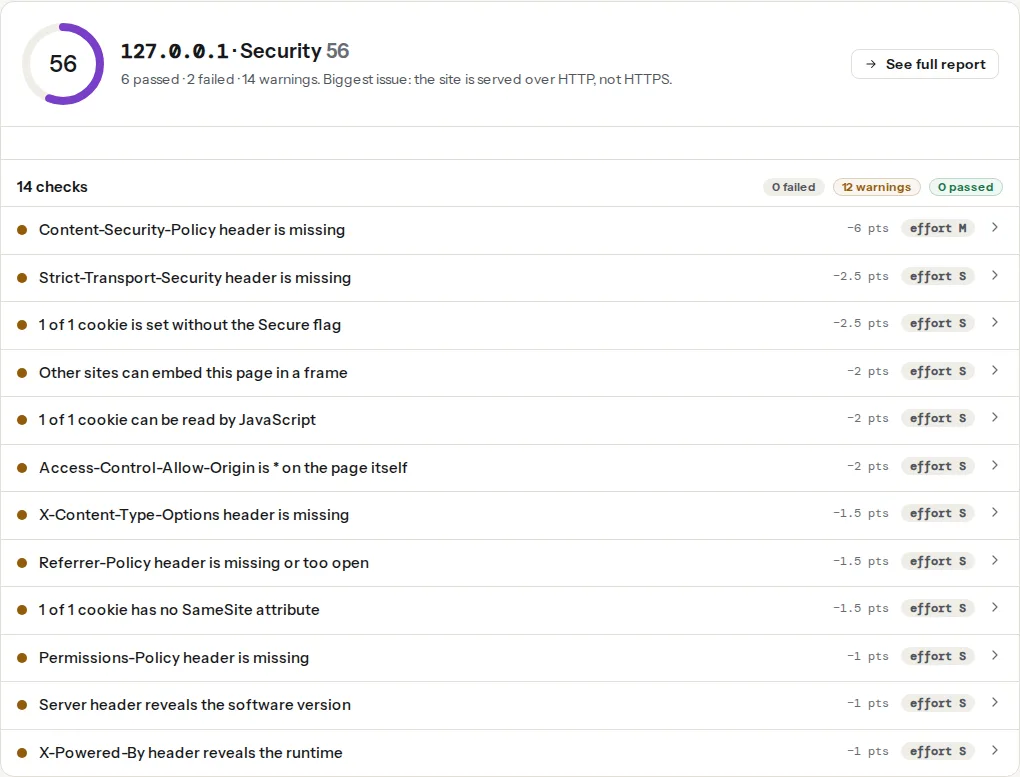
Security is left to you. Neither platform adds a Content-Security-Policy, framing protection, Referrer-Policy or Permissions-Policy, because any of them can break a site the platform knows nothing about. Vercel does send a Strict-Transport-Security header of its own. So a site that took ten minutes to deploy can still get a low security score, with every finding a missing header.
Caching is the other surprise. max-age=0, must-revalidate means the browser keeps a copy but asks the CDN before every use. The CDN answers 304 Not Modified quickly, so pages still feel fast, but each image, stylesheet and script costs a round trip on every page view. For HTML that is the right trade: a new deploy shows up immediately. For a file whose name contains a content hash, it is wasted time, because that URL can never change.
How getReport checks it
The checker requests the page like a browser, follows the redirects, and grades the headers on the final response. It does not matter whether a header comes from _headers, vercel.json, Next.js or the platform itself; only what arrives counts. The tech-stack line names the host: Netlify from its x-nf-request-id header or server: Netlify, Vercel from x-vercel-id, x-vercel-cache or server: Vercel. Neither Server value carries a version number, so the version-leak finding passes on both.
The cache finding comes from the full page load: it looks at every script, stylesheet, image and font and counts one as cacheable when it has a max-age above zero, immutable or a future Expires date. max-age=0, must-revalidate counts as no lifetime, so a site on the platform default warns as soon as more than a fifth of its static files have none. HTML is not part of this finding, which is why you can leave the default on your pages. The speed test shows the same files from Lighthouse's side, and cache headers explains the lifetimes in two minutes.
Step by step
1. See what arrives today
Before changing anything, look at the response of the production domain:
curl -sI https://example.com/ | grep -i -E "server|cache-control|strict|content-security|x-content|x-frame|referrer|permissions|x-robots|x-vercel|x-nf"
curl -sI https://example.com/assets/app.3f9a1c.js | grep -i cache-control
Swap the second URL for a real asset from your page source. On an untouched deploy you will see the platform's server value, the max-age=0 cache header and, on Vercel, a strict-transport-security line. Anything else is already configured somewhere, usually in a file a previous developer added.
2. Netlify: the _headers file
_headers is a plain text file that must end up in the publish directory, next to index.html. With a framework, put it where static files are copied from: public/_headers for Astro, Vite and Next.js static export, static/_headers for Hugo.
/*
  Strict-Transport-Security: max-age=31536000; includeSubDomains
  Content-Security-Policy: default-src 'self'; script-src 'self'; style-src 'self' 'unsafe-inline'; img-src 'self' data: https:; font-src 'self'; connect-src 'self'; frame-ancestors 'none'; base-uri 'self'; form-action 'self'; object-src 'none'
  X-Content-Type-Options: nosniff
  X-Frame-Options: DENY
  Referrer-Policy: strict-origin-when-cross-origin
  Permissions-Policy: camera=(), microphone=(), geolocation=(), payment=()

/assets/*
  Cache-Control: public, max-age=31536000, immutable

/_astro/*
  Cache-Control: public, max-age=31536000, immutable

/images/*
  Cache-Control: public, max-age=604800, stale-while-revalidate=86400

/fonts/*
  Cache-Control: public, max-age=604800
Rules match request paths, * matches anything, and every rule whose path matches applies. That is why Cache-Control stays out of the /* block: HTML keeps the platform default, and only the folders that need a lifetime get one. Keep the folders your build actually produces (/assets/ for Vite, /_astro/ for Astro) and delete the rest.
The same rules can live in netlify.toml at the repository root instead. Pick one place; two sources for the same header are hard to debug.
[[headers]]
  for = "/*"
  [headers.values]
    Strict-Transport-Security = "max-age=31536000; includeSubDomains"
    X-Content-Type-Options = "nosniff"
    X-Frame-Options = "DENY"
    Referrer-Policy = "strict-origin-when-cross-origin"
    Permissions-Policy = "camera=(), microphone=(), geolocation=(), payment=()"

[[headers]]
  for = "/assets/*"
  [headers.values]
    Cache-Control = "public, max-age=31536000, immutable"
3. Vercel: vercel.json or next.config.js
For any framework, vercel.json at the project root. source uses path patterns, so /(.*) means every path:
{
  "headers": [
    {
      "source": "/(.*)",
      "headers": [
        { "key": "Strict-Transport-Security", "value": "max-age=63072000; includeSubDomains" },
        { "key": "X-Content-Type-Options", "value": "nosniff" },
        { "key": "X-Frame-Options", "value": "DENY" },
        { "key": "Referrer-Policy", "value": "strict-origin-when-cross-origin" },
        { "key": "Permissions-Policy", "value": "camera=(), microphone=(), geolocation=(), payment=()" }
      ]
    },
    {
      "source": "/assets/(.*)",
      "headers": [{ "key": "Cache-Control", "value": "public, max-age=31536000, immutable" }]
    },
    {
      "source": "/images/(.*)",
      "headers": [{ "key": "Cache-Control", "value": "public, max-age=604800, stale-while-revalidate=86400" }]
    }
  ]
}
Setting HSTS yourself replaces Vercel's default value with one you chose, which you need for includeSubDomains or preload. For a Next.js app the same list can live in next.config.js under async headers(), which returns the same source and headers pairs; the static sites guide has that version. headers() only runs where Next.js runs, so with output: 'export' the host you upload to must set the headers.
4. CSP with a nonce on Next.js
A static site can allow its few inline scripts by hash. A Next.js app renders inline scripts of its own on every request, so the reliable policy is a fresh nonce per request, set in middleware. This is the pattern getReport's own pages run:
// middleware.js at the project root (Next.js 16 calls the file proxy.js and the function proxy)
import { NextResponse } from 'next/server';

export function middleware(request) {
  const nonce = Buffer.from(crypto.randomUUID()).toString('base64');
  const csp = [
    "default-src 'self'",
    `script-src 'self' 'nonce-${nonce}' 'strict-dynamic'`,
    "style-src 'self' 'unsafe-inline'",
    "img-src 'self' data: https:",
    "font-src 'self'",
    "connect-src 'self'",
    "frame-ancestors 'none'",
    "base-uri 'self'",
    "form-action 'self'",
    "object-src 'none'",
  ].join('; ');
  const requestHeaders = new Headers(request.headers);
  requestHeaders.set('x-nonce', nonce);
  requestHeaders.set('Content-Security-Policy', csp);
  const response = NextResponse.next({ request: { headers: requestHeaders } });
  response.headers.set('Content-Security-Policy', csp);
  return response;
}

export const config = {
  matcher: ['/((?!_next/static|_next/image|favicon.ico).*)'],
};
Next.js reads the policy from the request header and adds the nonce to its own scripts; your layout can read x-nonce for third-party tags. The cost is that every page is rendered per request instead of served as static HTML. Start with the header name Content-Security-Policy-Report-Only and follow the CSP rollout before enforcing.
5. Caching beyond static files
Server-rendered responses need a lifetime for the CDN rather than for the browser. Netlify reads Netlify-CDN-Cache-Control for its own edge, separately from the Cache-Control browsers get, and its durable directive shares one cached copy across all locations. Vercel reads CDN-Cache-Control and Vercel-CDN-Cache-Control the same way, and for Next.js adds Incremental Static Regeneration: export const revalidate = 3600 in a page, or revalidatePath() after an edit, rebuilds that page without a deploy. The x-vercel-cache header tells you whether a response was a HIT, MISS, STALE or PRERENDER. Cache-Control for humans explains the directives themselves.
6. Redirects, one hop each
Netlify reads a _redirects file in the publish directory (or [[redirects]] in netlify.toml); the status defaults to 301:
/old-pricing   /pricing       301
/blog/*        /news/:splat   301
A rule does not fire when a file exists at the old path, unless you force it with 301!. Vercel uses redirects in vercel.json: "permanent": true sends a 308 and false a 307, and statusCode sets a 301 explicitly if you prefer it.
{
  "redirects": [
    { "source": "/old-pricing", "destination": "/pricing", "permanent": true }
  ],
  "trailingSlash": false
}
308 is as permanent as 301, and the redirect checker shows it as such. The www decision belongs in the domain settings: on Netlify, the non-primary domain redirects to the primary one automatically; on Vercel, set the redirect on the www domain in the project's domain list. trailingSlash in vercel.json (or next.config.js) picks one style and redirects the other; on Netlify the style follows your files (about.html versus about/index.html). The report's trailing-slash finding compares your internal links, so make them match the style you chose.
7. Keep previews out of Google
Every pull request gets its own public URL. Vercel sends X-Robots-Tag: noindex on preview deployments. On Netlify, add the header to deploy previews and branch deploys in netlify.toml, so production never gets it:
[context.deploy-preview]
  command = "npm run build && printf '/*\\n  X-Robots-Tag: noindex\\n' >> dist/_headers"

[context.branch-deploy]
  command = "npm run build && printf '/*\\n  X-Robots-Tag: noindex\\n' >> dist/_headers"
Replace npm run build and dist with your build command and publish directory. Previews also leak through links: never paste a preview URL into a page, a sitemap or a public ticket.
8. A real 404
Netlify serves 404.html from the root of the publish directory with status 404; most static generators create it from a template. On Next.js, app/not-found.js does the same. The report requests a random path without following redirects and passes the check when it gets a 404 with a page of your own, so a catch-all rewrite to /index.html with status 200 (common in single-page apps) fails it.
Platform notes
Next.js on either platform
/_next/static/* is immutable already; do not override it. Keep all headers in next.config.js (or the middleware for CSP) so they apply the same way on either host, and do not repeat them in _headers or vercel.json.
Cloudflare in front
If the domain is also proxied through Cloudflare, headers can come from two places. Set each one in only one of them, and keep Cloudflare's SSL mode on Full (strict).
Verify
- Deploy, then run the security headers checker on the production domain. HSTS, CSP (report-only counts as present), X-Content-Type-Options, framing, Referrer-Policy and Permissions-Policy should all pass.
- Run the speed test or the full report. The cache finding should pass; its technical detail lists any static file still without a lifetime.
curl -sIa preview URL: Vercel previews and your Netlify previews showx-robots-tag: noindex; production does not.- Run the redirect checker on
http://,http://www.,https://www.and your old URLs: one hop each, ending on the production URL.
Common mistakes
_headersoutside the publish directory. Symptom: nothing changes after the deploy. Fix: put it where static files are copied from (public/orstatic/) and check it exists in the deploy's file browser.- Patterns that miss the files. Symptom: the cache finding still lists
/assets/app.3f9a1c.js. Fix: copy the path from the finding's technical detail and write the rule for that folder. - HTML cached for a year. Symptom: a deploy does not appear for returning visitors. Fix:
Cache-Controlonly on hashed folders; never on/*. includeSubDomainsbefore every subdomain has HTTPS. Symptom: an oldshop.ormail.host becomes unreachable in browsers that saw the header. Fix: move them to HTTPS first, or leave the directive out.- Two redirect layers. Symptom:
http://wwwgoes through the DNS provider's forwarding, then the platform, then the final host: three hops. Fix: remove the DNS provider's forwarding and let the platform's domain settings do it in one.