Caddy is a web server that treats HTTPS as the default rather than a project. Point a domain at the server, write two lines, and it fetches a certificate, renews it, redirects HTTP to HTTPS and speaks HTTP/2 and HTTP/3. That covers most of a report's TLS section on day one. It does not cover security headers, compression or cache lifetimes, which are opt-in. This guide shows exactly what the defaults give you, then adds the rest, with Caddyfiles for a static site, a Node or PHP app and WordPress. Allow 30 minutes.
Quick answer
- Two lines,
example.comandreverse_proxy localhost:3000(orfile_server), give you a trusted certificate with automatic renewal, a redirect from HTTP to HTTPS, TLS 1.2 and 1.3 only, HTTP/2 and HTTP/3. - Not included: HSTS and the other security headers, compression, cache lifetimes, a page cache, rate limiting.
- Add a
headerblock with HSTS, CSP (report-only first),X-Content-Type-Options,X-Frame-Options,Referrer-Policy,Permissions-Policy, and-Server. - Add
encode zstd gzipfor compression andheader @matcher Cache-Control …for lifetimes. - Behind Cloudflare, use SSL mode Full (strict), never Flexible.
- Check with the SSL/TLS checker, then the security headers checker.
Why Caddy is worth a look
Most TLS findings in a website report come from the moving parts around a certificate: a renewal job that stopped running, an HTTP port that serves the site instead of redirecting, a server that still accepts TLS 1.0, an intermediate certificate that was never installed. Caddy removes those parts. It gets certificates from Let's Encrypt, with ZeroSSL as a fallback, stores them, renews them well before expiry and installs the full chain, all without a cron job or a second tool.
That makes it a good fit for a VPS running one site or a handful: a small business site, an app behind a reverse proxy, a Docker host. If the server already runs nginx and you would rather keep it, Nginx configuration for an A grade reaches the same result by hand. getReport runs on it: the production Compose stack puts Caddy in front of the web app and the API, with Cloudflare in front of Caddy in Full (strict) mode, and the Caddyfile adds HSTS, removes the Server header and turns on compression. The snippets below follow the same pattern.
What Caddy does not do is guess your security policy or cache rules, and it has no built-in page cache or rate limiter. Those are the lines you add.
How getReport checks it
The SSL/TLS checker opens a TLS connection to your host, offering TLS 1.2 or newer, and records the protocol, the certificate's expiry date and whether the chain validates. It then tries a second handshake limited to TLS 1.0 and 1.1 and expects the server to refuse. The http-to-https finding requests the http:// address and checks that it lands on https://. A site behind default Caddy passes all of these; the screenshot shows what the same panel looks like before, on a server still answering over plain HTTP.
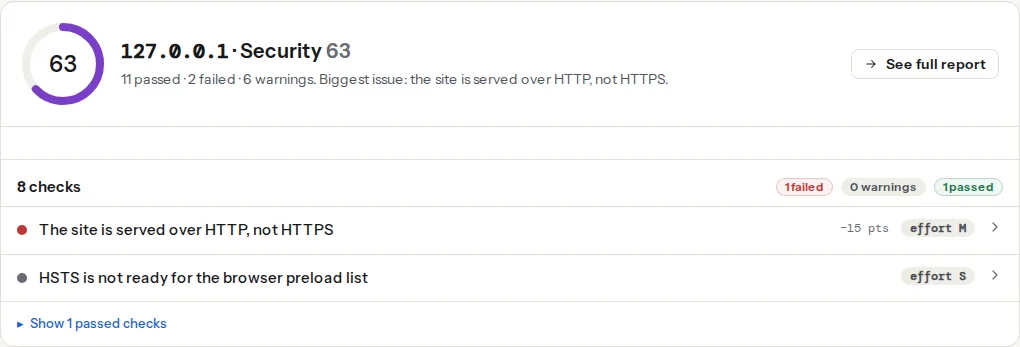
The expiry finding warns below 30 days and fails below 7 (TLS certificates explains the chain and the dates). Caddy renews with about a third of the lifetime left, around 30 days for a 90-day Let's Encrypt certificate, so a Caddy site that shows well under 30 days has a renewal that keeps failing. Certificate expiry: automate it, then monitor it covers what to watch.
Step by step
1. The two lines, and what they switch on
Point the domain's A and AAAA records at the server, open TCP ports 80 and 443 and UDP port 443, install Caddy from your distribution or the official packages, and write /etc/caddy/Caddyfile:
example.com
reverse_proxy localhost:3000
For a folder of HTML files, replace the second line with root * /var/www/example.com and file_server. Reload with sudo systemctl reload caddy. Caddy now:
- obtains a certificate for
example.comand renews it automatically; - answers every
http://request with a308 Permanent Redirecttohttps://, keeping the path and query; - negotiates TLS 1.2 or 1.3 only, with modern ciphers;
- speaks HTTP/2, and advertises HTTP/3 with an
Alt-Svc: h3=":443"header, which the HTTP/2 test reports as "HTTP/3 advertised"; - sends
Server: Caddywithout a version number, so the version-leak finding passes.
It does not send HSTS, any other security header, compressed responses or Cache-Control lifetimes. On the report, that shows up as warnings in the security and best practices modules.
2. A security header snippet
Define the headers once as a snippet and import it into every site block:
(security) {
	header {
		Strict-Transport-Security "max-age=31536000; includeSubDomains"
		Content-Security-Policy-Report-Only "default-src 'self'; script-src 'self'; style-src 'self' 'unsafe-inline'; img-src 'self' data: https:; font-src 'self'; connect-src 'self'; frame-ancestors 'none'; base-uri 'self'; form-action 'self'; object-src 'none'"
		X-Content-Type-Options "nosniff"
		X-Frame-Options "DENY"
		Referrer-Policy "strict-origin-when-cross-origin"
		Permissions-Policy "camera=(), microphone=(), geolocation=(), payment=()"
		-Server
		-X-Powered-By
	}
}
The CSP starts as report-only, which the check counts as present; switch the name to Content-Security-Policy once the browser console stays quiet. Security headers from zero to A explains each value.
The two lines starting with - delete headers, and they matter for a second reason. Caddy normally sets headers as the request comes in, before the app answers. Behind reverse_proxy, the app's own headers are then added next to yours: in a test, an upstream that sent X-Frame-Options: ALLOWALL produced a response with both DENY and ALLOWALL, plus the app's own Server and X-Powered-By lines. When a header block deletes anything, Caddy applies the whole block as the response is written, after the upstream, so your values replace the app's. In a block without a deletion, add the defer subdirective to get the same effect.
For HSTS preload, raise the value to max-age=63072000; includeSubDomains; preload once every subdomain serves HTTPS, and submit the domain at hstspreload.org. Removal takes months.
3. A static site with compression, lifetimes and a 404 page
example.com {
	import security
	root * /var/www/example.com
	encode zstd gzip

	@hidden {
		path /.*
		not path /.well-known/*
	}
	error @hidden 404

	@hashed path /assets/* /_astro/*
	header @hashed Cache-Control "public, max-age=31536000, immutable"
	@media path *.jpg *.jpeg *.png *.webp *.avif *.svg *.ico *.woff2
	header @media Cache-Control "public, max-age=604800"
	header ?Cache-Control "no-cache"

	file_server

	handle_errors {
		import security
		@404 expression {err.status_code} == 404
		handle @404 {
			rewrite * /404.html
			file_server
		}
	}
}

www.example.com {
	import security
	redir https://example.com{uri} permanent
}
What each part does:
encode zstd gzipcompresses text responses with Zstandard for browsers that accept it and gzip for the rest. Caddy has no on-the-fly Brotli encoder, and it does not need one: the report's compression finding counts zstd and gzip as compressed. If your build writes.brfiles,file_server { precompressed br zstd gzip }serves them.@hiddenanswers any path that starts with a dot (.env,.git/) with a 404, except/.well-known/.file_serverwould otherwise serve them, and the report requests both/.envand/.git/HEAD.- The two matchers give hashed build output a year with
immutableand images and fonts a week.?Cache-Controlsetsno-cacheonly on responses that have no lifetime yet, which leaves HTML revalidated on every visit. handle_errorsserves your own404.htmlwith status 404, which the custom-404 check needs. Error responses run through their own route, so the snippet is imported there too; without it, the 404 page goes out with no security headers.- The second site block sends
wwwto the bare domain in one 301. Caddy gets a certificate forwww.example.comtoo, sohttps://wwwredirects cleanly.
4. A Node, Python or Go app
app.example.com {
	import security
	encode zstd gzip
	reverse_proxy localhost:3000
}
Cache lifetimes for the app's static files usually come from the framework (Next.js, for instance, marks /_next/static/ immutable). If the report's cache finding lists them anyway, add a matcher as in step 3.
5. WordPress with PHP-FPM
example.com {
	import security
	root * /var/www/wordpress
	encode zstd gzip

	@hidden {
		path /.* /wp-config.php /xmlrpc.php
		not path /.well-known/*
	}
	error @hidden 404

	@versioned path *.css *.js *.woff2
	header @versioned Cache-Control "public, max-age=31536000"
	@images path *.jpg *.jpeg *.png *.webp *.avif *.svg *.ico
	header @images Cache-Control "public, max-age=604800"

	php_fastcgi unix//run/php/php8.3-fpm.sock
	file_server
}
php_fastcgi includes the rewrite WordPress needs for pretty permalinks. CSS and JavaScript get a year because WordPress adds ?ver= to their URLs, which changes on every update. Leave /xmlrpc.php out of @hidden if you use Jetpack or the WordPress mobile apps. Match the socket path to your PHP version (ls /run/php/).
Caddy renders every page through PHP on every request. It has no page cache, so time to first byte depends on WordPress; use a caching plugin that writes static files, or a cache layer in front.
6. Validate and reload
caddy fmt --overwrite /etc/caddy/Caddyfile
caddy validate --config /etc/caddy/Caddyfile
sudo systemctl reload caddy
validate catches typos and unknown directives before they reach the running server, and a reload that fails leaves the old configuration in place.
Platform notes
Behind Cloudflare
Set Cloudflare's SSL/TLS mode to Full (strict). Caddy's own Let's Encrypt certificate is valid, so strict mode works without an origin certificate. With Flexible, Cloudflare talks plain HTTP to Caddy, Caddy redirects to HTTPS, and visitors get an endless redirect loop. If your app needs visitors' real IP addresses, list Cloudflare's ranges under trusted_proxies in the global options; getReport's own Caddyfile does this.
Docker
Publish ports 80 and 443 (TCP and UDP) on the Caddy container only and keep the app containers internal. Mount a volume on /data, or certificates are requested again on every container rebuild and you can hit Let's Encrypt's rate limits.
Rate limiting
Not built in. The community caddy-ratelimit module needs a custom build with xcaddy; on a small site, a rate-limit rule at a CDN is simpler.
Verify
- SSL/TLS checker: served over HTTPS, http:// redirects to https://, TLS 1.0/1.1 refused, certificate chain valid with 30 or more days left, HSTS set.
- Security headers checker: every header finding passes, no
ServerorX-Powered-Byline. - HTTP/2 test: h2 negotiated, h3 advertised, compression and cache findings pass.
- From a terminal,
curl -sI https://example.com/does-not-exist | grep -i -E "^HTTP|strict"shows404and the HSTS line.
Common mistakes
- Cloudflare set to Flexible. Symptom: "too many redirects". Fix: Full (strict).
- No
encodeline. Symptom: the compression finding lists your own HTML, CSS and JavaScript. Fix:encode zstd gzipin every site block. - Headers without deletion or
deferin front of an app. Symptom: twoX-Frame-Optionsvalues, or the app'sServer: gunicorn/…next to Caddy's. Fix: keep-Serverin the snippet or adddefer. - Ports closed or DNS not pointing at the server yet. Symptom: no certificate, and the logs repeat ACME errors. Caddy can validate on port 80 or 443, so at least one must be reachable from the internet and the domain must already resolve to this server.
- Expecting a page cache. Symptom: WordPress TTFB unchanged after moving to Caddy. Fix: a caching plugin or a cache layer; Caddy serves, it does not cache.