# WordPress site migration checklist: host, domain and https moves
> The WordPress layer of a site move, from the backup and the serialized search-replace to wp-config, the one-hop redirect map and the bulk URL check that proves every old address still lands.
Updated 2026-09-25 · WordPress & WooCommerce · HTML version: https://getreport.app/guides/wordpress-site-migration-checklist
Moving a WordPress site is two jobs at once. The general one, redirect maps, launch-day order, Search Console, is covered in the [site migration checklist](https://getreport.app/guides/site-migration-checklist-domain-https-cms) and not repeated here. The WordPress job is the part that bites people who have migrated a dozen sites on other platforms: the database stores the old address thousands of times, some of it inside serialized strings, and one wrong replace empties every page built with a page builder. This guide covers only that layer and ends with the check that proves every old URL lands on the right new one in one hop. A host-only move takes an afternoon; a domain change with https takes a day plus two weeks of watching.
## Quick answer
- Decide which of the three moves you are doing: **host only** (URLs unchanged), **domain only** (same host, new address) or **both plus https**. Host-only moves need no redirects; the other two need a redirect map and a database replace.
- Before: full backup (database and `wp-content/uploads`), the plugin list from the report, the permalink structure, the SEO plugin's redirect export, a getReport link for five key pages, DNS TTL down to 300 s.
- During: move files and database with a migration plugin or `wp db export` / `wp db import`, then `wp search-replace` with `--all-tables --precise` and a `--dry-run` first. Never replace URLs in a text editor.
- After DNS: run the [WordPress checker](https://getreport.app/tools/wordpress-checker) on the new address. Indexable, canonical on the new domain, sitemap declared, "Discourage search engines" off.
- Prove the redirects with the bulk URL checker and the old URL list: every row reads OK or one redirect, none read "redirect chain" or "not found".
- Watch Search Console, the 404s in your access log and Core Web Vitals for two weeks.
## Why the WordPress layer matters
WordPress stores a page as rows in a database, and the site's address appears in those rows everywhere: `siteurl` and `home` in `wp_options`, every image in every post, every menu item and widget, and, in a page builder, inside a serialized PHP array that records the string length of each value. Replace `http://old.example` with `https://new.example` in a text editor and the recorded lengths no longer match, so PHP discards the whole array. Elementor pages come back empty, widgets vanish, theme options reset. The site "works" and the home page is blank.
The second WordPress-specific trap is the setting that made the staging copy invisible to Google. "Discourage search engines" lives in the database as `blog_public = 0`, so it travels with the database into production. A migration that copies the staging database over the live one silently removes the site from Google on launch day. It is the most expensive checkbox in WordPress, and the report tests for it on every run.
## How getReport checks it
> **Free tool:** [Bulk URL checker: status codes and redirects for up to 1,000 URLs](https://getreport.app/tools/bulk-url-checker): Paste up to 1,000 URLs and get the HTTP status, the final URL after redirects, the number of hops, the time to first byte, the content type and the noindex and canonical signals of every one, in one table you can filter and download as CSV. Free, no account, no cap at 500.
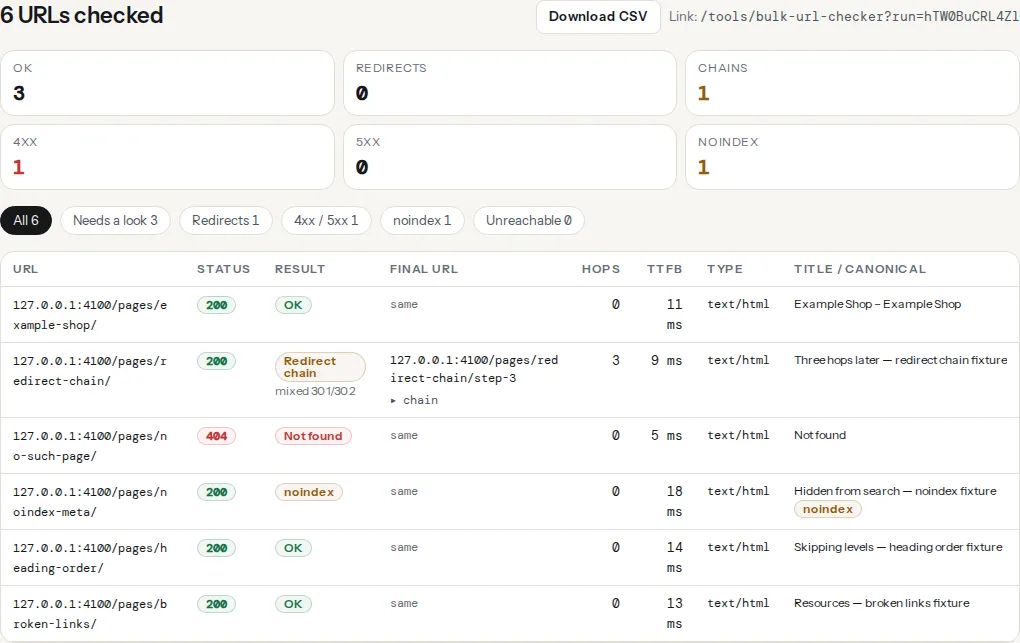
The migration itself is verified with the bulk URL checker. Paste the old URLs (from the old sitemap, Search Console's top pages and your most-linked pages, up to 1,000 per run) and every row shows the final status, the redirect chain with the type of each hop, the time to first byte and, for HTML answers, the title, canonical target and whether the page carries noindex. Rows are labelled OK, redirect, redirect chain, not found, server error, noindex or unreachable; a filter on anything but the first two is your to-do list.
On the new address, the ordinary report and the WordPress checker cover the four findings that migrations break most often:
> **Check: The URL loads without a redirect chain.** Each redirect is a full round trip before the browser can start loading, often 100–300 ms on mobile. Search engines pass less value with every hop and stop following after a few.
>
> 1. Point every old URL straight at the final one (a single 301), and update internal links to use the final URL directly.
> 2. Look for rules that stack, for example http → https, then non-www → www, then trailing slash; combine them into one rule.
> **Check: Search engines are not discouraged in Settings → Reading.** The WordPress setting adds a site-wide noindex, nofollow tag. It is meant for sites under construction and is often left on after launch, which removes the whole site from Google.
>
> 1. In wp-admin go to Settings → Reading and untick "Discourage search engines from indexing this site".
> 2. Then request indexing in Google Search Console; pages usually return within days to weeks.
> **Check: Canonical tag is present.** Without a canonical URL, search engines may index duplicate versions of this page (with and without trailing slash, with UTM parameters) and split its ranking signals.
>
> 1. Add in .
> 2. In WordPress, Yoast or Rank Math add this automatically — check it is not disabled for this page.
> **Check: robots.txt declares a sitemap.** A "Sitemap:" line in robots.txt is how crawlers find your XML sitemap without you registering it anywhere. Without it, new pages are discovered later.
>
> 1. Add a line to robots.txt: Sitemap: https://your-site.com/sitemap.xml (use the full URL).
The plugin table on the [plugin detector](https://getreport.app/tools/wordpress-plugin-checker) lists the plugins the page loads assets from, with the version where the asset URL carries a `?ver=` parameter. That is your pre-move plugin inventory. The learn page on [redirects](https://getreport.app/learn/redirects) explains how the chain finding counts hops.
## Step by step
### 1. Name the move
| Move | URLs change? | Redirects needed? | Database replace? |
| --- | --- | --- | --- |
| Host only | No | No | No (unless the path or scheme changes) |
| Domain only | Yes | Yes, old domain → new, one hop | Yes |
| Domain plus https | Yes | Yes, old http and https → new https | Yes |
| http → https on the same domain | Scheme only | Yes, http → https | Yes (`http://` → `https://`) |
Everything below applies to all four; the redirect and replace steps apply only where the table says yes.
### 2. Before the move: collect what you cannot get back
1. **Backup.** `wp db export backup-before-move.sql` plus a copy of the whole `wp-content` folder. Uploads are the part no plugin regenerates.
2. **Plugin inventory.** Run the plugin detector on the home page and one deep page and keep the report link. After the move, the same pages should list the same plugins and versions.
3. **Permalink structure.** Settings → Permalinks: note the exact pattern. A new install with a different pattern changes every URL on the site.
4. **Redirect export.** Yoast Premium, Rank Math and the Redirection plugin each export their rules as CSV; you need it if the new site starts from a clean database.
5. **Baseline reports.** Run the full report on five pages that matter (home, top product or post, a category, contact, one deep page) and keep the links.
6. **DNS TTL.** Lower the A/AAAA record TTL to 300 s at least a day before the switch.
### 3. Move the files and the database
Any of these works; pick by size and by what you can reach.
- **Migration plugins.** Duplicator packages files plus database with an installer that rewrites URLs; All-in-One WP Migration does the same in one archive, but its free version has an import size limit, so check it against your export first; WP Migrate (Lite) exports the database with a find-and-replace built in. Host-provided migrators are usually the least work for a host-only move.
- **wp-cli**, when you have SSH on both sides:
```bash
# On the old host
wp db export old-site.sql
tar czf uploads.tgz wp-content/uploads
# On the new host, after copying both files across
wp db import old-site.sql
tar xzf uploads.tgz
```
Copy plugins and themes the same way, or reinstall them fresh from wordpress.org and the vendors, which also drops anything that should not have been there.
### 4. Replace the address in the database, serialized data included
`wp search-replace` understands serialized PHP and fixes the recorded lengths as it goes. Dry run first, read the per-table counts, then run it for real:
```bash
# Dry run: shows how many replacements per table, changes nothing
wp search-replace 'http://old.example' 'https://new.example' \
--all-tables --precise --dry-run
# The real run, then a second pass for protocol-relative and escaped forms
wp search-replace 'http://old.example' 'https://new.example' --all-tables --precise
wp search-replace 'https://old.example' 'https://new.example' --all-tables --precise
wp search-replace '//old.example' '//new.example' --all-tables --precise
wp search-replace 'old.example' 'new.example' --all-tables --precise
```
`--all-tables` includes tables without the standard prefix (page builders and form plugins create their own); `--precise` uses PHP's own serialization functions instead of a regex, which is slower and correct. Run the passes from most specific to least specific; the last one also replaces email addresses and text mentions of the domain, so read its dry run. Without SSH, the Better Search Replace plugin does the same from wp-admin, with a dry run option.
Page builders keep their own copy of some URLs. Elementor has a Replace URL tool and a "Regenerate CSS & Data" button under Elementor → Tools; run both after the search-replace.
### 5. Fix the four places the address lives outside the content
1. **wp-config.php.** If it defines the address, that wins over the database:
```php
// wp-config.php: remove these, or set them to the new address.
define('WP_HOME', 'https://new.example');
define('WP_SITEURL', 'https://new.example');
```
2. **siteurl and home options**, if you did not run the search-replace: `wp option update siteurl https://new.example` and the same for `home`.
3. **.htaccess** on Apache. Open Settings → Permalinks and click Save once on the new host so the block is rewritten, or make sure the file contains it:
```apache
# BEGIN WordPress
RewriteEngine On
RewriteBase /
RewriteRule ^index\.php$ - [L]
RewriteCond %{REQUEST_FILENAME} !-f
RewriteCond %{REQUEST_FILENAME} !-d
RewriteRule . /index.php [L]
# END WordPress
```
4. **Uploads path.** If `upload_path` or `upload_url_path` in `wp_options` were ever set, they hold an absolute path from the old server. Empty them: `wp option update upload_path ''`.
After an https move, the report's mixed-content finding lists any `http://` image or script the replace missed; [mixed content after moving to https](https://getreport.app/guides/mixed-content-after-https) has the cleanup.
### 6. Switch DNS, then run the report on the new address
Point the records at the new host. Then run the WordPress checker on the new home page and read four things:
- **The page can be indexed**: HTTP 200, no noindex, allowed by robots.txt. If `wp-discourage-search` fails, untick Settings → Reading → "Discourage search engines" before anything else.
- **Canonical points at the new domain.** SEO plugins build it from `home`, so a canonical still on the old domain means step 5 is incomplete.
- **Sitemap declared and reachable.** robots.txt needs a `Sitemap:` line with the new domain, and the sitemap must list new URLs. Yoast and Rank Math regenerate it from `home`; a static sitemap file from the old site does not.
- **HSTS only once everything is https**, after mixed content is clean and the old domain redirects. [HSTS safely](https://getreport.app/guides/hsts-safely-and-the-preload-list) explains why not earlier.
### 7. Redirect the old domain in one hop
For a domain change, the redirect belongs at the server, for the whole old domain, before WordPress runs: one 301 hop, keeping the path, left in place for at least a year. On nginx, a server block for the old names:
```nginx
server {
listen 443 ssl;
listen 80;
server_name old.example www.old.example;
# certificate for old.example still needed so https://old.example redirects too
return 301 https://new.example$request_uri;
}
```
On Apache, in the old domain's virtual host or `.htaccess`:
```apache
RewriteEngine On
RewriteCond %{HTTP_HOST} ^(www\.)?old\.example$ [NC]
RewriteRule ^(.*)$ https://new.example/$1 [R=301,L]
```
Keep a certificate for the old domain: a crawler arriving at `https://old.example` needs a valid TLS handshake before the redirect can be sent. Pages whose slug changed as well get an extra rule (old path → new path) on the new domain, imported into the SEO plugin from the export in step 2. An old URL that goes old → new-old-slug → new-slug is two hops; [redirect chains after a migration](https://getreport.app/guides/redirect-chains-after-a-migration-finding-every-hop) shows how to collapse it.
### 8. Prove it with the bulk URL checker
Paste the old URL list. Read the labels:
- **OK** for host-only moves and **redirect** with one 301 hop to the expected new URL for domain moves.
- **redirect chain** means two or more hops, usually http → https → www → new. Combine the rules.
- **not found** is a page the redirect map forgot. Add the rule.
- **noindex** on a new URL is the staging setting that travelled. Step 6.
- **302** or **307** where you meant 301: the host panel's "temporary" toggle, or a plugin default. Make it permanent.
Download the CSV and keep it with the migration notes; it is the evidence if traffic drops and someone asks what changed.
### 9. Flush caches in the right order, then tell Search Console
Page cache first (the caching plugin's purge), then the object cache (`wp cache flush`), then the CDN, then a hard reload in your browser. Each layer refills from the one behind it, so purging the CDN first refills it from a stale page cache.
For a domain change, use Search Console's Change of Address tool on the old property; it applies to domain moves only, not to http → https or path changes. Add the new domain as a property and submit the new sitemap.
### 10. Watch for two weeks
- **Search Console → Pages**, both properties, every two days. "Not found (404)" growing on the new property is a missed redirect; "Redirect error" is a chain or a loop.
- **Your access log.** The [log analyser](https://getreport.app/tools/log-analyser) reads it in your browser and lists the 404s Googlebot keeps hitting: the old URLs your map missed.
- **Core Web Vitals.** The [Core Web Vitals history](https://getreport.app/tools/cwv-history) tool shows 40 weeks of real-user data per origin. A new domain has no history yet, so compare fresh reports on the new one with the old origin's last weeks.
- **The five baseline pages.** Re-run the report and compare TTFB and the module scores with the links from step 2.
## The printable checklist
| Step | Owner | Done |
| --- | --- | --- |
| Name the move (host / domain / both plus https) | | |
| Full backup: database and wp-content/uploads | | |
| Plugin inventory from the plugin detector, two pages | | |
| Permalink structure noted | | |
| Redirect rules exported from the SEO plugin | | |
| Baseline reports on five key pages, links kept | | |
| DNS TTL lowered to 300 s, a day ahead | | |
| Files and database moved | | |
| `wp search-replace --dry-run` read, then the real run | | |
| Elementor Replace URL and Regenerate CSS (if used) | | |
| wp-config WP_HOME / WP_SITEURL updated or removed | | |
| .htaccess block rewritten (Permalinks → Save) | | |
| Upload path options empty | | |
| DNS switched | | |
| WordPress checker on new address: indexable, canonical, sitemap, discourage off | | |
| Old domain redirects in one hop, certificate kept | | |
| Slug changes imported as redirects | | |
| Bulk URL check on the old URL list: no chain, no 404, no noindex | | |
| Caches flushed: page → object → CDN → browser | | |
| Search Console: Change of Address, new property, new sitemap | | |
| HSTS added last | | |
| Two-week watch: Pages report, 404 log, CWV, baseline pages | | |
## Verify
- The WordPress checker on the new home page: "The page can be indexed", "Canonical tag is present" with the new domain in the technical detail, "robots.txt declares a sitemap", "Search engines are not discouraged".
- The bulk URL run over the old list has zero rows labelled redirect chain, not found or noindex.
- `curl -sI http://old.example/any-page/ | grep -i -E "^(HTTP|location)"` prints one `301` and a `location:` on the new domain with the same path.
- The plugin detector lists the same plugins and versions as before the move.
## Common mistakes
- **Search-replace in a text editor or with a plain SQL `REPLACE()`.** Serialized lengths break and builder pages come back empty. Restore the backup and use `wp search-replace --precise` or Better Search Replace.
- **Copying the staging database over production with "Discourage search engines" on.** The new site is noindex on launch day. The WordPress checker's first finding tells you; untick the box and request indexing.
- **Redirecting inside WordPress on the old host.** If the old host expires, the redirects die with it. Put the whole-domain redirect at the server level and keep it a year or more.
- **Dropping the old domain's certificate.** `https://old.example` links then fail the TLS handshake before any redirect is sent, and Google sees them as broken.
- **Stacked rules that chain.** http → https, then non-www → www, then old → new: three hops. One rule that goes straight to the final https URL on the new domain.