# Wix: speed and SEO limits, and what to do inside them
> Wix handles hosting, SSR, WebP and canonicals for you and caps what you can do about JavaScript weight. Learn which findings you can fix in the editor, which are the platform's, and when to stop chasing the mobile score.
Updated 2026-09-25 · Other platforms · HTML version: https://getreport.app/guides/wix-speed-and-seo-limits
A Wix site can have a perfectly good SEO module and a mobile performance score in the 40s at the same time, and both numbers are telling the truth. Wix does a lot for you (hosting, server-side rendering, image conversion, canonicals, a sitemap) and it ships a JavaScript runtime you cannot shrink. This guide separates the two: the SEO and content settings that are yours to get right in the editor, the speed ceiling the platform sets, and the handful of layout choices that move the mobile numbers inside it.
## Quick answer
- **Yours to fix:** page titles, descriptions, slugs, canonicals and noindex per page (the SEO panel), structured data per page, redirects, the 404 page, robots.txt, image sizes, fonts, the number of sections, animations, galleries and apps above the fold.
- **The platform's:** hosting, CDN, TTFB, HTTP/2, TLS and HSTS, response headers, the JavaScript runtime and how much of it blocks the main thread.
- The mobile lab score is capped by that runtime. Judge the site on field data (real-user LCP, INP and CLS in the report) rather than on the lab score.
- The two things that most improve a Wix page: fewer and lighter elements above the fold, and fewer apps.
- Run the [speed test](https://getreport.app/tools/speed-test) on the home page and the busiest content page; read the LCP element and the Total Blocking Time first.
## Why the limits matter
Wix renders every page with its own runtime. The HTML arrives server-rendered, so the first paint is reasonable, but a large bundle of JavaScript then downloads, parses and runs on the visitor's phone to make the page interactive. On a throttled mobile test that bundle produces long tasks, and long tasks are what Total Blocking Time measures. No setting in the editor removes the runtime, so a Wix page's TBT has a floor, and the mobile performance score, which weights TBT most heavily, has a ceiling.
That is a limit, not a verdict. Real visitors have faster phones than Lighthouse's throttled profile, and the field data Google actually ranks on (the 75th percentile of Chrome users over 28 days) is often within the "good" thresholds on a Wix site whose lab score is 45. The mistake is to spend a month chasing the lab score with settings that cannot reach it; the better plan is to fix what the field data says is slow, keep the page light, and stop.
The SEO side has no such ceiling. Everything Google needs from a page (title, description, canonical, indexability, structured data, a crawlable URL) is a field in Wix's SEO panel, and the report reads the result exactly as Google does.
## How getReport checks it
> **Free tool:** [Website speed test](https://getreport.app/tools/speed-test): Lighthouse lab results and real-user Core Web Vitals for any page, mobile and desktop, with a filmstrip, a request waterfall and a fix for every slow part. Free, no signup.
The tool runs Lighthouse through Google's PageSpeed API on a throttled phone and on desktop and shows the Chrome UX Report field values beside the lab ones. On a Wix site the two findings to read first are the LCP element (usually a strip background or a gallery image) and Total Blocking Time (the runtime plus whatever apps added):
> **Check: Largest Contentful Paint.** LCP is when the biggest thing on screen — usually the hero image or headline — finishes loading. Visitors judge "is this site slow?" on it, and Google uses it for ranking.
>
> 1. Find the LCP element (named in your report) and make it lighter, earlier or both — a compressed WebP/AVIF, sized to the screen, without lazy loading.
> 2. Preload it with or add fetchpriority="high" on the .
> 3. Cut what comes before it — render-blocking CSS/JS and slow server responses push LCP back.
> **Check: Total Blocking Time.** TBT adds up every moment the page was too busy running JavaScript to respond to a tap. It is the lab stand-in for INP and the heaviest-weighted Lighthouse metric.
>
> 1. Remove or defer JavaScript that is not needed for the first screen (defer, async, or load on interaction).
> 2. Split long tasks (> 50 ms) into smaller chunks; move heavy work to a web worker.
> 3. Audit third-party tags — chat widgets, tag managers and A/B tools are the usual culprits.
The [SEO audit](https://getreport.app/tools/seo-audit) runs the SEO module on the same page. On a Wix site the canonical and description findings map directly onto fields in the page's SEO panel:
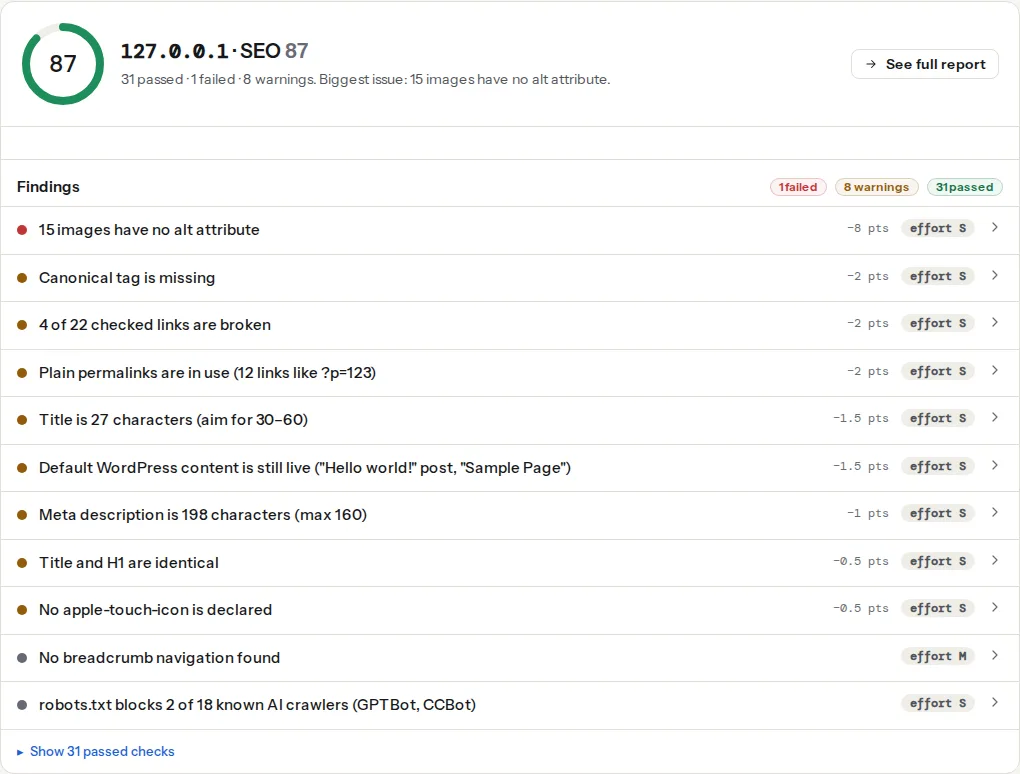
> **Check: Canonical tag is present.** Without a canonical URL, search engines may index duplicate versions of this page (with and without trailing slash, with UTM parameters) and split its ranking signals.
>
> 1. Add in .
> 2. In WordPress, Yoast or Rank Math add this automatically — check it is not disabled for this page.
> **Check: Meta description is present.** The description is the two-line preview under your result. Without it, Google picks a random sentence from the page.
>
> 1. Add with 70–160 characters that say what the page offers.
> 2. In WordPress, most SEO plugins add a field for it on every page.
Wix prints a self-referencing canonical on every page unless you override it, so a missing canonical means someone set the field to something invalid, not that the platform forgot.
## What Wix handles for you
| Area | What Wix does | What to do |
| --- | --- | --- |
| Hosting and CDN | Every site is on Wix's infrastructure behind its CDN, over HTTP/2 with TLS and HSTS | Nothing; TTFB findings describe the platform |
| Server-side rendering | Pages arrive as HTML, then the runtime takes over | Nothing; the render-blocking findings are mostly the runtime |
| Images | Uploaded images are resized per device and served as WebP to browsers that accept it | Upload at a sensible size anyway (step 3) |
| Sitemap | `/sitemap.xml` generated and updated automatically | Submit it once in Search Console |
| robots.txt | A default file with the rules Wix needs | Edit it in SEO Tools only when you have a reason |
| Canonicals | Self-referencing on every page | Override per page only for real duplicates |
| Structured data | Presets for blog posts, products, events and other page types | Add custom JSON-LD per page where the preset is not enough |
| Response headers | Set by Wix; no place to add your own | Ignore CSP and Permissions-Policy findings |
## Step by step
### 1. Read the field data before the lab score
Open the report's speed panel. If the field values for LCP, INP and CLS are green, the site passes Core Web Vitals as Google measures them, whatever the lab score says. If a field value is amber or red, that is the one to work on; the lab finding for the same metric tells you which element or which script. The difference between the two data sets is explained in [Field data vs lab data](https://getreport.app/guides/field-data-vs-lab-data), and why mobile is always lower in [Mobile vs desktop scores](https://getreport.app/guides/mobile-vs-desktop-scores).
### 2. Lighten the first screen
The LCP element on a Wix page is almost always a strip background image, a slideshow or the first gallery image. In the editor:
- Replace a full-width background image with an image element where the design allows; an image element gets Wix's responsive sizing, a background is loaded at strip size.
- Remove the slideshow from the top of the page or reduce it to one slide. Every slide is an image download before the first one can be shown as "done".
- Move galleries, video and maps below the fold. A Pro Gallery with 30 images on the home page loads 30 images; a video strip loads a player.
- Turn off entrance animations on the first strip. Animated elements are painted late by design, which delays LCP when the animated element is the hero.
Each of these is a design decision, not a setting, and each one shows up in the LCP finding as a different element after you make it.
### 3. Upload images at the size you use
Wix resizes on the fly, but the source still matters: a 6000 px photo produces a large variant for desktop and takes longer to process. Export photos at 2500 px on the long side and 300 KB or less before uploading; logos and icons as SVG. The report's image table shows what was served on the test device, with the file size and the displayed size next to each other, which is the fastest way to find the one image that is still 1.2 MB.
### 4. Cut apps and embeds
Every app from the App Market that shows on the page (chat, bookings, reviews, forms, social feeds, pop-ups) adds scripts to it, and third-party embeds (a YouTube video, an Instagram feed, a map, a pixel in the custom code settings) add more. The report's third-party finding lists them with bytes and blocking time. Remove the apps nobody uses, and replace embeds above the fold with a static image that links to the thing (a thumbnail for the video, a screenshot for the map). Custom code under Settings → Custom code should hold only what you need; each snippet there loads on every page it is assigned to.
### 5. Limit fonts
Fonts are set in the editor's text themes (the heading and paragraph styles the whole site inherits). Each font family in each weight is a file. Two families (a heading and a body font) in two weights each is plenty; a page that uses five different fonts across its sections downloads five. The report's font finding lists the files.
### 6. Fill the SEO panel on every page
In the editor, Pages → the page's menu → **SEO basics** (Wix also shows the same panel from the dashboard's SEO Tools). Per page:
- **Title tag** and **Meta description**: written for the result page, with the page's subject in the first words. The length rules and wording are in [Title and meta description: writing for the result page](https://getreport.app/guides/titles-and-descriptions-for-the-result-page).
- **URL slug**: readable words, not the page name Wix generated ("/copy-of-services-1").
- **Let search engines index this page**: off for thank-you pages, internal pages and duplicates.
- **Advanced SEO** → canonical URL: leave the default unless this page is a duplicate of another.
- **Structured data markup**: the preset for the page type, or your own JSON-LD block, pasted as-is.
For the site-wide patterns (what a product page or a blog post title looks like by default) use the dashboard's **SEO Tools → SEO Settings**, which sets the default title and description format per page type; the per-page field overrides it.
### 7. Redirects, 404 and robots.txt
- **URL Redirect Manager** (SEO Tools): one entry per old address, or a CSV import after a redesign. Wix serves them as 301.
- **404 page**: customise it in the editor under the site's pages so a dead link lands on something with navigation and a search, not the default notice.
- **robots.txt editor** (SEO Tools): only for a real need, such as blocking a parameterised search page or shaping AI crawlers. Never block the runtime's own paths; the default file already knows what it needs.
## What the report will always show on Wix
- **Total Blocking Time and the mobile score** below the thresholds, from the runtime. Reduce what you can (apps, embeds, sections) and then accept it; the field INP is the number that counts.
- **Render-blocking resources and unused JavaScript** naming Wix's own files. Not editable.
- **Security header findings** for CSP and Permissions-Policy. Wix sets the response headers; nothing to configure.
- **Cookie findings** on Wix's own cookies. Same.
- **Server response time** as the platform's value. A slow value on one page and not on others means that page is heavy (a large dynamic collection, many apps), not that the server is slow.
## Platform notes
### Wix Editor versus Wix Studio
Wix Studio (the editor for agencies) has different layout tools, better responsive control and the same runtime underneath. The speed advice above applies to both; Studio makes it easier to keep the mobile layout light because sections can differ per breakpoint instead of being the desktop layout scaled down.
### Velo
Sites that use Velo (Wix's code platform) add their own JavaScript to the runtime. Code that runs in `$w.onReady` on every page, fetches data from collections before rendering, or loads large npm packages shows up in TBT and LCP. Load data after the first paint and keep page code to what that page needs.
### Multilingual sites
Wix Multilingual prints `hreflang` links for every language version. The report's hreflang findings check the pairs; a language that is enabled but has untranslated pages produces links to pages that fall back to the main language, which shows as a mismatch. Translate or hide those pages.
## Verify
- The field values for LCP, INP and CLS in the report are green on the home page and on the busiest content page.
- The LCP finding names an image element rather than a strip background, and the element is under 300 KB in the image table.
- The third-party finding lists only the apps you kept.
- The title, meta description, canonical and indexability findings pass on every page in your top ten, and Search Console shows the pages indexed with the titles you wrote.
## Common mistakes
- **Chasing the mobile lab score.** Weeks spent on a number the runtime caps. Read the field data and fix the thing it points at.
- **A slideshow as the hero.** Three or five full-width images before the page is "done". One image, or a static hero with a button.
- **Apps installed for a trial and never removed.** Each one loads on every page. Uninstall from the dashboard, not just hide the element.
- **Leaving Wix's generated slugs and titles.** "/blank-1" and "Home | My Site" rank for nothing. Fill the SEO panel on every page.
- **Blocking things in robots.txt to "speed up crawling".** Blocking the runtime's paths breaks rendering for Google. Leave the default rules alone.
- **Uploading originals because Wix resizes.** It does, and the largest variant is still large. Export at 2500 px and under 300 KB.